Streamlined Publish Process

It just got easier to publish on MagCloud. We’ve  revamped the publishing process for all MagCloud products making it easier to upload, update and manage your publications. With the new Publish Process  you can name your publication, select your product type and begin uploading it to MagCloud all in one simple step.
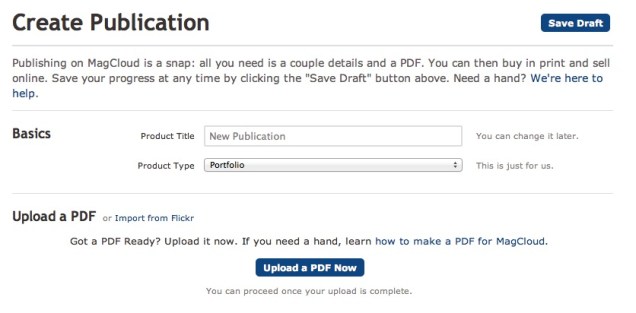
As part of this new publish process, we’ve also introduced the MagCloud Smart PDF Uploader, so if your page size is slightly off, the new uploader will automatically resize pages, check and warn for low resolution images, and add blank pages if the publication doesn’t have the exact page count needed for the chosen binding option.

We’ve also addressed some of our publishers’ most common requests. We have removed the back page tagline to give you even more design freedom. The lower right-hand 1.4″ by 0.625″ of the back cover will be covered by a white label with an order number in print versions of the publication. In the near future will further reduce the amount of space reserved for MagCloud use to a very small .5” by .5” square space in the lower right corner of a publication’s back page.

In addition, we have removed the ‘Issue Number’ nomenclature.  We realize not all our publishers are creating traditional magazines and you have told us that requiring issue numbers can be confusing. Now publishers have full control over naming their publication.  And if you still want an issue number, no problem, just include it as part of your publication title.

For all of you out there publishing single publications, or special editions, we no longer require that you publish as part of a ‘Magazine’ group.  Instead, you can now publish a standalone publication, or group your publications as collections.

Today’s release also includes enhanced search functionality making it easy for readers to find their favorite publishers and publications.

And last, but certainly not least, we are excited to announce a new addition to our MagCloud mobile family, MagCloud Newsstand for WebOS. That’s right, we’ll be bringing MagCloud to WebOS tablets this fall. With the MagCloud Newsstand for WebOS, readers will be able to browse, preview, purchase, download and read all of your MagCloud published content on their WebOS TouchPad devices.

Let us know what you think of the new Publish Process and today’s announcements in the comments section below.
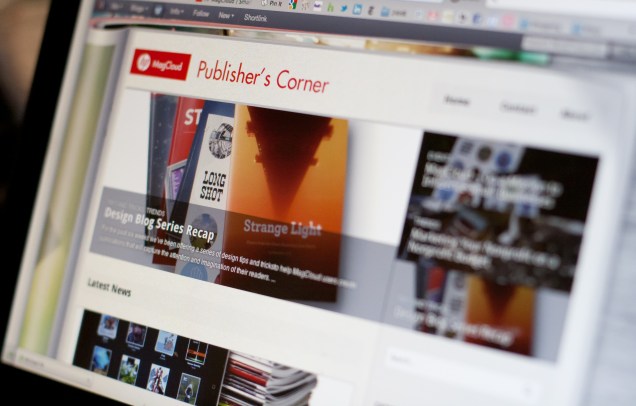
MagCloud Blog Gets A Makeover

As you have probably noticed our blog also received a few updates today.

Our new design and layout is intended to make MagCloud news, tips and features easier to find and enjoy.

All posts are accessible via categories — Design Resources, Events, News, Publisher Spotlight, Tips and Tricks, and Trends.  Or you can search on a word or phrase to find related articles.

The blog has also become more social making it easier to share posts with friends and colleagues across your social network, as well as keep in touch with MagCloud.

Let us know what you think of our new blog design and if you have any suggestions in the comments section below.

2 Days Later, Let’s Welcome Longshot Magazine Issue Two

One theme, five challenges, and a plethora of writers, editors, artists, photographers, programmers, videographers, and other Creatives from all around the world and you have a magazine.   This past weekend Longshot Magazine published Issue Two focused on the theme, Debt, in just 48 hours with help from a global community of literary zealots.

On Friday, July 29 at 3 p.m. EDT, contributors were given 24 hours to fill in the blanks: “I owe ___ for ___.” Through short essays, long-form articles, photographs, illustrations, the Longshot Magazine team narrowed down all the 672 crowd-sourced online submissions on Saturday to produce a 68-page paper magazine and a slick digital edition by Sunday evening.

Headquartered at Gawker.com’s New York City office and with satellite offices around the U.S. and Europe, the team was able to accomplish their goal through various tools such as SubMishMash, Kickstarter, Google Docs, and of course, MagCloud.

Check out Longshot Magazine’s Issue Two in all its glory. If you want to learn more about their very intense weekend, visit their Tumblr blog or follow @LongshotMag on Twitter. We hope Mat, Sarah and Alexis and their crew are getting some rest today.

Publisher Spotlight: Overland Sourcebook

With more readers accessing their news, schedules and more on the go, having a publication available in print and digital is gaining importance and publishers are noticing.

As the Overland Expo team was developing their expo guide, they knew it was essential to use both print and digital formats when reaching out to their thousands of global attendees each year. They needed a service that provided online and print-on-demand resources for their readers.

That’s where MagCloud comes in.

Founded three years ago in Arizona by Roseann Hanson, the Overland Expo is held every spring and tailored to adventure travel enthusiasts. As part of this year’s Expo, their team published Overland Sourcebook, their first MagCloud magazine, because they saw that 34% of their email news subscribers access their news via iPhones with now iPads becoming another source. “We must be ready to provide material to this market,” she exclaimed. “We see the ‘writing on the wall’ to provide digital as well as print materials.”

As a 60-page listing for all things adventure – vehicles, motorcycles, accessories, camping equipment, services, information, trip planning, business consultants, fabricators, and much more – the Sourcebook became a convenient and well-received guide for the Expo’s attendees.

Hanson attributes their Sourcebook’s success to their marketing plan which combined traditional and social media efforts. “Word of mouth, in today’s high-paced, noisy world, just doesn’t work any more,” said Hanson.

Hanson noted how MagCloud “is so easy to use” for both their team and customers. Pointing out the speed and ease of uploading their digital files to MagCloud’s timely support, Hanson advised new MagCloud publishers to “test, test, test and give yourself plenty of time to get things right as well.” The Expo team also loved how easy it was to integrate the Sourcebook with iPad. “[Our readers] were very impressed and the quality is wonderful.”

If you love the outdoors and are always on the lookout for adventures that await in the unknown corners of the world, you can also own the inaugural issue of Overland Sourcebook for $13. Overland Expo donates a good portion of their proceeds from the event to support ConserVentures, a program in place to promote the exploration of the planet and conservation of its natural and cultural resources.

MagCloud – On a Mission to Influence Small Businesses

We’ve always seen ourselves as an integral part for any small business’ marketing efforts, but it’s humbling and exciting to be recognized by others. Recently, we were nominated as one of the 2011 Small Business Influencers. This prestigious recognition honors companies, organizations and people who have made a significant impact on the small business industry. Paired with our recent Webby nomination, it has definitely been an exciting year thus far to see our name mentioned along with so many other notable industry organizations and professionals.

We’re in the next phase of the Small Business Influencer Awards and would love your help to reach the Top 100 by August 9th. If you feel that we’ve helped make a meaningful and lasting impact on small businesses, simply place a vote! Yes, you can even place a vote every day. :)

For more information on the 2011 Small Business Influencer, be sure to follow the folks behind this initiative – Anita Campbell (@smallbiztrends) and Ramon Ray (@ramonray). Please leave a comment below if you voted so we can thank you!

Marketing Your Nonprofit on a Nonprofit Budget

As a nonprofit executive, you have a lot on your mind. From creating more awareness about your efforts to preparing for your next big fundraising event, it’s easy to get overwhelmed by the pressure to survive in today’s profit-centric business climate.

Here are a few suggestions to help you  stay in-the-know with nonprofit business trends and help you get the most out of your marketing and publishing budget.

One important trend in the nonprofit sector is the use of publications in your marketing plan. Publications can be used to bring attention to a specific cause, disclose the latest research in your field or to market your organization to a new audience. MagCloud provides a way for you to tell your story in your own words and pictures without breaking your budget.

How do we do it? Our self-service publishing platform and pricing structure is designed with you in mind. If you need assistance designing your first brochure or revamping an existing program, be sure to check out some of the tips and resources on our site.

How-To Guide

Layouts and Templates

Design Blog Series

Can’t afford the upfront cost or huge print run commitments? Get ready to breathe a sigh of relief. At MagCloud, you can print on demand. That’s right, you order an issue for print only when you need an issue. That means no more over-ordering and potentially wasting money and paper. You also have the option to link to your MagCloud Storefront to your website, blog, Twitter account, etc., and have users place their orders direct.

We are proud to offer the highest quality print options at an affordable price. Prints are 4-color with full bleed and you can choose between saddle stitch and perfect binding. We take pride in the quality of our print work. After all, we are part of the HP family. And who knows print better than HP?

Now, we wouldn’t be giving you the full picture of what MagCloud can offer your nonprofit business without mentioning our digital publishing option. If print doesn’t fit into your business plan or your audience simply prefers an online option, we have an excellent digital publishing service. Just like print, you set your price and can optimize your publications for mobile devices.

We hope you’ll explore what we have to offer. If you have any questions about how to get started, feel free to contact us or leave your question in the comments section below.

Design Blog Series Recap

For the past six weeks we’ve been offering a series of design tips and tricks to help MagCloud users create publications that will capture the attention and imagination of their readers.

From dealing with trim and bleeds, to color selection and typeface dos and don’ts, we’ve tried to offer up ideas on how to deal with the most challenging design elements.

The complete list of design topics included:

Trim, Bleed and All That Jazz

The Importance of Layouts and Templates

Get The Most Out Of Your Images

The Space Between

Working With Color

6 Typeface dos and don’ts

Designing For Perfect Binding

Trends and Resources For Great Looking Business Collateral

PDF 101: Ten Common PDF Problems

We know that great design and great content are the all-star combination that can make your publication standout above the fray and keep your audience coming back for more.

Great design is also one of the things we look for when selecting publications to feature on our home page and our Put MagCloud to Work page.  Those selections are what some sites would call “staff picks” and are chosen by the MagCloud team based on rich content that spans our diverse set of categories, will appeal to the broadest segment of MagCloud’s eclectic reader base and of course adhere to all the design principals we’ve referenced in our recent blogs posts. So yeah we take this design stuff pretty serious :).

We also try and share design inspiration examples and other best practices as we find them, such as this post on magazine cover design.

Let us know what you thought of the design blog series, if there are other topics you would like us to cover or if you have design tips and inspirations you would like to share in the comments section below.

Get Publication Inspiration Through Networking

Looking for inspiration for your next issue, advice on how to create a branded publication or tips for creating a killer portfolio?  Consider increasing your networking time to socialize and exchange ideas with those in your industry or with common interests. Networking can be easily done in-person or virtually through association meetings, conferences, forums, NING sites, community websites, etc.

One example of combining the virtual and live worlds is Meetup.com – a site that launched after 9/11 and boomed. It now hosts 79,000 local groups in 45,000 cities worldwide! A whopping 250,000 “Meetups” occur each month on topics ranging from design to publishing to small business owners to marketing and just about any subject matter or topic you may be interested in.

We believe that there is great value to be gained from spending time with people in your profession or who share your love and interest in creating world-class publications. Meeting to exchange ideas, resources and best practices can lead to expanding your skill set and even to new business opportunities. Say you’re looking to find people to start a new cycling publication, check out these meetups with other cycling enthusiasts. Looking to get inspired by or for tips from other designers check out Behance Network’s Tip Exchange.

Below are some other opportunities to meet-and-greet, exchange ideas and network with your peers.

Marketing

American Marketing Association – Local Chapters
American Society of Association Executives – Communities Section
Business Marketing Association – Local Chapters

Creative Professionals

AIGA – The Professional Association for Design – Local Chapters
Adobe InDesign User Group – Local Chapters
Professional Photographers of America – Calendar of Events
Behance Network – A Creative Professional Platform

Magazine Publishers

Editor & Publisher  – Upcoming events around the world
Folio – Magazine publishers grouped by interest, location, field, etc.
Magazine Dojo –  Social networking site for magazine publishers

This is by no means a comprehensive list. Share more of your favorite networking opportunities with us in the comments section below.

Summer Festivals Galore!

Summer is a great time for vacations and relaxation. It’s also the season for many music festivals and film festivals. For the behind-the-scene teams that organize these events, it’s hard work right up until that last note is played and the final credits are rolling.

At MagCloud, we’re here to help make sure your event goes off without a hitch. We can make you confident that your printed programs, brochures and handouts are of the highest quality without breaking the bank.

Get started and create a PDF file of your publication, easily upload it to http://www.magcloud.com, preview your work, then select your print options. It’s that easy! It costs $0.20 per page and note that all orders for 20 or more print copies receive a 25% discount off the productions costs. Plus you can make the same PDF available in digital format for festival goers who want to enjoy the program on their mobile device or computer.

One of the perks of using MagCloud is that the connection you create with your audience doesn’t have to end at the event. We encourage you to publish a post-event roundup and share it out with festival goers via mail, email or your favorite social network. It’s taking that extra step that will bring people back next year, and it’ll be a fun, unique way to remember the festival long after the summer fades.

Need more details on what the process actually entails? We’ve got you covered. Remember, if you ever run into trouble or just need to learn more, you can always visit our Ask MagCloud page or find us on our social media channels (Twitter, Facebook and LinkedIn).

Wishing everyone a happy, fun-filled and rockin’ summer!

Trends and Resources For Great Looking Business Collateral

How you tell your business story can be the difference between turning a lead into a new customer or just a lost opportunity.

Eye catching and compelling business collateral plays an important role in buying decisions.  According to Eccolo Media’s “2010 B2B Technology Collateral Survey Report,” 83% of B2B technology purchasers say they had used brochures within the previous six months to evaluate a prospective purchase, 76% referred to white papers, followed by 67% who used case studies.

And great collateral isn’t just for big business, heavy investment in marketing collateral is also a key 2011 trend for Small Business as well.

So how do you create business collateral that stands out and gets your audience engaged?

1. Tell A Story.  Stories intrigue, keep our interest and help us convey information in an engaging way.  Conveying your brand promise or promoting your new product or service as a narrative helps your audience understand the possibility and gives them a call to action to learn more.  Chris Brogan, president of Human Business Works, offers some great insight into storytelling for business.

2. Bring Your Story To Life.  A story is more than words. You can use pictures, graphs, tables, screen shots, pull quotes from customers etc. − anything that will help visually convey your story, and underscore your viewpoint and competitive advantage.  There is a plethora of free tools to make creating charts and diagrams super easy.  If you want to push your story to a new visual level consider designing and incorporating infographics.  Infographics have been heavily used by B2C and B2B companies in the past few years to help convey complex information and trends.  Check out the Cool Infographics Blog, Weloveinfographics or Datavis for some infographic inspiration.

3. Invest in Design.  You don’t have to break your business piggy bank to design great looking collateral.  There are lots of desktop publishing applications that make brochure, newsletter, program and catalog design easy. Depending on your skill level and budget there is a spectrum of solutions including Microsoft Publisher, QuarkXPress, Apple Pages and Adobe InDesign.  Most of these programs also include templates or you can check out some of MagCloud’s free business templates as well.

4. Ask for Help.  If you are having trouble getting started there are lots of tutorials and resources to put you on the right path.  Microsoft for example offers a suite of tutorials for Publisher, there are forums for Adobe InDesign or head on over to Lynda.com for an array of business and software online courses. Or you can always consider outsourcing your business collateral design to a third-party or agency such as MagCloud partners HP Logoworks or Madison Ave. Collective.

5. Leverage the Web.  Printing and updating your business collateral no longer needs to be complex, time-consuming and expensive.  Thanks to new print on demand services like MagCloud you can upload a PDF of your collateral and have it printed and delivered to your customers without ever leaving your desk.  Need to change a product spec in your brochure or add a new offering to your catalog? No problem, simply upload a new version of your PDF.  The web also offers you the flexibility to take the same PDF you use for print and make it available digitally for reading on a PC or mobile device giving your audience choice.  Once you have your printed or digital publication ready, it’s easy to build an online marketing plan around it.  Make your content readily accessible and easy to share not only via your website but wherever your audience would be most receptive to your message–social networks, forums, blogs etc.  You spent all that time and effort creating it so don’t forget to make it easy to find.

We’ve had the pleasure of seeing some great looking brochures, newsletters, event programs and catalogs published on MagCloud, so we thought we would share a few of our favorites to help inspire you.

Axses Travel Platform

Cubic Machinery

High Points Promotional

Natural Homes

Overland Sourcebook

Toobydoo

Share any great resources or tips you’ve found useful in creating your business collateral in the comments section below.