Cooking-up a Recipe Book with MagCloud

It’s that time of the year, which means it’s time to start thinking about gifts…

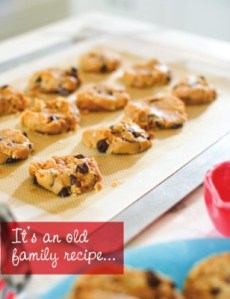
I used to spend 3 days making dozens of batches of home-made biscotti to give to the neighbors and friends who unexpectedly drop by during the holiday season.

But this year? Well, let’s face it–I’m too busy to spend 3 days baking, packaging and crafting these little masterpieces.

Instead, I have decided (Sorry friends, your surprise is ruined!) to give my loved ones and neighbors a custom cookbook, filled with our family favorites, printed by MagCloud.

Today I will share with you a template that I have made in InDesign and a few tricks for customizing it for your own use.

GETTING STARTED:

You can start with my custom-designed template that is already formatted for MagCloud settings, or create one of your own. MagCloud’s InDesign document settings and a blank template are available at magcloud.com/help/indesign

Download my InDesign Template.
Preview my cookbook on MagCloud.

CUSTOMIZING YOUR TEMPLATE:
Transforming this template into something of your own is pretty simple using style sheets. Before you start entering your own information, I suggest your go through the template and adjust the colors and fonts to your choosing.
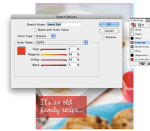
Change your Spot Color
1. Open the Swatches Panel
In CS6 or higher click Window > Color > Swatches
2. Double Click on the color named “sweet red”
3. Adjusting the C,M,Y and K values will change the “pop of color” on all of the pages where it is used in the template.

Adjusting Paragraph Style Sheets
Open the Paragraph Style Panel.
In CS6 or higher click Window > Styles > Paragraph Styles.

Once you have the Paragraph Styles Panel open, you can then go through the document and change your fonts and colors. You will notice that the style sheets are divided into subcategories based on where they are in the document.  (Tip: by opening up all of these sub-tabs you can easily see what style affects each block of text you select on the page)

To adjust the settings of your paragraph styles:
1. Select the text you want to change
2. Identify which Paragraph Style you are selecting within the Paragraph Styles Panel
3. “Right Click” or “Ctrl + Click” on the highlighted style in the Paragraph Styles Panel
4. Using the Paragraph Style Options Dialog box, adjust the font details

Add Your Own Photos and Personal Touches
Change the title, insert photos, recipes and update the intro letter to reflect your own personal style. You can even include a photo of the person who gave you the recipe or a special quote from them.

(Tip: to include more recipes select a “spread”–2 side-by-side pages–within the Pages Panel, and [ctrl + “click”] or [“Right Click”] on the highlighted pages within the panel. Select “Duplicate Spread,” this will insert a set of identical pages in your document.)

**Note that you will want to have a page count that is an increment of 4 pages to print with MagCloud… such as 16… 20… 24… 28… You get the idea!

SAVE AND EXPORT A PDF:
Want a quick easy way to be sure your export settings are correct?

DOWNLOAD the MagCloud PDF Export Job Options file

*If you are on a Mac: double click on the file, it will open in an Adobe application and add it to your presets. You can then close that application and return to InDesign.

*If you are on a PC, within InDesign go to File > Adobe PDF Presets > Define > Load
Find and Select the file you downloaded called “MagCloud_PDF_Export” > Click Done

To use these imported settings, with your file open in InDesign,
Select File > PDF Presets > “Adobe PDF Preset for MagCloud”

Name and Save your PDF and you are ready to publish!

Other Fun Ideas for Your Cookbook:
– make your cookbook themed with all family classics or recipes from a particular family member like “Granny’s Favorite Recipes”
– make a genre themed cookbook, like “Sweets,” “Holiday Dishes,” or “Brunch”
– make a cookbook for a school fundraiser and call it “Bake Sale”
– Ask friends to contribute recipes and do a collaborative cookbook

20% Savings This November With Coupon Code HOLIDAYCHEER

holidaysale

With the holiday season around the corner, there’s no better time to get started on gifts for everyone on your list. Whether you want to make a custom gift for friends, family, or clients, we’ve got you covered. Plus, we’re giving you 20% off* on all projects made by you from now until the end of November.

Simply enter the code HOLIDAYCHEER in your shopping cart on MagCloud.com.*

*Offer valid through November 30, 2015 (11:59 p.m. PST). A 20% discount is applied toward the production costs of publications made by you on MagCloud.com. This offer cannot be combined with volume discounts, other promotional codes, gift cards, or used for adjustments on previous orders.

Uncategorized

Season’s Greetings Printed by MagCloud

hangingcards_crop

‘Tis the season holiday cards and newsletters, and MagCloud is here to help! As we’ve discussed before, MagCloud’s print-on-demand capabilities offer a great way to produce personalized holiday communications on an affordable budget. With the premium 80# cover stock we use on all sizes of our Flyer and Pamphlet products, combined with the commercial quality of our full-color digital printing, you can rest assured that your message will look professional and polished whether you are keeping in touch with business clients or corresponding with family and friends.

Holiday Newsletters and Cards for Your Business

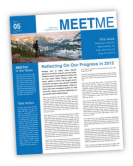
BizNewsWe have a number of businesses and organizations that use MagCloud for their newsletters year-round, and the holidays are no exception. As we near the end of the year, it’s a great time to connect with clients and members to update them on the prior year and get them thinking about the year to come. If you own a photography business, for example, you can use this as an opportunity to highlight some of your best work from the past year and remind previous customers about the other services you offer. Or if you are in charge of member communications for a nonprofit organization, now is a great time to highlight the work you’ve done in 2012, and encourage member participation in the new year.

No matter what business you are in, MagCloud’s 8.25″ x 10.75″ Pamphlet product is the perfect format for your holiday newsletter with four pages for full color images and text, a clean half-fold binding, and a professional-weight paper stock, all for as low as $0.60 per piece when you order 20 or more. Simply create your PDF in the software of your choice, upload it to MagCloud, and order as few or as many copies as you’d like. We can even take care of the distribution of your newsletter for you, and drop-ship copies of your newsletter to an address list at no additional cost.

Business CardsIf you don’t feel like a long-form newsletter is the right fit for your business, you could also create and send a custom greeting card instead. MagCloud’s 5.25″ x 8.25″ Pamphlet format fits perfectly into A9 envelopes, which can be found at any paper or office supply store, and the 80# cover stock that these products are printed on gives them a great professional feel. For only $0.48 per piece when you order 20 or more, this Pamphlet format offers an affordable way to incorporate your products, employees, or the work that you’ve done into your holiday greetings, along with your own branding and a more personalized message, rather than sending a generic card to your clients or organization members.

Holiday Newsletters and Cards for Your Family

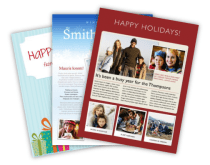
NewslettersOf course, businesses aren’t the only ones that send cards and newsletters during the holiday season. Holiday newsletters from families have become the norm in recent years as a way to update friends and relatives on the family’s activities over the prior year. Combining these updates with family photos into a single printed piece is a great way to streamline your holiday communications, either as a double-sided Flyer or using one of MagCloud’s four-page Pamphlet products for additional space.

Cards FamilyIf a newsletter isn’t your style, how about a custom greeting card. MagCloud’s 5.25″ x 8.25″ Pamphlet product makes great half-fold cards while the 5.5″ x 8.25″ or 8.25″ x 5.25″ Flyer works well as an oversized postcard. Both fit perfectly into A9 envelopes, and at only $0.24 per piece for 20 or more of the Flyers, or $0.48 per piece for 20 or more of the Pamphlets, both offer a blank slate to create affordable holiday greetings that are unique to you and your family. Whether you create a collage of family photos or scan some of your children’s artwork for the cover of your card, you can be sure that it will be met with a smile upon arriving at its destination.

Templates

TemplatesTo help you design your holiday newsletter or greeting card for printing through MagCloud, below are links to templates in a variety of formats and software programs. Each link below will take you to a preview of a publication created with that template on the MagCloud site, where you’ll find links in the description to download the corresponding template for a variety of software programs. You can also find a number of letter-sized newsletter templates in programs like Apple Pages, or online at office.microsoft.com for Microsoft Word and Microsoft Publisher. These work well with MagCloud’s 8.25″ x 10.75″ Pamphlet and Flyer products. After you’ve designed your file, be sure to follow the instructions on our Getting Started page to export your PDF.

4-page Business Newsletter (8.25″ x 10.75″ Pamphlet)

4-page Holiday Newsletter (8.25″ x 10.75″ Pamphlet): Adobe InDesign (CS4 or newer) | Microsoft Word | Apple Pages

2-page Holiday Newsletter (8.25″ x 10.75″ Flyer): Red Design | Blue Design

Left-Folded Holiday Card with One Image (5.25″ x 8.25″ Pamphlet)

Left-Folded Holiday Card with Three Images (5.25″ x 8.25″ Pamphlet)

Top-Folded* Holiday Card with One Image (5.25″ x 8.25″ Pamphlet)

Top-Folded* Holiday Card with Three Images (5.25″ x 8.25″ Pamphlet)

Portrait Flat Holiday Card (5.25″ x 8.25″ Flyer)

Landscape Flat Holiday Card (8.25″ x 5.25″ Flyer)

*Keep in mind that if you are using the 5.25″ x 8.25″ Pamphlet for your greeting card and want a top-fold, you will need to upload a PDF with the design rotated, in the same way you would if you were creating a calendar.