New Ways To Promote Your Magazines

Looking for ways to showcase your magazine on your blog, website or favorite social network?  Try out the new custom MagCloud Widgets! Select the size and colors you prefer for your magazine widget then simply copy and paste the code into any site that accepts HTML.

Want to attract more followers?  Try out our nifty new MagCloud badges to encourage more people to follow your magazine and show your MagCloud pride.

Interested in other ways to promote your magazines to the world at large? Then check out our new Promote Page.  Send an email or share a link with friends, co-workers, family and other like minded individuals letting them know about your latest magazine issue.

What are you waiting for?  Your magazine rocks so let the world in on it!

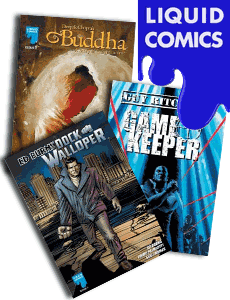
Liquid Comics on MagCloud

Just in time for Comic-Con, Liquid Comics are now available on MagCloud in print and iPad format.

Liquid has created graphic novels with acclaimed creators including John Woo, Shekhar Kapur, Deepak Chopra, Guy Ritchie, Dave Stewart, Jonathan Mostow, Edward Burns, Nicolas Cage, and others. Guy Ritchie’s Gamekeeper is currently being adapted for film by Warner Brothers.

And a special Comic-Con only offer – the first 1,000 copies of three special edition Liquid comics ordered from MagCloud are free!

MagCloud’s New Perfect Binding Option

One of the most requested features by publishers has been the option for perfect binding.  Perfect-bound magazines are square at the spine and use glue to hold the pages, like a paperback book. It gives your issues a more professional feel, and can accommodate a much higher page count – up to 384 pages.

Using MagCloud’s new perfect binding option is super easy:

perfectbinding1. To begin, sign in to MagCloud and go to your Publisher’s Desk.
2. Create a new magazine issue.
3. Upload your PDF or select your Flickr photo set.
4. Preview your issue. Look good? Keep going!
5. Now you get to choose a binding (saddle-stitched or perfect-bound) for your issue.
6. After you select perfect-bound you will see the “Add a spine” section, where you have a few options. You can choose to fill the spine with a solid color or upload your own design. To fill the spine with a color simply click the background color box and you will be given a chart from which you can select your spine color. If you prefer to “Design a Spine” you can download a template to create your custom design, then upload your design (JPG, PNG, or PDF format) and preview it on MagCloud. For issues over 80 pages you also have the option to create a spine with text directly from the MagCloud website.
7. Set your issue price, order a proof and you are done!  Note: because the binding process is more complex selecting the perfect-bound option does add $1.00 to your issue cost.

You can use the same PDF file or Flickr photo set for both saddle-stitched and perfect-bound magazines, but there will be some differences in the final product.  For a few tips on how to optimize your design for perfect-bound magazines or learn more about this great new feature visit our Help Section.

Enjoy this new feature and if you have any comments or questions please let us know.

Profile Pictures

Give your MagCloud profile some personality by uploading a profile picture. Simply click on “Account” at the top of the page (you must be logged in) and edit your profile to upload or change your profile picture.

You can also upload your picture directly from your profile page. Just hover over the placeholder image and you will be able to upload, change, or remove your profile picture.

Adding a profile picture helps your fellow members see that there’s a real person behind the magazines. Your profile picture will appear in MagCloud messages, on any issues and magazines you create, and of course on your profile page, too.

Give it a try and let us know what you think!

Talk Amongst Yourselves with MagCloud Messages

We’ve often heard that you want more ways to interact with your fellow MagClouders. Today we’re thrilled to announce a new feature to help you do just that: MagCloud Messages.

Now all MagCloud members to send each other messages. So if you have a question about a magazine, or just want to give a publisher props, click the “Contact” link under the publisher’s name on any issue, magazine or profile page and send them a message. (Note that this feature is for members, so it only appears when you’re signed in.)

If you like a magazine, you can also Follow it. Just click the “Follow” link on any issue or magazine page. Following a magazine is a way to give a publisher a little bit of encouragement. If you follow a magazine, the publisher will be able to send you messages about submissions, new issues, and other magazine news.

Publishers of public magazines will see a “Message Your Followers” link in the Messages Inbox. This lets you send a MagCloud Message to all of your magazine’s followers at once.

When you receive a message you’ll notice a number next to the Messages icon at the top of every page, to let you know how many new messages are in your inbox. We’ll also send you an email every day with a digest of new messages. You can set those emails to come immediately, daily, weekly, or not at all in your account settings.

At MagCloud, we always want you to be in control. In addition to the email settings, you can also set who can send you MagCloud Messages (admins, followed magazines, or any member). If an individual member becomes a little over-communicative, you can block them from sending any more messages. All these settings and more can be found in your account.

We’re really excited about this new feature and hope it’s a fun way for you to stay in touch with your magazine’s community, and each other.

So give the new MagCloud Messages feature a try! And, as always, please let us knowwhat you think!

Check Out the New MagCloud Wikia Merchandising Widget

As some of you may remember MagCloud and Wikia teamed up back in October to make it easy for Wikia users to create magazines of some of their favorite content.

Well our friends at Wikia have made that process even easier with their new MagCloud Merchandising Widget where you can publish a full-color magazine simply by selecting the articles you like, choosing a cover, and placing your order on MagCloud. In minutes you’ll have your magazine published and ready to share with the world.

Oh and while you are on the Wikia website check out the new MagCloud Wiki where you can browse some of the great wiki magazines that have already been created.

Potential UK Shipment Delay

Some MagCloud customers in the UK may experience a delay in receiving their magazine orders as a result of European air travel disruption due to the Iceland volcano eruption. Our shipping provider who services our UK customers is doing their best to deliver orders in the fastest time possible under these extreme conditions.

If you have any questions please contact us.

Thank you for your understanding.

The MagCloud Team

Introducing Upload from Flickr

MagCloud’s new “Upload from Flickr” feature lets you easily turn your Flickr photo sets into a magazine without the need to use a design program or upload a PDF file.

All you have to do is create a set in Flickr and authorize MagCloud to connect to your Flickr account. MagCloud will import the photos and lay them out automatically. In just minutes, you’ll have a photo magazine all your own!

The new “Upload from Flickr” feature is a fun and fast way to turn wedding photos, family vacation pictures, your kid’s little league action shots, your professional portfolio images and more into a high-quality printed keepsake magazine.

To give it a try, just create an issue and choose the “Upload from Flickr” option.

Publishers Monitor Your Sales In Real Time

Hey publishers! Ever wondered where your magazines are going? Well now you can find out.

We’ve enhanced our magazine and issue sales statistics to give you a better view into how your magazine issues are selling and who’s buying them. Once you’ve published a magazine, sign-in and click the “More Stats” link at the bottom of the MagCloud home page to see your personal Sales Stats page. Here you will find up-to-date stats for your published magazines such as:

–Views on your pages (profile, magazines, and issues).
–Issue sales per day.
–Followers (anyone who’s following your work).
–Places where your issues were shipped.
–And, of course, profit!

    All these statistics can be viewed by magazine or issue and you can download the raw data for your own bookkeeping.

    We’ve had a lot of requests for this, and we listened closely. This new feature will make tracking your results much easier and hopefully more fun.

    Please let us know what you think!

    Continue reading

    Get The Inside Scoop on the Oscars

    The Motion Picture & Television Fund’s 8th Annual “Night Before” Party, held on Oscar eve at the Beverly Hills Hotel, is one of the hottest pre-Academy Awards tickets, and this year’s gift bags will include a limited edition Daily Variety, commemorating Oscar 2010, printed exclusively through MagCloud.

    Daily Variety’s ‘Oscar 2010’ will get you ready for Oscar night with awards season analysis, photos of the nominees for all the major award categories and trivia from Oscar’s history. While the magazine was developed especially for the Night Before’s celebrity guests, HP and Variety have made a limited quantity available for purchase via MagCloud.com. Proceeds from the magazine will go to The Motion Picture & Television Fund (MPTF).

    MPTF is a charitable organization that offers assistance and care to those in the motion picture and television industries with limited or no resources. Its mission is to enrich the lives of people in the Southern California entertainment community by continuously evolving to meet their health and human services needs.

    Daily Variety’s ‘Oscar 2010’ is a must-have, whether you have a golden ticket to the event on March 7, or are watching from the comfort of your home. All profits from your purchase of Daily Variety’s ‘Oscar 2010’ will be donated directly to the Motion Picture & Television Fund. This is a limited edition (only 2000 in print) so order your copy today!