Portfolios Made Simpler With Flickr

Have you wanted to create a print portfolio for your photography, artwork or business but don’t have the design skills or the right software to get the job done?

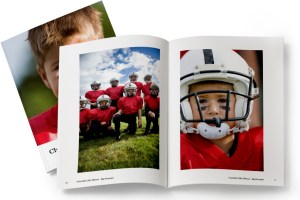
Here at MagCloud we are always looking to make things easier for you, which is why we offer the option to create a print publication using a Flickr photoset. It’s easy to use, and in just a few minutes MagCloud will take a set of your photos on Flickr and lay them out in a simple one-image-per-page template to create a tidy portfolio. What’s great is that it works almost instantly and is very easy to use, so if you need to get a collection off to a potential client immediately, or have procrastinated and need to get something together quick–then this is the tool for you. Follow along with my example below, and give it a try for yourself.

Here’s how it works:

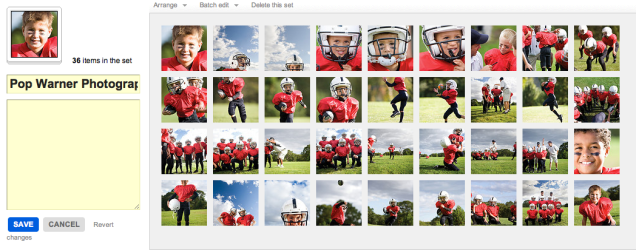
1. Upload your images to Flickr and organize them in a photoset.
Be sure to put the images in the order you wish for them to show in the portfolio. This means your first image will be your cover image, and then the rest will follow. Since each image will be assigned to a page, you will want to have a number that is an increment of 4 (that means 4, 8, 12, 16… etc). My set in this example has 36 images, so it will be 36 pages long.
2. Edit the titles of your photos. (optional)
If you wish to include captions for your photos, such as credit information, location or other details, be sure to edit the titles of your photoset while in Flickr. You’ll have the option to include these titles at the bottom of each page of your final printed portfolio, so you could also use this space to include your contact information or copyright details.

3. Start the creation process at MagCloud.com/publish.
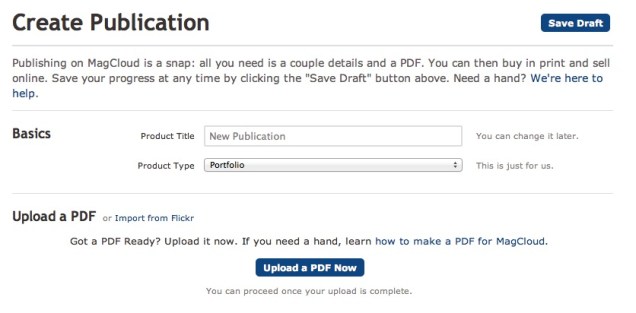
Once you are ready to publish, select the import from Flickr option on the Create Publication page. This will launch the importer, where you can select a photoset from your Flickr account.

4. Select your options and create your file.
The Title and Subtitle you enter here will appear on the cover of your publication. This is also where you can select whether you want to include photo titles and page numbers.

5. Preview your file and set binding options.
Take a quick look at your publication to confirm your settings. You can scroll through every page to see how your portfolio will look. Happy with it? Then select your binding options and publish!

6. You’re done!
See, now wasn’t that easy? Though this example is that of a children’s sports photographer, the Flickr Import could be used to make portfolios for your jewelry design business, fine art, architecture, decorating, crafts, or graphic design work. How you use it, is up to you.

A few tips and things to consider BEFORE you start your import:

What Image will be on my cover?
For simplicity, this should be the first image in your photoset.

What order do I want my images in?
The order that your images are in within your photoset, is the order they will appear in your MagCloud portfolio.

Which images will be facing on spreads?
If the first image in your set is the cover, then images 2 and 3 will be facing pages. It’s a good idea to go through your set to be sure that you like the arrangement of these photos (are people facing off the pages, or leaning against the outside edge of a page?) if so, you may want to swap around the order of your image.

Do I want to include captions or credits?
Because the title appears at the bottom of the page using this Flickr feature, you can also use this space for copyright information, or to include your contact information. In the examples below you can see how we accomplished this. To be sure every other page has the right information, just be sure to alternate the information in the titles of your images.

Is there any non-photographic content that I want to include like my contact information/ company logo?
To do this you have to get a bit tricky and create an image of the content and save it to flickr. You can use this trick to load verbiage into alternating pages, or if you want to include your company logo and contact information and logo on the back cover, this is a great work-around to do that. Simply create the image in any application that allows you to save an image (Flickr will let you upload JPEGs, non-animated GIFs, PNGs or TIFFs) and add it to your set.

What’s the maximum image size printed with the Flickr upload?
If you want to make sure your photo takes up as much of the page as possible, size it at 1875 by 2625 pixels at a minimum of 300 dots per inch resolution.

Are my images high enough resolution for printing?
The largest image size using the flickr uploader is 2475 by 2475 pixels on the covers and 1875 by 2625 pixels for interior images. For more information about photo quality and printing check out our blog post about getting the most out of your photos.

Can I have more than one photo on a page using the “Upload from Flickr” feature?
The “Upload from Flickr” feature currently only uses one photo per page. If you are adventurous, one way around this is to create a single image file (jpg, gif, png or tiff) that contains multiple photos and upload it as part of your Flickr set. Make sure the single image file is 1875 by 2625 pixels at a minimum of 300 dots per inch resolution. When your MagCloud publication is created, this file will be placed on a single page just like your other photos, creating the impression of multiple images on a single page like this example.


A Helping Hand

Need help creating or marketing your next publication?

Our Help section now includes a directory of templates, photography, design, advertising resources and more.  You can also find the the most popular design tips from our blog and latest How to Guides.

Still can’t find what you are looking for then visit the Ask MagCloud section to browse frequently asked questions about publishing, printing and shipping with MagCloud.

Our support team is also happy to answer any questions you can’t find answers for on our website.  Simply contact us so we can help you get the information you are looking for.

Know of a great resource that would help the MagCloud community?  Please drop us a line, we would love to hear about them.

Vote for MagCloud in the SXSW PanelPicker – Ends Friday!

SXSW 2012 is prepping to bring the most captivating speakers, interesting topics and creative panels to film, music and interactive enthusiasts attending their Austin, Texas gathering March 9-18, 2012. Once again, they’re giving the public a voice by opening up the SXSW PanelPicker and letting YOU cast your vote for your favorite panels.

The MagCloud team has entered two great panel submissions to the PanelPicker featuring MagCloud publishers.

We hope you’ll vote for us in hopes we can bring these presentations to the biggest interactive conference in the U.S.!

Print Pioneers in a Digital World is about capturing the attention of your customers and getting your story heard by those who really matter. The panel will feature Roseann Hanson of Overland Expo and ConserVentures, Atlanta-based editorial photographer Zack Arias and Paul Lips of online children’s wear retailer ToobyDoo. For more on this panel and to cast your vote, go here.

The PB&J Effect: How to Publish in Print & Digital is about the perfect combination of print and digital and how perfecting that balance will help you reach a bigger audience. Joining us on the panel are Gizmondo’s Senior Reporter Mat Honan (also known as one of the editors behind Longshot Magazine), well-known photographer Trey Ratcliff and graphic designer/illustrator Craig Frazier who recently debuted his new Living Letters font. For more on this panel and to cast your vote, go here.

If you like what you see, all you have to do is create a free account (it’s easy!) and hit the thumbs up button on our panel pages.

Want to help spread the word. Tweet or Facebook about these presentations:

 Hurry! Deadline to vote is 11:59 CDT on Friday, September 2.

Tell us you voted by leaving a comment below.

Good Things Come In Small Packages: New Digest Size

Many publishers have asked for more product sizes. Well we are happy to announce a new product type called Digest. At 5.5” x 8.5” it’s approximately half the size of our current Standard product, and is available in both perfect bound and saddle stitch versions.

And with a smaller size comes a smaller price point. While there are lots of things that go into creating a high-quality finished publication, another benefit of Digest is that it allows us to reduce our overall production costs, specifically those related to paper and ink.  Those savings help bring our per page cost down to $.16 per page vs. $.20 per page for our larger format. Smaller publications also mean lighter packages, which can reduce shipping rates.

The Digest product offers an overall more compact and affordable publishing solution.

Publishing for Digest is similar to how you publish today you just need to modify your PDF settings for a smaller trim size (5.25 x 8.25).


For step-by-step instructions on how to create your PDF, check out our Getting Started page.

Let us know how you plan to use the new Digest product in the comments section below.

Streamlined Publish Process

It just got easier to publish on MagCloud. We’ve  revamped the publishing process for all MagCloud products making it easier to upload, update and manage your publications. With the new Publish Process  you can name your publication, select your product type and begin uploading it to MagCloud all in one simple step.

As part of this new publish process, we’ve also introduced the MagCloud Smart PDF Uploader, so if your page size is slightly off, the new uploader will automatically resize pages, check and warn for low resolution images, and add blank pages if the publication doesn’t have the exact page count needed for the chosen binding option.

We’ve also addressed some of our publishers’ most common requests. We have removed the back page tagline to give you even more design freedom. The lower right-hand 1.4″ by 0.625″ of the back cover will be covered by a white label with an order number in print versions of the publication. In the near future will further reduce the amount of space reserved for MagCloud use to a very small .5” by .5” square space in the lower right corner of a publication’s back page.

In addition, we have removed the ‘Issue Number’ nomenclature.  We realize not all our publishers are creating traditional magazines and you have told us that requiring issue numbers can be confusing. Now publishers have full control over naming their publication.  And if you still want an issue number, no problem, just include it as part of your publication title.

For all of you out there publishing single publications, or special editions, we no longer require that you publish as part of a ‘Magazine’ group.  Instead, you can now publish a standalone publication, or group your publications as collections.

Today’s release also includes enhanced search functionality making it easy for readers to find their favorite publishers and publications.

And last, but certainly not least, we are excited to announce a new addition to our MagCloud mobile family, MagCloud Newsstand for WebOS. That’s right, we’ll be bringing MagCloud to WebOS tablets this fall. With the MagCloud Newsstand for WebOS, readers will be able to browse, preview, purchase, download and read all of your MagCloud published content on their WebOS TouchPad devices.

Let us know what you think of the new Publish Process and today’s announcements in the comments section below.

2 Days Later, Let’s Welcome Longshot Magazine Issue Two

One theme, five challenges, and a plethora of writers, editors, artists, photographers, programmers, videographers, and other Creatives from all around the world and you have a magazine.   This past weekend Longshot Magazine published Issue Two focused on the theme, Debt, in just 48 hours with help from a global community of literary zealots.

On Friday, July 29 at 3 p.m. EDT, contributors were given 24 hours to fill in the blanks: “I owe ___ for ___.” Through short essays, long-form articles, photographs, illustrations, the Longshot Magazine team narrowed down all the 672 crowd-sourced online submissions on Saturday to produce a 68-page paper magazine and a slick digital edition by Sunday evening.

Headquartered at Gawker.com’s New York City office and with satellite offices around the U.S. and Europe, the team was able to accomplish their goal through various tools such as SubMishMash, Kickstarter, Google Docs, and of course, MagCloud.

Check out Longshot Magazine’s Issue Two in all its glory. If you want to learn more about their very intense weekend, visit their Tumblr blog or follow @LongshotMag on Twitter. We hope Mat, Sarah and Alexis and their crew are getting some rest today.

Marketing Your Nonprofit on a Nonprofit Budget

As a nonprofit executive, you have a lot on your mind. From creating more awareness about your efforts to preparing for your next big fundraising event, it’s easy to get overwhelmed by the pressure to survive in today’s profit-centric business climate.

Here are a few suggestions to help you  stay in-the-know with nonprofit business trends and help you get the most out of your marketing and publishing budget.

One important trend in the nonprofit sector is the use of publications in your marketing plan. Publications can be used to bring attention to a specific cause, disclose the latest research in your field or to market your organization to a new audience. MagCloud provides a way for you to tell your story in your own words and pictures without breaking your budget.

How do we do it? Our self-service publishing platform and pricing structure is designed with you in mind. If you need assistance designing your first brochure or revamping an existing program, be sure to check out some of the tips and resources on our site.

How-To Guide

Layouts and Templates

Design Blog Series

Can’t afford the upfront cost or huge print run commitments? Get ready to breathe a sigh of relief. At MagCloud, you can print on demand. That’s right, you order an issue for print only when you need an issue. That means no more over-ordering and potentially wasting money and paper. You also have the option to link to your MagCloud Storefront to your website, blog, Twitter account, etc., and have users place their orders direct.

We are proud to offer the highest quality print options at an affordable price. Prints are 4-color with full bleed and you can choose between saddle stitch and perfect binding. We take pride in the quality of our print work. After all, we are part of the HP family. And who knows print better than HP?

Now, we wouldn’t be giving you the full picture of what MagCloud can offer your nonprofit business without mentioning our digital publishing option. If print doesn’t fit into your business plan or your audience simply prefers an online option, we have an excellent digital publishing service. Just like print, you set your price and can optimize your publications for mobile devices.

We hope you’ll explore what we have to offer. If you have any questions about how to get started, feel free to contact us or leave your question in the comments section below.

Birds, Beer and Binding…An Update From SXSW

Greetings from South by Southwest in Austin Texas.  The MagCloud team has come to the heart of Texas for the week to spread the word of digital publishing and show off some of our amazing publishers’ magazines to the more than 40,000 expected attendees.

Bloggers, designers, cinematographers, musicians, technologists, marketers, educators and business owners have all converged on Austin to discuss and enjoy the latest in technology, music and film.

Sharing the HP booth with the ePrint team we’ve had the pleasure to meet attendees from all over the world.  Next week we’ll post a recap of the show but in the meantime we hope y’all enjoy some photos from the show floor.