New Brochure Template for Adobe InDesign

Need a little help getting started creating your next brochure?  We have added a new brochure template to our free template collection.

This four page template is for Adobe InDesign users and is perfect for product or service brochures.  We’ve created a sample publication using this template to show you how easy it is to make a great looking brochure that is MagCloud-ready.

If you are new to using Adobe InDesign to create MagCloud-ready publications make sure to download our Adobe InDesign Getting Started Guide for tips on settings for trim, bleeds, image resolution and more.

Let us know what you think of the new template in our comments section below.

We’re Giving Back Even More of the Back Page

Last month, we announced that we were shrinking the label on the back cover to only 1.4” wide, and today we are excited to share that we have taken it a step further. Starting today, all MagCloud print publications will include only a small 6 mm square 2D barcode in the lower righthand corner of the back cover. This barcode allows us to process your order through our printing, binding, and shipping processes as efficiently as possible, while minimizing the impact on your back cover real estate.

For those of you who have been publishing with MagCloud for a while, take a walk down memory lane with this timeline of our ever-shrinking back page label. And as always, let us know what you think!

HP MagCloud: Create High-Quality Business Materials on a Small Business Budget

This post was written by Melissa_Zieger and originally appeared on the blog for 367 Addison Avenue, HP’s online community for small and medium businesses, on September 22, 2011. You can view the original post here.

Did you know that HP has a content publishing web service that can be used to create everything from your own magazine to business materials like catalogs and portfolios? It’s called HP MagCloud – invented by HP Labs, is a self-service publishing platform that allows businesses to easily create into professional-quality publications that can be printed on demand, shipped globally, or distributed digitally.

Better yet, there’s no upfront cost and MagCloud can turn your content from a PDF to delivered printed publication in just three days!

Using MagCloud’s digital storefront, customers can order the latest issue of their favorite publication and have it printed on demand and delivered directly to their doorstep, or download for reading on their digital device of choice. Plus, all content is printed to order using HP Indigo technology, delivering professional print quality with no waste or overruns, reducing the impact on the environment.

Businesses are using MagCloud to create everything from fashion catalogs and knitting guides to photography and architectural portfolios. I recently sat down with two small business customers using HP MagCloud to find out more about how the service is benefiting their business.

Alex Tinsley started her knitting pattern design business, Dull Roar, nearly six years ago. Prior to discovering MagCloud, Tinsley was only able to provide her customers with a PDF of her patterns via her blog. Today, she uses MagCloud to transform PDF versions of her design work into high-quality professional catalogs that she can distribute in both digital and print formats without a huge impact on her business’ bottom line.

“The quality of the printing is really just beautiful, and it’s pretty much the only place you can get that kind of quality in small quantities,” said Tinsley. “I love that it runs without much input from me – I just upload the issues and collect the income. MagCloud handles all the sales, printing and shipping.”

The ability to offer customers both print and digital formats helps Tinsley meet her customer’s needs without making an upfront investment in the creation and printing. Tinsley says that most of her customers prefer the digital copy for instant gratification, but that she uses the hard copies as giveaways and gifts. She’s also used the publication as a handout at tradeshows, which enables her to drive views to her website and increase downloads of her digital catalog.

Trey Hill, a Dallas-based photographer and storyteller, started using MagCloud in 2010 to create storytelling portfolios of his work. He needed a way to not only show the pictures he had shot but also to showcase his journey.

Hill uses Adobe InDesign to create photo portfolios and uses MagCloud to print his digital creations on-demand as a way to attract new business and share with clients as a thank you for their business. Hill says the ability to have both print and digital versions is important. “The print quality increases the value of my business, but we live in a digital world so it’s still important to provide a digital format, as well,” he said. “As a small business owner, not having to buy 1,000 copies to get a great price point is worthwhile. And my customers are blown away by the quality.”

Since using MagCloud, Hill has started to see a change in what his customers have come to expect – they now see him as a storyteller, not just a photographer.

About Alex Tinsley

An avid knitter since 2004 and knit design enthusiast since 2006, Alex Tinsey’s designs can now be seen in publications like Knitty, Knit Simple, the Knit Picks Independent Designer Program, and (soon) Knit Scene. You can access Tinsley’s MagCloud products here.

About Trey Hill

Trey Hill was one of the founding creatives behind I Am Second and his portfolio includes work for Addison Road, Relevant Magazine and the Dallas Stars. He works all over the world and has had the privilege of photographing some of the planet’s most revered and most overlooked people. You can access Hill’s MagCloud products here.

Vote for MagCloud in the SXSW PanelPicker – Ends Friday!

SXSW 2012 is prepping to bring the most captivating speakers, interesting topics and creative panels to film, music and interactive enthusiasts attending their Austin, Texas gathering March 9-18, 2012. Once again, they’re giving the public a voice by opening up the SXSW PanelPicker and letting YOU cast your vote for your favorite panels.

The MagCloud team has entered two great panel submissions to the PanelPicker featuring MagCloud publishers.

We hope you’ll vote for us in hopes we can bring these presentations to the biggest interactive conference in the U.S.!

Print Pioneers in a Digital World is about capturing the attention of your customers and getting your story heard by those who really matter. The panel will feature Roseann Hanson of Overland Expo and ConserVentures, Atlanta-based editorial photographer Zack Arias and Paul Lips of online children’s wear retailer ToobyDoo. For more on this panel and to cast your vote, go here.

The PB&J Effect: How to Publish in Print & Digital is about the perfect combination of print and digital and how perfecting that balance will help you reach a bigger audience. Joining us on the panel are Gizmondo’s Senior Reporter Mat Honan (also known as one of the editors behind Longshot Magazine), well-known photographer Trey Ratcliff and graphic designer/illustrator Craig Frazier who recently debuted his new Living Letters font. For more on this panel and to cast your vote, go here.

If you like what you see, all you have to do is create a free account (it’s easy!) and hit the thumbs up button on our panel pages.

Want to help spread the word. Tweet or Facebook about these presentations:

 Hurry! Deadline to vote is 11:59 CDT on Friday, September 2.

Tell us you voted by leaving a comment below.

Publisher Spotlight: Sell With Your Ears

President Obama once asserted “small businesses are part of the promise of America.” At MagCloud, we wholeheartedly believe this statement and strive to provide small business the opportunity to market their products with style and quality without demanding a hefty investment.

One such small business owner who relies on MagCloud is author and sales strategist Bill Zipp who published his publication, Sell With Your Ears, through MagCloud as a way to market his business and provide a valuable resource. Sell With Your Ears presents Zipp’s unique approach to the marketplace and resource and tips for uncommon ways to build a smarter, more profitable business. It represents Zipp’s thought-leadership in his industry among business owners and key stakeholders responsible for generating revenue for their business – large or small.

As a business owner himself, Zipp is responsible for promoting his brand at all times. His publication is a conversation generator in networking settings and helps spread his message to even wider audiences. “I give my publication to clients to give to their friends, essentially serving as a sophisticated, and powerful business card.”

One element we are proud of at MagCloud is the quality of the printed materials we produce every day for publishers and readers. Time and again, we hear from our customers that the quality of the printed magazine, brochure, flier, etc. exceeded their expectations and that of their readers.

Additionally, when customers like Bill who publish with MagCloud, they are take advantage of the print on demand feature which affords customers the ability to fulfill orders as they come in vs. having piles of magazines or books in their homes and offices waiting to sell and ship. (Or as Zipp explains, “I don’t have to store thousands of books in my garage.”) Bulk printing is no longer the standard in publishing thanks to print on demand.

We encourage you to learn more about Bill Zipp’s publication here, and hope that you are inspired to become an even savvier marketer with MagCloud.

Have you ever considered publishing a book through MagCloud? What marketing materials are you publishing using MagCloud? Let us know by posting below.

Streamlined Publish Process

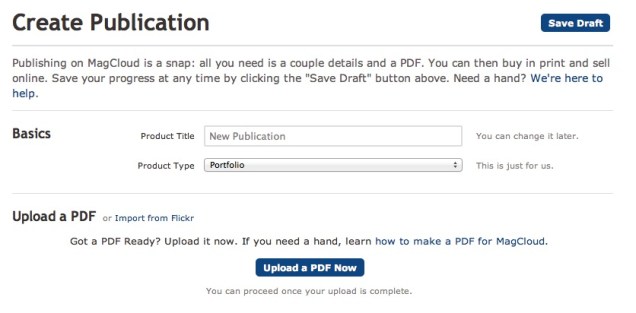
It just got easier to publish on MagCloud. We’ve  revamped the publishing process for all MagCloud products making it easier to upload, update and manage your publications. With the new Publish Process  you can name your publication, select your product type and begin uploading it to MagCloud all in one simple step.

As part of this new publish process, we’ve also introduced the MagCloud Smart PDF Uploader, so if your page size is slightly off, the new uploader will automatically resize pages, check and warn for low resolution images, and add blank pages if the publication doesn’t have the exact page count needed for the chosen binding option.

We’ve also addressed some of our publishers’ most common requests. We have removed the back page tagline to give you even more design freedom. The lower right-hand 1.4″ by 0.625″ of the back cover will be covered by a white label with an order number in print versions of the publication. In the near future will further reduce the amount of space reserved for MagCloud use to a very small .5” by .5” square space in the lower right corner of a publication’s back page.

In addition, we have removed the ‘Issue Number’ nomenclature.  We realize not all our publishers are creating traditional magazines and you have told us that requiring issue numbers can be confusing. Now publishers have full control over naming their publication.  And if you still want an issue number, no problem, just include it as part of your publication title.

For all of you out there publishing single publications, or special editions, we no longer require that you publish as part of a ‘Magazine’ group.  Instead, you can now publish a standalone publication, or group your publications as collections.

Today’s release also includes enhanced search functionality making it easy for readers to find their favorite publishers and publications.

And last, but certainly not least, we are excited to announce a new addition to our MagCloud mobile family, MagCloud Newsstand for WebOS. That’s right, we’ll be bringing MagCloud to WebOS tablets this fall. With the MagCloud Newsstand for WebOS, readers will be able to browse, preview, purchase, download and read all of your MagCloud published content on their WebOS TouchPad devices.

Let us know what you think of the new Publish Process and today’s announcements in the comments section below.

MagCloud Blog Gets A Makeover

As you have probably noticed our blog also received a few updates today.

Our new design and layout is intended to make MagCloud news, tips and features easier to find and enjoy.

All posts are accessible via categories — Design Resources, Events, News, Publisher Spotlight, Tips and Tricks, and Trends.  Or you can search on a word or phrase to find related articles.

The blog has also become more social making it easier to share posts with friends and colleagues across your social network, as well as keep in touch with MagCloud.

Let us know what you think of our new blog design and if you have any suggestions in the comments section below.

Publisher Spotlight: Overland Sourcebook

With more readers accessing their news, schedules and more on the go, having a publication available in print and digital is gaining importance and publishers are noticing.

As the Overland Expo team was developing their expo guide, they knew it was essential to use both print and digital formats when reaching out to their thousands of global attendees each year. They needed a service that provided online and print-on-demand resources for their readers.

That’s where MagCloud comes in.

Founded three years ago in Arizona by Roseann Hanson, the Overland Expo is held every spring and tailored to adventure travel enthusiasts. As part of this year’s Expo, their team published Overland Sourcebook, their first MagCloud magazine, because they saw that 34% of their email news subscribers access their news via iPhones with now iPads becoming another source. “We must be ready to provide material to this market,” she exclaimed. “We see the ‘writing on the wall’ to provide digital as well as print materials.”

As a 60-page listing for all things adventure – vehicles, motorcycles, accessories, camping equipment, services, information, trip planning, business consultants, fabricators, and much more – the Sourcebook became a convenient and well-received guide for the Expo’s attendees.

Hanson attributes their Sourcebook’s success to their marketing plan which combined traditional and social media efforts. “Word of mouth, in today’s high-paced, noisy world, just doesn’t work any more,” said Hanson.

Hanson noted how MagCloud “is so easy to use” for both their team and customers. Pointing out the speed and ease of uploading their digital files to MagCloud’s timely support, Hanson advised new MagCloud publishers to “test, test, test and give yourself plenty of time to get things right as well.” The Expo team also loved how easy it was to integrate the Sourcebook with iPad. “[Our readers] were very impressed and the quality is wonderful.”

If you love the outdoors and are always on the lookout for adventures that await in the unknown corners of the world, you can also own the inaugural issue of Overland Sourcebook for $13. Overland Expo donates a good portion of their proceeds from the event to support ConserVentures, a program in place to promote the exploration of the planet and conservation of its natural and cultural resources.

Marketing Your Nonprofit on a Nonprofit Budget

As a nonprofit executive, you have a lot on your mind. From creating more awareness about your efforts to preparing for your next big fundraising event, it’s easy to get overwhelmed by the pressure to survive in today’s profit-centric business climate.

Here are a few suggestions to help you  stay in-the-know with nonprofit business trends and help you get the most out of your marketing and publishing budget.

One important trend in the nonprofit sector is the use of publications in your marketing plan. Publications can be used to bring attention to a specific cause, disclose the latest research in your field or to market your organization to a new audience. MagCloud provides a way for you to tell your story in your own words and pictures without breaking your budget.

How do we do it? Our self-service publishing platform and pricing structure is designed with you in mind. If you need assistance designing your first brochure or revamping an existing program, be sure to check out some of the tips and resources on our site.

How-To Guide

Layouts and Templates

Design Blog Series

Can’t afford the upfront cost or huge print run commitments? Get ready to breathe a sigh of relief. At MagCloud, you can print on demand. That’s right, you order an issue for print only when you need an issue. That means no more over-ordering and potentially wasting money and paper. You also have the option to link to your MagCloud Storefront to your website, blog, Twitter account, etc., and have users place their orders direct.

We are proud to offer the highest quality print options at an affordable price. Prints are 4-color with full bleed and you can choose between saddle stitch and perfect binding. We take pride in the quality of our print work. After all, we are part of the HP family. And who knows print better than HP?

Now, we wouldn’t be giving you the full picture of what MagCloud can offer your nonprofit business without mentioning our digital publishing option. If print doesn’t fit into your business plan or your audience simply prefers an online option, we have an excellent digital publishing service. Just like print, you set your price and can optimize your publications for mobile devices.

We hope you’ll explore what we have to offer. If you have any questions about how to get started, feel free to contact us or leave your question in the comments section below.

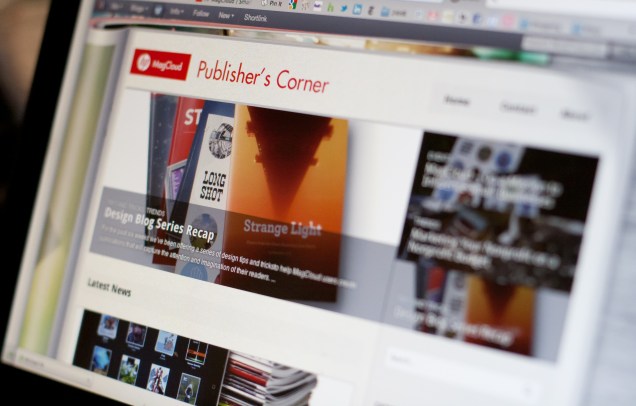
Design Blog Series Recap

For the past six weeks we’ve been offering a series of design tips and tricks to help MagCloud users create publications that will capture the attention and imagination of their readers.

From dealing with trim and bleeds, to color selection and typeface dos and don’ts, we’ve tried to offer up ideas on how to deal with the most challenging design elements.

The complete list of design topics included:

Trim, Bleed and All That Jazz

The Importance of Layouts and Templates

Get The Most Out Of Your Images

The Space Between

Working With Color

6 Typeface dos and don’ts

Designing For Perfect Binding

Trends and Resources For Great Looking Business Collateral

PDF 101: Ten Common PDF Problems

We know that great design and great content are the all-star combination that can make your publication standout above the fray and keep your audience coming back for more.

Great design is also one of the things we look for when selecting publications to feature on our home page and our Put MagCloud to Work page.  Those selections are what some sites would call “staff picks” and are chosen by the MagCloud team based on rich content that spans our diverse set of categories, will appeal to the broadest segment of MagCloud’s eclectic reader base and of course adhere to all the design principals we’ve referenced in our recent blogs posts. So yeah we take this design stuff pretty serious :).

We also try and share design inspiration examples and other best practices as we find them, such as this post on magazine cover design.

Let us know what you thought of the design blog series, if there are other topics you would like us to cover or if you have design tips and inspirations you would like to share in the comments section below.