5 Catalog Design Essentials for Your Business

If you have a small business with a large product or service offering, odds are you have a catalog, and if you don’t, then you’ve probably wanted to create one, but didn’t know where to start. The process can be daunting–with so many elements to pull together and all sorts of design options to consider. So to help you get started, we’ve made a list of 5 tips to keep your efforts and design on track.

1. Know Your Audience

When choosing a design for your catalog, keep in mind your audience and appeal to their style, interests and demographics. Creating a sense of lifestyle will help you connect with customers and position your product as an object of their desire.

2. Reflect Your Brand

Keep your catalog style consistent with your brand style. You want to be sure they can make a connection between your website, logo, and service/products and your catalogs. Whatever you do, design with your brand in mind and be sure the voice and design of the catalog matches the voice and design of your brand. Once you have established a successful look-and-feel for your catalog, resist the temptation to change it. Repetition builds brand recognition, favorable reception and sales.

3. Use Quality Photography

All images should be of the highest quality possible. Make sure your pictures are clear and vivid, not pixilated. Poor quality images will send the message that the products are low quality. If you can’t afford to hire a professional photographer, read up on blogs and forums for great tricks for taking your own product photos. Also try to mix up the type of shot. Catalogs benefit from pacing and surprise – simple silhouetted images, closeups of details, wide angles, full-bleed photographs and lifestyle shots sustain viewer interest and keep them turning to the next page.

4. Space and Layout

The most important thing about a catalog is highlighting your product, so be sure you have ample white space for each item. Cramming text and images into a page, or using the exact same layout throughout the document will make it look stale and won’t encourage your customers to really pause and look over the whole spread. A consistent layout throughout the catalog enhances readability but can become boring, so be sure to break up the monotony of a predictable layout by including a unique page or two to highlight a favorite product or create an editorial opportunity for your customer to connect with the product.

5. Use fonts and color wisely

Be sure to use fonts that fit your brand’s style. If you have a children’s apparel brand, your typeface selections will be very different than if you have a luxury spa brand. Do not go overboard with typefaces, it’s probably best to limit your selection to just three. You can read more about this in our recent typography blog post.

Start Planning and Then Start Publishing

There aren’t any hard and fast rules for creating your catalog, just remember to keep it simple so that your product attracts more attention than your design. After all, the objective is to sell more, right?

A good starting point is to jott down words that come to mind when describing your brand: Is it whimsical? Sophisticated? Luxurious? Fun? These words will make the perfect litmus test as you assemble your catalog. Then every step along the way you can ask yourself, is this publication reflecting this image?

Now that you are ready to get started, take a look at some of the great examples of catalogs on MagCloud. We hope they will help inspire you. Already published a catalog with MagCloud? Share it below in the comments!




Tech Tools For Event Planners

It’s been an exciting couple of weeks in the MagCloud offices. Our friends at SmallBiz Technology gave us a great shout out on their blog! In 7 Tech Tools to Help You Organize Your Next Successful Event, Ramon Ray names HP MagCloud as an “awesome service for printing your event program.” Being featured is great kudos in itself, but we’re mostly thrilled that we are considered a go-to, reliable service for printing your event materials.


We’re always looking for ways to make MagCloud better for you, and it’s moments like this that make us feel we’re getting the job done. Thanks, SmallBiz Tech!

Are you putting together an event soon? Will you be using MagCloud’s print and digital services? How about the other superb companies mentioned in Ray’s article?

Let us know what you think in the comments below.


Brochures that Engage and Inform

MagClouders are creating some truly attention-worthy brochures for their businesses…and it’s reaping rewards for their bottom-line. For example:

Wendy Whittemore’s Aerial Innovations Brochure mixes striking images with an eye-catching layout.

 Stanley Harmsen van der Vliet’s AML Training Center Brochure presents a lot of copy in a clean, easily-digestible format that somehow manages to offer plenty of white space and images to break up the content.

Ben Gin’s IADLEST Conference Brochure fills up every space with the retro look and feel of the conference location: Opryland in Nashville, TN.

These folks and others are creating amazing marketing pieces with MagCloud! If you’re working on a brochure project, we highly recommend you check out the work already published on MagCloud.com for inspiration.

A great brochure grabs the reader’s attention with eye catching images, great layout and of course compelling content. Here a few design and content things to keep in mind when developing your next business or event brochure.

Include stunning images, but make sure they speak to the purpose of the brochure

Maximize the white space – find a way to tell your story in fewer words and with smaller images. No one wants to read a brochure that fills every nook and cranny – it’s not very attractive to a reader.

Design within a real-life context. If your brochure is for an upcoming Harvest Festival, don’t forget to give a little nod to the season with a few Fall leaves. (Be careful, too much of a good thing is no good either – don’t go overboard).

Assume this is the first time the reader is hearing about your organization. Prominently feature the most important piece of information you want people to take away after reading the piece (product sale, mission statement, event date/location, etc.).

This is also your chance to clearly define your brand with a logo, tagline and color scheme that complement your other brand assets. In other words, make sure your brochure is consistent in design and tone with your company website, social media profiles and other printed materials.

Use persuasive language that focuses on the key differentiating factors of your product, company or event from the competition. You’re offering something unique—here’s your chance to tell the world!

Don’t forget the call to action – tell the reader what you want them to do when they’re done reading the brochure (call this number, visit a website, register online, etc.)

Bring in visuals. We’ve written about this in a previous post and recommend you take a look at our Trends and Resources for Great Looking Business Collateral for a refresher. In short, bring in images, infographics or quotes to highlight that will bring your story to life.

Be concise! Don’t try and tell your whole story within a brochure. Just remember, would YOU want to read a long brochure?

Let us know if you have any other tips for creating brochures. Or, post a link to a great brochure that inspires you in the comments section below.

It’s that time of year again…

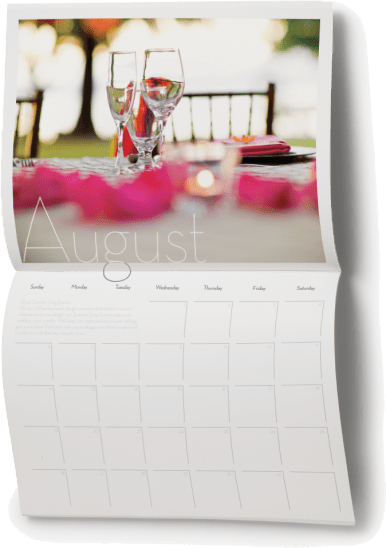
Every year around this time, we see a bevy of calendars popping up on MagCloud. But surprisingly, they are not all what you would think… Sure, there are plenty of family calendars published, undoubtedly intended for distribution to cousins, aunts and grandma, but we think the more interesting use-case are the those being put together by professionals to promote their businesses. And what better way to stay top of mind with your clients, than to be pinned to their wall, where they will see you everyday?

Whether you’re an event planner wanting to showcase your aesthetic, a photographer promoting your work, a non-profit raising awareness or a small business trying to keep your team top of mind with your audience–calendars are a great way to keep your name in front of your client all year long.

Assembling a calendar can be time consuming, so this week we did the heavy lifting for you. Below you will find calendar templates for 3 of the most-frequently used software programs on MagCloud:

Adobe InDesign (CS3 and newer) (zipped version is HERE)

Apple’s iWork Pages

Microsoft Word

You can use these as a starting point for creating your own professional or personal calendar. We won’t spend a ton of time going into the technicalities of how to use these templates because we’ve covered that for Word and Pages last year.

BONUS: if you are using InDesign, there are 3 styles of calendar hidden within the master pages that you can easily apply by changing the master pages for each spread.

Get inspired by some of the great 2011 and 2012 calendars already on MagCloud:


Have you created or found a great calendar on MagCloud? Share the link below in the comments section!

Marketing Your Nonprofit on a Nonprofit Budget

As a nonprofit executive, you have a lot on your mind. From creating more awareness about your efforts to preparing for your next big fundraising event, it’s easy to get overwhelmed by the pressure to survive in today’s profit-centric business climate.

Here are a few suggestions to help you  stay in-the-know with nonprofit business trends and help you get the most out of your marketing and publishing budget.

One important trend in the nonprofit sector is the use of publications in your marketing plan. Publications can be used to bring attention to a specific cause, disclose the latest research in your field or to market your organization to a new audience. MagCloud provides a way for you to tell your story in your own words and pictures without breaking your budget.

How do we do it? Our self-service publishing platform and pricing structure is designed with you in mind. If you need assistance designing your first brochure or revamping an existing program, be sure to check out some of the tips and resources on our site.

How-To Guide

Layouts and Templates

Design Blog Series

Can’t afford the upfront cost or huge print run commitments? Get ready to breathe a sigh of relief. At MagCloud, you can print on demand. That’s right, you order an issue for print only when you need an issue. That means no more over-ordering and potentially wasting money and paper. You also have the option to link to your MagCloud Storefront to your website, blog, Twitter account, etc., and have users place their orders direct.

We are proud to offer the highest quality print options at an affordable price. Prints are 4-color with full bleed and you can choose between saddle stitch and perfect binding. We take pride in the quality of our print work. After all, we are part of the HP family. And who knows print better than HP?

Now, we wouldn’t be giving you the full picture of what MagCloud can offer your nonprofit business without mentioning our digital publishing option. If print doesn’t fit into your business plan or your audience simply prefers an online option, we have an excellent digital publishing service. Just like print, you set your price and can optimize your publications for mobile devices.

We hope you’ll explore what we have to offer. If you have any questions about how to get started, feel free to contact us or leave your question in the comments section below.

Trends and Resources For Great Looking Business Collateral

How you tell your business story can be the difference between turning a lead into a new customer or just a lost opportunity.

Eye catching and compelling business collateral plays an important role in buying decisions.  According to Eccolo Media’s “2010 B2B Technology Collateral Survey Report,” 83% of B2B technology purchasers say they had used brochures within the previous six months to evaluate a prospective purchase, 76% referred to white papers, followed by 67% who used case studies.

And great collateral isn’t just for big business, heavy investment in marketing collateral is also a key 2011 trend for Small Business as well.

So how do you create business collateral that stands out and gets your audience engaged?

1. Tell A Story.  Stories intrigue, keep our interest and help us convey information in an engaging way.  Conveying your brand promise or promoting your new product or service as a narrative helps your audience understand the possibility and gives them a call to action to learn more.  Chris Brogan, president of Human Business Works, offers some great insight into storytelling for business.

2. Bring Your Story To Life.  A story is more than words. You can use pictures, graphs, tables, screen shots, pull quotes from customers etc. − anything that will help visually convey your story, and underscore your viewpoint and competitive advantage.  There is a plethora of free tools to make creating charts and diagrams super easy.  If you want to push your story to a new visual level consider designing and incorporating infographics.  Infographics have been heavily used by B2C and B2B companies in the past few years to help convey complex information and trends.  Check out the Cool Infographics Blog, Weloveinfographics or Datavis for some infographic inspiration.

3. Invest in Design.  You don’t have to break your business piggy bank to design great looking collateral.  There are lots of desktop publishing applications that make brochure, newsletter, program and catalog design easy. Depending on your skill level and budget there is a spectrum of solutions including Microsoft Publisher, QuarkXPress, Apple Pages and Adobe InDesign.  Most of these programs also include templates or you can check out some of MagCloud’s free business templates as well.

4. Ask for Help.  If you are having trouble getting started there are lots of tutorials and resources to put you on the right path.  Microsoft for example offers a suite of tutorials for Publisher, there are forums for Adobe InDesign or head on over to Lynda.com for an array of business and software online courses. Or you can always consider outsourcing your business collateral design to a third-party or agency such as MagCloud partners HP Logoworks or Madison Ave. Collective.

5. Leverage the Web.  Printing and updating your business collateral no longer needs to be complex, time-consuming and expensive.  Thanks to new print on demand services like MagCloud you can upload a PDF of your collateral and have it printed and delivered to your customers without ever leaving your desk.  Need to change a product spec in your brochure or add a new offering to your catalog? No problem, simply upload a new version of your PDF.  The web also offers you the flexibility to take the same PDF you use for print and make it available digitally for reading on a PC or mobile device giving your audience choice.  Once you have your printed or digital publication ready, it’s easy to build an online marketing plan around it.  Make your content readily accessible and easy to share not only via your website but wherever your audience would be most receptive to your message–social networks, forums, blogs etc.  You spent all that time and effort creating it so don’t forget to make it easy to find.

We’ve had the pleasure of seeing some great looking brochures, newsletters, event programs and catalogs published on MagCloud, so we thought we would share a few of our favorites to help inspire you.

Axses Travel Platform

Cubic Machinery

High Points Promotional

Natural Homes

Overland Sourcebook

Toobydoo

Share any great resources or tips you’ve found useful in creating your business collateral in the comments section below.

Put MagCloud to Work

You heard that right. MagCloud can help bring your professional projects to life in print and digital. Our service is a great way to showcase your work to customers, clients, colleagues, partners etc.

Besides magazines, we’ve seen a variety of creative ways that MagCloud customers have used our service for their most demanding business needs.  So whether you are creating a portfolio for client meetings, company brochure, customer newsletter or product catalog, MagCloud will take your publication from PDF to printed magazine and digital download with just a few clicks of the mouse. Planning an event? We’ve got you covered there too. Our event planners and marketing customers have utilized MagCloud to print event souvenir programs, meeting programs, handouts and brochures. You can even publish your workshop manuals with us too.

Whatever the purpose – fun, commemorative, professional or informational – there are no boundaries to the way people are using MagCloud. Let us bring your story to life. MagCloud can help promote your company, products and services in both professional quality print format or digitally for viewing on a PC or mobile device. Whether you are ordering 1 or 1000 copies, MagCloud will ship your business documents to customers and colleagues all over the world. Visit magcloud.com/work and learn about the many ways we can help you make your next gallery exhibit, client meeting, workshop, convention and fundraising event that much better.

What other ways do you use MagCloud? Share your past, current projects and future ideas in the comment section below.