Product Spotlight: Flyer for Business

One of the new product types we recently announced is the Flyer. The Flyer product is a single sheet of paper printed on both sides in full color with a full bleed, available in quantities of 10 copies or more. You can create a Flyer by uploading a one or two-page 8.5” x 11” PDF to MagCloud. Keep in mind that all Flyers must be two pages long, to encompass both the front and back sides of the printed sheet, so if you do upload a 1 page PDF we will automatically add a second blank page to the end of the PDF for you. Like our Standard product, the cost for a printed Flyer is 20 cents per MagCloud page, or $0.40 for each double-sided piece. As always, orders of 20 copies or more receive a bulk discount of 25%, dropping the price to just $0.30 per Flyer.

We feel like this shorter page limit opens up a number of new options for our publishers, and have listed a few ideas below for how you might be able to use the Flyer product for your business:

< Inserts
Update previously printed collateral to be more timely and customized by adding a single sheet insert. Adding a single sheet insert to a previously printed piece like this can provide more relevant information targeted to a specific recipient, or offer an update to existing collateral. For example, if you’re passing out a catalog, you might include an insert about your upcoming product line or summer sale. Similarly, if you are sending previous donors a copy of your non-profit’s annual prospectus, you might include a more personal thank you letter as an insert.

Conference and Tradeshow Handouts >
Whether they are included in the conference materials or handed out at a tradeshow booth, providing printed handouts to attendees to highlight the features of your product or service will help potential customers remember who you are when they get home.
< Datasheets
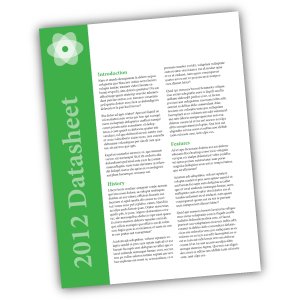
The Flyer product is a great option for creating single sheets of technical specs on your product or service. The high quality of the digital printing provides a more professional appearance than desktop printing, while the single letter-sized sheet is a format that can easily be included in a packet with other materials, or left behind at a sales meeting.

Real Estate Sales Sheets >
If you’re an Australian real estate agent, why not use the Flyer product to create sales sheets for your newly listed homes. The full color printing will allow you to include photos along with background information about the listing, that can be offered up as a way to entice potential buyers. Since MagCloud allows for shorter print runs, you can order fewer copies initially and print more on demand as they are needed, saving on storage and paper waste.

< Headshots and Resumes
Get your job interview or audition off on the right foot with a professionally printed resume or double-sided headshot.

Newsletters >
Use the Flyer product type to communicate with your clients or members by creating a single-sheet newsletter. With MagCloud’s digital options, you can offer your audience the same newsletter in both print and digital with a single PDF upload.
< Menus
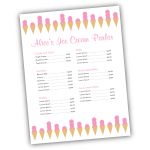
A single 8.5″ x 11″ sheet is the great size for menus, and MagCloud’s print-on-demand model provides a cost-effective and easy way to order additional copies or make updates to the menu as needed. If you’re a caterer, you can take advantage of MagCloud’s shorter print runs to create Flyer-sized menus tailored to each event you cater, whether it’s an intimate dinner party or a large buffet.
Price Sheets >
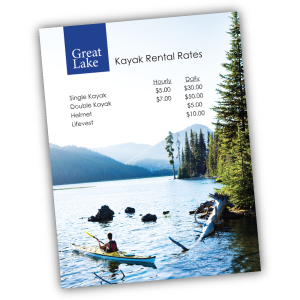
Are you a photographer offering senior portrait packages? How about a sporting goods store offering bikes, kayaks, and skis for rent? Or a spa owner with a list of services you need to publicize? Whether you are a makeup artist, landscaper, tutor, or dog walker, let your potential customers know the rates for your services with a professionally printed price sheet that can incorporate full-color images of your prior work and personal branding.
< Flyers for Sales and Events
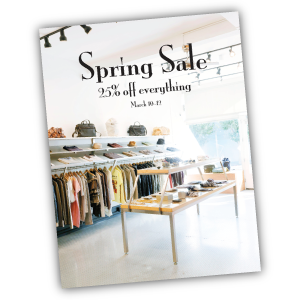
Use the Flyer product for what it was named after: flyers! Print and pass out single sheet flyers for your next retail sale, store opening, or company event. Whether you are hosting a signing in your book store, a concert in your coffee shop, or a spring sale in your clothing boutique, make sure your potential attendees and customers not only know about it but remember it with a printed flyer.

Looking for more inspiration, or wondering where to get started with your Flyer design? Templates that fit the 8.5″ x 11″ Flyer product type can be found around the internet, and even on your own computer. The Microsoft Office Suite, as well as Apple’s iWorks Pages come preloaded with a number of letter-sized templates that can be used for creating Flyer publications. In addition, sites like Inkd and Stock Layouts offer a range of different letter-sized templates in their Datasheet and Flyer sections that you can download for a price and edit to fit your needs before uploading to the MagCloud site for printing and distribution.

Have you already created something for your business with the new Flyer product? Let us know in the comments below!

367 Addison Avenue: Go Beyond Printing to the Heart of Your Business

Small businesses are finding more and more ways to use online resources to help their business grow and be successful. For example, HP MagCloud has helped thousands of businesses and independent publishers engage with their audiences, but did you know that HP has other small business resources available to help owners grow far beyond their communication and publishing needs?

A great resource is www.367AddisonAvenue.com. This HP small business blog features tips and tricks on basic business technology, how-to’s to grow your business, advice from leading experts on trends and upcoming small business technology, and stories about small businesses across the U.S. that are practicing technology innovation.

To all the small business owners and independent publishers out there who are trying to get your businesses off the ground, we encourage you to visit this blog to learn more on topics including:

You can also join the conversation or be the one to start it at HP’s Small Biz Nation community.


MagCloud 2012 Resolutions

The MagCloud team is really excited about 2012. With a new year comes an opportunity to think about what changes and improvements we would like to see on the website and with our service offerings.

So here are our top resolutions for MagCloud this year:

  • Offer More Product Types: including a cool square format and a larger landscape product.
  • Enhance our Direct Mail Services: making it easier to send publications to groups of customers, colleagues and subscribers in print and digital format.
  • Provide New Tools for Publication Creation: new web based authoring tools, templates and an improved help section to make creating MagCloud-ready publications easier.
  • Reward our Community: Referral and Advocate programs to reward MagCloud users for helping us spread the MagCloud word and attract new publishers to the service.
  • Enable MagCloud-aware Applications: enhance the MagCloud platform to make it easier for third party developers to build their own websites and applications on top of MagCloud that can link directly to MagCloud’s publishing and distribution capabilities.  So no need to recreate all the heavy lifting we’ve already spent the last 3 years building. Just tap into MagCloud and offer our services as part of your business.

These are just a few of the things we have in mind but we always appreciate your feedback on what new features are most important to you.

To ensure your voice is heard please take a few minutes to complete our short MagCloud user survey. After you complete the survey you’ll receive a coupon for 15% off the production costs of future purchases of full-priced publications on MagCloud.*

We look forward to your feedback and to an amazing year for the entire MagCloud community.

*This coupon cannot be combined with other offers or sales on the MagCloud website and is valid through April 30th, 2012.

Extending Your Brand With a Magazine

Your brand collateral is the most important opportunity to talk about your product or service. But getting your target audience to read your brochure, or catalog cover-to-cover isn’t always easy.

That’s why so many businesses have found that branded magazines are a unique way to pique audiences interest with relevant content and information, while reinforcing their brand message. It keeps them top of mind in a format that gets to their customers or target audience more frequently—be it annually, quarterly or monthly. What’s better—it’s in a form-factor that is both familiar and comfortable for the reader.

Many businesses have found that they can better engage with potential customers and increase brand loyalty by publishing a magazine of their own. According to a study conducted by the Association of Publishing Agencies (APA Advantage Study, 2007) on branded magazines (or as they call them, “customer magazines,”) – customers spend 25 minutes on average with such a publication, compared with a TV ad (30 seconds) and an internet ad (0.5 seconds). That’s 25 minutes immersed with a brand.  And while in-house magazines were once considered glorified advertorials, today the use of subtle branding and genuine editorial content helps many successful businesses tactfully promote themselves. *Want to read more about the study? You can download the executive summary as a PDF here.

How does it work? Well, by presenting your business in a more editorial format you can:

  • develop prospective customers and foster increased loyalty
  • establish your organization or company as current on issues and trends
  • position yourself as an expert in your field
  • be a resource for information that is relevant to your audience
  • reinforce your style and voice
  • give depth and relevance to your brand in an environment you can control

Finding Inspiration

Take for example a few major brands that publish their own magazines: British fashion label Asos’ self-titled magazine includes advertising for products that appeal to their demographic, such as cosmetics, high-end watches and perfumes. They also balance the promotion of their own products by pairing them with complimentary pieces and accessories that work with their customer’s style.

Coscto has it’s very own The Costco Connection, which combines information about what’s new at Costco with a mix of lifestyle and small business articles.

USAA’s USAA Magazine focuses on advice for becoming financially secure, with articles that appeal to it’s wide audience–young and old.

The Lance Armstrong Foundation’s LIVESTRONG Quarterly—delivers compelling profiles and medically stoked articles in a publication that hopes to bolster the Lance Armstrong Foundation’s efforts to ‘make cancer a global priority.’

Each of these do a great job of combining editorial content with promotional content for their products, services, mission or cause. One great thing you will notice about all of them too? They each reinforce their brand through styling and voice, but without seeming like pushy sales collateral.

Getting Started

So how do you even get started creating a brand magazine? Well there are a number of things to consider, the first of which is the actual branding. Much like traditional collateral, a brand magazine should be in line with your  brand’s style and voice, but it where it differs is that a branded magazine needs to be subtle and controlled in how and when you promote your brand. A branded magazine should be designed with the customer’s tastes, interests, style and wants at the forefront; and weave in brand, product or service messaging where it actually enhances editorial and design.

Brand magazines can help you achieve your desired positioning in the minds of your stakeholders and customers. Whether your brand is edgy, luxurious, down to earth, straight to the point, or fun and whimsical, you want that same feeling to come across through your magazine. For most businesses, when you established your branding, you probably came up with words to describe your mission, voice, style and audience.

Put it Down on Paper

Now is the time to grab a piece of paper and start defining the sort of message you want to give to your customer. How do you want to establish your brand? What sort of content will you include, and how should you style it to be in line with your voice, mission and style? Use words to describe your brand and you customer– are they fashion-forward, politically-minded, edgy, traditional, mostly men or women, older, youthful etc?

These are your design principles and the list should be short and sweet. In as few words as possible, make clear the vision for the publication and any keywords people should keep in mind while designing.

Keep this list. Pin it to your wall. It will make for a great litmus test as you move forward and start creating. Every once and awhile go back to the list and be sure you are appealing to your audience and staying true to your brand.

Deciding on Color

This seems like a no-brainer, but coming up with colors that are true to your brand, that you use consistently throughout your magazine, is tougher that it seems. You may find sites like COLOURlovers helpful for exploring colors that work well with your logo or brand colors. Create a palette and save it. Then as you publish new issues, the consistent use of color will also reinforce your brand.

Typography

Now it’s time to define the typefaces to use: sizes, line height, spacing before and after, colors, headline versus body font, etc. With editorial content there is some flexibility in this, but defining a consistent style sheet will maintain the integrity of your publication and brand throughout the publication. Use fancy fonts sparingly, so that they maintain their impact and legibility on the page.

Create a Mock-up Magazine

This will eventually be your style guide, but at first it is a way to flesh out all of the style choices that you will want to make so that you can stay true to your brand. This will also help you keep a visual consistency not only throughout each publication, but also from publication to publication over time. Save this file and use it to start creating your magazine, then keep that original as a starting point for each subsequent issue–it will save you a lot of time!

Now Get Your Brand Out There

Now, you’re ready to publish. If you’re looking for more advice for designing your file, or templates to get you started, remember you can always check out our other Tips & Tricks!

How do you get your brand out there? Have you come up with other unique ways to keep you brand top-of-mind with your customers? Does your organization or company have a branded magazine? Tell us about it below in the comments section!

MagCloud Holiday Schedule

The holidays are upon us and the MagCloud elves are hard at work getting final holiday orders out.

We will be taking some time off during the holidays (even a MagCloud elf needs a break now and then) so you may experience some delays in orders, as well as customer support response time.

MagCloud Holiday Schedule:

  • Closed: December 24th, December 25th, December 31st and January 1st.
  • No Printing or Shipping: December 26th, December 30th and January 2nd

So please expect the following delays:

  • 1 day delay for orders placed on December 22nd and 23rd
  • 2 day delay for orders placed on December 28th and 29th
  • 1 day delay for orders placed on December 30th, 31st and January  1st.

From everyone here at MagCloud we wish your and yours a very Happy Holiday Season!

The MagCloud Team

Getting Your Members on the Same Page

Community organizations, non-profits and student groups all work hard to build a strong member base that understands and spreads their mission. From new member materials to monthly newsletters, a clear, well-designed member communications strategy is an important step towards that goal. Thankfully, MagCloud is here to help you achieve that goal. Many groups already publish their materials with MagCloud and we’re excited to show you the high quality work they’re producing. These examples should give you a few ideas about where to focus your materials:

Orange County Orchid Society publishes this monthly newsletter filled with images of the group’s beautiful orchids and to update the group on its members, the latest meeting notes, tips and a few local ads.

American Glass Guild newsletter features a message from the president of the AGG, the latest news on awards and recognition for members and a recap of a recent AGG workshop.

Fort Collins Alumnae Chapter of Delta Delta Delta has several important updates for members such as key upcoming dates, a note from the chapter’s PanHellenic rep, an update on Fall recruitment and plans for several events in the next year.

Alpha Tau Omega Fraternity quarterly publication is a good publication for other Greek organizations to get content tips for. It features a spotlight on outgoing seniors and new members and several editorial pieces from members looking to stretch their writing muscles.

The Pulse is a publication by the Korean American Students of Yale that packs a concise update into six pages including a message from the outgoing board, notes from the most recent board meeting, a look at the top 9 KASY moments of the year and, of course, some funny KASY superlatives. It’s worth noting that each KASY publication is similar in length but the content varies by issue.

Let us know what member communications materials you use to share updates with your members. We want to hear about it

Our Product Family Keeps Growing

Today we launched two new products into the MagCloud family–Digest Landscape and Flyer.

Digest Landscape is compact and ultra-portable at 8.5″ wide x 5.5″ tall. It’s perfect for portfolios, brochures, catalogs, books and more.  Simply upload an 8.5″ wide x 5.5″ tall PDF and we’ll trim it down by 0.125″ on the top and bottom and 0.25″ on the outside edge to a final size of 8.25″ wide x 5.25″ tall so it’s ready for our professional printing presses.  We’ve also updated our website preview app so users will be able to preview your publication in all it’s landscape glory.

Our double-sided, single sheet Flyer product is ideal for brief messages or content that changes often such as sales promotions, menus, product data sheets, event schedules and more. Simply upload an 8.5″ wide x 11″ tall PDF and we’ll get it ready for printing by trimming it down by 0.125″ on all sides to a final size of 8.25″ wide x 10.75″ tall.  We print Flyer publications as a single sheet with a front and back side, so if you only upload one page don’t worry we’ll automatically add a blank page for the back side.  The Flyer product does require a minimum print order of 10 copies which will be bundled into one shipping order.

We hope you enjoy these new products and would love to hear how you plan to use them in our comments section below.

5 Catalog Design Essentials for Your Business

If you have a small business with a large product or service offering, odds are you have a catalog, and if you don’t, then you’ve probably wanted to create one, but didn’t know where to start. The process can be daunting–with so many elements to pull together and all sorts of design options to consider. So to help you get started, we’ve made a list of 5 tips to keep your efforts and design on track.

1. Know Your Audience

When choosing a design for your catalog, keep in mind your audience and appeal to their style, interests and demographics. Creating a sense of lifestyle will help you connect with customers and position your product as an object of their desire.

2. Reflect Your Brand

Keep your catalog style consistent with your brand style. You want to be sure they can make a connection between your website, logo, and service/products and your catalogs. Whatever you do, design with your brand in mind and be sure the voice and design of the catalog matches the voice and design of your brand. Once you have established a successful look-and-feel for your catalog, resist the temptation to change it. Repetition builds brand recognition, favorable reception and sales.

3. Use Quality Photography

All images should be of the highest quality possible. Make sure your pictures are clear and vivid, not pixilated. Poor quality images will send the message that the products are low quality. If you can’t afford to hire a professional photographer, read up on blogs and forums for great tricks for taking your own product photos. Also try to mix up the type of shot. Catalogs benefit from pacing and surprise – simple silhouetted images, closeups of details, wide angles, full-bleed photographs and lifestyle shots sustain viewer interest and keep them turning to the next page.

4. Space and Layout

The most important thing about a catalog is highlighting your product, so be sure you have ample white space for each item. Cramming text and images into a page, or using the exact same layout throughout the document will make it look stale and won’t encourage your customers to really pause and look over the whole spread. A consistent layout throughout the catalog enhances readability but can become boring, so be sure to break up the monotony of a predictable layout by including a unique page or two to highlight a favorite product or create an editorial opportunity for your customer to connect with the product.

5. Use fonts and color wisely

Be sure to use fonts that fit your brand’s style. If you have a children’s apparel brand, your typeface selections will be very different than if you have a luxury spa brand. Do not go overboard with typefaces, it’s probably best to limit your selection to just three. You can read more about this in our recent typography blog post.

Start Planning and Then Start Publishing

There aren’t any hard and fast rules for creating your catalog, just remember to keep it simple so that your product attracts more attention than your design. After all, the objective is to sell more, right?

A good starting point is to jott down words that come to mind when describing your brand: Is it whimsical? Sophisticated? Luxurious? Fun? These words will make the perfect litmus test as you assemble your catalog. Then every step along the way you can ask yourself, is this publication reflecting this image?

Now that you are ready to get started, take a look at some of the great examples of catalogs on MagCloud. We hope they will help inspire you. Already published a catalog with MagCloud? Share it below in the comments!


Attract an Audience to Your Event with Great Content

Whether you are planning a large conference, an intimate meeting for VIP customers, a quarterly gathering for club members, or an annual fundraising event, content plays a pivotal role in attracting and pleasing attendees.

Compelling speakers are the most important factor in attracting attendees to your event.  Finding speakers who are relevant, experienced and have a unique story to tell will not only drive attendees to your event, but keep them talking about it well after the event is over. You should even consider soliciting potential attendee feedback in the process of selecting keynote speakers, panelists and meeting topics.  A great example of this is the South by Southwest Panel Picker, which allows their community to vote on proposals for various speakers and panel topics, thus engaging their audience in the actual content programming of the event.

Networking is more than a handshake. Besides great speakers the other reason people attend events is to network.  As an event organizer you can help your attendees get the most out of the event by making networking easier before, during and after your event.  Use the existing social networks to get attendees talking prior to an event—event Facebook Pages or Groups, Twitter Hashtags, LinkedIn Groups etc.  Consider hosting Birds-of-a-Feather sessions or lunches where attendees can gather to informally discuss topics of mutual interest.

Attention grabbing materials.  Print and digital materials you use to promote your event—brochures, flyers, newsletters; and inform attendees while at your event—programs, daily papers, agendas etc. are an important factor in audience engagement. Events like music festivals, sporting events and business conferences are complemented well by programs that can serve as both a guide to attendees as well as used for marketing material down the road. An event program is a great way to showcase the talent you’ve organized, share the purpose of your event, promote your sponsors and acknowledge those who deserve thanks.

Here are a few of our MagCloud favorites (from MagCloud publishers as well as others) to provide some inspiration:

    • Conference of Creative Entrepreneurs published the program for their August 2011 event in San Francisco. This program does a great job of posting the packed schedule along with speaker bios and ads for local businesses (It’s clear they put a priority on great design – a top MagCloud tip!)
    • 2010 Albuquerque Balloon Fiesta – it’s not just about a one-week event in October. This program delves into the history of the annual Balloon Fiesta and gives details on each balloon flying at the event – it’s sort of like the “speaker bios” of the balloon festival world.
    • 2010 Justin Timberlake Shriners Hospitals for Children Open program has a clear focus on great photography especially the shots of the individual holes (pages 50-66) not to mention beautiful integrations with their sponsors. The ads are woven into the program and don’t feel forced or out of place.
    • SXSW 2012 Event Marketing brochure is chock full of impressive stats, engaging content and gorgeous design.
    • TED Fellows 2011 Booklet gives shout outs and thank yous up front along with a brief description of the program and of course a look at each TED Fellow and the work they are up to.
    • Guide to Davos dives into the topics at hand for the 2011 Davos Conference and gives the reader a feel for the tone and sheer importance of the event. Layout is unique and could work well for an event that requires articles in their program to communicate its story.

And if you are ready to get started on materials for your next event and need a little help check out our collection of free event program and brochure templates:

Have you taken a unique approach to selecting speakers, creating networking opportunities or created killer event materials? If so please feel free to share those ideas in the comments section and tell us what kind of feedback you received from event attendees and partners.


Easier Access to Publisher Tools

With our redesign of the MagCloud home page we’ve put the most important publisher tools just a few clicks away. Now when you sign-in to MagCloud you’ll immediately have access to a variety of publisher tools including  sales stats, publication drafts, promotion tools, recent orders and much more.

Your personalized home page will dynamically serve up content that is most important to you:

  • Sales Information: If you sell your publications via MagCloud, you’ll automatically see your pertinent sales stats: page views, recent sales, digital downloads, your followers and your sales earnings.
  • Publishing Tools: You’ll have easy access to your latest drafts, and one click access to promotion tools, your address book, a pricing calculator and your entire publication library.
  • Recent Purchase History: You can easily access recent order details and available digital downloads.
  • Recommendations: We’ll recommend other publications you might be interested in based on other publications and publishers you’ve shown interest in.
  • News Feature and Tips Updates: We are constantly adding new features, offering new templates and giving out design tips to make your publishing lives a little easier and you’ll be able to access the latest information directly from your home page.
So sign-in to MagCloud to check out our new home page design and let us know what you think in the comments section below.