Extending Your Brand With a Magazine

Your brand collateral is the most important opportunity to talk about your product or service. But getting your target audience to read your brochure, or catalog cover-to-cover isn’t always easy.

That’s why so many businesses have found that branded magazines are a unique way to pique audiences interest with relevant content and information, while reinforcing their brand message. It keeps them top of mind in a format that gets to their customers or target audience more frequently—be it annually, quarterly or monthly. What’s better—it’s in a form-factor that is both familiar and comfortable for the reader.

Many businesses have found that they can better engage with potential customers and increase brand loyalty by publishing a magazine of their own. According to a study conducted by the Association of Publishing Agencies (APA Advantage Study, 2007) on branded magazines (or as they call them, “customer magazines,”) – customers spend 25 minutes on average with such a publication, compared with a TV ad (30 seconds) and an internet ad (0.5 seconds). That’s 25 minutes immersed with a brand.  And while in-house magazines were once considered glorified advertorials, today the use of subtle branding and genuine editorial content helps many successful businesses tactfully promote themselves. *Want to read more about the study? You can download the executive summary as a PDF here.

How does it work? Well, by presenting your business in a more editorial format you can:

  • develop prospective customers and foster increased loyalty
  • establish your organization or company as current on issues and trends
  • position yourself as an expert in your field
  • be a resource for information that is relevant to your audience
  • reinforce your style and voice
  • give depth and relevance to your brand in an environment you can control

Finding Inspiration

Take for example a few major brands that publish their own magazines: British fashion label Asos’ self-titled magazine includes advertising for products that appeal to their demographic, such as cosmetics, high-end watches and perfumes. They also balance the promotion of their own products by pairing them with complimentary pieces and accessories that work with their customer’s style.

Coscto has it’s very own The Costco Connection, which combines information about what’s new at Costco with a mix of lifestyle and small business articles.

USAA’s USAA Magazine focuses on advice for becoming financially secure, with articles that appeal to it’s wide audience–young and old.

The Lance Armstrong Foundation’s LIVESTRONG Quarterly—delivers compelling profiles and medically stoked articles in a publication that hopes to bolster the Lance Armstrong Foundation’s efforts to ‘make cancer a global priority.’

Each of these do a great job of combining editorial content with promotional content for their products, services, mission or cause. One great thing you will notice about all of them too? They each reinforce their brand through styling and voice, but without seeming like pushy sales collateral.

Getting Started

So how do you even get started creating a brand magazine? Well there are a number of things to consider, the first of which is the actual branding. Much like traditional collateral, a brand magazine should be in line with your  brand’s style and voice, but it where it differs is that a branded magazine needs to be subtle and controlled in how and when you promote your brand. A branded magazine should be designed with the customer’s tastes, interests, style and wants at the forefront; and weave in brand, product or service messaging where it actually enhances editorial and design.

Brand magazines can help you achieve your desired positioning in the minds of your stakeholders and customers. Whether your brand is edgy, luxurious, down to earth, straight to the point, or fun and whimsical, you want that same feeling to come across through your magazine. For most businesses, when you established your branding, you probably came up with words to describe your mission, voice, style and audience.

Put it Down on Paper

Now is the time to grab a piece of paper and start defining the sort of message you want to give to your customer. How do you want to establish your brand? What sort of content will you include, and how should you style it to be in line with your voice, mission and style? Use words to describe your brand and you customer– are they fashion-forward, politically-minded, edgy, traditional, mostly men or women, older, youthful etc?

These are your design principles and the list should be short and sweet. In as few words as possible, make clear the vision for the publication and any keywords people should keep in mind while designing.

Keep this list. Pin it to your wall. It will make for a great litmus test as you move forward and start creating. Every once and awhile go back to the list and be sure you are appealing to your audience and staying true to your brand.

Deciding on Color

This seems like a no-brainer, but coming up with colors that are true to your brand, that you use consistently throughout your magazine, is tougher that it seems. You may find sites like COLOURlovers helpful for exploring colors that work well with your logo or brand colors. Create a palette and save it. Then as you publish new issues, the consistent use of color will also reinforce your brand.

Typography

Now it’s time to define the typefaces to use: sizes, line height, spacing before and after, colors, headline versus body font, etc. With editorial content there is some flexibility in this, but defining a consistent style sheet will maintain the integrity of your publication and brand throughout the publication. Use fancy fonts sparingly, so that they maintain their impact and legibility on the page.

Create a Mock-up Magazine

This will eventually be your style guide, but at first it is a way to flesh out all of the style choices that you will want to make so that you can stay true to your brand. This will also help you keep a visual consistency not only throughout each publication, but also from publication to publication over time. Save this file and use it to start creating your magazine, then keep that original as a starting point for each subsequent issue–it will save you a lot of time!

Now Get Your Brand Out There

Now, you’re ready to publish. If you’re looking for more advice for designing your file, or templates to get you started, remember you can always check out our other Tips & Tricks!

How do you get your brand out there? Have you come up with other unique ways to keep you brand top-of-mind with your customers? Does your organization or company have a branded magazine? Tell us about it below in the comments section!

Vote for MagCloud in the SXSW PanelPicker – Ends Friday!

SXSW 2012 is prepping to bring the most captivating speakers, interesting topics and creative panels to film, music and interactive enthusiasts attending their Austin, Texas gathering March 9-18, 2012. Once again, they’re giving the public a voice by opening up the SXSW PanelPicker and letting YOU cast your vote for your favorite panels.

The MagCloud team has entered two great panel submissions to the PanelPicker featuring MagCloud publishers.

We hope you’ll vote for us in hopes we can bring these presentations to the biggest interactive conference in the U.S.!

Print Pioneers in a Digital World is about capturing the attention of your customers and getting your story heard by those who really matter. The panel will feature Roseann Hanson of Overland Expo and ConserVentures, Atlanta-based editorial photographer Zack Arias and Paul Lips of online children’s wear retailer ToobyDoo. For more on this panel and to cast your vote, go here.

The PB&J Effect: How to Publish in Print & Digital is about the perfect combination of print and digital and how perfecting that balance will help you reach a bigger audience. Joining us on the panel are Gizmondo’s Senior Reporter Mat Honan (also known as one of the editors behind Longshot Magazine), well-known photographer Trey Ratcliff and graphic designer/illustrator Craig Frazier who recently debuted his new Living Letters font. For more on this panel and to cast your vote, go here.

If you like what you see, all you have to do is create a free account (it’s easy!) and hit the thumbs up button on our panel pages.

Want to help spread the word. Tweet or Facebook about these presentations:

 Hurry! Deadline to vote is 11:59 CDT on Friday, September 2.

Tell us you voted by leaving a comment below.

Let’s Give It Up For Our Dads

Whether he’s a techie or a trekkie, MagCloud has something for all the fathers around the world. Shopping for Dad is never easy, but with Father’s Day approaching this Sunday, we’re here to help with a few gift ideas.


Choose from MagCloud’s virtual newsstand and find something that fits his passion and hobbies. Below are a few suggestions knowing that most dads are fanatics about something:

Comic Book Geek

Family Chef

Film Lover

Health and Fitness Guru

History Buff

Music Junkie

The Outdoorsman

The Sports Fan

…and more!

— Collect photographs of your favorite moments with dad and create a photo magazine that’ll bring a tear to his eyes or give him a good laugh.

 Remember to take some time this weekend to thank your dad for all he’s done for you…teaching you to ride a bike, driving your first car, and even how to do the proper Vulcan salute…live long and prosper!

What have you learned from your Dad? Share with us in the comments below!

Magazine Cover Design Inspiration

At MagCloud, we’ve seen a lot of magazine covers and know that the cover can significantly influence the popularity of an issue. Today, we’re sharing a few online resources that can provide more “food for thought” when you’re sitting down to design the cover of your next issue.

We know our customers’ design experience and expertise ranges significantly so no matter where on the spectrum you fall, it’s best to stay updated on the latest design software and trends available to you.

Let’s dive right in. Layers Magazine is an invaluable resource for designers of all sorts. Whether you’re looking to build a better portfolio or want to know how to make your magazine cover stand out among the rest, the website offers a variety of sections with tips and tricks for getting the most out of Adobe’s design tools.

Typography arguably plays an important role for your cover. Even if your magazine is image-driven, there is still a need to spend time researching trends and case studies before thoughtfully selecting a font. Don’t know where to start? Typophile’s Typography 101 will have you weighing the pros and cons of Venetian vs. Garalde types in no time. If you get stuck or have a question about using a specific font, head on over to the forum section and ask the experts!

For help designing graphics to insert into your magazine layout, check out Abduzeedo, which has a section devoted to daily inspirations for designers. Their interview section features established photographers, graphic artists, illustrators and others that can also provide real inspiration when you’ve hit a wall with your issue. Finally, Designmoo and 365psd let you download free graphic design files and collaborate with a community of designers.

It’s also essential to stay on top of today’s trends in print design. Visit Colourlovers for the latest in color trends and Trendland for trends across all mediums. It’s truly a go-to site for every designer.

Have a favorite site, blog or resource that we didn’t mention? Share it in the comments below! And, don’t forget to share this article. Your friends and followers will thank you!

Designing a Magazine: A Publisher’s Perspective

MagCloud publisher Hacker Monthly recently wrote a great blog post about how they go about designing a magazine. They shared their experience as “non designers” and how they mastered using Adobe InDesign.

Here’s an excerpt of the post:

The questions I’ve got the most since I started Hacker Monthly are “How do you design the magazine?”, “What tools do you use?” and “What books/tutorials do you recommend?”. This post answers all of the questions (and possibly more).

As you might already know, I’m not a designer. My only design experience is drafting up the simplest looking website or user interface in Adobe Fireworks (I never really gotten my way around Photoshop). When I was starting up Hacker Monthly, I wanted to outsource the design since I have zero experience in print. This turns out pretty costly, so I decided to do it myself. Now, it’s the part of the job that I love the most.

To start, learn to use Adobe InDesign. The first version of Hacker Monthly was designed using Pages. It looked okay, but it just doesn’t have that magazine feel. So countless hours of tutorials and books later, I ended up using InDesign. It’s the best tool you can use. To save you the trouble, the only tutorial you need to see is Nigel French’s Designing a Magazine Layout Hands-on Workshop on Lynda.com. Nigel French is exceptionally good at guiding through the total newbie (umm…me) on both magazine design principles and using InDesign professionally.

To read the full post please visit the Hacker Monthly blog.

Easy Design with Templates in Apple’s [iWork] Pages

If you’ve been holding off on publishing through MagCloud because you didn’t have the design skills, couldn’t afford expensive design software and didn’t have a best friend who is a graphic designer, why not use a template in a more accessible application?

PC users, I apologize, as this post doesn’t apply to you, but Mac lovers: GET EXCITED.

With Apple’s iWork Pages it’s easy to make a MagCloud-ready PDF. Here in my second exploration of basic design software, I’ll dive into using Apple’s design tool that comes in their iWork productivity suite (retails for just $79 at store.apple.com) to create your MagCloud publication.

When you open Pages it will offer you a number of template options. Any designed to print full size on an 8.5”x 11” piece of paper are almost great starting points for creating MagCloud publications. A number of other sites also offer Pages templates, but for my example today, I’m going to use the standard “Program” template in the application’s “Template Chooser”.

The original Pages version is available here: Download original Pages Template and my MagCloud-ready version with a Southern California theme, is available here: Download Modified Template

GETTING STARTED:
To get started, you’ll want to find and open a template.

In this case I found mine in the “Template Chooser” within the Pages application. Because the template is designed for a US Letter sized paper (8.5” x 11”) it will be really easy modify for my own use.

CUSTOMIZING A TEMPLATE:
Apple’s Pages templates all come with built-in Paragraph and Character style templates which make it much easier to keep a consistent style throughout your publication.

Rather than start with a blank document, I always start with a template in Pages and modify it to suit my needs, this way I already have built-in paragraph and character styles.

*With this particular application, it’s my suggestion that you work on setting up your template before you start adding any of your content.

Add all pre-designed pages within the template
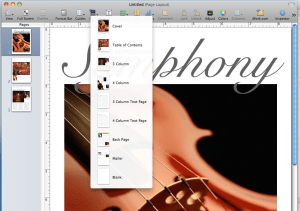
Within the template there are a number of layout styles available. In my example here there are eight (varying from a cover, table of contents, feature article and 4-column text page, etc).

The reason for doing this is that you want to see what’s available to you, and actually modify the “template” so that you can use it again and again, rather than having to copy and paste design elements repetitively throughout the design process.

Change view to “Facing pages”
This not only helps with visualizing layout, but also will help you decide which page styles are going to be right-hand pages and left-hand pages.

Add guides to pages and adjust layout for trim
Adding guides to the outside edges of each page will ensure that everything will fit inside the trim line). Because MagCloud trims its documents to 8.25” x 10.75” we are going to lose 0.125” inches off the top and bottom, and 0.25” off the outside edge. This means in order for our template to be centered on the printed page, we are going to have to adjust the content on the page. With your Rulers active and visible, you’ll want to drag guides into place (0.13 in from the top and bottom, 0.25 from the outside edges). Be sure when you are designing your templates that you are making a conscious decision as to which pages will be left-hand pages and which will be right-hand pages. It will help to name them as such when you “capture” the layouts in a later step.

Adjust style sheets to your needs
Not making a ‘Metropolitan Symphony Program?’ Then go through each page and make the necessary adjustments to layout and fonts. You’ll notice this is exactly the same layout, with different fonts and colors. Amazing how simple style changes can make a template your own.

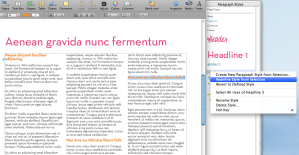
Tip: After you have adjusted a font in the font menu, such as the headline, update your template style sheet so you can easily apply the same style again. You can do this by either “right-clicking” or “ctrl+ click” on the name of the font style in your “Styles Drawer”, then select “Redefine Style from Selection.”

“Capture Pages” for future use
Save yourself a lot of work in the future by establishing your own templates with your style/colors and fixed text. Once you have modified the provided pages in the template with your own fonts and colors, you can “Capture Pages” to use in your template over and over again. You can do this by “right-clicking” or “ctrl+ click” on the page thumbnails on the left margin or by selecting “FORMAT> Advanced> Capture Pages”


Tip: since you have adjusted your content for the trim settings, be sure to name pages accordingly, like “Left-Feature” or “Right-4 paragraph story”). To delete the old template pages, select “FORMAT> Advanced> Manage Pages.”

Commit to a page count and layout
Planning ahead will save you a lot of design time. You should come up with an outline for your publication before you start laying out pages or entering content. This is important because inserting one page at the front of your document will throw off the layout for all of the subsequent spreads. You should also take your layout into consideration when designing and capturing your template spreads, because certain content will be better suited for a right-hand or left-hand page layout.

Save your file as a “Template” for future issues
If you plan to have future issues with this same style, be sure to save your personalized document as a template. It’s easy to do, just select “File> Save as Template.” This puts a copy of your file into the Pages Template Chooser so you can find it easily next time you launch the application.

TURNING YOUR DOCUMENT INTO A PDF:
This part couldn’t be easier! Simply select “FILE> Export.” Leave the default settings for PDF, and save your file.

WANT MORE INFORMATION ABOUT PAGES?

Apple’s Pages ’09 site

Apple Store: iWork $79

PREVIEW THE TEMPLATES ON MAGCLOUD

Original Brochure Template

Original Brochure Template with minor changes

Transformed Brochure Template with Southern California theme

Publisher Spotlight: Plant Society Magazine

From 20/30-something hipsters with first-time plots in big city community gardens to lifelong rare plant collectors and members of the most esoteric of gardening societies, anyone with a desire to dig around in dirt will find Matt Mattus’ newest venture, Plant Society Magazine, not just educational, but inspirational.

Mattus, an author, designer, brand creative, adventurer, naturalist and plant expert, is well known among green thumb types. His popular gardening blog,growingwithplants.com, attracts plant enthusiasts from around the world who are fans of his near-daily diary entries and enjoy the stunning photographs from his many gardens.

When Mattus learned about MagCloud’s print on demand service last year, he began thinking a print magazine would be a perfect extension of his blog — a way to provide yet more in-depth knowledge and greater detail about connoisseur and collectable plants, with a bit of food, travel, design and home and garden décor mixed in for good measure.

“These days, mainstream gardening magazines are too commercial and ordinary,” Mattus says. “Plant collectors and rare plant enthusiasts want something unique and original. They’re curious about discovering new things.”

And Mattus is just the one to uncover anything exciting and unusual. As a creative director at Hasbro, it’s Mattus’ job to discover new trends in the making — and to keep the company a few steps ahead. He has even written a book on the subject: Beyond Trend – How to Innovate in an Over Designed World.

It’s a mission that has become his personal passion, especially when it comes to gardening. A self-described “hortigeek,” Mattus lives on his family’s 100-year-old farm in Worcester, Mass., where for the past 40 years he has collected and grown rare plants and actively participated in obscure plant societies — Androsace Society, anyone? He planted his first seeds on the farm at the age of 5 and remembers when the zinnias were taller than he was.

His own experiences are a sharp contrast to the modern science efficiencies so common in the gardening world today.

“With the rise of mass-produced micro-propagated plants that are all the same at every home center around the world, I can see dumbing-down happening everywhere,” Mattus says. “They’re selling ‘supertunias’ and sheep-sized Chrysanthemums. Gardening has morphed into a pastime that feels more like disposable decorating. But I know there’s still a huge population of gardeners out there who still honor the art and science of it all.”

It’s this population that Mattus reaches with his blog and now with Plant Society Magazine. He writes all the content, focusing only on plants that he, himself, has grown. And he pulls images from his vast collection of more than 10,000 photographs he has taken of plants from his greenhouses and gardens. He organizes his photographs by species and time of year.

“I have so much content, it’s a little overwhelming,” Mattus says. “I’m obsessive when it comes to plants. I photograph every step of the growing process, from planting the seeds to tending to them — even how I display them in pots and vases. With MagCloud, I don’t have to design something six months in advance. I can shoot my cover the same day that I upload my files to the MagCloud website.”

Mattus published his first issue, High Summer, in 2009, featuring 75 pages of in-depth information about, and photographs of, exhibition chrysanthemums, dahlias, pelargonium, nerines and crocosmia.

His Autumn issue focuses on cultivating miniature species Narcissus for cold greenhouses and alpine beds, odd and rare winter blooming bulbs, Cyclamen species in pots and winter shrubs for color.

Mattus promotes the magazine, which also will include Spring, featuring the genus Primula, seed growing, Corydalis and rare Japanese orchids, and mid-Winter editions, on his blog and through his Twitter account.

“I love being my own editor and art director,” he says. “I also appreciate being in charge of my own advertising. You’ll never see me writing about organic gardening and then running an ad for fertilizer on the next page.”

Mattus still recalls the day his first issue arrived in his mailbox. “It came in a plastic bag, and it looked like a real magazine,” he says. “I work with printers all the time. The quality I get from MagCloud is as good as anything out there. I would recommend MagCloud to even the pickiest of designers.” Mattus also appreciates the ease with which MagCloud handles all the order processing and distribution. “Anyone in the US, Canada or UK can order issues direct from the MagCloud website, and can even pay directly with a credit card or Paypal,” he notes. “MagCloud prints to order, and in five days or fewer, the magazine is printed, bound and mailed directly to the reader.”

Without MagCloud’s self-publishing service, Mattus says a magazine like his, with its relatively smaller run and niche market and lack of a traditional distribution channel, wouldn’t be possible.

“I understand the need for big publishers to remain profitable,” Mattus says. “But the publishing business is changing so fast. Self-publishing is now much more accepted in our new digital world of blogs, Twitter and Facebook. For me and for the readers I want to reach, MagCloud is the perfect solution.

“Frankly, I had no idea how the magazine would be received,” he adds. “I expected both positive and critical comments, just as I get on my blog. And that’s terrific. My favorite comments are from readers who tell me that Plant Society Magazine is better than the fancy British gardening magazines. One reader said, ‘Finally, a well-designed and informative magazine that not only shows me step-by-step tasks, but that actually teaches me how to grow something out of the ordinary.’

“That’s exactly what I’m striving for.”

Check out the latest issue!

Publisher Spotlight: Fotoblur Magazine

After struggling to get his work published in print, software developer and photography enthusiast Lance Ramoth set up a little spot on the Internet where he and a few photographer friends could easily post their fine art images. Through the site, Ramoth reckoned, they could encourage one another, vote for their “community favorites” to be featured on the home page and enjoy some great talent that might otherwise go unnoticed.

He dubbed the site fotoblur.com, and before long, with word of mouth and the magic of the Internet, itself, his small group in early 2007 blossomed into an international community of 2,500 members today and counting.

“I was surprised by how well it worked,” Ramoth says. “The images that the community selected as their favorites were among some of the best photographs I had seen. Launching our own magazine just seemed like the next step given that we had a pool of great photographers who would provide the content.”

And photographers who appreciate the reproduction quality of print. “It’s just dramatically better than what you see online,” Ramoth says. “Plus, Web sites come and go, but magazines can last decades. And for those of us chronically attached to our computers, it’s nice to be able to enjoy a magazine anywhere besides on our screens.”

Ramoth’s instincts were spot on. The first issue of Fotoblur Magazine drew 600 submissions from the fotoblur.com community. Issue 2 brought in 800. By the time Issue 3 (the most recent issue) came around, Ramoth was overwhelmed with 1,400 images.

Just as the fotoblur.com community votes for favorite images to be featured on the site’s home page, members also vote on which images should appear in the magazine. Ramoth and a small group of editors review the top 10 percent of the vote-getters, selecting 40 or so black-and-white and color images per issue that represent a diverse cross-section of subjects and a range of photographers, themselves.

Ramoth then designs the issues, usually devoting a full page to each image with very limited text and no advertising.

“There are already a lot of photo magazines out there with articles and ads,” he says. “But our philosophy is all about the image and the celebration of it. Each image contains a story in itself and requires a full page for it to be fully processed and appreciated by the viewer.”

The decision to bypass advertising meant, of course, that Ramoth needed a way to print the magazine without incurring any expenses. He heard about MagCloud from a colleague and decided to give it a try.

“I’ll admit that I was skeptical about the print quality,” he says. “But when I held the first issue in my hand, I was simply blown away — it truly exceeded my expectations. The color of the images was spot on. There was little to no color cast on the black-and-white images, which was one of my major concerns. I just remember thinking, I really did it!”

Since Ramoth runs fotoblur.com and manages the magazine almost singlehandedly, he appreciates that MagCloud handles all the printing, shipping and order processing details. He looked into working with a few newsstand magazine distributors, but found that the upfront costs and the need for advertising to support the distribution would have threatened his creative vision. “MagCloud allows me the freedom to concentrate on the results I desire creatively,” he says.

As each issue is published, Ramoth spreads the word via fotoblur.com, as well as through Twitter (@fotoblur) and digital publication sharing services like Issuu (issuu.com) and Scribd (scribd.com) and various file sharing services. Contributors to the issues also help publicize the magazine’s availability.

Ramoth makes the issues free to download and view online and supplies links to MagCloud for those who’d like to purchase the print version, $15.40.

Ramoth hasn’t given up on his hope to turn Fotoblur into a newsstand magazine if he can attract enough purchasers. He’s also considering combining all four of this year’s issues into a hardcover book.

His advice for other potential magazine publishers? Purchase a good software package, create the content and do it. “When I told people that I wanted to start a photography magazine, they thought I was crazy,” Ramoth says. “But I just didn’t listen — I just did it anyway.

“Be creative, publish, then promote,” he adds. “It’s an amazing experience in itself, and you’ll feel something special when you turn that idea in to something tangible.”

Check out the latest issue!