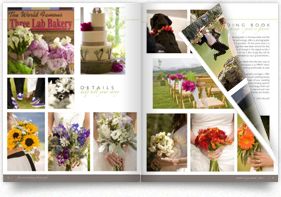
Q&A with Holli True of Holli True Photography

Q-and-A-Series-header-HolliTrue2The words Young & Free come to mind when you mention the name Holli True, and it’s not just because that’s her business’ tagline. The Oregon-based high school senior portrait photographer manages to keep a free spirit and a young attitude finding inspiration in the teen-world around her. In 2010 the savvy businesswoman decided to specialize her business from general photography to a very specific market: high school senior girls. While it may seem like a small niche, Holli has made a name for herself in the region amongst high school girls and in the photography community worldwide. Over the past two years, she’s begun hosting workshops across the US and has spoken at a number of photography conferences and events. Now she’s furthering her reach with a new magazine, set to launch in May of this year.

How did you get started publishing?

FieldNotes

Holli True When I was planning my first workshop, I decided to create books for each of my attendees. I didn’t want them to have to scribble notes, so I provided each of them with all of the workshop content in a book. Following the first workshop, I received a dozen emails from other photographers that had heard about my workshop book. While they weren’t able to attend my workshop, they wanted to buy my book. I decided to revamp the workshop book and offer it to the public for purchase, calling it Field Notes: Workshop in a Book. Since then, I have also released Body Language: The Pose Book.

What exactly are your Young & Free publications?

HT Traditional studios offer proof books with printed images in a leather album, but I am not a traditional photographer. The Young & Free Look Book is my version of a proof book, in magazine format. Needless to say, it was a huge hit with my clients and got everyone buzzing about my business. While albums tend to be more of an heirloom product, our Young & Free look books are intended to be toted around and shared with their friends.

Q&A-Products

How did Young & Free come about? What inspired you?

HT In 2012, while planning for my senior photography season (which peaks in late summer and fall), I looked at my assortment of products and decided to simplify. I stripped down my products, which used to consist of photo boxes, signature books, mounted prints, gallery prints and more. Having too many options for clients can be overwhelming, so I decided I wanted to focus on a small handful of items–keeping my brand in mind–I ended up with Albums & Metal Gallery Prints. I quickly realized that I was missing one thing: a key product that my clients would love, that would do constant advertising for me. My solution: a Look Book.

I absolutely love looking at designer look books, they are different from magazines, as they are filled with just pictures. I adopted the same format and dedicate the entire look book to my clients, filling all of the pages with their beautiful pictures. It is a unique product that other photographers in my area aren’t offering, which allows us to stand out, while remaining true to our brand.

Tell us about your newest publishing adventure.

HT Earlier this year I joined forces with Heather Dunnigan, of TheaCreative, to create a new magazine publication for photographers called Denim+Grace. As a workshop instructor and business mentor, I am very passionate about teaching and sharing. I was craving a creative outlet and new platform to connect with other photographers in the industry and create something beautiful–a magazine was the natural choice. We are so excited about our premiere issue launching on May 1st, 2013!
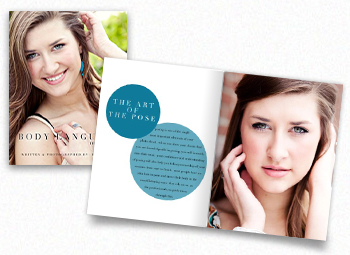
BodyLanguage

Why did you choose MagCloud?

HT I have been a dedicated MagCloud user for over a year now. I turn to MagCloud for all of my printing needs in terms of magazines & books, it was a no-brainer for us when it came to Denim+Grace. We absolutely love the print quality, quick turnaround time and impeccable customer service that MagCloud offers. Thank you so much for creating a product that makes our hard work look gorgeous!

How has MagCloud made a difference in your business?

HT I think the biggest difference I have seen in my business because of MagCloud is with my look books. Our Young & Free look books sell themselves, we always have them on hand when we are out and about, which has been a huge marketing piece for us this year.

What software do you use to design your publication? Do you have any special tricks to make it easier or well designed?

HT I am a Photoshop girl, so it’s my go-to for design. Due to the number of look books I had to create, I wanted to make it as simple as possible to get them designed, so I made an assortment of templates that I can mix and match easily. Due to the popularity of the look books, I recently wrote a blog post about how I created them and now offer templates for purchase to anyone looking to create similar publications.

What tips do you have for someone new to self-publishing?

HT Do it! MagCloud makes the entire process a breeze, just commit and go for it! Oh, and before you order a large number of copies, make sure to do a test run, just in case! When you start designing, it’s easy to forget to leave enough cushion on some pages, a simple test can give you peace of mind!

If you were stranded on a desert island, what one book would you want with you?

HT Eclipse by Stephanie Meyer. I am obsessed with the Twilight Saga- Eclipse was my absolute favorite! I could read it and reread it time and time again. I’m not even ashamed to admit it! ;)
Q&A with Cory Ann Ellis of SD Wedding Style

Q-and-A-Series-header-ACELLIS

When Cory Ann Ellis moved from California to the Midwest to study Physical Education in college, she never imagined that she’d one day have a booming photography business in South Dakota and her name on the masthead of two magazines.

Her first headlong dive into publishing, SD Wedding Style, is focused on wedding information and ideas for couples with both an annual print publication and a regular blog-site.

  What lead you from photography to publishing?

Cory Ann Ellis It was really a natural progression. While I love magazines, I am a horrible writer but I found my images are a wonderful visual compliment writing and so it just made sense to create a publication where there wasn’t one previously. The on-demand printing made it possible for us to bring SD Wedding Style to life without looking for financial backers to help with the cost of printing.

There are many magazines to choose from for wedding inspiration–the greats like Martha Stewart and Real Simple–but my partner Leah (a graphic designer and wedding coordinator) and I had never seen a single South Dakota wedding or vendor featured. Therefore it was time to create one and showcase all of the great options couples have right here.

My partner on Wholesome Magazine came to me to pick my brain on launching her idea of a South Dakota-based food magazine. Shayla is a wonderful journalist, talented graphic design and amazing cook. It made sense to join her in the endeavor and now our first issue is due out in Sept 2013 and it will be a bimonthly publication. I’m excited for it’s release, although my waistline is a little less excited–you know I have to try all the foods I photograph…

  What sorts of publications do you publish?

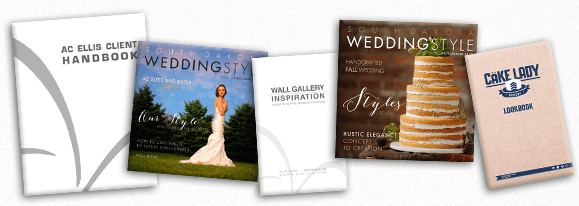
CA With MagCloud I print for AC Ellis, SD Wedding Style, Wholesome Magazine and The Cake Lady. I use MagCloud to print magazine publications as well as collateral material and lookbooks for multiple businesses. SDWS uses MagCloud for both our print and digital distribution and media materials. Wholesome uses MagCloud for our collateral materials. With AC Ellis I use MagCloud for everything I can. My product catalog, proof magazines, client handbook, rate guide, vendor magazines, lookbooks and more. For home projects I like to use it for image catalogs of all the images I want to reference without going to the computer.

The many publications of ACEllis

  How did you get started publishing through MagCloud?

CA A friend originally told me about MagCloud and I immediately was excited about the idea of short run magazines.

  How has your business evolved with on-demand publishing?

CA In my photography business MagCloud has allowed me a new means to put my images in print. In the age of digital too often images do not leave the computer. Heirloom quality albums and many lab produced products are incredibly expensive and aren’t ideal for quick distribution and lots of handling/updating. My images are in more hands thanks to MagCloud and that means more exposure, bookings, and income. The number of my referrals turned to bookings has increased since I’ve used MagCloud to print materials specific to the venues and coordinators I wanted to work with. This year about 42% of my weddings are based on these referrals versus about 10% the previous year.

  What software do you use to design your publications? Do you have any special tricks to make it easier or well designed?

CA I use Adobe InDesign® for all of my design work. When I found layers it opened up a whole new world.

  What tips do you have for someone new to self-publishing?

AC ELLIS Photography Product Catalog

CA For someone new to self-publishing I have three main tips.

1. Research.

In order to produce a great product you need to research all aspects of the business. While this may be a creative outlet or a small project there are certain legal steps to take for your business. For example if you are going to sell advertising or the publication itself, things like obtaining sales tax licensing and filing, business registration, EIN number, etc.

2. Protect.

Your work is worth something and you should protect it. Either submit the entire publication or all of your images and text to the copyright office. While your work is copyrighted the moment you create it, registration allows for the recovery of damages in the event it is illegally copied. You can also trademark your name and logo. Not only federally, but in your state. Business names can also typically be registered in your state. Get your ISSN number so that your publication is searchable and citable. Lastly, put a copyright disclosure in your masthead or somewhere in your publication.

3. Partner.

You may be good at one skill like writing, but not design, editing, photography, or business operations. Find other professionals to round out your team. Either as partners in an LLC/Corp or as paid professionals and sub-contractors. A great team will make for a great publication.

  What are your business resolutions for 2013?Farmer's Market Calendar

CA I’m not a resolution gal, but I am a huge goal and list maker. And since I’m also into SMART goals I typically have a list of about 70-100 items designed to help me achieve about 10 main goals. This year’s largest undertaking is a complete business re-branding. Lots of fun and work.

  Are there any blogs or publications that you use for business advice or guidance? Which ones?

CA Surprisingly I do not read many business blogs, but I do follow some great people on twitter and love to read their posts and links. A few are Whitney Johnson @johnsonwhitney, Lucas Marcus @lucymarcus, and Oliver Blanchard @thebrandbuilder. I do always recommend small business owners read the book E Myth Revisited by Michael E. Gerber.

SMB Business Tips from Guest Blogger Merritt Design

Today’s post is from designer and MagCloud publisher Jennifer Koskinen, owner of Merritt Design.

smbtipsWith a desire to start the year with a positive outlook, Sandy Puc just began a great discussion thread on LinkedIn asking people to think about the Top 10 things they believe contribute to a successful photography studio.

I love taking the first week of January to revisit goals for my photography business, and so was inspired to take a moment to reflect on my overall strategies for success. In no particular order, here are my Top 10 (ok 12) things I have observed over the years which motivate me every day.  Some I live with confidence.  Others I am still working to make wholly mine. What would YOU add?

1. THE CLIENT EXPERIENCE

Make booking, scheduling, delivering, and of course, shooting the photo session a memorable and fun experience. Inspire referral business through existing clients.

2. SMILE

Yes, you. Genuinely. Smile!! On the job … and at the proverbial coffee shop (can’t even count how many clients I’ve earned with this philosophy).

3. INSPIRATION / EDUCATION

Keep reading, networking, attending seminars and workshops, stay abreast of current trends, and try new things based on what inspires you.

4. GOALS / LISTS

Keep business and personal deadlines, and self-impose deadlines for non client driven ones. If you keep pushing back a deadline, ask yourself if the item should really be on the list (if so: do it! If not, remove it or put it on a separate back-burner list).

5. MARKETING

Schedule regular activity and think outside the box to market yourself creatively (in print, in person and via social media) Your website should reflect your personality. And especially when you’re starting out, don’t show every photo, show only your BEST photos!

6. COMFORT ZONE

Push it! Often! Shoot new material.  I love to use my phone camera to shoot personal projects even on days when I’m not shooting for clients.

7. PRICING

Review cost of business and package pricing annually and always communicate clearly and confidently with clients (unless you happen to love negotiating — which I decidedly do NOT — printed materials with pricing menus help tremendously).

8. MONEY

Fall in love with the business side of what you do. This is still my biggest challenge. I had to finally design myself a beautiful system of spreadsheets because the available software systems were all too dry for me. May sound silly, but it works for me. Find what works for you.

9. CONTRACTS

Know and continually update your contracts to stay on top of constantly changing on-line world (especially if you work with digital files and licensing). Educate your clients about copyright laws, and gently educate clients that they are investing in your talent, creativity, instinct and vision, NOT paper and ink.

10. GRATITUDE

Be grateful for the fact that you get to do what you love for a living! Remind yourself of this simple and amazing fact when times are tough.

11. ACCEPT CHANGE

Don’t attach to old ways of doing things and don’t be afraid of learning new tricks. Let go of fear, take chances, dive in…

12. TAKE DANCE BREAKS

Often. Crazy ones. They are immeasurably good for the spirit. Not to mention sore, over-worked eyeballs.

And as part of my “outside the box marketing” I like to use MagCloud to show off my work in print and digital, as well as providing my clients with new ways to market their own businesses.


Learn more about Jennifer’s work on her website and see her collection of MagCloud publications on her publisher page.

Do you have your own Small Business tips?  Share them in the comments section below.

Show the Love with a Personalized MagCloud Gift

ValentineTemplate-featured

It’s February, which means it’s officially time to start thinking about gifts for your friends and loved-ones for Valentine’s Day. But rather than buying an impersonal card at the store, why not make the holiday more meaningful with a DIY Recipe Book, Instagram-style poster or custom card? We’ve designed templates to help you get started and we can’t wait to see what you’re inspired to create!

View MagCloud Recipe Booklet on MagCloud.comRecipe Booklet

Around the holidays, we’re a big fan of the K.I.S.S method (Keep it simple, Silly!), so with that in mind we’ve created a template that makes for a great little gift, but doesn’t take a whole lot of time to create.

You can choose how little or how much to customize of this 12-page Digest Landscape recipe booklet. Make it personal by including photos, love notes and your favorite recipes, or you can use ours (don’t worry we won’t tell).

We’re offering the same template in some of your favorite software applications, so click on the links below to download the template of your choosing and get started!

Adobe InDesign CS4 or newer

***InDesign users: There are multiple layers in your file for you to get instructions and customize the design. Please note the “Example” layer is currently set to not print, so if you want to use our recipes and just edit the design directly, select the “Example” layer in the Layers palette and right-click to edit the “layer options” (just check the box that says “Print Layer”)

Apple iWork Pages

View MagCloud Valentine Poster Template on MagCloud.com

Personalized Instagram Poster or Card

If the recipe booklet seems like too much, or you’d rather make a big impression without too much work, then the Instagram Poster or greeting card templates will be perfect for you. Swap in some personal photos of you and your loved one, or artistic shots they might enjoy and add a personalized message and you’re good to go!

Just be sure to use images that are high-enough resolution:

  • Poster – the squares require images that are at least 900 x 900 pixels  and the rectangular images need to be a minimum of 1900 x 900 pixels.
  • Card – the square images need to be a minimum of 600×600 pixels and the rectangular images need to be a minimum of 1200×600 pixels.

Get the poster Template:

Adobe InDesign CS4 or newer

Apple iWork Pages

View MagCloud Valentine Card Template on MagCloud.comGet the card template:

Adobe InDesign CS4 or newer

Apple iWork Pages

Word

Play with Typography for a More Personal Feel

All of the templates include standard system fonts, but to emulate that custom handmade look in our examples we recommend you swap out the typefaces for something more creative:

ValentineTemplate-blackjack
ValentineTemplate-jennasue

MagCloud’s Favorite Instagram Users and Hashtags

instagramfeaturedimage

If you’re not already following @HPMagCloud on Instagram, you should be! We love to engage with our publishers and see MagCloud publications and products out in the wild–how you use them, where you enjoy them and cool pictures of your work coming together… So when you decide to show off your MagCloud product, be sure to tag us (@hpmagcloud) or use the #magcloud hashtag.

In the meantime, we have a few favorite Instagram users we’re following, and some suggested hashtags for when you share the MagCloud love on Instagram.

Favorites to follow:

Us, of course – @hpmagcloud

Andrew Shinn – @shinnphoto

BRINK Magazine – @brinkmag

Cory Ann Ellis/AC Ellis – @coryannellis

CycleEXIF – @cycleexif

James Worrell – @worrellphoto

Jennifer Koskinen/Merritt Photo – @merrittphoto

Julian Bialowas (16 Hours Mag) – @julianbialowas

Rob Shore/I Carry the Bag – @shorespeak

Sian Richardson Tax Attorney (16 Hours Mag) – @sian_richardson

Standard Magazine – @standard_mag

Toobydoo – @toobydoo

We Like We Love – @welikewelove

#tags to remember:

#MagCloud

#MagCloudinthewild

#MagCloudLove

#printisnotdead

#graphicdesign

Q+A with Merritt Design’s Jennifer Koskinen

No sooner did Jennifer Koskinen begin using MagCloud to showcase her architectural photography work than she found herself designing MagCloud magazines for her clients, too – quickly parlaying her architectural firm into a photography and graphic design boutique. In fact, MagCloud was a source of inspiration for transforming her architectural skills into graphic design skills.

“I love the creativity of designing photographs and then thinking of how to best present them,” Koskinen says. “MagCloud makes it easy and affordable to experiment with design ideas and try new things.”

  How did your architecture work lead to your new career in photography?

Jennifer Koskinen I fell in love with photography when I got my first camera in the eighth grade. But I’d never considered working as a photographer. I pursued a career in architecture, instead.

After a few years of design work, my firm hired me to shoot scouting photos of one of our projects in pursuit of publication. So I submitted my photographs to a magazine, thinking they’d send their own photographer to reshoot them.

The magazine loved what I sent and wanted to publish them. It was just the validation I needed to start shooting more, and soon I realized that I felt more creative photographing architecture than designing it. I absolutely love photography! It’s hard to believe that I get to do this for a living!

  How did MagCloud inspire you in your graphic design business?

JK I started creating my own magazines with MagCloud to give to existing and potential clients. Everyone loved them, right from the start, and wanted me to design magazines for them, too. I’ve created eight MagCloud magazines so far for other architects, builders, chefs, jewelry designers and so forth, with two more in the works. My clients in turn use the magazines to market their work, which makes for fabulous co-marketing for all of us!

  How did you get started publishing through MagCloud?

JK I’d been interested in self-publishing in general, but could find solutions only for books. When I came across MagCloud, I was immediately excited. The first thing I designed was a magazine for my architectural photography. The magazine format was intriguing, so I even wrote stories and included advertisements for some of my clients.

  How has MagCloud made a difference?

JK Next to my website, distributing my MagCloud magazines to potential clients is the most important thing I can do to attract business. I love the reaction that I get from people when I hand them out. People visibly respond to something they can hold in their hands and flip through at their own pace. I see them feel the paper and the weight of it. The pages hold the color so well. It’s one thing to see my images on a computer monitor – it’s nice to see them in print, too.

There’s nothing else out there that beats the quality and the price point better than these magazines. They’re invaluable, and they give my business credibility. There’s no doubt that my sales have dramatically increased because of MagCloud.

  What tips would you give to someone new to self-publishing?
JK Dive in. When I set out to design something, I look at things I love, study graphical trends, fonts, proportions – even white space and how it’s used. It’s really fun to play with, and MagCloud’s templates make everything so easy. I recommend studying what you like and then creating something that’s your own, including things you’ve noticed and like in other people’s designs. Have fun and try things you’ve never done.

  If your publication were a superhero, who would it be?

JK Pixelgirl! She’s a stylish superhero who can fly – cameras in tow – from location to location, harnessing her amazing powers of composition and her ability to capture the most dynamic subjects in the most beautiful light. And she gets home in time to cook dinner for her son!

Q+A with Professional Photographer James Worrell

Simplicity, color and humor. These are the keys to the powerfully graphic images that James Worrell’s clients depend on to tell their stories and sell their products.

When it comes to promoting his work to new clients and keeping connected with previous ones, the New York City-based editorial and advertising photographer uses those same concepts to stand apart from his competitors.

“To have an affordably and beautifully printed version of my portfolio in this day and age when everything is online – it’s extraordinary, and it makes a lasting impression,” Worrell says. “There’s something still wonderful about the printed piece.”

  Tell us more about your work and your “Photography for Thinking” philosophy.

James Worrell I’ve been a still-life photographer for the past 17 years, shooting everything from cosmetics to food. What I love to do the most is conceptualized still life. Clients will call with rough ideas – maybe they’re telling the same story over and over and they need a new way to present it visually.

That’s where “Photography for Thinking” comes in. My wife and I bounce ideas off each other, produce sketches and send them to the client. The back-and-forth process starts from there.

  How does publishing your portfolio fit into your marketing strategy?

JW My clients are inundated with marketing pieces from photographers and other creative types. So if I can do something slightly different and slightly more special, I’ll increase my chances that someone will pick it up, look at it and even save it.

MagCloud is a wonderful tool that allows me to do a substantial piece, in short print runs, and get it out there at a decent price. And, from a visual perspective, it looks really good. A lot of print-on-demand services are expensive and the quality is poor. My brand is my brand – everything I produce is of the highest quality.

I always turn to MagCloud for part of my marketing process. You have to keep working and exploring ideas, and you have to remain excited about your work. MagCloud is one of those platforms that keeps you fresh.

  You did a very special promotional piece this summer.

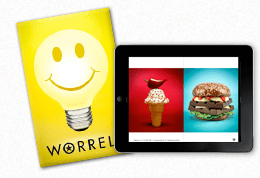
JW Yes, in July we ordered 70 custom-printed boxes with my logo on them, each with a light bulb jar filled with yellow M&Ms candy – some had a star printed on them; others featured “Think Worrell.” And we included a 40-page printed catalog of my work called “Worrell: Photography for Thinking.” We created the catalog using MagCloud. We hand-delivered about 45 boxes and mailed the rest. Plus, we shot a fun video of how we pulled the whole package together.

That promotion resulted in three strong gigs right away and several nice thank-you emails from clients and potential clients.

  What got you started publishing through MagCloud?

JW I’ve always been an early adopter of technology. I read about MagCloud on a photo blog, right when the service was introduced. I’ve stuck with the service because it works.

  What tips would you give to someone new to self-publishing?

JW My best piece of advice is: Don’t overdo it. MagCloud offers a simple, elegant platform. Just get started. Don’t overthink it. Use it for what it is: a way to show your work.

  If your portfolio was an ice cream flavor, what would it be and why?

JW I see my business as the perfect vanilla ice cream cone – not some crazy Ben and Jerry’s flavor – just a simple, elegant vanilla. Usually, less is more and the simplest idea can be the most effective, if you produce it properly.

Make Summer Last All Year – Turn Your Photos into a Calendar

In the last few weeks, we’ve been talking about ways to turn your photos into something special with MagCloud. Whether that’s creating a photo book with Photoshop, Lightroom or Aperture, or creating a Summer Memory Magazine, MagCloud makes it easy to enjoy your photos in beautiful print and digital formats. So why not enjoy Summer all year-round by creating a calendar with your photographs?

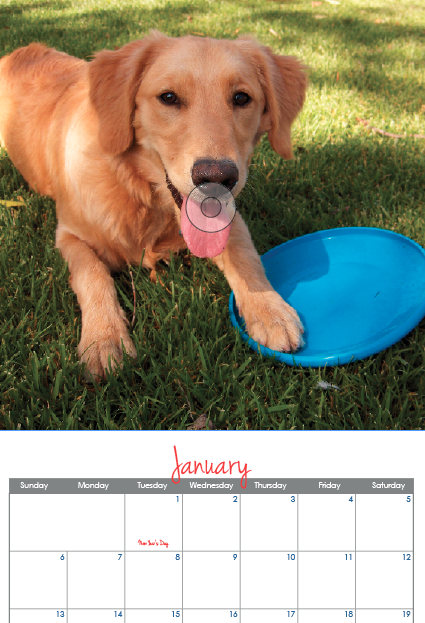
To help you get started, we’ve created 6 templates for you to use with Adobe InDesign and Apple Pages. Simply add your own photos, special dates and details, upload your PDF to MagCloud and you’re set! You can sell your calendar online in the MagCloud Storefront or use our Direct Mail feature to send a copy to all of your friends with just a few clicks of the mouse.

Let’s get started!

Select the Format/Size of Calendar

Our templates are available in 3 sizes:

  • Small Square (8″ x8″) calendars (ideal for square photos like those from Instagram) with Saddle  Stitch Binding (28 pages – $5.60/each + Shipping)
  • Standard (10.75″ x 8.25″) calendars with Saddle Stitch Binding (28 pages – $5.60/each + Shipping)
  • Large Square (12″ x 12″) calendars with Wire-O Binding (28 pages – $12.08/each + Shipping)

*Remember that prices drop 25% off when you order 20 copies or more. So if you’re looking to order gifts for friends and family, or a great way to promote your business–a MagCloud-published calendar may be the perfect solution.

Select Your Software

InDesign CS5 & Newer

InDesign CS4

Pages

Script (handwriting) Typeface used in templates: Jenna Sue

Calendars for Business

You may also remember that last year we talked about using a MagCloud-printed calendar to promote your business. In exchange for you summer vacation photos, you can easily add images of your products, team members, or local scenery. Add your logo to the back cover along with a bit about your business and contact information and voila–you’ll keep your brand top-of-mind and in front of your customers all-year-round.

Since last year’s calendar template was so popular we also decided to revamp it for 2013. Enjoy!

That sounds too complicated for me.

Don’t want to use either of the above applications? MagCloud Partner Poyomi has an easy-to-use web-based platform that helps you create 14″ x 11″ calendars that are printed by MagCloud. With their service you can easily upload photos from your computer or connect to your accounts on photo-sharing services like Flickr, Smugmug, Picasa and Facebook.

*Please note that using the Poyomi tool and templates to create a calendar or photo book will affect the pricing. For Poyomi pricing, visit poyomi.com/pricing

To get started with the Poyomi calendar tool click here.

MagCloud Project: Framed Poster

Last month, we introduced a handful of new product types, including a new Poster format. Posters are available in 18″ x 12″ landscape and 12″ x 18″ portrait sizes, and use the same high quality print output as all of MagCloud’s products, for only $2 per printed Poster. In addition to being a great way to advertise an event or new product for your business, these new Posters are also a great opportunity to get large format prints of your photos at an affordable price. With that in mind, today I am going to show you how easy it is to make framed art for your home using MagCloud’s new Poster format, and a photo taken with the popular photo app Instagram.

http://vimeo.com/48024577

The first step is to create a PDF file that you can upload to the MagCloud website. You’ll want to export your square Instagram photo from your phone’s Camera Roll/Gallery and put it on your computer for editing. Using the photo that Instagram saves to your iPhone or Android device will be of higher quality than using the photo that gets posted to your Instagram account. Once you have your photo on your computer, you have a few options for creating your PDF. I’ve listed some steps specific to this project below, but check out the Getting Started page on the MagCloud website for more general instructions in other software programs.

Create Your PDF in Adobe Photoshop:

  1. Open your original image
  2. Go to Image > Image Size and set size to 3675 pixels by 3675 pixels at 300 pixels/inch resolution. Select “Bicubic Smoother (best for enlargement)” from the Resample Image drop down menu and click OK.
  3. Go to Image > Canvas size and set width to 18.25 inches, leaving height at 12.25 inches, and click OK.
  4. Go to File > Save As and select “Photoshop PDF” from the Format drop down menu. Make sure the box to embed color profile is checked and click Save. In the PDF Export window, select “Press Quality” from the Adobe PDF Preset dropdown menu, and uncheck the box for “Preserve Photoshop Editing Capabilities.”
  5. Upload your PDF to MagCloud as usual*

Create Your PDF in Adobe Lightroom:

  1. Import your original image
  2. Go to the Print module and select “Single Image/Contact Sheet” as the Layout Style.
  3. Click the Page Setup button and choose “Manage Custom Sizes” from the Paper Size dropdown menu. Create a new custom page that is 18.25 inches wide and 12.25 inches tall, with a User-Defined Non-Printable Area that equals 0.00 inches on all sides. Click OK twice to return to Lightroom.
  4. Make sure all the boxes under Image Settings are unchecked. Under Layout, set all of your Margins to 0.00 inches and set the cell size: Height = 12.25 inches | Width = 18.25 inches. Under Print Job, select “Printer” next to Print to and make sure the Print resolution is 300 ppi.
  5. Click Print, then select “Save as PDF” from the PDF dropdown menu. Pick a name for your PDF and click Save.
  6. Upload your PDF to MagCloud as usual.*

Create Your PDF in Apple Aperture:

  1. Import your original image
  2. Go to File > Print Image and select Custom from the Paper Size dropdown menu. Enter 18.25 inches x 12.25 inches as the Paper Size, with a Landscape Orientation, and select Maximum to Fit from the Image Size dropdown menu. Make sure the box next to Crop Image to Fill is NOT checked so the whole image appears on the page.
  3. Click Print, then select “Save as PDF” from the PDF dropdown menu. Pick a name for your PDF and click Save.
  4. Upload your PDF to MagCloud as usual.*

*After uploading, you will be told that your PDF is not long enough. Select “Proceed with this PDF” to have an extra page added automatically.

After you’ve uploaded your PDF to MagCloud, simply order a print copy and select your desired shipping method. When your print arrives, trim off the 3” white edges on either side so that you have a 12” x 12” copy of your photo, which can then be placed into the frame of your choice. The square VIRSERUM frame from IKEA is a great option – it’s available in both white and dark brown to match a variety of décor, and includes a mat with an 11 ½ inch square opening for only $19.99. Using the VIRSERUM frame, you can get your photos off your phone and turn them into a framed piece of custom art to display in your home for less than $25.

Eternalize Summer Memories With Your Own Magazine

Though Summer’s heat lingers on, Labor day is just around the corner marking the unofficial end of Summer.  Whether your family took a big trip or just used the lazy afternoons to hang out together, you are sure to have plenty of memories – and pictures – you want to save.

For many, vacation photographs wind up unorganized and spread amongst their hard drives, cell phones, Instagram and Facebook–doomed to be lost in the shuffle. With that in mind, why not take an afternoon and organize your family’s vacation experience, photographs, and mementos into a summer memory magazine?

With MagCloud’s beautiful print quality and direct mail options, you can even order copies to be sent directly to grandparents, cousins and friends to enjoy.

Getting Started: Where will you create your PDF?

First, you’ll want to select a platform to design/assemble your MagCloud-ready PDF­. You can use web-based Poyomi, or software like Adobe InDesign, Quark, Apple iWork Pages, or Microsoft Word.

As you get started, you can choose to start with a pre-designed template from the software (if available), or with a plain MagCloud template available here. You may even remember a post from awhile back, when we used Apple Pages’ built-in Templates to create magazines.

Organize Your Images and Treasures

Next, gather together your vacation photographs and organize them into a single folder. Then select the images that most effectively represent your vacation experience.

Collect any small items that you may have picked up along the way (i.e., a drink coaster with a resort’s logo, maps, airline ticket stubs, brochures from attractions, etc.). Such items can be scanned and added throughout your magazine and provide a more personal touch to the project. For example, you can use your ticket stubs from the theme park to give a different look to your family’s latest roller coaster adventure.

Order and Details

Although you have complete creative control over how you assemble your summer memory magazine, the easiest way is to assemble things is in chronological order so those enjoying your magazine can experience your vacation from start to finish. Throughout the publication you can include  quotes from your family members, or funny anecdotes – like when the duck bit the zoo keeper during his presentation.

Be sure to take the time to caption your photographs, indicating the “who, what, when, and where” of each picture. This will be helpful for others viewing your memory magazine and for you in later years when small details slip from memory.

Write a short paragraph for each of your summer highlights. Ask your children for input and have them answer questions about their favorite parts of the summer. You’ll be amazed by what they come up with and it’s always fun to look back and remember what was happening in pop culture at the time.

Some details you may want to include:

  • Favorite Summer Memory
  • Places and people you visited
  • Friends made
  • Activities and Games played
  • Movies watched
  • Books read
  • Song that was on repeat in the car
  • The silliest moment of the summer

Design Can be Daunting

When it comes to assembling your summer memory magazine, don’t worry if you don’t have a lot of design skills or experience. You can look at magazines for inspiration, simply use photos and captions for a basic layout, or even re-purpose templates that have nothing to do with this purpose. You can find inspiration anywhere, you just have to look past the content and look at the design. For example, the magazine pictured above used our Microsoft Publisher Brochure Template as a starting point for the layout. The design was a perfect way to include ample text to tell the story that went along with the photos. A few tweaks to colors and typefaces and we were able to completely transform the look of the original design..

As an additional example below, we used the layout from an Apple Pages design template for a school yearbook. With a few changes (and by deleting the extra clip art that made the layout look  “education-centric” we were able to create a casual scrapbook-style. Adding a scanned scrap of paper with Sara’s favorite memory from the water park gave the page a personalized feel.

Microsoft Word also has some great “Newsletter Templates” that are built-in to the software (Mac) or available online. Below are some samples that could be easily tweaked and used as the interior pages of your memory magazine.

No matter what software or platform you choose to create your magazine in, there are lots of sources for inspiration. So start designing and have some fun with it!

Have you created a photo magazine or book with MagCloud to commemorate and event, trip or season in your life? Tell us about it, or share your publication in the comments below!