The Space Between

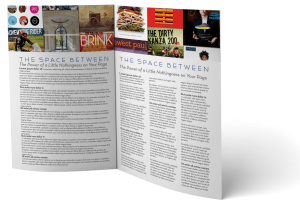
No matter what sort of document you’re planning to publish through MagCloud, it’s important to understand the role that white space plays in your design’s aesthetics.

White space, also known as negative space, is the unused space between text and graphic elements within a publication. It gives the eye a place to land and rest, and implies significance to the content you place on a page.  Some would argue that this empty space is as important as the text and graphic images of a page and that it can make, or break a design. So let’s explore why it’s so important.

Balance and Harmony in Print Design
White space is an integral element of design, as it enables a state of balance to exist between the design objects. It also plays an active role in the effectiveness of a layout; it can highlight important elements and support the overall hierarchy, leading the viewer around the page as the designer intended. The empty space on a page can be every bit as important as the space occupied by graphic elements, and thoughtful use of white space can give a page a timeless, tasteful, and professional appearance.

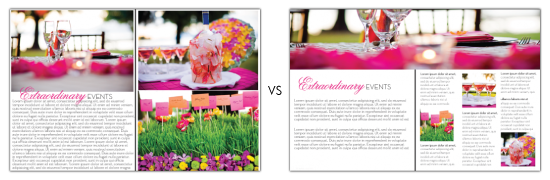
Check out this example below of a Small Business Brochure that has been reworked to better showcase their photography while still including valuable messaging.
Balance and Harmony in Print Design
Give your photos room to breathe. Highlighting photography doesn’t mean you have to fill a page edge-to-edge with your image. Leaving empty space near an image leaves room for the consumer to pause and use their imagination beyond the frame. The second layout has the same written content, and even had room for a 3rd photo.
 

De-clutter Your Page to Get Your Message Across
Clutter on a page is a lot like clutter in a room–it’s distracting and can overwhelm you, or in this case can overwhelm your reader. But when space is at a premium, white space is often abandoned in order to get as much information on the page as possible. It’s important to keep in mind that a page crammed full of text or graphics with very little white space runs the risk of seeming busy, cluttered and in turn difficult to read. It can also cheapen the overall image you are trying to portray.

Large blocks of text, with little breathing room, tire the eyes much more quickly than those that are adequately spaced with healthy kerning (spacing between characters) and leading (spacing between lines of text). A crowded layout runs the risk of being overlooked by readers simply because it puts strain on their eyes, and in turn, their patience.

With that in mind, when you are designing your next publication, keep in mind a goal of making the end viewing experience as easy and pleasant for your readers as possible. Just like you would tidy your house for guests, de-clutter your pages to make them inviting for your readers, helping them feel more relaxed and encouraging them to spend time lingering over your content.
Use White Space to Convey Your Message
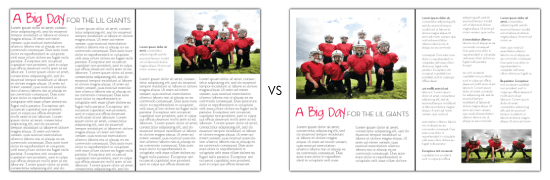
Step away from the edge. Asymmetry and putting content on the margin, when done deliberately, can have a powerful effect on the reader, but when overdone, it can leave the reader feeling on edge. Text that gets too close to the edge of a page can leave the reader feeling like they are going to fall off the page. What’s worse? If you play it too close, content could get trimmed off during the binding process. In this example above, we re-worked the layout and narrowed the columns to make it easier to read.
 

Focus on the Negative, Just This Once
There aren’t many situations in life where focusing on the negative is a good thing, but when it comes to print design, you’ll find it can lead to positive results. Take a look through your favorite magazines to see which designs strike a chord with you more frequently. Chances are, you’ll notice a theme. You may start to notice that highlighting and separating text and graphics with white space imparts more value to content.

After you’ve explored other print designs with this focus on the negative space, be sure to revisit some of your own designs, we’re sure you’ll find ways to tidy up and balance your content with a little more breathing room.

Focus on the Negative
Which would you rather read? When dealing with text-heavy content, you don’t need to fill the page from margin to margin with tiny, single-column text. Take a step back and look at the page from afar. Does the content look digestible? Ask yourself “Would I want to read that?” Narrower columns are easier to read than wide ones that span an entire page. 
 

Get Inspired by Other MagCloud Publishers
For more great examples, check out these MagCloud publishers who really know how to use white space to their advantage:

Hacker Monthly
Snapixel Magazine
Stumble

Think you have an exemplary use of white space in your MagCloud publication?
Share it in the comments section below!

Give Your Microsoft Publisher Documents the Pro Treatment

Take your Microsoft Publisher documents to a new level with professional quality print and digital distribution.

Create professional looking print and digital publications you can send to clients, colleagues, friends and family with Microsoft Publisher and HP MagCloud.

Order 1 or 1000 copies and we will print and ship them anywhere in the world. You can even make your publication available in digital format for easy viewing on any computer or mobile device.

Simply export your Microsoft Publisher file to PDF, upload it to MagCloud and we’ll take care of printing, distribution and shipping so you can focus on the important stuff…creating great content.

Need a little help creating your publication and getting it ready for professional printing?  We offer step-by-step instructions and templates specifically for Microsoft Publisher users to get you started.

Brochure Template 1
Brochure Template 2
Brochure Template 3
Brochure Template 4
Catalog/Portfolio Template 1
Catalog/Portfolio Template 2
Catalog/Portfolio Template 3

So whether you are creating a business portfolio, company brochure, customer newsletter or product catalog, Microsoft Publisher and HP MagCloud will take your publication from concept to printed publication with just a few clicks of the mouse.

Let us know in the comments section how you are using Microsoft Publisher and MagCloud.

Trim, Bleed and All That Jazz

One of the trickiest things about designing for print is understanding trim size and all things related to it.

After the printed pages come off our presses and are bound together, they need to be “trimmed” so that each page is exactly the same size.  This ensures each page in your publication is even, giving it that professional look.

While we always try to trim as accurately as possible, it’s natural for the trim line to vary slightly in one direction or the other, which is why we recommend that you include a “bleed” and work within a “safe zone” when you design your PDF.

Bleed

To ensure that no important parts of the page are cut off in the trimming process a “bleed” area is defined.  The “bleed” extends beyond the “trim” for when you want a photo or color to extend to the edge of the page.  For Standard, Digest, and Digest Landscape publications, the bleed is the top 0.125 inches, the bottom 0.125 inches, and the outside 0.25 inches of your PDF. For Flyer publications, the bleed is the 0.125 inches on all sides of the 8.5″ x 11″ PDF.

The reason to include a bleed in print files is to ensure that images you want to go to the edge of the page always do so, regardless of how exact the trim is.  If an image is cropped at the 8.25” x 10.75” trim edge on a Standard size publications, as shown in the below diagram on the left, and the print is trimmed slightly wider, then there will be a white bar between the printed image and the edge of the page.  If the image is extended all the way to the 8.5” x 11” PDF edge instead, filling the bleed area as shown in the below diagram on the right, then the printed image will go all the way to the edge of the page regardless of where the actual trim occurs.

Safe Zone

The “safe zone” is the area inside the trim line where your text and graphics are not at risk of being cut off or lost into the binding in the final print, regardless of any variation in the trim.  For MagCloud publications this area is 0.25 inches within all sides of the trim edge.

Any content that you want to appear completely within the final printed publication should be kept inside the safe zone.  Placing content too close to the top, bottom or outside edge of the PDF could result in that content being cut off during trimming.  This is something to keep in mind when adding page numbers to your publication, as those tend to be placed closer to the page edge.  Similarly, placing content too close to the inside edge of the PDF could result in that content being lost into the binding if your publication is perfect bound.  By keeping your content within the safe zone, you ensure that it will appear completely in the final print and digital copies of your publication.

For more information and step-by-step instructions to set up your PDF with the bleed and safe zone in mind be sure to check out our Getting Started page.

Next up in the MagCloud Design series: The Importance of Layouts and Templates

Have a Question? We Have Answers!

We’ve expanded our Help section adding more detailed instructions and FAQs to make publishing on MagCloud a little easier.

Our new How to Publish page offers diagrams and PDF specs to guide you through each stage of the MagCloud Publish process. In our new PDF Guides section you can select step-by step instructions for a variety of design and publishing applications such as Adobe InDesign, Microsoft Publisher and Apple Pages to help you create and export a MagCloud-ready PDF. You can also download a PDF of those instructions directly from the PDF Guides page, or order a print copy as a way to see MagCloud’s print and digital quality and have the information at hand while you create your PDF.

If you run into any questions, search for answers on the new Ask MagCloud page. We’ve expanded our frequently asked questions and made them searchable to help you find the answers you need as quickly as possible. If the answer you’re looking for can’t be found on the site, you can use our new Contact Us page to send the MagCloud support team all the necessary information up front so they can get you back on the path to publishing even faster.

We are also making it easier to keep up-to-date with new features and promotions via our About section. This is where you can find out about the latest website enhancements, printing options, calculate what it will cost to print and ship your order, or find out more about MagCloud’s digital distribution options.

We hope these new resources will make publishing through MagCloud even easier.

Let us know what you think!

MagCloud @ SXSW Recap

What is the quintessential event of the year for tech innovators and startups? In the digital age, it is – without a doubt – South by Southwest Interactive. Every March, the most inspiring minds in emerging technology gather in Austin, Texas to showcase the latest in digital innovation. SXSW Interactive was a critical turning point in the success of both Foursquare (in 2009) and Twitter (in 2007). SXSWi 2011 was no different and MagCloud was there to see it first-hand and share the latest from HP’s ePrint SXSW Go! Spots.  Now that we’re back and letting all that we learned sink in, we want to share the highlights of this 5-day frenzy of panels, parties and presentations with you.

–SXSW was the perfect platform for lots of great conversations around the new world of publishing (where readers are also publishers) and the impact of interactivity on storytelling and marketing.

–The Group Messaging Wars were at full strength but GroupMe came out on top (the free grilled cheese sandwiches certainly helped their cause).

–Tag your it…mobile tagging was quite the rage at SXSW.

–SXSW is not just about music and film anymore…this year saw SXSWi attendance grow at record levels and outpace it’s sister events.

–There was of course lots of great music all week long.  Check out Esquire’s list of bands to see at SXSW and one of MagCloud’s personal favorites was Bright Light Bright Light.

If you would like to see a glimpse of SXSW through the eyes of social media influencers  — including Mark Briggs, Brian Zisk, Steve Garfield, Michael Celiceo and Beverly W. Jackson checkout this edited video journal courtesy of Mashable.

And for all those that stopped by the HP booth and Mobile Park to visit with MagCloud it was great to meet you and we look forward to seeing you again next year!

What Does The Future Newsstand Look Like?

We’re all curious to know what the future holds for the magazine industry. The digital space has become a second home for print publications, but how will the newsstand evolve? Let’s look at a few of the key trends affecting the newsstand, as we’ve known it.

1.  One trend that the publishing industry simply can’t ignore is the emergence of digital platforms. The tablet platform is a game-changer; and plays a strong role in helping publishers expand readership, provides more opportunities to repurpose content libraries and creates new business models. Publishers that embrace new ways to integrate print and digital across platforms will put themselves at the forefront of the publishing industry transformation.

2.  The new frontier for magazine publishers is interactive media. Whether print or online, it’s essential to add a social layer to the content experience in an effort to stay relevant in an over-populated space. It may be a QR code, a Facebook promotion or a section featuring the up-and-coming blogs in your field, but print media should not be shy about showing off the latest tech innovations. For instance, companies like Microsoft came bursting onto the scene with programs such as Tag, which launched in January 2009, and spent their first year making a splash in the print magazine industry with partners like Condé Nast Traveler and Lucky.

3.  The social revolution also brings recognition and credibility to bloggers in a way that just wasn’t done five years ago. Style Sample, a fashion magazine promoting independent style for all, knows the importance of bloggers in reaching the budding-fashionista masses. The idea behind this trend is to leverage the readership of these blogs, which can even reach in the millions! Magazines are another medium that bloggers can use to develop an even closer and authentic bond with their readers. By embracing this new reality, any person who has a voice to be shared and a community to reach can become their own publishers. From bloggers to associations and non-profits to marketers, your magazine can help broaden your audience and provide new forms of engagement.

We’re just scraping the surface of what’s possible in publishing as more technologies emerge and content continues to evolve.

Where do you see the newsstand heading? And, more importantly, how do you intend to keep ahead of trends? Leave your comments below.

Publisher Spotlight: Plant Society Magazine

From 20/30-something hipsters with first-time plots in big city community gardens to lifelong rare plant collectors and members of the most esoteric of gardening societies, anyone with a desire to dig around in dirt will find Matt Mattus’ newest venture, Plant Society Magazine, not just educational, but inspirational.

Mattus, an author, designer, brand creative, adventurer, naturalist and plant expert, is well known among green thumb types. His popular gardening blog,growingwithplants.com, attracts plant enthusiasts from around the world who are fans of his near-daily diary entries and enjoy the stunning photographs from his many gardens.

When Mattus learned about MagCloud’s print on demand service last year, he began thinking a print magazine would be a perfect extension of his blog — a way to provide yet more in-depth knowledge and greater detail about connoisseur and collectable plants, with a bit of food, travel, design and home and garden décor mixed in for good measure.

“These days, mainstream gardening magazines are too commercial and ordinary,” Mattus says. “Plant collectors and rare plant enthusiasts want something unique and original. They’re curious about discovering new things.”

And Mattus is just the one to uncover anything exciting and unusual. As a creative director at Hasbro, it’s Mattus’ job to discover new trends in the making — and to keep the company a few steps ahead. He has even written a book on the subject: Beyond Trend – How to Innovate in an Over Designed World.

It’s a mission that has become his personal passion, especially when it comes to gardening. A self-described “hortigeek,” Mattus lives on his family’s 100-year-old farm in Worcester, Mass., where for the past 40 years he has collected and grown rare plants and actively participated in obscure plant societies — Androsace Society, anyone? He planted his first seeds on the farm at the age of 5 and remembers when the zinnias were taller than he was.

His own experiences are a sharp contrast to the modern science efficiencies so common in the gardening world today.

“With the rise of mass-produced micro-propagated plants that are all the same at every home center around the world, I can see dumbing-down happening everywhere,” Mattus says. “They’re selling ‘supertunias’ and sheep-sized Chrysanthemums. Gardening has morphed into a pastime that feels more like disposable decorating. But I know there’s still a huge population of gardeners out there who still honor the art and science of it all.”

It’s this population that Mattus reaches with his blog and now with Plant Society Magazine. He writes all the content, focusing only on plants that he, himself, has grown. And he pulls images from his vast collection of more than 10,000 photographs he has taken of plants from his greenhouses and gardens. He organizes his photographs by species and time of year.

“I have so much content, it’s a little overwhelming,” Mattus says. “I’m obsessive when it comes to plants. I photograph every step of the growing process, from planting the seeds to tending to them — even how I display them in pots and vases. With MagCloud, I don’t have to design something six months in advance. I can shoot my cover the same day that I upload my files to the MagCloud website.”

Mattus published his first issue, High Summer, in 2009, featuring 75 pages of in-depth information about, and photographs of, exhibition chrysanthemums, dahlias, pelargonium, nerines and crocosmia.

His Autumn issue focuses on cultivating miniature species Narcissus for cold greenhouses and alpine beds, odd and rare winter blooming bulbs, Cyclamen species in pots and winter shrubs for color.

Mattus promotes the magazine, which also will include Spring, featuring the genus Primula, seed growing, Corydalis and rare Japanese orchids, and mid-Winter editions, on his blog and through his Twitter account.

“I love being my own editor and art director,” he says. “I also appreciate being in charge of my own advertising. You’ll never see me writing about organic gardening and then running an ad for fertilizer on the next page.”

Mattus still recalls the day his first issue arrived in his mailbox. “It came in a plastic bag, and it looked like a real magazine,” he says. “I work with printers all the time. The quality I get from MagCloud is as good as anything out there. I would recommend MagCloud to even the pickiest of designers.” Mattus also appreciates the ease with which MagCloud handles all the order processing and distribution. “Anyone in the US, Canada or UK can order issues direct from the MagCloud website, and can even pay directly with a credit card or Paypal,” he notes. “MagCloud prints to order, and in five days or fewer, the magazine is printed, bound and mailed directly to the reader.”

Without MagCloud’s self-publishing service, Mattus says a magazine like his, with its relatively smaller run and niche market and lack of a traditional distribution channel, wouldn’t be possible.

“I understand the need for big publishers to remain profitable,” Mattus says. “But the publishing business is changing so fast. Self-publishing is now much more accepted in our new digital world of blogs, Twitter and Facebook. For me and for the readers I want to reach, MagCloud is the perfect solution.

“Frankly, I had no idea how the magazine would be received,” he adds. “I expected both positive and critical comments, just as I get on my blog. And that’s terrific. My favorite comments are from readers who tell me that Plant Society Magazine is better than the fancy British gardening magazines. One reader said, ‘Finally, a well-designed and informative magazine that not only shows me step-by-step tasks, but that actually teaches me how to grow something out of the ordinary.’

“That’s exactly what I’m striving for.”

Check out the latest issue!

Publisher Spotlight: Fotoblur Magazine

After struggling to get his work published in print, software developer and photography enthusiast Lance Ramoth set up a little spot on the Internet where he and a few photographer friends could easily post their fine art images. Through the site, Ramoth reckoned, they could encourage one another, vote for their “community favorites” to be featured on the home page and enjoy some great talent that might otherwise go unnoticed.

He dubbed the site fotoblur.com, and before long, with word of mouth and the magic of the Internet, itself, his small group in early 2007 blossomed into an international community of 2,500 members today and counting.

“I was surprised by how well it worked,” Ramoth says. “The images that the community selected as their favorites were among some of the best photographs I had seen. Launching our own magazine just seemed like the next step given that we had a pool of great photographers who would provide the content.”

And photographers who appreciate the reproduction quality of print. “It’s just dramatically better than what you see online,” Ramoth says. “Plus, Web sites come and go, but magazines can last decades. And for those of us chronically attached to our computers, it’s nice to be able to enjoy a magazine anywhere besides on our screens.”

Ramoth’s instincts were spot on. The first issue of Fotoblur Magazine drew 600 submissions from the fotoblur.com community. Issue 2 brought in 800. By the time Issue 3 (the most recent issue) came around, Ramoth was overwhelmed with 1,400 images.

Just as the fotoblur.com community votes for favorite images to be featured on the site’s home page, members also vote on which images should appear in the magazine. Ramoth and a small group of editors review the top 10 percent of the vote-getters, selecting 40 or so black-and-white and color images per issue that represent a diverse cross-section of subjects and a range of photographers, themselves.

Ramoth then designs the issues, usually devoting a full page to each image with very limited text and no advertising.

“There are already a lot of photo magazines out there with articles and ads,” he says. “But our philosophy is all about the image and the celebration of it. Each image contains a story in itself and requires a full page for it to be fully processed and appreciated by the viewer.”

The decision to bypass advertising meant, of course, that Ramoth needed a way to print the magazine without incurring any expenses. He heard about MagCloud from a colleague and decided to give it a try.

“I’ll admit that I was skeptical about the print quality,” he says. “But when I held the first issue in my hand, I was simply blown away — it truly exceeded my expectations. The color of the images was spot on. There was little to no color cast on the black-and-white images, which was one of my major concerns. I just remember thinking, I really did it!”

Since Ramoth runs fotoblur.com and manages the magazine almost singlehandedly, he appreciates that MagCloud handles all the printing, shipping and order processing details. He looked into working with a few newsstand magazine distributors, but found that the upfront costs and the need for advertising to support the distribution would have threatened his creative vision. “MagCloud allows me the freedom to concentrate on the results I desire creatively,” he says.

As each issue is published, Ramoth spreads the word via fotoblur.com, as well as through Twitter (@fotoblur) and digital publication sharing services like Issuu (issuu.com) and Scribd (scribd.com) and various file sharing services. Contributors to the issues also help publicize the magazine’s availability.

Ramoth makes the issues free to download and view online and supplies links to MagCloud for those who’d like to purchase the print version, $15.40.

Ramoth hasn’t given up on his hope to turn Fotoblur into a newsstand magazine if he can attract enough purchasers. He’s also considering combining all four of this year’s issues into a hardcover book.

His advice for other potential magazine publishers? Purchase a good software package, create the content and do it. “When I told people that I wanted to start a photography magazine, they thought I was crazy,” Ramoth says. “But I just didn’t listen — I just did it anyway.

“Be creative, publish, then promote,” he adds. “It’s an amazing experience in itself, and you’ll feel something special when you turn that idea in to something tangible.”

Check out the latest issue!