Portfolios Made Simpler With Flickr

Have you wanted to create a print portfolio for your photography, artwork or business but don’t have the design skills or the right software to get the job done?

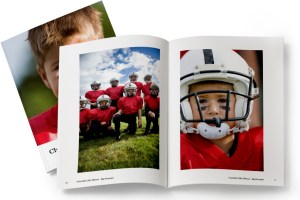
Here at MagCloud we are always looking to make things easier for you, which is why we offer the option to create a print publication using a Flickr photoset. It’s easy to use, and in just a few minutes MagCloud will take a set of your photos on Flickr and lay them out in a simple one-image-per-page template to create a tidy portfolio. What’s great is that it works almost instantly and is very easy to use, so if you need to get a collection off to a potential client immediately, or have procrastinated and need to get something together quick–then this is the tool for you. Follow along with my example below, and give it a try for yourself.

Here’s how it works:

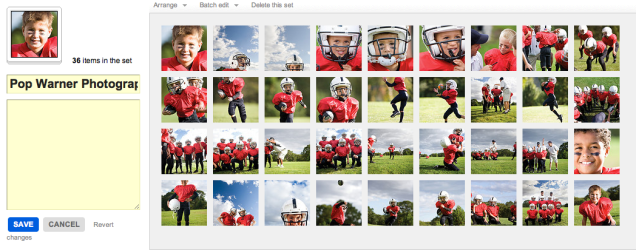
1. Upload your images to Flickr and organize them in a photoset.
Be sure to put the images in the order you wish for them to show in the portfolio. This means your first image will be your cover image, and then the rest will follow. Since each image will be assigned to a page, you will want to have a number that is an increment of 4 (that means 4, 8, 12, 16… etc). My set in this example has 36 images, so it will be 36 pages long.
2. Edit the titles of your photos. (optional)
If you wish to include captions for your photos, such as credit information, location or other details, be sure to edit the titles of your photoset while in Flickr. You’ll have the option to include these titles at the bottom of each page of your final printed portfolio, so you could also use this space to include your contact information or copyright details.

3. Start the creation process at MagCloud.com/publish.
Once you are ready to publish, select the import from Flickr option on the Create Publication page. This will launch the importer, where you can select a photoset from your Flickr account.

4. Select your options and create your file.
The Title and Subtitle you enter here will appear on the cover of your publication. This is also where you can select whether you want to include photo titles and page numbers.

5. Preview your file and set binding options.
Take a quick look at your publication to confirm your settings. You can scroll through every page to see how your portfolio will look. Happy with it? Then select your binding options and publish!

6. You’re done!
See, now wasn’t that easy? Though this example is that of a children’s sports photographer, the Flickr Import could be used to make portfolios for your jewelry design business, fine art, architecture, decorating, crafts, or graphic design work. How you use it, is up to you.

A few tips and things to consider BEFORE you start your import:

What Image will be on my cover?
For simplicity, this should be the first image in your photoset.

What order do I want my images in?
The order that your images are in within your photoset, is the order they will appear in your MagCloud portfolio.

Which images will be facing on spreads?
If the first image in your set is the cover, then images 2 and 3 will be facing pages. It’s a good idea to go through your set to be sure that you like the arrangement of these photos (are people facing off the pages, or leaning against the outside edge of a page?) if so, you may want to swap around the order of your image.

Do I want to include captions or credits?
Because the title appears at the bottom of the page using this Flickr feature, you can also use this space for copyright information, or to include your contact information. In the examples below you can see how we accomplished this. To be sure every other page has the right information, just be sure to alternate the information in the titles of your images.

Is there any non-photographic content that I want to include like my contact information/ company logo?
To do this you have to get a bit tricky and create an image of the content and save it to flickr. You can use this trick to load verbiage into alternating pages, or if you want to include your company logo and contact information and logo on the back cover, this is a great work-around to do that. Simply create the image in any application that allows you to save an image (Flickr will let you upload JPEGs, non-animated GIFs, PNGs or TIFFs) and add it to your set.

What’s the maximum image size printed with the Flickr upload?
If you want to make sure your photo takes up as much of the page as possible, size it at 1875 by 2625 pixels at a minimum of 300 dots per inch resolution.

Are my images high enough resolution for printing?
The largest image size using the flickr uploader is 2475 by 2475 pixels on the covers and 1875 by 2625 pixels for interior images. For more information about photo quality and printing check out our blog post about getting the most out of your photos.

Can I have more than one photo on a page using the “Upload from Flickr” feature?
The “Upload from Flickr” feature currently only uses one photo per page. If you are adventurous, one way around this is to create a single image file (jpg, gif, png or tiff) that contains multiple photos and upload it as part of your Flickr set. Make sure the single image file is 1875 by 2625 pixels at a minimum of 300 dots per inch resolution. When your MagCloud publication is created, this file will be placed on a single page just like your other photos, creating the impression of multiple images on a single page like this example.
A Few Inspirations For Your Portfolio

As mentioned in our blog series, MagCloud is here to help publish your portfolio and provide options to create a big impression with a small format. So what’s the next step? We thought we’d offer a few examples to inspire you to start or update your existing portfolio. Portfolios are critical for designers, photographers and other small business owners who want to get exposure for their work and land new clients.

Whether you’re a musician, watercolor painter or even a blacksmith, you can capture a moment of creativity by browsing through more than 300 portfolios already on MagCloud. Draw additional inspiration from portfolios of other notable interior designers, graphic designers, and architects. Below are a few more examples of what your fellow publishers have been working on.

This collection of artist’s portfolios is a great example of using our digest format. For those conscious about budgets and the size of your portfolio, digest size provide an efficient way to share your best work in both print and digital formats.

As a small business, Sweet Pea Floral Creations showcases some of their favorite floral arrangements and highlights from client events and weddings.

Just graduated? Compile your best work for a great supplement to your resume, just like this advertising creative portfolio that Lauren Richer created.

Interior and architectural photographer David Duncan Livingston created various portfolios of his clean, welcoming photographs of homes, hospitality and products.

Below is a run-down of additional photography print portfolios that have caught our eyes.

  • The Art of Enzo Mondejar features an avant-garde take on portraiture by the gifted photographer, Enzo Mondejar. The images are creatively captivating and we hope they offer some inspiration for your print portfolio.
  • Nevertheless is the creative output of Peter Olschinsky, Verena Weiss and Gerhard Weib. This gorgeous layout design can teach us all more about how to present our images in the best light and perspective.
  • Finally, the Lolli POP Project is the work of photographer Massimo Gammacurta and is a great example of letting color explode onto a printed page and take off. Featured in Wired Magazine in December 2010, this project is both eye-catching and salivating.

What other portfolios have you seen that help inspire you to create your own? Share them with us in the comments below.

Ship As Much As You Want, Wherever You Want

Starting today, we are removing the 300-page restriction on MagCloud shipments outside the United States, United Kingdom and Canada. Now, you can ship publications of any size, in any quantity, to any country! Not only that, but we’ve expanded the shipping options available for worldwide destinations, adding faster and more reliable service through FedEx.

You can opt for FedEx International Priority service and have your order in 5 business days from the date of purchase. If you can wait a little longer, you could save some money with FedEx International Economy service and have your order in hand in 7 business days. With both of these FedEx options, we’ll send you a tracking number as soon as the order ships so you can keep an eye on it as it travels from our print facilities to your doorstep, no matter where that is in the world.

One thing to keep in mind with these new larger FedEx shipments is that they may be subject to import taxes, customs duties, and fees imposed by the destination country, which may cause delays beyond our original delivery estimates. Since customs policies vary widely from country to country, we have no control over these charges nor can we predict what they may be, so it will be the responsibility of the recipient to cover any additional charges that may come up. For information on potential taxes and fees specific to your country, we suggest contacting your local customs office, or viewing the applicable FedEx country profile.

If you are willing to wait for your shipment, for orders weighing less than a pound we also have a cheaper shipping option through USPS International First Class Mail. See the table below for a comparison of turnaround times and tracking availability for these new shipping methods.

Costs vary by country and order size. To see the new shipping options available for your country, and what they cost, check out our Price Calculator.

We’re Giving Back Even More of the Back Page

Last month, we announced that we were shrinking the label on the back cover to only 1.4” wide, and today we are excited to share that we have taken it a step further. Starting today, all MagCloud print publications will include only a small 6 mm square 2D barcode in the lower righthand corner of the back cover. This barcode allows us to process your order through our printing, binding, and shipping processes as efficiently as possible, while minimizing the impact on your back cover real estate.

For those of you who have been publishing with MagCloud for a while, take a walk down memory lane with this timeline of our ever-shrinking back page label. And as always, let us know what you think!

A Helping Hand

Need help creating or marketing your next publication?

Our Help section now includes a directory of templates, photography, design, advertising resources and more.  You can also find the the most popular design tips from our blog and latest How to Guides.

Still can’t find what you are looking for then visit the Ask MagCloud section to browse frequently asked questions about publishing, printing and shipping with MagCloud.

Our support team is also happy to answer any questions you can’t find answers for on our website.  Simply contact us so we can help you get the information you are looking for.

Know of a great resource that would help the MagCloud community?  Please drop us a line, we would love to hear about them.

Make a Big Impression in a Smaller Package

Continuing our series on publishing your portfolio through MagCloud, today we take a look at a few design ideas for using the new Digest product to present your work in a more compact format. Digest publications provide the same professional image quality and finishing you’ve always gotten with MagCloud, but with a trim size of 5.25″ wide by 8.25″ tall, they take up only about half the space in your bag. Plus with a cheaper price point (16 cents per page) you can stretch your budget a bit further, and get your work into the hands of even more potential customers.

The question is, how to design within this more constrained space and still highlight your work? To help you get started, we’ve listed a few ideas below…

Use Both Pages

Take full advantage of the available space with images of your work spanning both pages, and bleeding off the trim edges. If you are going to be opting for perfect binding and want to place your images across the spine, be sure to check out our tips for designing for perfect binding.

Highlight One Piece of Work Per Page

Place one image per page to create a kind of photobook. This format is particularly conducive to lookbooks for fashion collections, with each page containing one look.

Combine Images and Text Across a Spread

Make a photo of your work the focus of one page, either with a full bleed or as a contained image, and then include descriptive text on the opposing page. This way each spread focuses on one project, combining both imagery and text to tell the story of each piece of work.

Think Outside Portrait Orientation

Until we are able to offer a true landscape product, show off your work in a landscape format by rotating your content 90 degrees, such that the spine of the publication is on the top edge of the page. If you want to add some practically to your portfolio, and ensure it gets kept around for the coming year, use this rotated format to make a mini calendar, with each month highlighting a different piece of past work.

Create a Themed Booklet with a Segment of Your Work

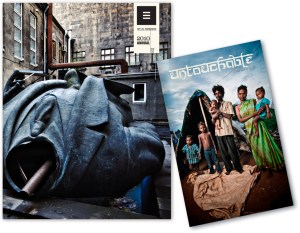
When photographer Trey Hill learned about our new Digest format, he used it to combine a collection of his images into a photo story called Untouchable. These are images that are included as part of his larger 2010 Photography Annual, but the smaller form factor offers a more focused look at the story this series of photos tells. See for yourself how Trey has used this smaller format to tell his photo story: we’re taking 25% off the production costs on all print orders of Untouchable from now until the end of October.

Have you had a chance to experiment with our new Digest format to create your portfolio? Let us know in the comments what your design strategy has been.

HP MagCloud: Create High-Quality Business Materials on a Small Business Budget

This post was written by Melissa_Zieger and originally appeared on the blog for 367 Addison Avenue, HP’s online community for small and medium businesses, on September 22, 2011. You can view the original post here.

Did you know that HP has a content publishing web service that can be used to create everything from your own magazine to business materials like catalogs and portfolios? It’s called HP MagCloud – invented by HP Labs, is a self-service publishing platform that allows businesses to easily create into professional-quality publications that can be printed on demand, shipped globally, or distributed digitally.

Better yet, there’s no upfront cost and MagCloud can turn your content from a PDF to delivered printed publication in just three days!

Using MagCloud’s digital storefront, customers can order the latest issue of their favorite publication and have it printed on demand and delivered directly to their doorstep, or download for reading on their digital device of choice. Plus, all content is printed to order using HP Indigo technology, delivering professional print quality with no waste or overruns, reducing the impact on the environment.

Businesses are using MagCloud to create everything from fashion catalogs and knitting guides to photography and architectural portfolios. I recently sat down with two small business customers using HP MagCloud to find out more about how the service is benefiting their business.

Alex Tinsley started her knitting pattern design business, Dull Roar, nearly six years ago. Prior to discovering MagCloud, Tinsley was only able to provide her customers with a PDF of her patterns via her blog. Today, she uses MagCloud to transform PDF versions of her design work into high-quality professional catalogs that she can distribute in both digital and print formats without a huge impact on her business’ bottom line.

“The quality of the printing is really just beautiful, and it’s pretty much the only place you can get that kind of quality in small quantities,” said Tinsley. “I love that it runs without much input from me – I just upload the issues and collect the income. MagCloud handles all the sales, printing and shipping.”

The ability to offer customers both print and digital formats helps Tinsley meet her customer’s needs without making an upfront investment in the creation and printing. Tinsley says that most of her customers prefer the digital copy for instant gratification, but that she uses the hard copies as giveaways and gifts. She’s also used the publication as a handout at tradeshows, which enables her to drive views to her website and increase downloads of her digital catalog.

Trey Hill, a Dallas-based photographer and storyteller, started using MagCloud in 2010 to create storytelling portfolios of his work. He needed a way to not only show the pictures he had shot but also to showcase his journey.

Hill uses Adobe InDesign to create photo portfolios and uses MagCloud to print his digital creations on-demand as a way to attract new business and share with clients as a thank you for their business. Hill says the ability to have both print and digital versions is important. “The print quality increases the value of my business, but we live in a digital world so it’s still important to provide a digital format, as well,” he said. “As a small business owner, not having to buy 1,000 copies to get a great price point is worthwhile. And my customers are blown away by the quality.”

Since using MagCloud, Hill has started to see a change in what his customers have come to expect – they now see him as a storyteller, not just a photographer.

About Alex Tinsley

An avid knitter since 2004 and knit design enthusiast since 2006, Alex Tinsey’s designs can now be seen in publications like Knitty, Knit Simple, the Knit Picks Independent Designer Program, and (soon) Knit Scene. You can access Tinsley’s MagCloud products here.

About Trey Hill

Trey Hill was one of the founding creatives behind I Am Second and his portfolio includes work for Addison Road, Relevant Magazine and the Dallas Stars. He works all over the world and has had the privilege of photographing some of the planet’s most revered and most overlooked people. You can access Hill’s MagCloud products here.

Use MagCloud To Publish Your Portfolio

Today we begin a new blog series highlighting some of the great use cases we’ve seen people publish on MagCloud, along with design tips and inspiration to help you create your own publications. First up: portfolios.

On MagCloud we’ve seen portfolios that run the gamut from photography to fashion, architecture to interior design, music to floral arranging. With both print and digital options, uploading your portfolio to MagCloud is an easy way to spread the word about your work across a variety of mediums. With one PDF upload, you can have professionally printed books that you can send ahead or leave behind, as well as downloadable PDFs that can be displayed on any mobile device or computer.

When designing your portfolio PDF for MagCloud, a good starting point are the downloadable instruction packets on our Getting Started page for your software of choice. These step-by-step instructions will help you take your file from document setup to PDF export, and help ensure that your final publication matches MagCloud’s print specifications.

Once your file is set up, the next step is selecting your content. Since the goal of any portfolio is to highlight your work, for many industries, images will be the focal point of your content. When selecting your images, it’s important to remember to choose photos that are high enough resolution for printing, and ensure that your color profiles are embedded in your final PDF. Doing so will ensure the highest quality output of your images in print, setting a good foundation for the rest of your layout.

Which brings us to our next step, placing content in your document. When designing your portfolio layout, it’s good to determine what samples of your work you want to feature and then make that the focal point of each two-page spread. This will ensure that your work stays in the spotlight throughout the publication. If you will be using our perfect bound option, which provides a more professional look and feel with a square binding and thicker cover, don’t forget to check out our design tips for perfect binding when designing your layout to make sure you don’t lose any content into the spine.

We will be providing sources of inspiration throughout the series, but to encourage you to get something in hand to inspire your portfolio design sooner rather than later, we are lowering the production cost on print orders of the following well-designed MagCloud portfolios until the end of October:

Trey Hill Photography Annual: Issue 1: 2010” by Trey Hill
California Kitchens Now” by David Duncan Livingston
James Worrell Photographs: Make Up” by James Worrell

Have you published a portfolio showcasing your work on MagCloud? Share it in the comments below, and let us know what was most important to you when designing the publication. Then, stay tuned to the MagCloud blog as we continue this new series in the coming weeks with more design tips, sources of inspiration, and a few surprises.

To Serif or Sans Serif? Typefaces Make A Difference

Typography is the cornerstone of graphic design. It’s what brings character to your magazine, catalog, brochure or newsletter. It should never be overlooked or left to the end of your project. Typography should be considered during initial design phases and should be allowed to impact your layout and image choices. Why is it so important? Because the typography you choose sets the tone for your readers. It helps you tell your story in a way that an image (or even your copy) can’t.

Being fans of infographics, we came across this little gem recently which has generated quite a bit of conversation in the office. It’s sort of an ABC guide to typography which has also sparked interest on our Facebook and Twitter channels. The MagCloud community is clamoring for typography tips so we thought we reiterate these 4 professional tips from the Noodlor infographic:

1. Limit yourself to a maximum of 3 well contrasting typefaces.

2. 95% of graphic design is typography. Treat it well!

3. First, start off on paper, then move on to your computer!

4. When you’re stuck…discard old ideas and start fresh!

Still need convincing? Check out this video from typographer and graphic designer Erik Spiekermann. He breaks down the elements of typography and explains what makes it such a key part of any design.

Erik Spiekermann – Putting Back the Face into Typeface from Gestalten on Vimeo.

Also check out our recent blog post on Typeface Do’s and Don’ts for additional insight in how best to use typefaces in your next portfolio, magazine, brochure or other print project.

Share your thoughts on the art of typography as a comment below. Is it something you spend a lot of time on when designing your MagCloud publication?

Vote for MagCloud in the SXSW PanelPicker – Ends Friday!

SXSW 2012 is prepping to bring the most captivating speakers, interesting topics and creative panels to film, music and interactive enthusiasts attending their Austin, Texas gathering March 9-18, 2012. Once again, they’re giving the public a voice by opening up the SXSW PanelPicker and letting YOU cast your vote for your favorite panels.

The MagCloud team has entered two great panel submissions to the PanelPicker featuring MagCloud publishers.

We hope you’ll vote for us in hopes we can bring these presentations to the biggest interactive conference in the U.S.!

Print Pioneers in a Digital World is about capturing the attention of your customers and getting your story heard by those who really matter. The panel will feature Roseann Hanson of Overland Expo and ConserVentures, Atlanta-based editorial photographer Zack Arias and Paul Lips of online children’s wear retailer ToobyDoo. For more on this panel and to cast your vote, go here.

The PB&J Effect: How to Publish in Print & Digital is about the perfect combination of print and digital and how perfecting that balance will help you reach a bigger audience. Joining us on the panel are Gizmondo’s Senior Reporter Mat Honan (also known as one of the editors behind Longshot Magazine), well-known photographer Trey Ratcliff and graphic designer/illustrator Craig Frazier who recently debuted his new Living Letters font. For more on this panel and to cast your vote, go here.

If you like what you see, all you have to do is create a free account (it’s easy!) and hit the thumbs up button on our panel pages.

Want to help spread the word. Tweet or Facebook about these presentations:

 Hurry! Deadline to vote is 11:59 CDT on Friday, September 2.

Tell us you voted by leaving a comment below.