Turn Your Summer Pics into a Photo Book with Apple Aperture

Looking for something to do with all those great photos you’ve taken this summer of trips, pool parties, nature hikes and more?  Why not create a photo book keepsake to share with friends and family so you can relive the great memories for years to come.

Apple Aperture is a great tool for keeping photos organized, polishing them up and even creating MagCloud-ready photo books.  We’ve added new Software-Specific Instruction Packets for Aperture to our Getting Started page for all of our product sizes. These downloadable folders contain MagCloud-specific templates and instructions for Aperture 3.0 and newer.

Below are a few tips to get you started.

Organize Your Photos

The first step is selecting the photos you want to use for your book.  Aperture makes it easy to weed through the large volume of photos you’ve taken this past summer with the Smart Album feature.  Create a new smart album using ratings (i.e. all your fave photos who you gave 3 or more stars too), and/or keywords (i.e. summer, Hawaii trip, beach) to select your favorite photos for inclusion in your book.

Tip for Instagram Users:

While Instagram doesn’t allow you to send directly to Aperture the smart folks over at ApertureExpert.com have outlined a simple way to use Flickr as a go between to bring your Instagram photos directly Aperture.  One thing to note for MagCloud-ready publications is that the photos Instagram sends to Flickr are low resolution and may not print well so we recommend after you’ve created your Instagram album in Aperture to transfer the pictures from your mobile device to your Mac via iCloud or cable sync, and replace one by one the Flickr pictures with your higher resolution images from your Camera Roll.

Oh and if the whole Instagram importing and resolution workarounds seem like too much check out the Aperture Instagram Presets created by photographer Casey Mac and create your own Instagram like photos directly in Aperture.

Create Your Book with a MagCloud Photo Book Theme

Once you’ve organized your photos it’s time to select what size book you want to create.  We’ve created Aperture themes and instructions for each MagCloud product from Digest to Tabloid; simply download the files from our Getting Started page.

Installing the Aperture Book Theme
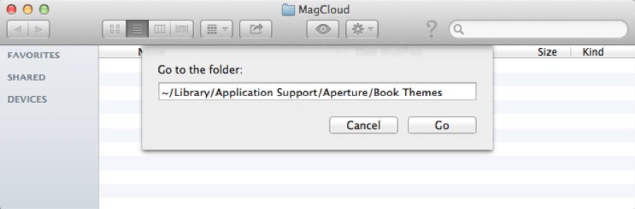
  1. Open a new Finder window and select “Go to Folder…” from the Go menu
  2. In the text field that appears, type: ~/Library/Application Support/Aperture/Book Themes
  3. Click Go
  4. Drag the “8 x 8 Square or Pamphlet” folder from the unzipped folder into this new Book Themes window

Creating a MagCloud-Ready Book

Now the fun part…creating your book!

Select Your Theme

  1. Open Aperture (if not already opened)
  2. Click the New icon in the upper left corner, then select Book from the drop-down menu
  3. Enter a Book Name for your book
  4. Select “Custom” from the Book Type drop-down menu
  5. Select the MagCloud theme you loaded (i.e. “8 x 8 Square or Pamphlet”)
  6. Click Choose Theme to create your book
Build Your Book

Aperture makes it easy to layout your book simply by organizing your photos in the book editor by date, rating, label, file name etc. and then selecting “Autoflow Unplaced Images”.  Of course your can reorder and move images from one page to the next at any time.

You can also customize your book by changing layout (i.e. 2 Up to 4 Up), adding text, selecting background colors etc.

Tips for Creating An Awesome MagCloud Book
  • Perfect bound publications can be anywhere from 8 to 384 pages long, but the total page count needs to be a multiple of 2.
  • Saddle stitch bound publications can be anywhere from 8 to 100 pages long, but the total page count needs to be a multiple of 4.
  • You can add and delete pages using the + and – buttons under the page display.
  • When adding text, don’t go beyond the theme margins (the edge of the image in the 1-up layout). The margins are set to the edge of the safe zone, and any text placed outside this area is in danger of being trimmed off in the print version.
  • If you have a lot of large photos in your publication, or if it is a lot of pages, it’s possible that your final PDF will be over MagCloud’s 300MB upload limit. If this happens, there are a few things you can do to reduce the file size after you export the PDF from Aperture. See the instructions you downloaded with your Aperture theme for how to reduce image size with Apple Preview or Adobe Acrobat Pro.

Export Your Book as a PDF

Once you’ve got your book looking exactly how you want it, its time to export it as a MagCloud-ready PDF file.

  1. After you have finished designing your book, click Print Book in the upper right-hand corner
  2. Select your “Color Profile” from the drop-down menu. In this case I’ve selected sRGB as my color profile to embed.
  3. Click the “PDF” button and select “Save as PDF…” from the drop-down menu
  4. Enter a name for your PDF and select where you want it to be saved on your computer
  5. Click Save

The PDF of your book is now ready to be uploaded to magcloud.com.

What types of MagCloud publications will you use Aperture to create?  Let us know in the comments section below.

Vote for MagCloud as a 2012 Small Business Influencer Champion!

It’s great to have more reasons to keep celebrating MagCloud’s birthday this month! We’re thrilled to hear that we were nominated for the Small Business Influencer Award this year.  As you may remember, we were selected as one of the last year’s Small Business Influencer Champions and hope to repeat that distinction again!

This prestigious recognition honors companies, organizations and people who have made a significant impact on the small business industry. We remain committed to improving our services and offering new products to assist small businesses with their marketing efforts. Over the last twelve months, we’ve rolled out Digest Landscape, new Flyer options, Square Format, Large FormatPremium Paper and Shipping Options, and still have more to come!

We would love your votes to help us reach the Top 100 by August 5. Have we made a meaningful and lasting impact for your business? Place a vote! Yes, you can vote every day. :)

For more information on the 2012 Small Business Influencer, be sure to follow @SMBInfluencer on Twitter or the folks behind this initiative – Anita Campbell (@smallbiztrends) and Ramon Ray (@ramonray). Let us know that you voted by leaving a comment below and thanks for your support!

Travel Photo Tricks and Tips

Vacationing this summer? Whether you’re flying internationally or driving just a few hours away, we want to help make every moment of your trip a little more memorable.

As promised in our Summer Fun with MagCloud blog post, we’ve got some great tricks and tips to help you capture your summer memories through photography.

Hitting the Beach

As fun as they are, beaches can prove to be tricky for photo opps! Some points to remember when capturing your fun in the sun:

  • Try shooting closer to sundown: Not only will there be less people there, but the sun will be at an angle that produces great shadows and colors.
  • Try black and white: This can completely change the mood and feel of a shot. It’s great for overcast or dull days, too.

For more beach tips, check out this helpful blog post!

Picnic-Perfect Pics

Family picnics make fantastic photos! When hanging out at the park and snapping shots between bites of potato salad, remember a couple of basic things:

  • Location, location, location: Picking a spot in the sun or the shade will make for a beautiful lighting situation!
  • Useful props: Place wax paper or white shower curtain between the sun and your subjects. This will diffuse the light and soften the shadows.

Check out even more ways to make your family picnic memorable by reading the full post from Olympus cameras here.

Making Vacation Last, Digitally

Shooting perfect shots of vacation can take some talent, even with your new digital camera! Bad vacation photographs get thrown away, while great shots can create a lifetime of memories. Remember these tips:

  • Power up: Nothing is worse than wanting to snap that perfect picture, and realizing your battery is dead!
  • Don’t be afraid to crop: Cropping a photo can change an average photo into a dramatic one, especially if you crop “off center.”
  • Rule of thirds: When you are lining up that beautiful church, amazing sunset or one-of a kid safari shot keep in mind composition and the rule of thirds dividing your photo into thirds both vertically and horizontally with the key subject at the intersection point.  Newer smartphones make this particularly easy to do with their Grid settings.
  • Put your own spin on landmarks and well-known sites: Rather than take the usual straight on shot of the Eiffel Tower consider taking it from underneath looking straight up, take a lush jungle shot in the rain, or shoot the crowd below from the top of the Empire State Building.  Don’t be afraid to take unique shots or see things as the locales do.
  • Go for contrast and color: Boat sales against a blue sky, a garden of wildflowers, colorful mailboxes on a cobblestone street all make for interesting travel shots with pops of color.

Here’s a few other tips to get you inspired.

We’re curious about your best vacation photos – what are some tricks and tips you’ve learned along the way? Please share with us in the comments below!

“Ask the Chief MagClouder” Twitterview

Our first “Ask the Chief MagClouder” Twitterview will take a closer look at our new large format products! It kicks off from 10:00 to 10:30 a.m. PST on Tuesday, July 17 on our MagCloud Twitter handle (@MagCloud) and our host will be Chief MagClouder Andrew Bolwell.

What are Twitterviews? It’s simply an interview conducted on Twitter, where you get to interview our Chief MagClouder about, in this case, the new large format products as well as any other MagCloud questions you have on your mind.


How can you participate? Starting now, submit questions for Andrew by either tweeting them to @MagCloud using the #MagCloud hashtag or ask them right here in the comments section of this blog post. We also encourage everyone to join our Twitterview from 10:00 to 10:30 a.m. PST on July 17 where Andrew will respond to your questions live.

As an added incentive, all fans who ask a question will be entered into a random drawing for a chance to win a $25 Paypal MagCloud gift card perfect for you, your colleagues, friends, family, etc. to purchase your favorite publications on MagCloud.com. The drawing is open to residents in the United States only. For the complete rules, see below.

Here’s a little more info about Andrew:

Andrew Bolwell loves to make things happen, and with over 20 years of high-tech experience, Andrew has spearheaded some of HP’s most groundbreaking business initiatives. Celebrating MagCloud’s fourth birthday, Andrew is excited to share new products and experiences that support the needs of MagCloud users. When he’s not steering the MagCloud juggernaut, crunching numbers and doing whatever it takes, Andrew can be found practicing his life philosophy that we’re not here for a long time, we’re here for a good time.

Don’t forget to follow our Twitter handle, @MagCloud, for the latest MagCloud news and updates, and ask those questions using #MagCloud or in the comments section here! We hope to see you (virtually) on Tuesday, July 17!

The giveaway opens on Friday, July 13, 2012. Entries must be submitted by 10:30 a.m. PST, Tuesday, July 17, 2012 and the winner will be announced via Twitter and our blog on Tuesday, July 17, 2012. The prize will be one (1) $25 MagCloud gift card and one (1) winner will be selected at random. All entrants agree to be contacted by Hewlett Packard for prize fulfillment. The drawings are open to MagCloud blog readers, Twitter followers and Facebook fans that reside in the United States and are at least 18 years of age at time of entry. No purchase necessary to enter or win. There is no limit on the number of entries from any entrant, but each entry must be submitted separately as a Tweet using the hashtag #MagCloud on Twitter or as a blog comment on this blog post. Anyone found to be in violation of any of our rules or third party networks will be ineligible. Entries in this contest will not be carried over into subsequent giveaways or drawings.

Go Big With Our Large Form Factor Products

MagCloud users deserve larger form factor products and we are happy to offer not just one but seven large product types.

Tabloid Product Family

At 11″ x 14″ trim size Small Tabloid is smaller than a standard newspaper but larger than our Standard letter-size product.  Our Large Tabloid product has a 17″ x 11″ trim size offering more room for images and content. All Tabloid products are published on premium cover stock, have Wire-O Binding, and are ideal for large format portfolios, custom calendars, manuals and more.

  • Small Tabloid: 11″ x 14″ and 14″ x 11″ trim size options
  • Large Tabloid: 17″ x 11″ trim size
  • $0.36 per page with full color printing
  • 8 to 90 pages in length in multiples of 2
  • $2.00 per copy for durable Wire-O Binding

Poster Product Family

Our full-color, double-sided Poster are printed on premium cover stock and come standard with UV coating giving them an extra sheen and making them more durable. Posters are ideal for promotions and special event keepsakes such as gallery exhibits, music festivals and fundraisers.

  • Available in 12″ x 18″ or 18″ x 12″ trim sizes
  • Full-color professional printing on 80# premium cover stock paper
  • Standard UV Coating front and back for increased durability
  • Each individual Poster is only $2 to print ($1.50 for orders of 20 or more).

Large Square

MagCloud is adding to its Square product family by offering a new large form factor Square product. At 12″ x 12″ trim size, this new product is great for one-of-a-kind portfolios, photo books or training material.

  • Available in 12″ x 12″ trim size
  • Durable Wire-O Binding
  • 80# premium cover stock
  • 8 to 90 pages in multiples of 2
  • $0.36 per page with full color printing
  • $2.00 per copy for Wire-O binding

Standard Landscape

Finally we are also expanding our Standard product line, with the addition of a landscape option. Measuring 11” x 8.5” and also using Wire-O Binding and premium #80 cover stock paper, this new product option is useful for portfolios, magazines, booklets, catalogs and more.

  • Available in 10.75″ x 8.25″ trim size
  • Durable Wire-O Binding standard
  • 80# premium cover stock
  • 8 to 90 pages in multiples of 2
  • $0.20 per page with full color printing
  • $2.00 per copy for Wire-O Binding

Note: Standard Landscape page and trim size will also be available as a Flyer option.

What do you think of these new products and how do you plan to use them?  Let us know in the comments section below.

MagCloud for Graduation Memories

Congratulations class of 2012! Now that you’re graduated, what’s next? Graduation parties? Summer travels? Job hunting? If it’s any and/or all of the above, then we’ve got you covered.

From party invitations to summer travel itineraries to professional portfolios to thank you cards, we’ve put together some ways that MagCloud can help prepare you for the next step in your life.


Graduation Parties

Hosting a graduation party? MagCloud’s new square product is perfect for invitations and party programs. After the party is over, create a one-of-a-kind scrapbook with photos and memories so you’ll never forget the special day.


Summer Travels

Traveling this summer? Whether you are traveling alone or with friends, keep track of flights, train schedules, hostels, and global destinations before you leave – our flyers are perfect for travel notes and itineraries!  After your trip, compile all of your pictures and memories into a Square photo book or scrapbook to share with your friends and family!  Need a little help designing that photo book then try out our partner Poyomi’s on-line templates.


Job Hunting

Looking for the perfect job? Show off your work by creating a portfolio with MagCloud’s new 8×8 square product, or make your resume stand out with our Flyer or Pamphlet products.


Thank You Cards

A simple ‘thank you’ note goes a long way. Use our smaller flyer products to create unique thank you cards for your family and friends for their support – and even your potential employer after you nail that interview.


Have you used MagCloud in planning or celebrating a graduation, or other special event? We would love to hear how – please share in the comments below!


Congrats again, graduates and good luck!

MagCloud Goes to the Head of the Class

MagCloud has been a friend of teachers, trainers and curriculum designers for some time.

Offering an easy way to bring lesson plans to life and engage students, MagCloud is being used as an educational tool both in and out of the classroom.


Curriculum Resource Planning and Teacher’s Aids

A number of educators and researchers are using MagCloud to share curriculum ideas and best practices. Whether using our Standard product to create a best practices magazine or simply a short curriculum synopsis with our Pamphlet product, MagCloud makes it easy for teachers to collaborate on current curriculum initiatives.

Example Publications:

Class Projects

Self-publishing provides students with a creative way to showcase their understanding of a topic, their personal perspectives and their own artistic work.  Publications like Bulldog Press and FIT have allowed high school and college students to express themselves and demonstrate their evolving skills.

Example Publications:

Workbooks, Study Guides, Training Materials and More

Teachers, instructors and trainers have used MagCloud to print field guides, camp workbooks, how-to guides, study-guides, training manuals, and educational workbooks to complement a variety of educational needs. In some cases these are printed ahead of time for use during a workshop or class, while other times they are simply made available online for attendees to purchase as supplementary or stand-alone training materials or as samples for other teachers.

Example Publications:

The Lorax Storytelling Tool

MagCloud has also developed a Storybook tool for creating custom books using templates, characters and backgrounds from the movie The Lorax. Used in conjunction with Scholastic’s custom Lorax curriculum, students can write a story that describes one creative new idea for how they, their family, or their community could live more sustainably.

Share in the comments section how you’ve used MagCloud for your teaching needs or read about some additional ideas from Jim Vanides, a member of the HP Office of Global Social Innovation.

Adding MagCloud Touches to Your Wedding

Planning a wedding can be stressful, but MagCloud is here to help. We recently posted ways to use MagCloud when planning a wedding, as a helpful resource for both professional wedding planners and those brides and grooms to be who are choosing to go with a more DIY approach. Today we want to share some additional ways MagCloud can make sure the perfect day goes off without a hitch.

Invitations

For those who want to design their own wedding invitations and give them a personal touch, we recently upgraded our Flyer and Pamphlet products to 80# Cover Stock, so your invitations will have a heavier weight, giving them a premium look and feel. Here’s a great example of a wedding booklet, which includes information for guests about directions, places to stay, things to do etc. MagCloud also offers a wide variety of templates so you can pick and choose which is right for you and your event.

‘The Story of Us’ Booklet

Everyone enjoys a good love story. Share the bride and groom’s story in a beautiful MagCloud booklet, and distribute it as part of the wedding gift. Here’s a creative example featured on our Pinterest board for inspiration.

Wedding Planning Survival Guide

Member of the wedding party? Help out the happy couple by creating a wedding survival guide. Organize the run-of-show, tips, funny bride/groom stories and/or any last minute advice into a beautifully-designed and personalized booklet for the bride and groom to be.

Magazine Guest Scrapbooks

Create a unique one-of-a-kind scrapbook about the best day of your lives using Flickr! All you need to do is gather your photos into an online photo album (take a peek at this post for tips!), then choose the photo set. From there, your photos will automatically be organized into a beautiful magazine format. You can even use Poyomi to create a personal wedding collage book.

Now that you’ve heard ours, we’d love to hear your wedding planning ideas, and/or how you’ve used MagCloud for wedding planning-please share in the comments below!

April’s Monthly Giveaway is Here

A new month means a new giveaway! Starting today, we’re launching our monthly giveaway for three $25 PayPal MagCloud gift cards. You can enter to win by answering the question below in the blog comments section, or tweeting @MagCloud your answer using the #MagCloudQ hashtag. The questions and prizes will change each month so if you don’t win this round, check back in May for another chance.

Photographers! This month’s question is for you. As you may have noticed, we here at MagCloud love photography.  From advancements in camera technology, to the explosion in photo apps across devices, to the astonishing growth in social photo sharing  (uh hello Facebook’s recent purchase of Instagram or the Pinterest phenomenon), photography is top of mind with both professional photographers and consumers alike.  So this month we would love to know, from DSLRs to point and shoots to smartphones, what’s your go-to camera when you want to capture that perfect shot?

The details:

  • Post your answer to the above question in the comments section below or tweet @MagCloud with the #MagCloudQ hashtag
  • Responses must be posted by Monday, April 30, 2012 at 5:00pm PST
  • Winners will be announced via Twitter, Facebook, and our blog on Thursday, May 3, 2012 by 12:00pm PST
  • Questions? Post in the comments below or tweet us @MagCloud
  • And don’t forget to follow @MagCloud on Twitter and/or ‘Like’ us on Facebook for the latest MagCloud news and future contest details

The contest opens at 12:00 pm PST on Friday, April 13, 2012. Entries must be submitted by 5:00 p.m. PST, Monday, April 30, 2012 and the winner will be announced via Twitter, Facebook, and our blog on Wednesday, May 3, 2012. The prize will be one $25 MagCloud gift card. Three unique winners will be selected at random. All entrants agree to be contacted by Hewlett Packard for prize fulfillment. The drawings are open to MagCloud blog readers, Twitter followers and Facebook fans that reside in the United States and are at least 18 years of age at time of entry. No purchase necessary to enter or win. Limit two entries (one on Twitter and one blog comment) per person, per month. Anyone found to be in violation of any of our rules or third party networks will be ineligible. Entries in this contest will not be carried over into subsequent giveaways or drawings.