Ringing in the Holidays with a Meet-up and Twitter Chat

Hope you’re all enjoying December so far and that you’ve got those final MagCloud orders in for the holidays!

For your viewing pleasure, below are a few shots from our recent holiday meet-up at the Press Club in San Francisco. Be sure to follow MagCloud on Instagram to see the latest and greatest from our team. We look forward to seeing you at our next meet-up in the new year!

MagCloudMeetup_2

MagCloud’s Chief MagClouder Andrew Bolwell and
Marketing Mixologist Patty Tulloch at the MagCloud Meetup.
 

MagCloudMeetup_4

All the awesome MagCloud publications at our meetup!
 

MagCloudMeetup_3

Hooray for new MagCloud fans and friends!
 

MagCloudMeetup_1

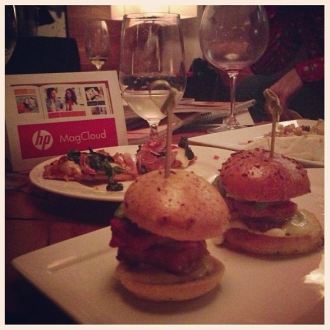
Delicious food and wine from the Press Club
at the MagCloud Holiday Meet-up.
 

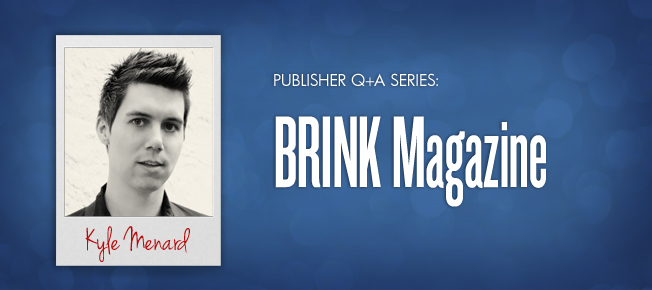
We also had a memorable Twitter Chat last week with Kyle Menard, editor of BRINK Magazine. There were quite a few inspirational tweets that we wanted to share with you. Below is a brief excerpt from the Twitter Chat – feel free to read our entire Twitter Chat via Storify.

  1. MagCloud
    Q1 – To start things off – @BRINKmag, how did you get started in publishing? #MagCloud
  2. BRINKmag
    Started with a vision & to create a guide for young professionals RT @magcloud how did you get started in publishing? #MagCloud
  3. MagCloud
    Q3 – Do you see a difference in behavior/interest between your print and digital readers? #MagCloud
  4. BRINKmag
    @MagCloud It’s a challenge, but readers want that hard copy AND the instant download of the latest issue. MC lets us provide that #MagCloud
  5. BRINKmag
    @MagCloud Definitely. Big digital numbers when an issue debuts, but it tapers off. Hard copy somewhat sustains through the year #MagCloud
  6. MagCloud
    That’s great to hear, @BRINKmag. Digital offers instant gratification while print gives longevity – makes it easy to go back to. #MagCloud
  7. MagCloud
    Q5 from @TONE_DOPE: “When will @MagCloud begin offering subscriptions & an oversized 10×13 print copy option? #MagCloud
  8. MagCloud
    @TONE_DOPE We’re looking at subscription models and new product types. We do offer 11×14 today. #MagCloud
  9. MagCloud
    Okay, @BRINKmag. Jumping back to you with question from our community, how do you see #mag publishing evolving in the future? #MagCloud
  10. BRINKmag
    @magcloud There will always be a place for print, but with trends, it seems essential that a publication have an app #MagCloud
  11. MagCloud
    Last question from our team, @BRINKMag – what advice do you have for magazine publishers starting out? #MagCloud
  12. BRINKmag
    @magcloud It comes down to being on top of your game (in whatever you do), being a leader in what you believe in & staying current #MagCloud
  13. BRINKmag
    Lay the groundwork, be prepared (cont) RT @magcloud – what advice do you have for magazine publishers starting out? #MagCloud
  14. BRINKmag
    Also, (turning the tables) what advice do you have for publishers? RT @MagCloud Do you have any questions for Andrew? #MagCloud
  15. MagCloud
    Answering your 2nd Q: Listen to your customers, focus on innovation, embrace change, and don’t be afraid to take risks. #MagCloud
  16. BRINKmag
    BOOM —> RT @MagCloud “Listen to your customers, focus on innovation, embrace change, and don’t be afraid to take risks.” #MagCloud
  17. BRINKmag
    Definitely going to be quoting some of that for the next few weeks @MagCloud! Great stuff. #MagCloud

MagCloud Holiday Meet-Up and Twitter Chat

HolidayHeader_V2

Hey Bay Area! Help us celebrate 2012 at the MagCloud holiday meet-up in San Francisco with our Chief MagClouder and his team. Hear about all the latest MagCloud products and services, and learn what’s in store for next year.

  • Who: Fans of MagCloud – from new to seasoned publishers and all our social media fans!  Not sure what MagCloud is? Stop by to find out!
  • What: Learn about what the MagCloud team is working on, ask questions, share feedback and win prizes!
  • When: 6:30-8:30 p.m. on Tuesday, December 11
  • Where: Press Club, 20 Yerba Buena Lane, San Francisco, CA 94103 (View Map)
  • Cost: FREE! Light appetizers and drinks will be served
  • RSVP: Let us know you’re coming by RSVPing in the comment section below!

If you can’t join us on Tuesday evening, you can still discuss all things publishing during our next Twitter Chat with one of our MagCloud publishers! The hour-long Twitter Chat kicks off at 10:00 a.m. PST on Tuesday, December 11 on our MagCloud Twitter handle (@MagCloud) and will feature our Chief MagClouder Andrew Bolwell and BRINK Magazine editor Kyle Menard.

What are Twitter Chats? It’s simply a discussion conducted on Twitter, where you get to Tweet live with our Chief MagClouder and Kyle about, in this case, publishing as well as any other MagCloud questions you have on your mind.

How can you participate? Starting now, submit questions for Andrew and Kyle by either tweeting them to @MagCloud using the #MagCloud hashtag or ask them right here in the comments section of this blog post. We also encourage everyone to join our Twitter Chat from 10:00 to 11:00 a.m. PST on December 11 where Andrew and Kyle will respond to your questions live.

As an added incentive, all fans who ask a question will be entered into a random drawing for a chance to win a $25 Paypal MagCloud gift card perfect for you, your colleagues, friends, family, etc. to purchase your favorite publications on MagCloud.com during the holidays. The drawing is open to residents in the United States only. For the complete rules, see below.

Here’s a little more info about Kyle:KyleMenard

Kyle Menard sets his sights on achievable goals while keeping the big picture within his scope. After launching his own award winning magazine in 2009, BRINK, he continues to explore fresh and innovative channels to reach a bigger and broader audience while keeping the current audience engaged. He thrives on spreading the message of entrepreneurship, attainable goals and staying dedicated to a brand – the ultimate message of BRINK Magazine.

Don’t forget to follow our Twitter handle, @MagCloud, for the latest MagCloud news and updates, and ask those questions using #MagCloud or in the comments section here! Look forward to seeing you in-person or virtually next week!

The giveaway opens on Thursday, December 6, 2012. Entries must be submitted by 10:00 a.m. PST, Tuesday, December 11, 2012 and the winner will be announced via Twitter and our blog on Tuesday, December 11, 2012. The prize will be one (1) $25 MagCloud gift card and one (1) winner will be selected at random. All entrants agree to be contacted by Hewlett Packard for prize fulfillment. The drawings are open to MagCloud blog readers, Twitter followers and Facebook fans that reside in the United States and are at least 18 years of age at time of entry. No purchase necessary to enter or win. There is no limit on the number of entries from any entrant, but each entry must be submitted separately as a Tweet using the hashtag #MagCloud on Twitter or as a blog comment on this blog post. Anyone found to be in violation of any of our rules or third party networks will be ineligible. Entries in this contest will not be carried over into subsequent giveaways or drawings.

Q+A with Rachael Cavallo of Palu Ltd.

Rachael Cavallo refers to her job title as “magician.” She and her coworkers – her fellow “magicians” – run Seattle-based Palu Ltd., specializing in the design and manufacture of affordable home furnishings. It might take a bit of magic, she says, to combine fine craftsmanship, quality materials and contemporary style with the needs of an increasingly green world – yet Palu remains committed to environmental responsibility in all aspects of its business.

And when it comes to publishing catalog that help sell Palu products, Cavallo leaves the magic to MagCloud. “It’s been absolutely wonderful – and we especially appreciate the fast turnaround,” she says. “I can’t recommend MagCloud highly enough.”

  Tell us a little bit about Palu.

Rachael Cavallo We like to imagine things differently. From a broad range of chairs to cabinets, dining tables, mirrors and more, our line offers versatile furniture that is elegant, appropriate and approachable.

We recognize that the business of making furniture can have a heavy impact on our environment and our world. We are constantly working to minimize the impact we have and to promote positive change. We actively support sustainable and accountable forest management, fair labor practices, energy conservation, recycling, transparency and innovation in everything we do.

  How did you get started publishing through MagCloud?

RC We used to do a catalog with each item having an individual page, and we assembled all of the pages into binders. It didn’t take long, though, for customers’ binders to become unorganized – especially when we’d add or discontinue items. If we weren’t there to update the customers’ binders personally, it just wasn’t working. Plus, our printer wasn’t doing a very good job. So we needed a new platform.

We found MagCloud and began creating individual booklets by room. So we have a bedroom booklet, a dining room booklet, a living room booklet, one for accessories – and the like. So now when we have revisions, we just alert customers to the revised booklets and they can order them directly from MagCloud.

  How has MagCloud improved your business?

RC I like that we can do very small print runs. We can easily put together a 12-page catalog every few months, print out a few and send those to anyone who’s interested in what we have to offer. We’ll do about 400 or 500 at a time. And if we need, say, three more, then we order just three more. Or 300 more. The quantity is never a problem.

The expense is so small compared with the benefit of always having something for customers to hold on to. That’s always been the challenge for us.

  What tips would you give to someone new to self-publishing?

RC Learn your publishing software. I think that’s the most important tip I can give. We use InDesign, and we had a local designer create 10 styles of a template that we use on a regular basis. InDesign is a wonderful tool. Learn to use it, and it will not fail you.

  If your catalog were an ice cream flavor, what would it be?

RC I’m going with Marionberry Swirl because vanilla is its classic base – you can’t go wrong with that. The marionberry comes from our part of the country – and our pieces definitely have a Seattle/Northwast flair. The marionberry shows that we’re classic, but with a special twist.

Q+A with Kyle Menard of BRINK Magazine

Kyle Menard has loved magazines since he could read. So much so that he once even dreamed of opening a newsstand selling magazines from around the world. “Like the kind you see in New York City,” he says.

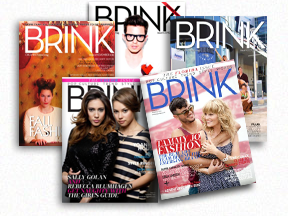
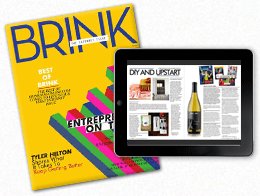
Now an adult in the digital age, Menard has directed his passion for print into a magazine of his own. In 2009, he launched BRINK, an Orlando, Fla.-based bimonthly magazine that celebrates entrepreneurs – those already successful and those just starting – and the spirit that makes them all so special. BRINK was voted “Best Magazine in Orlando 2012” by TheDailyCity.com readers.

  How did BRINK come about?

Kyle Menard  I’m just a huge fan of magazines and wanted to create a magazine of my own. So I put all my ideas together and named the magazine BRINK – because it’s always exciting to be on the cusp of something new, whatever that might be.

BRINK celebrates entrepreneurs and shares their stories and the lessons they’ve learned along the way. We feature entrepreneurs in the realm of entertainment, fashion, human interest and pop culture – everyone from indie musicians and actors to designers and artists – people who’ve quit their day jobs to live their dreams. We hope these stories inspire future entrepreneurs to create their own paths to success.

  How has publishing a magazine changed for you in the past five years?

KM My name has definitely become more recognizable in Orlando. And through the years people have become more willing to work with me and participate in BRINK. They want to join in the conversation. There’s something about publishing a print magazine that gives you more credibility.

There’s been a lot of talk about the demise of publishing, but print is not going anywhere. Online is great – everyone loves immediate gratification. But people still want to hold something in their hands. They want the physical magazine that they can hold – they want to experience a deeper connection.

  How did you get started publishing through MagCloud?

KM I did a web search for “publishing magazines” and found MagCloud. I began with a simple eight-page prototype. And after teaching myself Photoshop, going through some MagCloud tutorials and trial and error, I’ve never looked back.

  Why did you choose MagCloud?

KM We’re always evolving, and MagCloud is always evolving. The convenience factor is huge. If we need something printed right away, MagCloud can do that. If we need perfect bound instead of saddle stitched, MagCloud can do that. If we need 10 copies shipped to Spain, again, MagCloud makes all that possible. Plus, MagCloud is always encouraging us to do more with our magazine. They don’t just print your PDFs. They really care about your success.

View MagCloud Publications in Your Web Browser

Today we are excited to announce a new web-based viewer that enables publishers to bring stunning versions of their publications to life in any modern web browser on both desktop and mobile computers.

Now publishers can upload a single PDF file and immediately distribute as a free or paid digital publication, in print, in a web browser or as a PDF download.

The web viewer delivers an immersive reading experience for users. Simply click the “read now” button and the publication launches within the web viewer. Readers can page forward and back, rotate, zoom in and out, and enter full-screen mode. Pages can be viewed individually or as a spread, and are easily navigated with thumbnail and all-pages views. Additionally, users can buy a printed copy, download a PDF version or add to their Digital Library for viewing later.

The web viewer supports all HP MagCloud publications, regardless of format, on any desktop or notebook computer running a modern web browser.

The web viewer technology also offers hyperlink support, benefiting publishers and users by allowing you to link from your catalog of products back to an ecommerce site, link directly to advertisers’ web pages, allow customers to draft emails to an address listed in your brochure just by clicking on it or provide information about the author.

Publishers can also monitor how well their readers engage with their online publications via the Stats section in their account.  You can see important web viewer reading information including the number of total readers, how often your publication was read, pageviews, shares, hyperlinks clicked, click through rates etc. for all your collections or a single publication.

Publishers and readers can promote their favorite publications by sharing publications they like with friends and colleagues via email or social media channels or embedding a badge or link that launches  the web viewer directly from their own website or blog.

All publishers who currently have digital distribution turned on for their publications will automatically have web viewer versions available on the MagCloud website. To turn digital distribution on simply select Sell Online (after uploading your PDF and selecting your binding). This is where you will add any markup to your print version, and will have the option to opt-in to digital distribution.  Opting-in to digital distribution is a one time setting that instantly gives readers digital access via the web viewer and PDF download.

What do you think of the new MagCloud web viewer?  Let us know in the comments section below.

Ask MagCloud: Can I Write on a MagCloud Publication with Pen or Pencil?

We receive a lot of great questions from our MagCloud community, but this particular one really sparked our curiosity—so we decided to investigate! A new MagClouder, Patricia, submitted the following question on our Facebook Page:

“I just discovered you guys and want to know if the paper you publish in would be suitable to write on with either pen or pencil. I’m interested in uploading a student planner, much like a ‘day minder’ so I want to make sure the paper is not coated in any way. Some such paper can make it hard to write with pencil or makes some ink smudge. Thanks for your help!!!”

MagCloud publications are printed on an uncoated satin paper stock that is both FSC-certified and acid-free (for more information on our paper, check out this FAQ ). To answer Patricia’s question, we decided to test it out first-hand. Check out the video to see what we found out.

Passing the smudge-proof test is especially great for those of you who use MagCloud to create personal planners, calendars, to-do lists and beyond!

Do you have a question for MagCloud? Check out magcloud.com/help, or ask us directly via Facebook or Twitter.  We’d love to hear from you.

Eternalize Summer Memories With Your Own Magazine

Though Summer’s heat lingers on, Labor day is just around the corner marking the unofficial end of Summer.  Whether your family took a big trip or just used the lazy afternoons to hang out together, you are sure to have plenty of memories – and pictures – you want to save.

For many, vacation photographs wind up unorganized and spread amongst their hard drives, cell phones, Instagram and Facebook–doomed to be lost in the shuffle. With that in mind, why not take an afternoon and organize your family’s vacation experience, photographs, and mementos into a summer memory magazine?

With MagCloud’s beautiful print quality and direct mail options, you can even order copies to be sent directly to grandparents, cousins and friends to enjoy.

Getting Started: Where will you create your PDF?

First, you’ll want to select a platform to design/assemble your MagCloud-ready PDF­. You can use web-based Poyomi, or software like Adobe InDesign, Quark, Apple iWork Pages, or Microsoft Word.

As you get started, you can choose to start with a pre-designed template from the software (if available), or with a plain MagCloud template available here. You may even remember a post from awhile back, when we used Apple Pages’ built-in Templates to create magazines.

Organize Your Images and Treasures

Next, gather together your vacation photographs and organize them into a single folder. Then select the images that most effectively represent your vacation experience.

Collect any small items that you may have picked up along the way (i.e., a drink coaster with a resort’s logo, maps, airline ticket stubs, brochures from attractions, etc.). Such items can be scanned and added throughout your magazine and provide a more personal touch to the project. For example, you can use your ticket stubs from the theme park to give a different look to your family’s latest roller coaster adventure.

Order and Details

Although you have complete creative control over how you assemble your summer memory magazine, the easiest way is to assemble things is in chronological order so those enjoying your magazine can experience your vacation from start to finish. Throughout the publication you can include  quotes from your family members, or funny anecdotes – like when the duck bit the zoo keeper during his presentation.

Be sure to take the time to caption your photographs, indicating the “who, what, when, and where” of each picture. This will be helpful for others viewing your memory magazine and for you in later years when small details slip from memory.

Write a short paragraph for each of your summer highlights. Ask your children for input and have them answer questions about their favorite parts of the summer. You’ll be amazed by what they come up with and it’s always fun to look back and remember what was happening in pop culture at the time.

Some details you may want to include:

  • Favorite Summer Memory
  • Places and people you visited
  • Friends made
  • Activities and Games played
  • Movies watched
  • Books read
  • Song that was on repeat in the car
  • The silliest moment of the summer

Design Can be Daunting

When it comes to assembling your summer memory magazine, don’t worry if you don’t have a lot of design skills or experience. You can look at magazines for inspiration, simply use photos and captions for a basic layout, or even re-purpose templates that have nothing to do with this purpose. You can find inspiration anywhere, you just have to look past the content and look at the design. For example, the magazine pictured above used our Microsoft Publisher Brochure Template as a starting point for the layout. The design was a perfect way to include ample text to tell the story that went along with the photos. A few tweaks to colors and typefaces and we were able to completely transform the look of the original design..

As an additional example below, we used the layout from an Apple Pages design template for a school yearbook. With a few changes (and by deleting the extra clip art that made the layout look  “education-centric” we were able to create a casual scrapbook-style. Adding a scanned scrap of paper with Sara’s favorite memory from the water park gave the page a personalized feel.

Microsoft Word also has some great “Newsletter Templates” that are built-in to the software (Mac) or available online. Below are some samples that could be easily tweaked and used as the interior pages of your memory magazine.

No matter what software or platform you choose to create your magazine in, there are lots of sources for inspiration. So start designing and have some fun with it!

Have you created a photo magazine or book with MagCloud to commemorate and event, trip or season in your life? Tell us about it, or share your publication in the comments below!

Turn Your Summer Pics into a Photo Book with Apple Aperture

Looking for something to do with all those great photos you’ve taken this summer of trips, pool parties, nature hikes and more?  Why not create a photo book keepsake to share with friends and family so you can relive the great memories for years to come.

Apple Aperture is a great tool for keeping photos organized, polishing them up and even creating MagCloud-ready photo books.  We’ve added new Software-Specific Instruction Packets for Aperture to our Getting Started page for all of our product sizes. These downloadable folders contain MagCloud-specific templates and instructions for Aperture 3.0 and newer.

Below are a few tips to get you started.

Organize Your Photos

The first step is selecting the photos you want to use for your book.  Aperture makes it easy to weed through the large volume of photos you’ve taken this past summer with the Smart Album feature.  Create a new smart album using ratings (i.e. all your fave photos who you gave 3 or more stars too), and/or keywords (i.e. summer, Hawaii trip, beach) to select your favorite photos for inclusion in your book.

Tip for Instagram Users:

While Instagram doesn’t allow you to send directly to Aperture the smart folks over at ApertureExpert.com have outlined a simple way to use Flickr as a go between to bring your Instagram photos directly Aperture.  One thing to note for MagCloud-ready publications is that the photos Instagram sends to Flickr are low resolution and may not print well so we recommend after you’ve created your Instagram album in Aperture to transfer the pictures from your mobile device to your Mac via iCloud or cable sync, and replace one by one the Flickr pictures with your higher resolution images from your Camera Roll.

Oh and if the whole Instagram importing and resolution workarounds seem like too much check out the Aperture Instagram Presets created by photographer Casey Mac and create your own Instagram like photos directly in Aperture.

Create Your Book with a MagCloud Photo Book Theme

Once you’ve organized your photos it’s time to select what size book you want to create.  We’ve created Aperture themes and instructions for each MagCloud product from Digest to Tabloid; simply download the files from our Getting Started page.

Installing the Aperture Book Theme

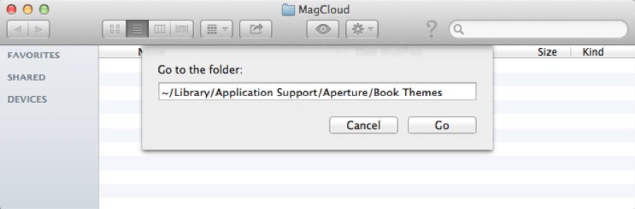
  1. Open a new Finder window and select “Go to Folder…” from the Go menu
  2. In the text field that appears, type: ~/Library/Application Support/Aperture/Book Themes
  3. Click Go
  4. Drag the “8 x 8 Square or Pamphlet” folder from the unzipped folder into this new Book Themes window

Creating a MagCloud-Ready Book

Now the fun part…creating your book!

Select Your Theme

  1. Open Aperture (if not already opened)
  2. Click the New icon in the upper left corner, then select Book from the drop-down menu
  3. Enter a Book Name for your book
  4. Select “Custom” from the Book Type drop-down menu
  5. Select the MagCloud theme you loaded (i.e. “8 x 8 Square or Pamphlet”)
  6. Click Choose Theme to create your book
Build Your Book

Aperture makes it easy to layout your book simply by organizing your photos in the book editor by date, rating, label, file name etc. and then selecting “Autoflow Unplaced Images”.  Of course your can reorder and move images from one page to the next at any time.

You can also customize your book by changing layout (i.e. 2 Up to 4 Up), adding text, selecting background colors etc.

Tips for Creating An Awesome MagCloud Book
  • Perfect bound publications can be anywhere from 8 to 384 pages long, but the total page count needs to be a multiple of 2.
  • Saddle stitch bound publications can be anywhere from 8 to 100 pages long, but the total page count needs to be a multiple of 4.
  • You can add and delete pages using the + and – buttons under the page display.
  • When adding text, don’t go beyond the theme margins (the edge of the image in the 1-up layout). The margins are set to the edge of the safe zone, and any text placed outside this area is in danger of being trimmed off in the print version.
  • If you have a lot of large photos in your publication, or if it is a lot of pages, it’s possible that your final PDF will be over MagCloud’s 300MB upload limit. If this happens, there are a few things you can do to reduce the file size after you export the PDF from Aperture. See the instructions you downloaded with your Aperture theme for how to reduce image size with Apple Preview or Adobe Acrobat Pro.

Export Your Book as a PDF

Once you’ve got your book looking exactly how you want it, its time to export it as a MagCloud-ready PDF file.

  1. After you have finished designing your book, click Print Book in the upper right-hand corner
  2. Select your “Color Profile” from the drop-down menu. In this case I’ve selected sRGB as my color profile to embed.
  3. Click the “PDF” button and select “Save as PDF…” from the drop-down menu
  4. Enter a name for your PDF and select where you want it to be saved on your computer
  5. Click Save

The PDF of your book is now ready to be uploaded to magcloud.com.

What types of MagCloud publications will you use Aperture to create?  Let us know in the comments section below.

“Ask the Chief MagClouder” Twitterview

Our first “Ask the Chief MagClouder” Twitterview will take a closer look at our new large format products! It kicks off from 10:00 to 10:30 a.m. PST on Tuesday, July 17 on our MagCloud Twitter handle (@MagCloud) and our host will be Chief MagClouder Andrew Bolwell.

What are Twitterviews? It’s simply an interview conducted on Twitter, where you get to interview our Chief MagClouder about, in this case, the new large format products as well as any other MagCloud questions you have on your mind.


How can you participate? Starting now, submit questions for Andrew by either tweeting them to @MagCloud using the #MagCloud hashtag or ask them right here in the comments section of this blog post. We also encourage everyone to join our Twitterview from 10:00 to 10:30 a.m. PST on July 17 where Andrew will respond to your questions live.

As an added incentive, all fans who ask a question will be entered into a random drawing for a chance to win a $25 Paypal MagCloud gift card perfect for you, your colleagues, friends, family, etc. to purchase your favorite publications on MagCloud.com. The drawing is open to residents in the United States only. For the complete rules, see below.

Here’s a little more info about Andrew:

Andrew Bolwell loves to make things happen, and with over 20 years of high-tech experience, Andrew has spearheaded some of HP’s most groundbreaking business initiatives. Celebrating MagCloud’s fourth birthday, Andrew is excited to share new products and experiences that support the needs of MagCloud users. When he’s not steering the MagCloud juggernaut, crunching numbers and doing whatever it takes, Andrew can be found practicing his life philosophy that we’re not here for a long time, we’re here for a good time.

Don’t forget to follow our Twitter handle, @MagCloud, for the latest MagCloud news and updates, and ask those questions using #MagCloud or in the comments section here! We hope to see you (virtually) on Tuesday, July 17!

The giveaway opens on Friday, July 13, 2012. Entries must be submitted by 10:30 a.m. PST, Tuesday, July 17, 2012 and the winner will be announced via Twitter and our blog on Tuesday, July 17, 2012. The prize will be one (1) $25 MagCloud gift card and one (1) winner will be selected at random. All entrants agree to be contacted by Hewlett Packard for prize fulfillment. The drawings are open to MagCloud blog readers, Twitter followers and Facebook fans that reside in the United States and are at least 18 years of age at time of entry. No purchase necessary to enter or win. There is no limit on the number of entries from any entrant, but each entry must be submitted separately as a Tweet using the hashtag #MagCloud on Twitter or as a blog comment on this blog post. Anyone found to be in violation of any of our rules or third party networks will be ineligible. Entries in this contest will not be carried over into subsequent giveaways or drawings.

Go Big With Our Large Form Factor Products

MagCloud users deserve larger form factor products and we are happy to offer not just one but seven large product types.

Tabloid Product Family

At 11″ x 14″ trim size Small Tabloid is smaller than a standard newspaper but larger than our Standard letter-size product.  Our Large Tabloid product has a 17″ x 11″ trim size offering more room for images and content. All Tabloid products are published on premium cover stock, have Wire-O Binding, and are ideal for large format portfolios, custom calendars, manuals and more.

  • Small Tabloid: 11″ x 14″ and 14″ x 11″ trim size options
  • Large Tabloid: 17″ x 11″ trim size
  • $0.36 per page with full color printing
  • 8 to 90 pages in length in multiples of 2
  • $2.00 per copy for durable Wire-O Binding

Poster Product Family

Our full-color, double-sided Poster are printed on premium cover stock and come standard with UV coating giving them an extra sheen and making them more durable. Posters are ideal for promotions and special event keepsakes such as gallery exhibits, music festivals and fundraisers.

  • Available in 12″ x 18″ or 18″ x 12″ trim sizes
  • Full-color professional printing on 80# premium cover stock paper
  • Standard UV Coating front and back for increased durability
  • Each individual Poster is only $2 to print ($1.50 for orders of 20 or more).

Large Square

MagCloud is adding to its Square product family by offering a new large form factor Square product. At 12″ x 12″ trim size, this new product is great for one-of-a-kind portfolios, photo books or training material.

  • Available in 12″ x 12″ trim size
  • Durable Wire-O Binding
  • 80# premium cover stock
  • 8 to 90 pages in multiples of 2
  • $0.36 per page with full color printing
  • $2.00 per copy for Wire-O binding

Standard Landscape

Finally we are also expanding our Standard product line, with the addition of a landscape option. Measuring 11” x 8.5” and also using Wire-O Binding and premium #80 cover stock paper, this new product option is useful for portfolios, magazines, booklets, catalogs and more.

  • Available in 10.75″ x 8.25″ trim size
  • Durable Wire-O Binding standard
  • 80# premium cover stock
  • 8 to 90 pages in multiples of 2
  • $0.20 per page with full color printing
  • $2.00 per copy for Wire-O Binding

Note: Standard Landscape page and trim size will also be available as a Flyer option.

What do you think of these new products and how do you plan to use them?  Let us know in the comments section below.