Using MagCloud as a Sales Tool for Your Real Estate Business

In addition to using MagCloud to market their real estate business, a number of real estate agents have been using MagCloud as a sales tool. MagCloud’s print on demand capabilities allow real estate agents to order informational flyers for their open houses in smaller quantities, only as they need them, reducing waste and storage costs. Agents have taken advantage of MagCloud’s Ship to Group feature to easily mail copies of their listing catalog to an address list of potential buyers with a single order. The added benefit of MagCloud’s digital distribution means real estate agents can get these flyers and catalogs in front of potential buyers across all formats, whether it’s in print, as a downloadable PDF, or on the iPad. And if the price of a listing should change or photos need to be switched out, it’s as simple as uploading a new PDF file to immediately update both print and digital collateral.

Beyond the traditional flyers and catalogs used as sales tools in the real estate industry, MagCloud’s combination of professional print quality and no minimum order volume offers real estate agents the opportunity to experiment with to market their listings without breaking their budget. For example, if you are trying to sell a condo with a breathtaking view you could give buyers the opportunity to see what the view looks like at different points during the day by creating a time-lapse photo flipbook using the MagCloud Digest Landscape product. By taking photos at regular intervals from the same spot over the course of the day, then placing one photo per page in a MagCloud publication, potential buyers attending an open house will be able to look at individual pages in the printed book to see how the view looks at different times during the day, or can flip through the booklet all at once to watch the view change over time. Highlighting a key feature like this can be a great sales tool, and using MagCloud will allow the piece to be professional and affordable even if you just a need a couple of copies.

Alternatively, let’s say you have a listing for a single-family home in a neighborhood that has a lot to offer in terms of amenities. You could expand on the usual informational flyer and create a more in-depth, full color brochure with MagCloud that shows off not only the property, but shops, parks, restaurants, and schools in the surrounding area. Highlighting the key features outside the home that might appeal to your ideal buyer could be the difference that makes your listing stand out over the alternatives. Presenting this information as a high quality printed piece will have the added benefit of offering a more professional look without the expense of a traditional print run.

If you have multiple target buyers for a single property you could even take it a step further and create different versions of the brochure to highlight the amenities that appeal to your different audiences. For example, one version of the brochure might give more emphasis to the great schools and parks in the area, while the other might highlight the local restaurants, public transportation and nearby fitness centers. With MagCloud, printing 25 copies each of two different brochures will cost the same amount as printing 50 copies of the same brochure, so with no added cost you can align the messaging on your sales materials to a particular buyer’s interests and help them more readily see themselves in the property, which could translate into a sale for you.

To help you get started using MagCloud as a marketing and sales tool for your NSW real estate business, check out these resources that offer real estate-based templates that can be used to create MagCloud-ready PDFs:

MagCloud Real Estate Catalog Template: Catalog template created using the MagCloud specs for use with Microsoft Publisher. You can download the template here.

Microsoft Office Templates: The Microsoft Office website has a number of real estate templates that can be used with Word and Publisher, like this real estate flyer template for Microsoft Publisher. This template will allow you to create an 8.5 x 11″ PDF, perfect for printing with MagCloud’s Flyer product type.

LayoutReady: LayoutReady has templates for Microsoft Word and Publisher, and offer a variety of options for real estate publications. Their 2-page letter-sized newsletter templates can be used with the MagCloud Flyer product type, and their 8.5″ x 11″ flyer templates can as well. Their 17″ x 11″ brochure templates will require some editing to convert them to 4 page 8.5 x 11″ PDFs, but after doing so they can be printed as 4-page MagCloud Standard publications.

StockLayouts: StockLayouts has templates for Adobe InDesign, QuarkXPress, iWork Pages, Microsoft Word and Microsoft Publisher. Like LayoutReady, their 8.5 x 11″ flyer templates can be used with the MagCloud Flyer product type, while their 17″ x 11″ brochure templates and 11″ x 8.5″ newsletter templates will require some editing to convert them to 4 page 8.5 x11″ and 5.5 x8.5″ PDFs, respectively, but after doing so they can be printed as 4-page MagCloud Standard and Digest publications.

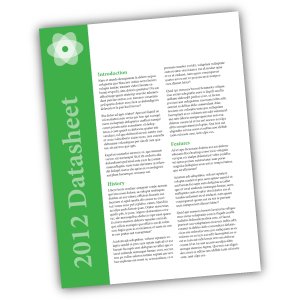
Inkd: Inkd has templates for a wide variety of design software, and has a section of templates specific to the real estate industry. Their 8.5 x 11″ datasheet and flyer templates work great with the MagCloud Flyer product.

Are you a real estate agent that has used MagCloud as a sales tool for your business? Let us know how you’ve been using it in the comments section below.

Using MagCloud to Market Your Real Estate Business

Today we want to speak to the real estate agents and agencies of the world. If you’re spending time and money printing up fact sheets, flyers, listing catalogs and brochures every month or even once a week, our service can help make the process easier. We know in the world of real estate, things are constantly changing. You sell a house and have to remove it from your list catalog. A new unit goes on the market and you’re turning around a new fact sheet in a few hours.

Just browse our site and you’ll see that MagCloud is already a popular tool for real estate agents. MagClouders are branching out beyond property listings; they’re including tips for first-time homeowners, agent profiles and ads for local businesses that home buyers might find useful. Photographers are in on the real estate market too as they sell annuity, using MagCloud to show how hiring a professional photographer can make your properties stand out as an agent. (And we couldn’t agree more!) MagCloud’s Flyer product is popular for any prints that don’t require binding. Full-color fliers with images of your listings will make your sales sheets pop and your competitors green with envy.

MagCloud’s services can also help you be more nimble as a business, keeping you a step ahead of that other agency or agent. Think about it. We offer a print-on-demand service which means no more bulk orders of brochures. With MagCloud, you order what you need as you need it and you’ll receive your prints in as little as three days. Go further with your publication by offering an iPad or PDF-friendly version as well. Your clients will appreciate a paperless version when they’re juggling fact sheets and flyers for so many different properties.

Beyond its true cost-saving and waste-reducing advantages, HP’s top-notch print quality is the No. 1 reason MagCloud customers keep coming back. Don’t just take our word for it, hear from a satisfied real estate agent who’s been using MagCloud to promote his realty business with 4-page flyers and community Buyers Guides. Also, check out other resources on our site like the Product Spotlight: Flyer for Business and tips on how to attract an audience with great content.

Now we want to hear from you. As a real estate agent, how have you incorporated MagCloud as a tool to promote your business? Feel free to share your tips and success stories with us in the comments section below.
Product Spotlight: Flyer for Business

One of the new product types we recently announced is the Flyer. The Flyer product is a single sheet of paper printed on both sides in full color with a full bleed, available in quantities of 10 copies or more. You can create a Flyer by uploading a one or two-page 8.5” x 11” PDF to MagCloud. Keep in mind that all Flyers must be two pages long, to encompass both the front and back sides of the printed sheet, so if you do upload a 1 page PDF we will automatically add a second blank page to the end of the PDF for you. Like our Standard product, the cost for a printed Flyer is 20 cents per MagCloud page, or $0.40 for each double-sided piece. As always, orders of 20 copies or more receive a bulk discount of 25%, dropping the price to just $0.30 per Flyer.

We feel like this shorter page limit opens up a number of new options for our publishers, and have listed a few ideas below for how you might be able to use the Flyer product for your business:

< Inserts
Update previously printed collateral to be more timely and customized by adding a single sheet insert. Adding a single sheet insert to a previously printed piece like this can provide more relevant information targeted to a specific recipient, or offer an update to existing collateral. For example, if you’re passing out a catalog, you might include an insert about your upcoming product line or summer sale. Similarly, if you are sending previous donors a copy of your non-profit’s annual prospectus, you might include a more personal thank you letter as an insert.

Conference and Tradeshow Handouts >
Whether they are included in the conference materials or handed out at a tradeshow booth, providing printed handouts to attendees to highlight the features of your product or service will help potential customers remember who you are when they get home.

< Datasheets
The Flyer product is a great option for creating single sheets of technical specs on your product or service. The high quality of the digital printing provides a more professional appearance than desktop printing, while the single letter-sized sheet is a format that can easily be included in a packet with other materials, or left behind at a sales meeting.

Real Estate Sales Sheets >
If you’re an Australian real estate agent, why not use the Flyer product to create sales sheets for your newly listed homes. The full color printing will allow you to include photos along with background information about the listing, that can be offered up as a way to entice potential buyers. Since MagCloud allows for shorter print runs, you can order fewer copies initially and print more on demand as they are needed, saving on storage and paper waste.

< Headshots and Resumes
Get your job interview or audition off on the right foot with a professionally printed resume or double-sided headshot.

Newsletters >
Use the Flyer product type to communicate with your clients or members by creating a single-sheet newsletter. With MagCloud’s digital options, you can offer your audience the same newsletter in both print and digital with a single PDF upload.

< Menus
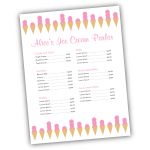
A single 8.5″ x 11″ sheet is the great size for menus, and MagCloud’s print-on-demand model provides a cost-effective and easy way to order additional copies or make updates to the menu as needed. If you’re a caterer, you can take advantage of MagCloud’s shorter print runs to create Flyer-sized menus tailored to each event you cater, whether it’s an intimate dinner party or a large buffet.

Price Sheets >
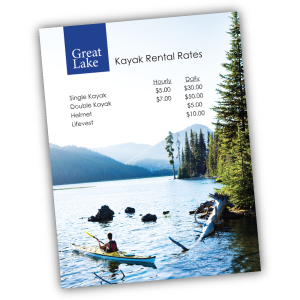
Are you a photographer offering senior portrait packages? How about a sporting goods store offering bikes, kayaks, and skis for rent? Or a spa owner with a list of services you need to publicize? Whether you are a makeup artist, landscaper, tutor, or dog walker, let your potential customers know the rates for your services with a professionally printed price sheet that can incorporate full-color images of your prior work and personal branding.

< Flyers for Sales and Events
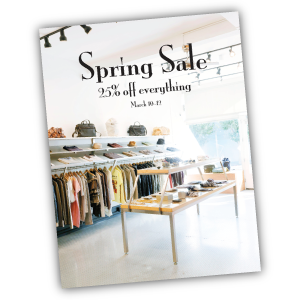
Use the Flyer product for what it was named after: flyers! Print and pass out single sheet flyers for your next retail sale, store opening, or company event. Whether you are hosting a signing in your book store, a concert in your coffee shop, or a spring sale in your clothing boutique, make sure your potential attendees and customers not only know about it but remember it with a printed flyer.

Looking for more inspiration, or wondering where to get started with your Flyer design? Templates that fit the 8.5″ x 11″ Flyer product type can be found around the internet, and even on your own computer. The Microsoft Office Suite, as well as Apple’s iWorks Pages come preloaded with a number of letter-sized templates that can be used for creating Flyer publications. In addition, sites like Inkd and Stock Layouts offer a range of different letter-sized templates in their Datasheet and Flyer sections that you can download for a price and edit to fit your needs before uploading to the MagCloud site for printing and distribution.

Have you already created something for your business with the new Flyer product? Let us know in the comments below!

Publisher Spotlight: Portfolio Contest Winners Sean McCloskey, Cemal Ekin and Jeremiah Johnson

In this post, we’re excited to highlight the work of the top three winners of the MagCloud Portfolio Contest.

This photo of U2 is Sean's favorite concert photo. It was taken on the final night of their 2001 U.S. tour. (Credit: Sean McCloskey)

Sean McCloskey
Photographer Sean McCloskey, grand prize winner of the MagCloud Portfolio Contest, got his start shooting concerts while in college. His passion for the business led him to publish his first magazine just two months after graduation. He’s now been in the photography business for more than 16 years and as well as a magazine publisher for the past 13 years. Sean’s MagCloud contest entry is a showcase of his first 15 years in the concert photography business.

Thanks to MagCloud, Sean has been able to break out of the local market and get more eyes on his work. He found a way to not only distribute digitally but also easily maintain the high quality print distribution that’s so important to photographers.

He currently has four publications on MagCloud.com: SFL Music, Movie Zone, Streets and his submission for the Portfolio Contest. Check out Sean’s work and join us in congratulating him once again!

Photo of the Hagia Sophia from inside the dome. (Credit: Cemal Ekin)

Cemal Ekin
Cemal Ekin, one of our contest runners-up, is a true MagCloud whiz. He stumbled across the service when looking for a new way to spark innovation in his classroom at Providence College. His students began creating and publishing MagCloud magazines each semester – their publications were a hit and Cemal saw an opportunity to spread the word about his own work.

The portfolio he entered in our contest, along with his other publications, have really made an impact with clients and have helped attract new business opportunities. Whether at an unveiling party for his latest publication or a closed-door meeting with new prospects, it’s the quality of MagCloud’s print and binding that grabs the audiences’ attention. Obtaining shots of the Hagia Sophia from inside the dome is a rarity, and Cemal’s portfolio of this work not only wooed his community into voting for him in our contest but also spread his work to new contacts – notably ARTstor.org (a premiere collection for art and art history research) who accepted his photos of the dome’s detailed mosaics and structure of the dome into their exclusive collection.

Ekin has even written up the process he uses for preparing his photos for printing through MagCloud on his site, KeptLight.com. A big fan of the ease of publishing workflow, he breaks the process down in digestible steps. Have a look!

Don’t forget to view all of Cemal’s MagCloud publications here, including his portfolio submission. Bravo on your win, Cemal!

Entryway and mud-room of the PrairieHouse project. (Credit: Jeremiah Johnson)

Jeremiah Johnson
Designer and amateur photographer Jeremiah Johnson created his MagCloud portfolio to showcase his architectural and graphic design work along with his budding photography skills. Seeking work, he needed a solid portfolio to leave behind at job interviews and cold calls. From the start, Jeremiah knew that MagCloud’s publishing quality and value was tough to beat.

Jeremiah was thrilled to receive job offers from the first three firms he submitted his MagCloud portfolio to and accepted an offer from an architecture firm in Minneapolis. In addition to his design and photography skills, Jeremiah said that “the professional quality of the publication is what caught the eye of potential employers who often receive spiral bound booklets of inkjet printed pages from applicants.”

Congratulations on the win and the new job, Jeremiah! View his portfolio here and catch even more of his great work here.

367 Addison Avenue: Go Beyond Printing to the Heart of Your Business

Small businesses are finding more and more ways to use online resources to help their business grow and be successful. For example, HP MagCloud has helped thousands of businesses and independent publishers engage with their audiences, but did you know that HP has other small business resources available to help owners grow far beyond their communication and publishing needs?

A great resource is www.367AddisonAvenue.com. This HP small business blog features tips and tricks on basic business technology, how-to’s to grow your business, advice from leading experts on trends and upcoming small business technology, and stories about small businesses across the U.S. that are practicing technology innovation.

To all the small business owners and independent publishers out there who are trying to get your businesses off the ground, we encourage you to visit this blog to learn more on topics including:

You can also join the conversation or be the one to start it at HP’s Small Biz Nation community.


How to Personalize Your MagCloud Page

If you’re using MagCloud to create collateral for your business, portfolios for photography, catalogs for your retail store, a unique magazine, or other content to promote your brand, then shouldn’t your MagCloud page reinforce your brand too?

It’s easy to make your MagCloud profile and publication pages work for you by taking a few minutes to flesh out your publisher profile and create header images that reinforce your brand throughout your pages.

Your Publisher Page

No matter what sort of business you’re into, when customers discover your content on MagCloud, you want them to be able to connect with you directly. Your profile page includes an option to link directly to a website of your choosing, and with some simple html you can also include hyperlinks, images and emphasize text within your profile description.

To get started, you’ll need to log into your account and go to your publisher profile editor.


Link to a website: <a href=”URL”>link</a>

In our Jane Doe example, we used some of MagCloud’s allowed HTML tags to include more links in Jane’s profile. To add a link to your website without having to include the whole website URL, you can simply insert a block of text like below:

Curious about more recent work, or what I’m up to?
Check out my <a href=”http://yourwebaddress.com”>blog</a&gt;.

It will show up in your profile like this:

Bold Text: <b>text</b>

To create bold text, you just need to add <b> before your selection and </b> after. We did this with our Jane example like this:

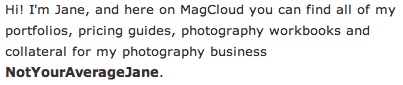
Hi! I’m Jane, and here on MagCloud you can find all of my portfolios, pricing guides, photography workbooks and collateral for my photography business <b>NotYourAverageJane</b>.

Which then looks like this:

Emphasize/italicize Text: <em>emphasis</em>

To add the title of Jane’s autobiography in italics we used the code for emphasis. Simply put <em> before the text you want italicized and </em> after the text to close the emphasis:

Want to find out more about me, and my life behind the lens? Be sure to check out my 200-page autobiography <em>Don’t Call Me Jane</em> available for purchase here on MagCloud.

Which will appear like this:

Image Link: <img src=”URL”>

You can also insert images or logos into your profile by linking to the image within the text using <img src=”URL”>. This requires that the image is the size you want it to appear in the profile, and that it already has an associated URL. It’s best if this image is pulled from your own website (like your logo) or if you have loaded a special sized image onto your own flickr or other photo host that allows linking directly to the image. If you link to a resource that you don’t control, you might run into broken links if the image is ever moved. For Jane’s example we linked the social media icons that she already had on her blog. This example actually includes two pieces of html, one for the icon image, and then the following text which links to the associated LinkedIn URL:

You can also find me on
<img src=”http://notyouraveragejane/images/LinkedIn_IN_Icon_25px.jpg&#8221; />
<a href=”http://linkedin.com”>LinkedIn</a&gt;

Which will appear like this:

Your Collection Page

For every group of documents you create, you get to have a “collection page” which can have it’s own branded banner and unique URL. This is great if you have a selection of related documents that you want to be able to promote as a group. A great example of this is MagCloud publisher, Golfweek, which has created collections of Souvenir Golf Programs and Golfweek Special Editions. Each collection reinforces the Golfweek brand and furthers their messaging but keeps relevant content together. Check out their banners below:

Customizing with Banners

Want to create your own branded banners? To setup the custom banner for a collection, you must first create the graphic that you plan to use. The banner specs require an image with a maximum size of 790 x 90px, in either JPG, GIF, or PNG formats. You can create this image in any software application of your choosing that can output to one of these formats. You can also upload a smaller image–it’s up to you.

Uploading Your Banner

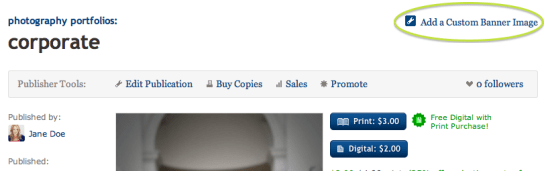
Once you have your image ready to go, you’ll want to navigate to your collection page. You can get here by visiting your profile page (yourusername.magcloud.com) or by going to one of your publications via magcloud.com/publish. On the right-hand side of the page, you will see an “Add a Custom Banner Image” button.

Once you have clicked the button, you will be prompted to find the image file on your harddrive, and upload it to MagCloud.

The image you upload will be visible on the associated collection page,

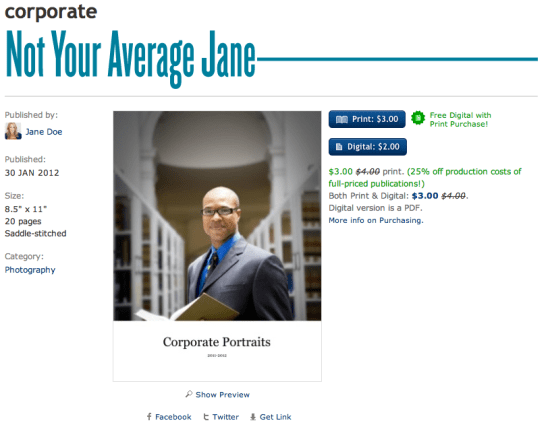
and on each of the individual publication pages within that collection.

Have you used custom banners or any of these HTML tricks in your publisher/publication descriptions?
If so, please share them below in the comments section to inspire others.

MagCloud 2012 Resolutions

The MagCloud team is really excited about 2012. With a new year comes an opportunity to think about what changes and improvements we would like to see on the website and with our service offerings.

So here are our top resolutions for MagCloud this year:

  • Offer More Product Types: including a cool square format and a larger landscape product.
  • Enhance our Direct Mail Services: making it easier to send publications to groups of customers, colleagues and subscribers in print and digital format.
  • Provide New Tools for Publication Creation: new web based authoring tools, templates and an improved help section to make creating MagCloud-ready publications easier.
  • Reward our Community: Referral and Advocate programs to reward MagCloud users for helping us spread the MagCloud word and attract new publishers to the service.
  • Enable MagCloud-aware Applications: enhance the MagCloud platform to make it easier for third party developers to build their own websites and applications on top of MagCloud that can link directly to MagCloud’s publishing and distribution capabilities.  So no need to recreate all the heavy lifting we’ve already spent the last 3 years building. Just tap into MagCloud and offer our services as part of your business.

These are just a few of the things we have in mind but we always appreciate your feedback on what new features are most important to you.

To ensure your voice is heard please take a few minutes to complete our short MagCloud user survey. After you complete the survey you’ll receive a coupon for 15% off the production costs of future purchases of full-priced publications on MagCloud.*

We look forward to your feedback and to an amazing year for the entire MagCloud community.

*This coupon cannot be combined with other offers or sales on the MagCloud website and is valid through April 30th, 2012.

Announcing: Portfolio Contest Winners

After an exciting voting round with 2,389 votes, the official winners of the MagCloud Portfolio Contest have been selected!

Grand Prize Winner: Sean McCloskey
Sean’s portfolio showcases his 15 years of concert photography experience and trust us – the images do not disappoint. Sting, Sheryl Crow, Prince and David Bowie all grace the pages of this 83-page montage of music heavyweights on stage and in their element.

Click here to view and purchase Sean’s winning portfolio, or read more about Sean and his photography on his website.

Runner-up Winner: Cemal Ekin
Cemal’s submission shows off the architectural beauty of the famed Hagia Sophia museum in Istanbul. Views from all angles make this structure shine in a most deserving light.

Click here to view and purchase Cemal’s amazing work, or visit his MagCloud profile and follow him on Twitter.

Runner-up Winner: Jeremiah Johnson
Jeremiah draws a close relationship between photography, design and architecture in his portfolio. His extensive experience in the field is chronicled in his 46-page submission. We encourage you to take a look.

Click here to view and purchase Jeremiah’s submission, or see more of his work on his website.

We want to thank each of these great creative professionals as well as everyone who submitted an entry to our Portfolio Contest and voted. A very special thanks to our wonderful sponsors: Wacom, Pantone and MyFonts. Our winners got some truly amazing prizes.

Extending Your Brand With a Magazine

Your brand collateral is the most important opportunity to talk about your product or service. But getting your target audience to read your brochure, or catalog cover-to-cover isn’t always easy.

That’s why so many businesses have found that branded magazines are a unique way to pique audiences interest with relevant content and information, while reinforcing their brand message. It keeps them top of mind in a format that gets to their customers or target audience more frequently—be it annually, quarterly or monthly. What’s better—it’s in a form-factor that is both familiar and comfortable for the reader.

Many businesses have found that they can better engage with potential customers and increase brand loyalty by publishing a magazine of their own. According to a study conducted by the Association of Publishing Agencies (APA Advantage Study, 2007) on branded magazines (or as they call them, “customer magazines,”) – customers spend 25 minutes on average with such a publication, compared with a TV ad (30 seconds) and an internet ad (0.5 seconds). That’s 25 minutes immersed with a brand.  And while in-house magazines were once considered glorified advertorials, today the use of subtle branding and genuine editorial content helps many successful businesses tactfully promote themselves. *Want to read more about the study? You can download the executive summary as a PDF here.

How does it work? Well, by presenting your business in a more editorial format you can:

  • develop prospective customers and foster increased loyalty
  • establish your organization or company as current on issues and trends
  • position yourself as an expert in your field
  • be a resource for information that is relevant to your audience
  • reinforce your style and voice
  • give depth and relevance to your brand in an environment you can control

Finding Inspiration

Take for example a few major brands that publish their own magazines: British fashion label Asos’ self-titled magazine includes advertising for products that appeal to their demographic, such as cosmetics, high-end watches and perfumes. They also balance the promotion of their own products by pairing them with complimentary pieces and accessories that work with their customer’s style.

Coscto has it’s very own The Costco Connection, which combines information about what’s new at Costco with a mix of lifestyle and small business articles.

USAA’s USAA Magazine focuses on advice for becoming financially secure, with articles that appeal to it’s wide audience–young and old.

The Lance Armstrong Foundation’s LIVESTRONG Quarterly—delivers compelling profiles and medically stoked articles in a publication that hopes to bolster the Lance Armstrong Foundation’s efforts to ‘make cancer a global priority.’

Each of these do a great job of combining editorial content with promotional content for their products, services, mission or cause. One great thing you will notice about all of them too? They each reinforce their brand through styling and voice, but without seeming like pushy sales collateral.

Getting Started

So how do you even get started creating a brand magazine? Well there are a number of things to consider, the first of which is the actual branding. Much like traditional collateral, a brand magazine should be in line with your  brand’s style and voice, but it where it differs is that a branded magazine needs to be subtle and controlled in how and when you promote your brand. A branded magazine should be designed with the customer’s tastes, interests, style and wants at the forefront; and weave in brand, product or service messaging where it actually enhances editorial and design.

Brand magazines can help you achieve your desired positioning in the minds of your stakeholders and customers. Whether your brand is edgy, luxurious, down to earth, straight to the point, or fun and whimsical, you want that same feeling to come across through your magazine. For most businesses, when you established your branding, you probably came up with words to describe your mission, voice, style and audience.

Put it Down on Paper

Now is the time to grab a piece of paper and start defining the sort of message you want to give to your customer. How do you want to establish your brand? What sort of content will you include, and how should you style it to be in line with your voice, mission and style? Use words to describe your brand and you customer– are they fashion-forward, politically-minded, edgy, traditional, mostly men or women, older, youthful etc?

These are your design principles and the list should be short and sweet. In as few words as possible, make clear the vision for the publication and any keywords people should keep in mind while designing.

Keep this list. Pin it to your wall. It will make for a great litmus test as you move forward and start creating. Every once and awhile go back to the list and be sure you are appealing to your audience and staying true to your brand.

Deciding on Color

This seems like a no-brainer, but coming up with colors that are true to your brand, that you use consistently throughout your magazine, is tougher that it seems. You may find sites like COLOURlovers helpful for exploring colors that work well with your logo or brand colors. Create a palette and save it. Then as you publish new issues, the consistent use of color will also reinforce your brand.

Typography

Now it’s time to define the typefaces to use: sizes, line height, spacing before and after, colors, headline versus body font, etc. With editorial content there is some flexibility in this, but defining a consistent style sheet will maintain the integrity of your publication and brand throughout the publication. Use fancy fonts sparingly, so that they maintain their impact and legibility on the page.

Create a Mock-up Magazine

This will eventually be your style guide, but at first it is a way to flesh out all of the style choices that you will want to make so that you can stay true to your brand. This will also help you keep a visual consistency not only throughout each publication, but also from publication to publication over time. Save this file and use it to start creating your magazine, then keep that original as a starting point for each subsequent issue–it will save you a lot of time!

Now Get Your Brand Out There

Now, you’re ready to publish. If you’re looking for more advice for designing your file, or templates to get you started, remember you can always check out our other Tips & Tricks!

How do you get your brand out there? Have you come up with other unique ways to keep you brand top-of-mind with your customers? Does your organization or company have a branded magazine? Tell us about it below in the comments section!