
Maximize the Impact of Your Member Communications

Now that we’ve shared some of our best MagCloud examples of member communications, it’s time to talk content. What information is vital to include and what is best to leave out? Our take, like in most printed materials, is that less is more.

For many independent organizations, fundraising is typically a part of your member communications. Because of this, if not for other reasons, you must ensure that your materials are concise and compelling to make sure you’re reaching as many members as possible with your message.

Here are a few more tips to consider when composing your next member communication:

Spotlight Individual Members – Profiling a particularly active member can bolster involvement from the rest of the members who will strive to earn the honor as well, and it may drive the spotlighted guest to share the communication with his or her broader online network thus spreading the reach of your group.

Promote Your Social Media Channels – Many alumnae organizations have LinkedIn Groups and local community groups often have Facebook Pages. Whatever your channel, be sure you’re using your printed materials to promote your online social media channels. It’s a fast way to spread your message and it’s easy to communicate last-minute details about upcoming events.

Limit the Real Estate– All members are aware of the need for fundraising so when creating your materials, try to balance your fundraising call to actions with information that will inspire and inform members about your cause, club or organization. Each group will have a different setup, but no matter how many pages your publication is try to balance fundraising efforts with important news and updates.

Be Mindful of the White Space – We’ve spoken a lot about this subject in previous blog posts, and our advice remains the same. Make your images eye-catching and high quality (hire a professional photographer, if possible), but be sure you leave room on each page to avoid overcrowding.

Share your best practices for member communications in the comments below!

MagCloud Holiday Schedule

The holidays are upon us and the MagCloud elves are hard at work getting final holiday orders out.

We will be taking some time off during the holidays (even a MagCloud elf needs a break now and then) so you may experience some delays in orders, as well as customer support response time.

MagCloud Holiday Schedule:

  • Closed: December 24th, December 25th, December 31st and January 1st.
  • No Printing or Shipping: December 26th, December 30th and January 2nd

So please expect the following delays:

  • 1 day delay for orders placed on December 22nd and 23rd
  • 2 day delay for orders placed on December 28th and 29th
  • 1 day delay for orders placed on December 30th, 31st and January  1st.

From everyone here at MagCloud we wish your and yours a very Happy Holiday Season!

The MagCloud Team

Member Communication Made Easy (Well, Easier…)

Whether you have a non-profit, church group, student association, small business, or sports team, getting your message out to your members, supporters, and investors can be a large task. Staying on schedule and under budget can be tough, and creating a print newsletter that looks good is only a fraction of the challenge. Then you have to worry about mailing lists, postage and distribution… and you have to do this annually? Quarterly? Monthly?! Yikes. My head hurts just thinking about it…
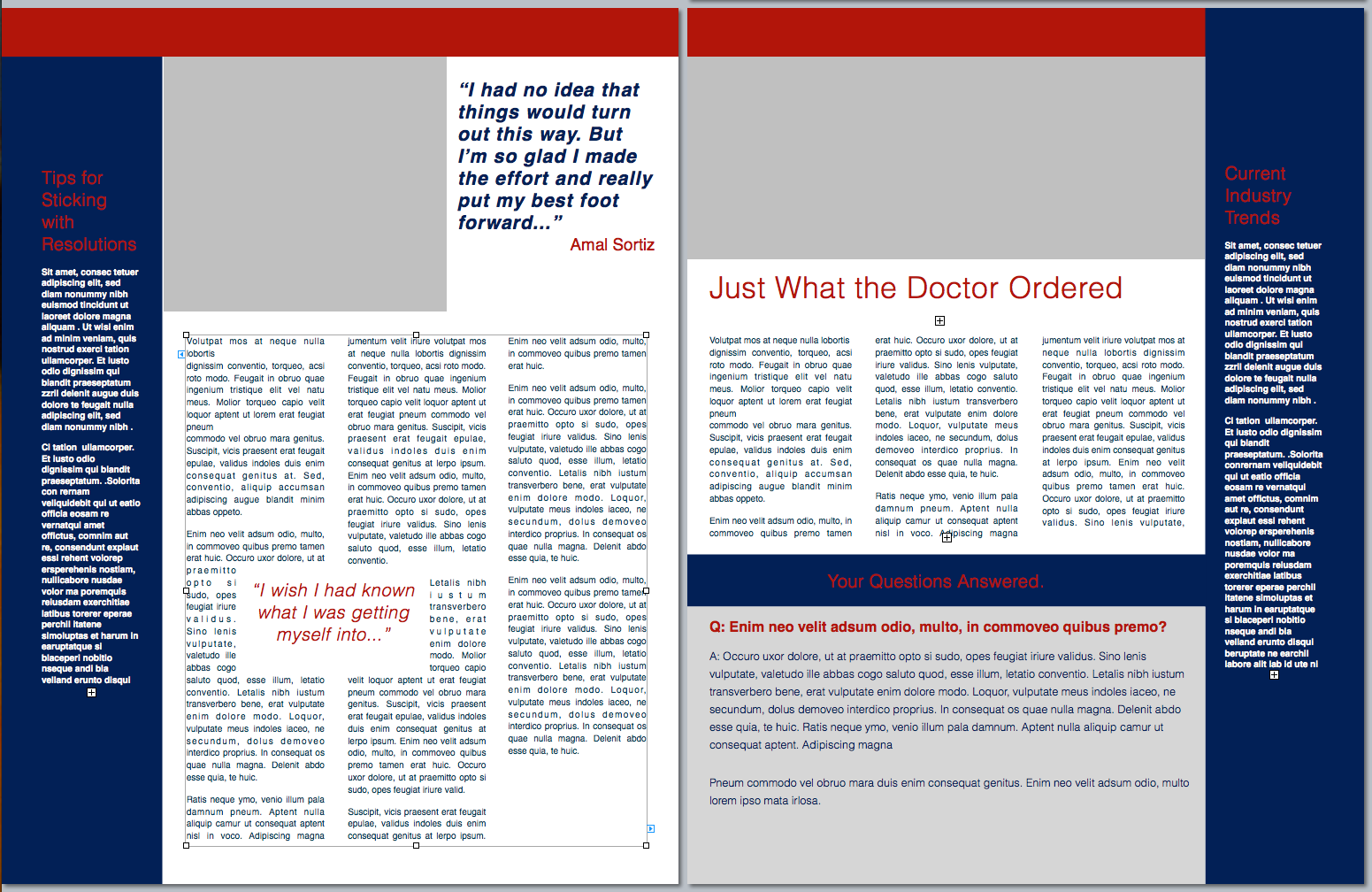
Well, now you can worry less, because you have MagCloud–and we’re working to make it easier for you. With Ship to Group functionality we can take on the heavy-lifting of drop-shipping to your mailing list and you won’t have to deal with pesky paper-cuts or trips to the post office. Digital distribution gives you the option to share a PDF with your users who prefer to stay up-to-date with their iPad or other digital device. And you can get it all done without having to leave your desk or get out of your PJs (no judgement here).

So since it’s the start of a new year, what better way to turn over a new leaf with your organization, than to turn a glossy page? Your publication can look professional and still be affordable if you publish through MagCloud and we’re going to help you get started right now.

To make the process easier, we created a classic newsletter template designed for printing as a 4-page MagCloud publication (which comes to just 60¢/copy if you order 20 or more copies). It’s easy to edit and available in three software formats. Check out the original and a variation of the template on the left, and then get started creating your own in Adobe InDesign (CS3 or newer), Microsoft Word or Apple Pages. *Please note, you may have to “right-click” or “ctrl+click” to start the download.

Starting with a template is a great trick for speeding up the design process (don’t tell anyone I told you, but a lot of professional designers do it themselves) and many well-designed templates have style sheets built in that make it easy to change fonts and styles with just a few clicks of the mouse. So with a few simple typeface changes, tweaks to color, and some new imagery, you can easily transform this basic template into a newsletter that fits your organization’s image. We used Neutra typefaces and swapped in orange for our example, but how you customize it is up to you.

Want to try a different design?
Depending on your software of choice, you can also find great resources built into some applications or as free downloads in their online resources.

Apple Pages has built-in templates that can be great starting points, just be sure to check your margins and settings because these layouts may need a bit of adjusting so that they are properly centered on the page after printing/trimming. For more detailed help with this task check out the “Add guides to pages and adjust layout for trim” section of last year’s blog post.

Microsoft also has free templates available for Word and Publisher online at office.microsoft.com.

If you’re willing to splurge and buy a template, from an online source like stocklayouts.com, be aware that most of these templates are not designed to MagCloud specs and will need to be adjusted to 8.5″ x 11″ pages in order to output a properly-sized, MagCloud-ready PDF. So before you spend the money, be sure you select a file format for software you are comfortable with, and that you are prepared to make the necessary changes to set the file up to match our PDF specifications.

More Resources
Still needing more inspiration? Check out some of our past blog posts for newsletter content and design tips, or great sample publications. And as always you can find all of MagCloud’s design Tips and Tricks and all of our free templates in our Design Resources section of the blog.

Have you found other great templates or resources to use when creating your MagCloud publications? Then please share them below in the comments section.

Congrats To All Our Portfolio Contest Entrants


The voting period has officially closed for our first-ever Portfolio Contest. We received a lot of impressive submissions and are having a blast seeing the work that our publishers do every day. Thank you to all who submitted and voted in the contest.

Winners will be notified in mid-January. Your patience is appreciated during the next few weeks while we sort out the winners. Until then, check out all the great entries on our Facebook page.

A big thank you to our sponsors: Wacom, Pantone and MyFonts. Their products made our prize packs irresistible!

Remember, there will be a total of ten lucky winners. Here’s a little reminder about what you could be taking home.

We appreciate your time and energy and would love to hear any feedback on our contest in the comments section below.


Getting Your Members on the Same Page

Community organizations, non-profits and student groups all work hard to build a strong member base that understands and spreads their mission. From new member materials to monthly newsletters, a clear, well-designed member communications strategy is an important step towards that goal. Thankfully, MagCloud is here to help you achieve that goal. Many groups already publish their materials with MagCloud and we’re excited to show you the high quality work they’re producing. These examples should give you a few ideas about where to focus your materials:

Orange County Orchid Society publishes this monthly newsletter filled with images of the group’s beautiful orchids and to update the group on its members, the latest meeting notes, tips and a few local ads.

American Glass Guild newsletter features a message from the president of the AGG, the latest news on awards and recognition for members and a recap of a recent AGG workshop.

Fort Collins Alumnae Chapter of Delta Delta Delta has several important updates for members such as key upcoming dates, a note from the chapter’s PanHellenic rep, an update on Fall recruitment and plans for several events in the next year.

Alpha Tau Omega Fraternity quarterly publication is a good publication for other Greek organizations to get content tips for. It features a spotlight on outgoing seniors and new members and several editorial pieces from members looking to stretch their writing muscles.

The Pulse is a publication by the Korean American Students of Yale that packs a concise update into six pages including a message from the outgoing board, notes from the most recent board meeting, a look at the top 9 KASY moments of the year and, of course, some funny KASY superlatives. It’s worth noting that each KASY publication is similar in length but the content varies by issue.

Let us know what member communications materials you use to share updates with your members. We want to hear about it

Our Product Family Keeps Growing

Today we launched two new products into the MagCloud family–Digest Landscape and Flyer.

Digest Landscape is compact and ultra-portable at 8.5″ wide x 5.5″ tall. It’s perfect for portfolios, brochures, catalogs, books and more.  Simply upload an 8.5″ wide x 5.5″ tall PDF and we’ll trim it down by 0.125″ on the top and bottom and 0.25″ on the outside edge to a final size of 8.25″ wide x 5.25″ tall so it’s ready for our professional printing presses.  We’ve also updated our website preview app so users will be able to preview your publication in all it’s landscape glory.

Our double-sided, single sheet Flyer product is ideal for brief messages or content that changes often such as sales promotions, menus, product data sheets, event schedules and more. Simply upload an 8.5″ wide x 11″ tall PDF and we’ll get it ready for printing by trimming it down by 0.125″ on all sides to a final size of 8.25″ wide x 10.75″ tall.  We print Flyer publications as a single sheet with a front and back side, so if you only upload one page don’t worry we’ll automatically add a blank page for the back side.  The Flyer product does require a minimum print order of 10 copies which will be bundled into one shipping order.

We hope you enjoy these new products and would love to hear how you plan to use them in our comments section below.

2011 Holiday Shipping Schedule

During the holidays the MagCloud elves tend to be extra busy so please order as early as possible and allow extra time for delivery. Below are our estimated time frames for December 23rd delivery.  We also recommend you consider using our FedEx shipping options this time of year so you’ll have the added piece of mind of being able to track your order from our holiday headquarters to your doorstep.

USPS and FedEx are very busy this time of year and in some locations may be impacted by weather delays so we recommend you also check their websites for the latest updates:

USPS Mail Service Updates

FedEX Service Delays

Design Tips to Help You Get Your Message Out

MagCloud offers a lot of options to help you communicate with members of your organization. Not only can you offer members the choice of a print or digital version through the MagCloud website, but you can also use our Ship to Group feature to mail a print copy to each one of them or use our Guest Pass feature to allow members-only access to unlisted publications via email.

Whether your group is focused on a shared interest or a shared alma mater, keeping members informed is an important part of maintaining any membership organization. At MagCloud we’ve seen membership communications take many forms, including newsletters, annual reports, member directories, and even calendars.

While the content of member communications varies greatly depending on the type of organization and the form of publication being created, here are a couple of design tips that are always good to keep in mind:

1. Keep your message clear. This doesn’t just pertain to what you are writing, but also to how you present your message on the page. Make sure that the information that is most important to your members is placed front and center, and anything additional is cleanly laid out in an organized and easy to follow fashion. Doing so will allow members to easily navigate through the publication and better ensure that they receive the messages you are hoping to deliver. This is particularly important when creating a member directory, which by nature contains a large amount of content. You don’t want to hinder the delivery of this content by having a disorderly layout that is difficult to find your way through.

Moorestown Rowing The Moorestown Rowing Club’s annual publication offers a great example of a large amount of content that has been laid out in an orderly fashion. Using bold titles and a consistent two-spread layout they are able to present their team rosters in a way that is easy to navigate and understand.

2. Use colors, fonts and imagery that are familiar. Although you may not think of it this way, your organization is a brand, and it’s important to take advantage of brand recognition in the communications you send to your members. The easiest way to do this is through the colors, fonts and imagery you use, matching those in your publication with ones that are used elsewhere on your group’s website or blog. By maintaining a consistent look and feel, you’ll help ensure that members make the association with your organization instantly when the printed piece lands on their doorstep.

American Glass GuildThe American Glass Guild does a great job of establishing a brand with their MagCloud-published newsletter. They not only keep a consistent look and feel with each issue but also using colors, fonts and imagery in their publications that is similar to those found on their website.

3. Balance your content. As with the other publication types we’ve discussed in recent weeks, it’s good to keep your readers engaged in your content, regardless of what the intent of the publication is. A big part of this is visual – when a reader encounters a page full of text, they may feel somewhat daunted by the amount of content they are being presented with. Rather than just giving your readers a lot of text to consume, balance the layout of your member communications with supporting images and related infographics. Even just breaking up a page of text with some white space can help make your message easier on the eyes. The easier your message is to consume, the more likely it is that your members will receive it.

Perception MagazineThe Canadian Council on Social Development’s Perception magazine is a great example of a membership publication with a balanced layout. Each of the longer text pieces in the magazine are accompanied by images, call-out quotes, and colored text boxes of related information. Not only does this makes the pages of the publication more visually appealing than they if they were just filled with solid blocks of text, but the added content also makes them more interesting to read.

Has your club or organization used MagCloud to communicate with its members? Tell us how in the comments below.

When it Comes to Catalogs, Content is King

Over the past few weeks, we’ve shared tips and templates to help design your catalog for MagCloud. Today we discuss catalog content, and a few best practices to keep in mind when selecting your content.

First up, images. As they say, a picture is worth a thousand words, and you want the images you select for your catalog to speak highly of your products and services. Therefore, make sure you select high quality images for your publication (we recommend 300 dpi for printed publications), and that each image highlights the product or service you’re hoping to sell. Mixing up stand-alone product images with lifestyle imagery is a great way to offer more visual interest for the reader, just be sure that the products remain the focus regardless of the image style you select.

And where are images more prominent than on your catalog cover.  Catalog covers are critical in quickly grabbing your customer’s attention and getting them to open your publication.  MultiChannel Merchant recently published a great article discussing the key strategies in designing an effective catalog cover, which include relevance, emotion, drama and differentiaton.

Next, let’s talk about text. If you look at a lot of mainstream catalogs, you’ll notice that text is used only for detailed descriptions of the products and services being featured, but also as brief call out quotes and titles. Using text features like this help attract the reader’s attention and interest, and can be a great way to encourage the reader to linger over your catalog longer. It’s also a great opportunity to call out more marketable features of the products and services you are hoping to sell.

Similarly, smaller paragraphs of text are great for providing descriptions of your products and services, just be sure you don’t overwhelm your reader with too much text. You will want to include enough text to get your point across, but not so much that your customer loses interest halfway though.

Finally, just as important as the text and image content is how it is arranged. Since catalogs are complex by nature, it’s important to keep your content organized and clean. Having a table of contents and creating sections in your catalog can be a great way to break up a large amount of content. Also, as we’ve discussed before, using white space to break up your content is a great way to keep the focus on the products and services you’re hoping to highlight.

If you’re looking for more ideas and inspiration, check out Slodive’s 25 Best Catalog Design Inspirations.

Have any other tips to share from your own catalog creation experience? Share them in the comments below!

New Catalog Template

Looking for ways to showcase your growing line of products or services?  We have added a new catalog template to our free template collection.

This multi-page template is for Adobe InDesign users and is perfect for product or service brochures.  We’ve created a sample publication using this template to show you how easy it is to make a great looking catalog that is MagCloud-ready.

If you are new to using Adobe InDesign to create MagCloud-ready publications make sure to download our Adobe InDesign Getting Started Guide for tips on settings for trim, bleeds, image resolution and more.

Let us know what you think of the new template in our comments section below.