Summer Wanderlust

summertimewanderlustWhether you’re planning a big family vacation, or a small weekend staycation during the summer break, wanderlust seems to be an epidemic during warm summer months. In the Travel and Vacation Category of the MagCloud storefront, you can find all sorts of great publications to help inspire your travel whims, help you plan your trip, or inspire you to document your family adventure when you come home. And if you don’t get to travel anywhere this summer, you can always enjoy a good read on your lunch break and take a mental vacation.

So in honor of our own summer wanderlust, today we’re featuring some of our favorite travel-inspired publications on MagCloud.


LittleIndianalittle Indiana Quarterly Magazine

little Indiana: Where to Stay, Play, and Eat in Small Indiana Towns (population 15,000 and less). Just like littleIndiana.com, the magazine takes things to a whole new level! Find information about Indiana’s restaurants with outdoor seating, mom and pop ice cream shops, a young couple that renovated a building and restored a downtown, memories of summer from a town that no longer exists, a business on the brink of closure, and plenty more! Don’t miss regular features like “From the Hoosier bookshelf” and the Indiana trivia crossword puzzle.


toandfromTo & From: The Paris Issue

To & From Magazine merges travel and lifestyle.
The newest issue features Paris, “the City of lights.”


Tourism TattlerTourism Tattler: Kenya

The July edition of Africa’s premier Travel Trade Journal features Kenya, plus articles on Business, Conservation, Events, Hospitality, Legal and Marketing issues.


BVI NewbieBVI Newbie

A quirky and colourful guide to the BVI for residents and visitors. This books uses tongue-in-cheek commentary and bubbly design elements which keep the reader entertained and at ease when the time comes to move to Nature’s Little Secrets. This handy guide book also provides step by step instruction for several unfamilliar practices and/or procedures visitors often face while in the Virgin Islands.


Don’t just read about others’ adventures, publish your own.

Rather than let those sunny summer memories fade with your suntan at the end of the summer, start planning now to chronicle your summer adventures and photos into a cool summer recap magazine, or travel photo book printed through MagCloud. You can create a personal memento in magazine format to easily share your memories with family and friends in print and digitally.

Save and scan ticket stubs, itineraries and after your trip, compile all of your pictures and memories into a Square photo book or scrapbook using Apple Aperture  or Photoshop to share with your friends and family! If you’re not a big designer or super savvy with software–not to worry–you can try out our partner Poyomi’s on-line tool for photo book design.

Need some inspiration? Check out some of these great examples published on MagCloud:


DisneylandDisney Vacation 2013

To & From Magazine merges travel and lifestyle.
The newest issue features Paris, “the City of lights.”


 Hawaii Trip 2012Hawaii Trip 2012

A 8″ x 8″ book of photos from the Splonskowski family 2012 trip to Hawaii

DIY Wedding Ideas using MagCloud

Maybe its a side effect of Pinterest, and all of the beautiful weddings we keep seeing pop up, but with June being one of the busiest months of wedding season, we couldn’t help but get into the spirit and explore some DIY wedding ideas using MagCloud products.

invites

Custom Party Invites

It all started last month when I created some fun custom bachelorette invitations for a getaway weekend for my friend who is a bride-to-be. Using MagCloud’s digest pamphlet product I designed a fun little invitation that fit into the top 5.25″ of the template. When the prints arrived (each cost just $0.64) I took a quick snip with my scissors and popped them into coordinating 5.75″ x 5.75″ square envelopes that I found at Paper Source.

Then the idea of creating custom stationary using our digest product got me thinking:

How else could you use MagCloud products for wedding DIYs?

programs

Wedding Programs

Whether you have 12 bridesmaids or 2, having a nice wedding program helps keep guests informed of the order of the ceremony, and who you’ve cast in the important roles for you big day. The four-page digest pamphlet–or if you have a lot going on and want to include songs, readings and hymns–a digest-sized 8-page booklet are classically styled and beautiful printed. We also tried using the square pamphlet for a more modern feel. Depending on the form factor you choose, and the quantity you need, a 4-page digest or square pamphlet could cost somewhere between $0.48 and $0.80 a piece, perfect for the bride on a budget.

Like our modern design? You can download the template for Adobe InDesign below:

Wedding Menus

menus

Using our flyer product to create a sleek menu was really simple too. By dividing the page lengthwise (basically creating a 0.5″ gutter right down the middle of the page) we were able to print two menus per flyer and simply cut them in half with a paper cutter when they arrive.

Because our flyers cost just $0.40 print (or buy at least 20 and the price drops to $0.30/print), printing two per page makes them$0.15-0.20 per menu. That means you could print 200 menus for just $30.00 + shipping.

*Note: Flyer publication orders are subject to an 8 quantity minimum in multiples of 4.

Wedding Poster

posterscompared

The wedding poster seems to have surpassed traditional guestbooks in recent years as the popular way to commemorate one’s wedding day. Rather than being stuffed into a box and never looked at again, the wedding poster allows newly-wed couples to enjoy the love notes and encouragement given to them by family and friends for years to come.

MagCloud’s 12″ x 18″ poster costs just $2, leaving you plenty to spare for a fancy frame. We recommend having your loved ones sign a mat (like this one available from Amazon) rather than directly onto the poster (UV coating which protects the poster, also makes some inks smudge). But if you really want to let folks sign right onto your print, we found that you can do so with Sharpie Metallic Fine Point Permanent Markers.

Get started creating your own! For more design guidelines for our poster product, visit our Getting Started page.

Banners and Pennants

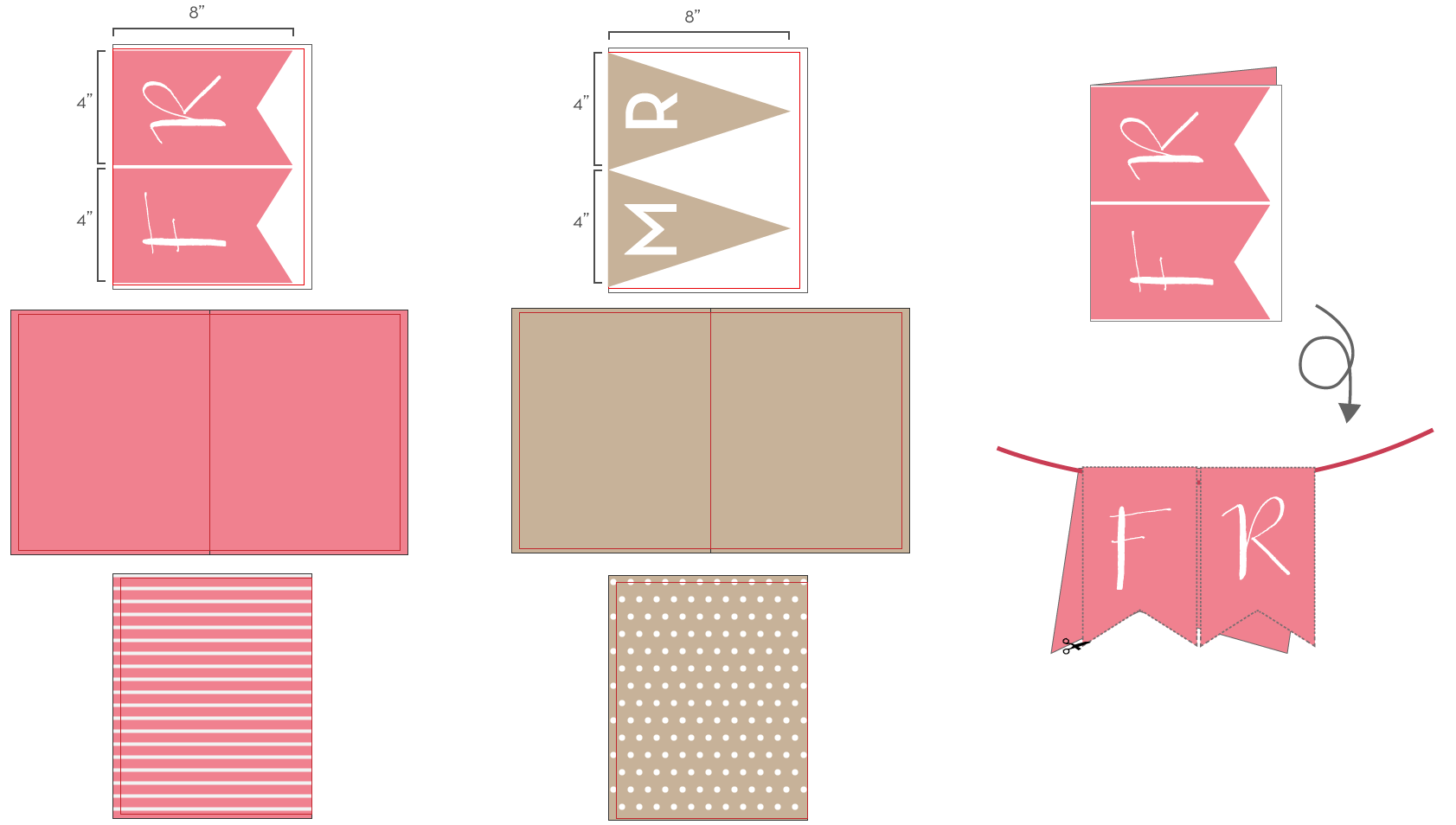
With the “Rustic Chic” style of weddings still ever-popular– pennant or flag signs have become a wedding or shower must-have. We’ve seen every variation from “she said yes” to the classic “Bride” and “Groom” signs on the backs of chairs, and found that the MagCloud standard pamphlet is a great tool for creating your own. With two letters per pamphlet we were able to create this sign for just $6.40. Using fishing line, twine or a narrow strip of ribbon and a glue stick, we simply cut out the pennants, lined the ribbon up in the fold of the paper, and glued the two sides together around it. The 100# cover stock used in our pamphlet product helped the banner hold up in a nice afternoon breeze.

banner

pennant-guideTo create your own banner, each pair of letters will need to be designed as it’s own 4-page pamphlet. We used the standard size, 8.25 x 10.75 publication so that we could get 4″ x 8″ pennants. In order to be sure the pennants look great from all sides, we set the full inside “spread” of the document to be a matching color to the outsides (this hides trimming/gluing errors) and to add a little bit of fun, we added a pattern, like stripes or polka dots, to the back sides for when the banner is blowing in a breeze. For the space between words, we used a heart symbol, so the banner would read “FROM❤MS.❤TO❤MRS.” or “SHE♥SAID♥YES.”

Try it and Save

Interested in creating your own event DIY with MagCloud?
Use promo code MCDIY when you publish and save 15%. Valid through June 30, 2013

More Wedding Reading on MagCloud

Now that you’re in the wedding mood, check out some of our favorite publications in the Brides & Weddings Section of the MagCloud Shop.

SmittenSD Wedding StyleDIY Weddings

Disrupting From Within: Lessons in Business Innovation

recipe-for-disruptionAs Chief MagClouder I know first hand that starting a new business inside an existing, well-established, large and profitable company can be just as challenging as launching an enterprise all on your own. Especially if your idea is a disruptive one – and one that requires time to grow before it adds a noticeable boost to your company’s overall bottom line.

In Innovator’s Dilemma, author and leading business thinker Clayton Christensen is spot on with his observation: Traditional companies are wary of pursuing new products and services that will initially have smaller target markets with unproven business models.

Why invest in something new that will result in a smaller return (at least initially) when you can continue cultivating larger and much better-understood markets based on your existing business proposition?

The answers vary, but the one that strikes a chord with us is simply this: If you don’t disrupt your own business, someone else will.

We’ve learned some useful lessons about launching a disruptive business inside a large company – in our case, creating MagCloud within Hewlett-Packard (HP).

You might find these lessons useful, too.

1. Bottom-up ideas can be just as successful as those directed from the top down.

The idea for MagCloud didn’t come from HP’s executive offices or reports from famous industry consultants. Instead, a couple of researchers in HP Labs thought it would be cool to create a way for anyone to become a publisher.

We took that idea and ran with it. It was bottom-up driven and an approach supported by our cross-company sponsors. It’s a model that suits both HP and MagCloud well.

That bottom-up philosophy suits many companies well. Google, for example, encourages employees to spend about 20 percent of their time “on projects that aren’t necessarily in [their] job descriptions.” This dabbling in other endeavors has resulted in some of Google’s most important products, including Gmail and Google News.

Facebook Hackathons – all-night, code-writing “ragers” – are a big tradition at Facebook, inspiring employees to collaborate on some great (and some not-so-great) ideas.

2. Flexibility is your friend.

Starting a business is no time to be set in your ways. From the moment you come up with your initial idea to the day you launch, you must be flexible enough to tack and weave your way forward, evolving your idea as you go.

When we began working on MagCloud, we thought that, along with providing print-on-demand based publishing, we should offer a tool that publishers could use to put together their publications – you know, type your text here, add your pictures there. And, voilà, you get a great-looking publication.

Then we remembered that authoring tools already exist in applications such as Microsoft Word, Adobe InDesign and Apple Pages.

Why make customers use our tool when they’re already working with existing, proven programs? It seems obvious now, but at the time it was a big “aha” moment for us.

We might revisit creating authoring tools at some point as we tack and weave our way forward.

3. Small teams can outperform big ones.

If you’ve ever worked within a large group, you know the perils of spending far too much time communicating just to stay in sync, and adhering to the many processes designed to keep a large group coordinated – both of which can hinder creativity.

There’s a great story about a high-profile Silicon Valley software CEO who, upon hearing from a manager that a project was late, asked that one person be cut from the team. When the project continued to be delayed, he asked that another person be cut from the team. And so it went, until the project was successfully delivered.

The moral: The smaller the team, the more flexible you can be – and the easier it can be to keep working toward a common goal. At fewer than 20 staff members, we know this lesson all too well at MagCloud. We take turns at doing everything and finishing our projects on time. Mostly.

4. Small teams can make big impressions.

Whether you’re one person working from a spare bedroom or part of a 100-person, full-fledged marketing department, producing beautiful, professional-quality publications with MagCloud will give the impression that your business is bigger than it really is.

And, in fact, as long as you produce quality products that people enjoy, even the smallest team can attract millions of fans and followers.

Consider Pinterest, founded in March 2010 with a handful of employees. The company employs 100 today, just three years later. But what’s really impressive is Pinterest’s 40 million faithful fans who spend hours pinning their favorite things to their own virtual bulletin boards, so they can organize them and share them with friends. Pinterest is now the largest social media platform as measured by users per employee.

Instagram’s team was even smaller. Just 13 employees built the business, which now has 30 million users who pause in mid-step to capture just the right photo, add their favorite filter and post it to Facebook, Twitter, Tumblr, Flickr and Foursquare.

It’s difficult to argue that small groups can’t deliver big results. Instagram’s tiny team caught the $1 billion attention of Facebook, its new owner.

5. Look ahead, but not too far.

Most large companies have very strict planning cycles, forecasting three or more years out and detailing every step of the way.

At MagCloud, we don’t pretend to know what the world will look like in three years. We don’t pretend to know what MagCloud will look like in three years.

Instead, we focus on a month ahead.

We decide what we’re going to invest in for the next month based on what we learned from our previous month through our customer support, website analytics, blog comments and social media interactions.

In a large stable business with mature markets even the slightest changes can have significant impact and high risk. This often results in long decision-making timelines that require deeper data analysis and more people involved in choosing the course of action.

At MagCloud, all of us – all fewer than 20 of us – are empowered by HP to make all the decisions that affect our business, hundreds of times, every day.  Even if we make decisions that aren’t quite right, we make them and move on.

We’re willing to take the risk because what we know – and what you know, too – is that if we don’t quickly iterate to meet our customers’ needs, someone else will.

Which brings me back to my beginning point:

6. Disrupt, lest ye be disrupted.

Disruption. It’s what makes new businesses successful and old, stuck-in-their-ways businesses fall to the wayside.

One great example of this lesson was when Netflix disrupted movie rental stores with DVD rental subscriptions. Remember how much you anticipated receiving those red envelopes in your mailbox? Then Netflix was smart enough to disrupt its own DVD rental subscriptions with even easier access to streaming video at a fraction of the price.

I wonder what they’ll do next.

In much the same way Netflix disrupted Netflix, MagCloud doesn’t want to be disrupted by someone else. We want to be our own disruptor, and we work hard at giving our customers what they want, even if it means we need to continually reinvent ourselves to do it.

New possibilities for meaningful impact

Discipline and focus are crucial with a small team.  There is never a shortage of new ideas but choosing the ones that will have the greatest impact to building our reach and growing our business are the keys to success.

We’re in control, we make the decisions and we live with the consequences. It’s exciting and exhilarating, and it’s one of the reasons why I love doing what we do as a small-medium business.

I suspect it’s why you love what you do, too.  I would love to hear what lessons you learned starting your own business or innovating as part of a small business or team in the comments section below.


Q&A with Holli True of Holli True Photography

Q-and-A-Series-header-HolliTrue2The words Young & Free come to mind when you mention the name Holli True, and it’s not just because that’s her business’ tagline. The Oregon-based high school senior portrait photographer manages to keep a free spirit and a young attitude finding inspiration in the teen-world around her. In 2010 the savvy businesswoman decided to specialize her business from general photography to a very specific market: high school senior girls. While it may seem like a small niche, Holli has made a name for herself in the region amongst high school girls and in the photography community worldwide. Over the past two years, she’s begun hosting workshops across the US and has spoken at a number of photography conferences and events. Now she’s furthering her reach with a new magazine, set to launch in May of this year.

How did you get started publishing?

FieldNotes

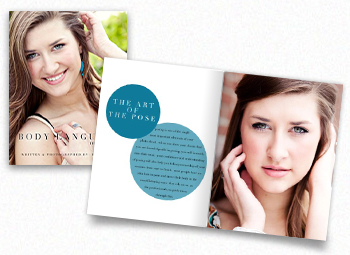
Holli True When I was planning my first workshop, I decided to create books for each of my attendees. I didn’t want them to have to scribble notes, so I provided each of them with all of the workshop content in a book. Following the first workshop, I received a dozen emails from other photographers that had heard about my workshop book. While they weren’t able to attend my workshop, they wanted to buy my book. I decided to revamp the workshop book and offer it to the public for purchase, calling it Field Notes: Workshop in a Book. Since then, I have also released Body Language: The Pose Book.

What exactly are your Young & Free publications?

HT Traditional studios offer proof books with printed images in a leather album, but I am not a traditional photographer. The Young & Free Look Book is my version of a proof book, in magazine format. Needless to say, it was a huge hit with my clients and got everyone buzzing about my business. While albums tend to be more of an heirloom product, our Young & Free look books are intended to be toted around and shared with their friends.

Q&A-Products

How did Young & Free come about? What inspired you?

HT In 2012, while planning for my senior photography season (which peaks in late summer and fall), I looked at my assortment of products and decided to simplify. I stripped down my products, which used to consist of photo boxes, signature books, mounted prints, gallery prints and more. Having too many options for clients can be overwhelming, so I decided I wanted to focus on a small handful of items–keeping my brand in mind–I ended up with Albums & Metal Gallery Prints. I quickly realized that I was missing one thing: a key product that my clients would love, that would do constant advertising for me. My solution: a Look Book.

I absolutely love looking at designer look books, they are different from magazines, as they are filled with just pictures. I adopted the same format and dedicate the entire look book to my clients, filling all of the pages with their beautiful pictures. It is a unique product that other photographers in my area aren’t offering, which allows us to stand out, while remaining true to our brand.

Tell us about your newest publishing adventure.

HT Earlier this year I joined forces with Heather Dunnigan, of TheaCreative, to create a new magazine publication for photographers called Denim+Grace. As a workshop instructor and business mentor, I am very passionate about teaching and sharing. I was craving a creative outlet and new platform to connect with other photographers in the industry and create something beautiful–a magazine was the natural choice. We are so excited about our premiere issue launching on May 1st, 2013!

BodyLanguage

Why did you choose MagCloud?

HT I have been a dedicated MagCloud user for over a year now. I turn to MagCloud for all of my printing needs in terms of magazines & books, it was a no-brainer for us when it came to Denim+Grace. We absolutely love the print quality, quick turnaround time and impeccable customer service that MagCloud offers. Thank you so much for creating a product that makes our hard work look gorgeous!

How has MagCloud made a difference in your business?

HT I think the biggest difference I have seen in my business because of MagCloud is with my look books. Our Young & Free look books sell themselves, we always have them on hand when we are out and about, which has been a huge marketing piece for us this year.

What software do you use to design your publication? Do you have any special tricks to make it easier or well designed?

HT I am a Photoshop girl, so it’s my go-to for design. Due to the number of look books I had to create, I wanted to make it as simple as possible to get them designed, so I made an assortment of templates that I can mix and match easily. Due to the popularity of the look books, I recently wrote a blog post about how I created them and now offer templates for purchase to anyone looking to create similar publications.

What tips do you have for someone new to self-publishing?

HT Do it! MagCloud makes the entire process a breeze, just commit and go for it! Oh, and before you order a large number of copies, make sure to do a test run, just in case! When you start designing, it’s easy to forget to leave enough cushion on some pages, a simple test can give you peace of mind!

If you were stranded on a desert island, what one book would you want with you?

HT Eclipse by Stephanie Meyer. I am obsessed with the Twilight Saga- Eclipse was my absolute favorite! I could read it and reread it time and time again. I’m not even ashamed to admit it! ;)

MagCloud’s Favorite Instagram Users and Hashtags

instagramfeaturedimage

If you’re not already following @HPMagCloud on Instagram, you should be! We love to engage with our publishers and see MagCloud publications and products out in the wild–how you use them, where you enjoy them and cool pictures of your work coming together… So when you decide to show off your MagCloud product, be sure to tag us (@hpmagcloud) or use the #magcloud hashtag.

In the meantime, we have a few favorite Instagram users we’re following, and some suggested hashtags for when you share the MagCloud love on Instagram.

Favorites to follow:

Us, of course – @hpmagcloud

Andrew Shinn – @shinnphoto

BRINK Magazine – @brinkmag

Cory Ann Ellis/AC Ellis – @coryannellis

CycleEXIF – @cycleexif

James Worrell – @worrellphoto

Jennifer Koskinen/Merritt Photo – @merrittphoto

Julian Bialowas (16 Hours Mag) – @julianbialowas

Rob Shore/I Carry the Bag – @shorespeak

Sian Richardson Tax Attorney (16 Hours Mag) – @sian_richardson

Standard Magazine – @standard_mag

Toobydoo – @toobydoo

We Like We Love – @welikewelove

#tags to remember:

#MagCloud

#MagCloudinthewild

#MagCloudLove

#printisnotdead

#graphicdesign

Introducing the MagCloud Referral Program

Get rewarded when friends, family or colleagues sign up for a MagCloud account and become publishers.  Existing MagCloud users can earn $10 for every friend they refer that joins MagCloud and buys or sells $25 worth of their own published content through the website.

Participating is really easy:

  • Sign-in to your MagCloud account and share a link to a publication, seo company, a publisher profile, even a MagCloud web page via the MagCloud website or web viewer.
  • Your friend signs up from that link and becomes a new MagCloud member.
  • They publish their first MagCloud publication.
  • Then your friend buys or sells at least $25 of their own published content.
  • You will receive a $10 cash credit for your referral.

You don’t need to sign up for our referral program all MagCloud members are automatically eligible.  Just start sharing links (while signed-in) from the MagCloud website to participate.

For more information see our website or FAQs.

How to Use Pinterest for MagCloud Publishers

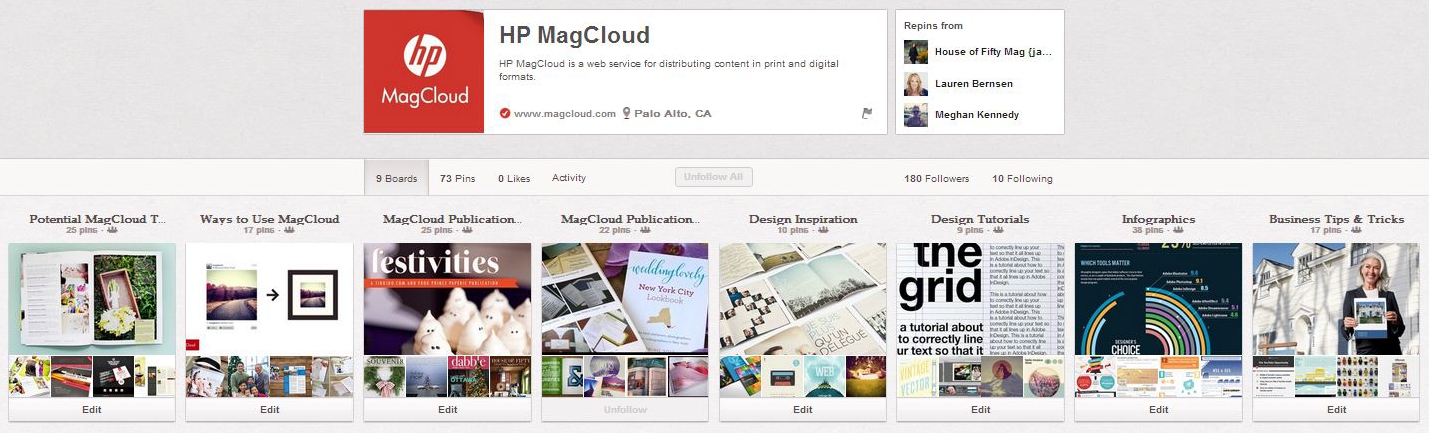
We’re quite fond of photos and videos much like the online community on Pinterest. It’s no wonder that we heart the pinboard-style visual sharing site (we made our own Pinterest account too!) and are always inspired by what people are pinning.

MagCloud_Pinterest2

Our publishers are also including Pinterest as part of their marketing strategy and we’re seeing a lot of readers using our new social sharing capabilities. Remember that readers can like, tweet, pin, and share their favorite print and digital publications from our website or within the web-based viewer.

For those of you starting a Pinterest account, here are a few tips we’ve found to be helpful on how to use the visual platform to market your publication and engage with your readers.

  • Pin photos from your publication or website – The pinned images will include a link back to your site, which will help drive traffic there.
  • Pin videos – Go beyond just pinning pictures and share videos especially ones that are highly relevant to the theme of your Pinterest boards.
  • Introduce the members of your team – Let your readers and customers know who’s behind the genius.
  • Follow other Pinterest users in your local area and/or field of expertise – You can see how other pinners are getting likes and re-pins and help build upon your presence in your community. Remember to follow us on Pinterest, too!
  • Ask fans to pin photos of themselves with your publication – This is a great way to build engagement with your readers and learn which issues are their favorites.
  • Test different captions – Be sure to include keyword phrases and hashtags, and remember to have fun with your captions.
  • Find out which pictures have been pinned from your site – Simply type the following URL: “http://pinterest.com/source/ADD YOUR URL HERE” and you can see which photos or content are most popular. Find out what people are pinning now, from MagCloud.com!

As a publisher, are you using Pinterest to market your publication? Share your tips on how to use Pinterest with us in the comments section below.

Put Your Resolutions Right Where You Can See Them–on the Wall.

postertemplates

Well, it’s that time of year again–when we all take a moment to reflect on the last 12 months and set goals for the future. The beginning of 2013 is less than a week away, so it’s time to set your New Year’s Resolutions and figure out how you will stick to them this year.

Some of us write them down and start off resolute, yet a good portion of us will likely forget about them or give up by March. This year, to keep us on track, the MagCloud team decided to decorate our offices with empowering words and goals printed on our awesome Poster product.

If you’re not familiar with HP MagCloud’s Poster product, you should definitely check it out. Available in 12″ x 18″ and 18″ x 12″ trim size options, our posters are printed on 80# premium cover stock, and come standard with UV Coating for increased durability. At just $2 a piece (plus shipping) they make for very affordable gifts, or leave plenty of room to mark-up and sell. We’ve seen folks use them to show off their love for cars, create unique calendars, or even as an alternative to guest books.

But let’s not to get distracted from our resolutions already.  To get you started creating your own resolution posters we’ve created some templates and design inspirations below.

Please note that our Poster product offers you the ability to print on both sides (we like to put a little message on the back for gifts/clients) but if you choose to upload a file with only one “facing page” the MagCloud uploader will warn you that you should have two “pages.” Don’t worry about this–we will add a blank side to the back for you.

COLOR-BLOCK POSTERS

Adobe InDesign (CS4 or higher):

Apple iWork Pages (’09 or newer):

Microsoft Word:

Adobe InDesign (CS4 or higher):

Apple iWork Pages (’09 or newer):

Microsoft Word:

Special Italicized Font used: EXMOUTH

Ringing in the Holidays with a Meet-up and Twitter Chat

Hope you’re all enjoying December so far and that you’ve got those final MagCloud orders in for the holidays!

For your viewing pleasure, below are a few shots from our recent holiday meet-up at the Press Club in San Francisco. Be sure to follow MagCloud on Instagram to see the latest and greatest from our team. We look forward to seeing you at our next meet-up in the new year!

MagCloudMeetup_2

MagCloud’s Chief MagClouder Andrew Bolwell and
Marketing Mixologist Patty Tulloch at the MagCloud Meetup.
 

MagCloudMeetup_4

All the awesome MagCloud publications at our meetup!
 

MagCloudMeetup_3

Hooray for new MagCloud fans and friends!
 

MagCloudMeetup_1

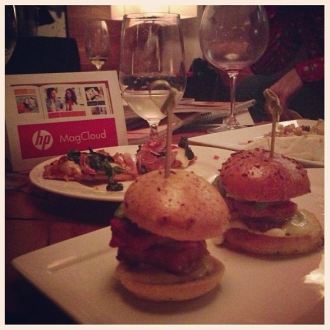
Delicious food and wine from the Press Club
at the MagCloud Holiday Meet-up.
 

We also had a memorable Twitter Chat last week with Kyle Menard, editor of BRINK Magazine. There were quite a few inspirational tweets that we wanted to share with you. Below is a brief excerpt from the Twitter Chat – feel free to read our entire Twitter Chat via Storify.

  1. MagCloud
    Q1 – To start things off – @BRINKmag, how did you get started in publishing? #MagCloud
  2. BRINKmag
    Started with a vision & to create a guide for young professionals RT @magcloud how did you get started in publishing? #MagCloud
  3. MagCloud
    Q3 – Do you see a difference in behavior/interest between your print and digital readers? #MagCloud
  4. BRINKmag
    @MagCloud It’s a challenge, but readers want that hard copy AND the instant download of the latest issue. MC lets us provide that #MagCloud
  5. BRINKmag
    @MagCloud Definitely. Big digital numbers when an issue debuts, but it tapers off. Hard copy somewhat sustains through the year #MagCloud
  6. MagCloud
    That’s great to hear, @BRINKmag. Digital offers instant gratification while print gives longevity – makes it easy to go back to. #MagCloud
  7. MagCloud
    Q5 from @TONE_DOPE: “When will @MagCloud begin offering subscriptions & an oversized 10×13 print copy option? #MagCloud
  8. MagCloud
    @TONE_DOPE We’re looking at subscription models and new product types. We do offer 11×14 today. #MagCloud
  9. MagCloud
    Okay, @BRINKmag. Jumping back to you with question from our community, how do you see #mag publishing evolving in the future? #MagCloud
  10. BRINKmag
    @magcloud There will always be a place for print, but with trends, it seems essential that a publication have an app #MagCloud
  11. MagCloud
    Last question from our team, @BRINKMag – what advice do you have for magazine publishers starting out? #MagCloud
  12. BRINKmag
    @magcloud It comes down to being on top of your game (in whatever you do), being a leader in what you believe in & staying current #MagCloud
  13. BRINKmag
    Lay the groundwork, be prepared (cont) RT @magcloud – what advice do you have for magazine publishers starting out? #MagCloud
  14. BRINKmag
    Also, (turning the tables) what advice do you have for publishers? RT @MagCloud Do you have any questions for Andrew? #MagCloud
  15. MagCloud
    Answering your 2nd Q: Listen to your customers, focus on innovation, embrace change, and don’t be afraid to take risks. #MagCloud
  16. BRINKmag
    BOOM —> RT @MagCloud “Listen to your customers, focus on innovation, embrace change, and don’t be afraid to take risks.” #MagCloud
  17. BRINKmag
    Definitely going to be quoting some of that for the next few weeks @MagCloud! Great stuff. #MagCloud

MagCloud Holiday Meet-Up and Twitter Chat

HolidayHeader_V2

Hey Bay Area! Help us celebrate 2012 at the MagCloud holiday meet-up in San Francisco with our Chief MagClouder and his team. Hear about all the latest MagCloud products and services, and learn what’s in store for next year.

  • Who: Fans of MagCloud – from new to seasoned publishers and all our social media fans!  Not sure what MagCloud is? Stop by to find out!
  • What: Learn about what the MagCloud team is working on, ask questions, share feedback and win prizes!
  • When: 6:30-8:30 p.m. on Tuesday, December 11
  • Where: Press Club, 20 Yerba Buena Lane, San Francisco, CA 94103 (View Map)
  • Cost: FREE! Light appetizers and drinks will be served
  • RSVP: Let us know you’re coming by RSVPing in the comment section below!

If you can’t join us on Tuesday evening, you can still discuss all things publishing during our next Twitter Chat with one of our MagCloud publishers! The hour-long Twitter Chat kicks off at 10:00 a.m. PST on Tuesday, December 11 on our MagCloud Twitter handle (@MagCloud) and will feature our Chief MagClouder Andrew Bolwell and BRINK Magazine editor Kyle Menard.

What are Twitter Chats? It’s simply a discussion conducted on Twitter, where you get to Tweet live with our Chief MagClouder and Kyle about, in this case, publishing as well as any other MagCloud questions you have on your mind.

How can you participate? Starting now, submit questions for Andrew and Kyle by either tweeting them to @MagCloud using the #MagCloud hashtag or ask them right here in the comments section of this blog post. We also encourage everyone to join our Twitter Chat from 10:00 to 11:00 a.m. PST on December 11 where Andrew and Kyle will respond to your questions live.

As an added incentive, all fans who ask a question will be entered into a random drawing for a chance to win a $25 Paypal MagCloud gift card perfect for you, your colleagues, friends, family, etc. to purchase your favorite publications on MagCloud.com during the holidays. The drawing is open to residents in the United States only. For the complete rules, see below.

Here’s a little more info about Kyle:KyleMenard

Kyle Menard sets his sights on achievable goals while keeping the big picture within his scope. After launching his own award winning magazine in 2009, BRINK, he continues to explore fresh and innovative channels to reach a bigger and broader audience while keeping the current audience engaged. He thrives on spreading the message of entrepreneurship, attainable goals and staying dedicated to a brand – the ultimate message of BRINK Magazine.

Don’t forget to follow our Twitter handle, @MagCloud, for the latest MagCloud news and updates, and ask those questions using #MagCloud or in the comments section here! Look forward to seeing you in-person or virtually next week!

The giveaway opens on Thursday, December 6, 2012. Entries must be submitted by 10:00 a.m. PST, Tuesday, December 11, 2012 and the winner will be announced via Twitter and our blog on Tuesday, December 11, 2012. The prize will be one (1) $25 MagCloud gift card and one (1) winner will be selected at random. All entrants agree to be contacted by Hewlett Packard for prize fulfillment. The drawings are open to MagCloud blog readers, Twitter followers and Facebook fans that reside in the United States and are at least 18 years of age at time of entry. No purchase necessary to enter or win. There is no limit on the number of entries from any entrant, but each entry must be submitted separately as a Tweet using the hashtag #MagCloud on Twitter or as a blog comment on this blog post. Anyone found to be in violation of any of our rules or third party networks will be ineligible. Entries in this contest will not be carried over into subsequent giveaways or drawings.