So whether you are a tourney stats master, like to pick based on your favorite mascots or simply want to show support for your alma mater, show-off your picks with a cool Bracket Poster.
To get started you can either order a print copy of our blank 18″ x 12″ Bracket Poster and fill it out with your lucky picks when it arrives. Or if you already feel confident in your picks download a Microsoft Word template and create your custom poster bracket. Once you’ve finished filling in your picks in the tempate, be sure to follow our software-specific instructions to export your MagCloud-ready PDF:
Once you’ve exported your PDF, upload your completed bracket to MagCloud and order a copy of your custom poster, picks and all.
MagCloud Posters are just $2.00 for a full color front and back professionally printed poster that will look great in your office cube, dorm room or on the fridge, so you can track your team’s road to the Final Four.
Share who you are pulling for in this year’s tournament or other ideas you have for MagCloud posters in the comment’s section below.
Let’s be honest with ourselves, when you hear somebody say “I’ve never heard of Twitter,” or “I don’t tweet” you might double take – at least on the inside. The inner marketer in you can’t believe there’s someone out there who hasn’t heard of Twitter. Twitter has been around for …
That’s where you get sidetracked. You know Twitter’s old, but it can’t be that old. As it so happens, Twitter changed everything with its inception in 2006. And although it’s not even 10-years old in human years, being seven years old in fast moving social media years makes it an adolescent, roughly speaking.
Twitter, and Facebook, LinkedIn, YouTube etc. are no longer a new-borns. You’ve been talking about them the same way you talk about your 16-year-old nephew – you hold your palm to your knee and say, “I remember when you were this big.” Similarly, the same incentives that worked for your nephew when he was “yay tall” no longer work on the teenage version. It’s the same with social media.
It’s time we really examined why – not how – today’s users are communicating across social networks, and why we as marketers cannot afford to limit our business efforts to just strategic silos. As Twitter and Facebook grow-up, the SMBs who approach their customers on common ground will enjoy the most success.
Here’s how SMBs can use Teenage Twitter and Teenage Facebook to enhance their brand:
Twitter
TWITTER AS A YOUNGSTER: The “mentions” landscape was fractured, directionless and often low-value. SMBs participated because the consumers were there, but they didn’t know why they were there or what they necessarily wanted to talk about.
TWITTER NOW: Twitter, as an adolescent, is a self-sustaining marketplace. Consumers engage the businesses they love because the nature of communication on social media is “out of the norm.” The veil of Internet anonymity mixed with the wonton desire for greater personal gain creates an environment through which consumers are entitled. This isn’t necessarily a bad thing for small businesses.
WHY THIS IS IMPORTANT FOR SMALL BUSINESSES: The communication marketplace on Twitter is fluid and has a very short shelf life. The number of users on Twitter is far larger than you may imagine. Not all your customers engage on Twitter, but many listen. The best SMBs understand this and play with it. Here’s how you can present a better image to all: Follow your customers on Twitter. Read their posts (yes this takes time, but there’s a direct relationship between time invested and trust gained). Engage with them on their interests. Because it’s your customer, they need to know that your business is using Twitter to make them feel special. Do this for a few customers, and more will recognize the “special” value they can gain by meeting you there. Take Oreo for instance, they regularly meet consumers on the consumer level. This tweet provided only slim brand association, yet was still highly engaged upon due to the brand sponsoring its community’s interests. For some of the best small business engagement, follow @UnMarketing, @RamonRay and Anita Campbell of @SmallBizTrends and see how they conduct conversations.
Facebook
FACEBOOK AS A YOUNGSTER: The introduction of ads and privacy concerns initially put Facebook users and business at odds. Facebook took some time to fine tune its platform: traditional display ads made way for sponsored stories, sponsored accounts and higher values on visual content (more on that soon), Facebook has certainly been an up-and-down in its youth. Brands and businesses were in an arms race to gain more likes, without having a real-world understanding for what a “like” meant.
FACEBOOK AS A TEENAGER: Everybody uses Facebook (Moms, Kids, Teenagers, even cats and dogs). Your content may only be delivered to a certain percentage of your already-gained audience. BUT, your beacon of branding still exists as a landing page, and now it’s mobile. And as any parent will tell you, a mobile phone is a teenagers third hand.
WHY THIS IS IMPORTANT FOR SMALL BUSINESSES: Teenage Facebook tells us exactly what it wants. It wants fresh, visual content that looks great on that $600 smartphone. The emphasis is less about using it to post posts, and more about creating an environment where your consumers’ interests are sponsored and hosted on your Facebook page. Tactically speaking, this means SMBs should be focused on creating and posting more pictures, graphics, videos, videos of cats…For a good cue, go to MagCloud publisher BRINK Mag’s Facebook page. There’s tight integration with photo sharing, leading to more relevant and inspiring content. The key with strong visuals is allowing for a breadth of creativity, especially for SMBs. Create something memorable, and your consumers will be more inclined to participate, associate and share. For a great example of memorable visuals, visit the How to Market Your Horse Business Facebook page.
Have some ideas of your own? Agree/Disagree with how to treat Twitter and Facebook as they grow up? Let us know in the comments!
Feel like your business collateral needs a little refresh? Let us help out with our brochure and flyer templates.
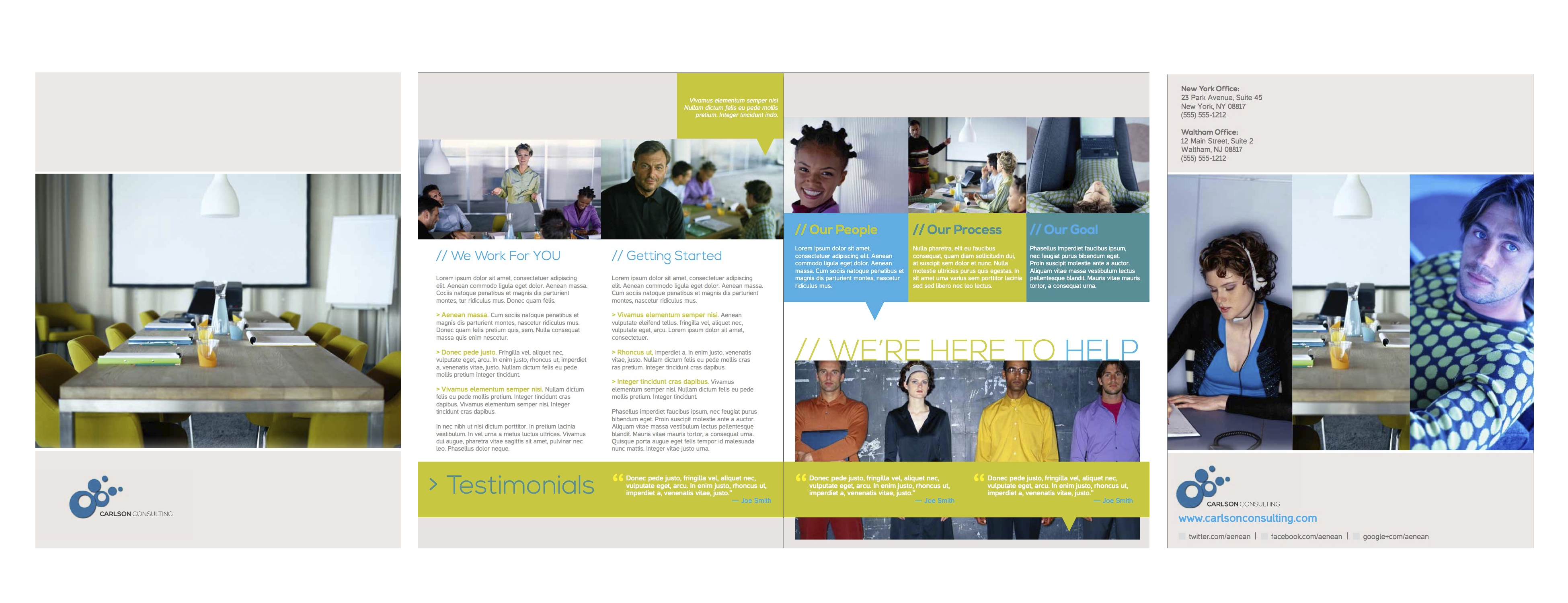
Business Services Brochure
This four page 8.5 x 11 Pamphlet template is an easy way to create a great looking company, product or service brochure that is MagCloud-ready.
Once you’ve finished designing your brochure in InDesign or Pages using the templates below, be sure to follow our software-specific instructions to export your MagCloud-ready PDF:
Our Flyer product is great for customer case studies, data sheets, real-estate sales sheets, menus and more. Download our case study template to showcase your latest sales wins and solutions.
Once you’ve finished designing your flyer in InDesign or Pages using the templates below, be sure to follow our software-specific instructions to export your MagCloud-ready PDF:
When Cory Ann Ellis moved from California to the Midwest to study Physical Education in college, she never imagined that she’d one day have a booming photography business in South Dakota and her name on the masthead of two magazines.
Her first headlong dive into publishing, SD Wedding Style, is focused on wedding information and ideas for couples with both an annual print publication and a regular blog-site.
What lead you from photography to publishing?
Cory Ann Ellis It was really a natural progression. While I love magazines, I am a horrible writer but I found my images are a wonderful visual compliment writing and so it just made sense to create a publication where there wasn’t one previously. The on-demand printing made it possible for us to bring SD Wedding Style to life without looking for financial backers to help with the cost of printing.
There are many magazines to choose from for wedding inspiration–the greats like Martha Stewart and Real Simple–but my partner Leah (a graphic designer and wedding coordinator) and I had never seen a single South Dakota wedding or vendor featured. Therefore it was time to create one and showcase all of the great options couples have right here.
My partner on Wholesome Magazine came to me to pick my brain on launching her idea of a South Dakota-based food magazine. Shayla is a wonderful journalist, talented graphic design and amazing cook. It made sense to join her in the endeavor and now our first issue is due out in Sept 2013 and it will be a bimonthly publication. I’m excited for it’s release, although my waistline is a little less excited–you know I have to try all the foods I photograph…
What sorts of publications do you publish?
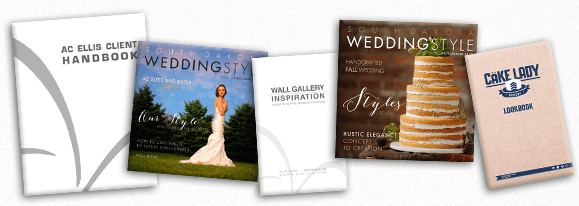
CAWith MagCloud I print for AC Ellis, SD Wedding Style, Wholesome Magazine and The Cake Lady. I use MagCloud to print magazine publications as well as collateral material and lookbooks for multiple businesses. SDWS uses MagCloud for both our print and digital distribution and media materials. Wholesome uses MagCloud for our collateral materials. With AC Ellis I use MagCloud for everything I can. My product catalog, proof magazines, client handbook, rate guide, vendor magazines, lookbooks and more. For home projects I like to use it for image catalogs of all the images I want to reference without going to the computer.
How did you get started publishing through MagCloud?
CAA friend originally told me about MagCloud and I immediately was excited about the idea of short run magazines.
How has your business evolved with on-demand publishing?
CAIn my photography business MagCloud has allowed me a new means to put my images in print. In the age of digital too often images do not leave the computer. Heirloom quality albums and many lab produced products are incredibly expensive and aren’t ideal for quick distribution and lots of handling/updating. My images are in more hands thanks to MagCloud and that means more exposure, bookings, and income. The number of my referrals turned to bookings has increased since I’ve used MagCloud to print materials specific to the venues and coordinators I wanted to work with. This year about 42% of my weddings are based on these referrals versus about 10% the previous year.
What software do you use to design your publications? Do you have any special tricks to make it easier or well designed?
CAI use Adobe InDesign® for all of my design work. When I found layers it opened up a whole new world.
What tips do you have for someone new to self-publishing?
CAFor someone new to self-publishing I have three main tips.
1. Research.
In order to produce a great product you need to research all aspects of the business. While this may be a creative outlet or a small project there are certain legal steps to take for your business. For example if you are going to sell advertising or the publication itself, things like obtaining sales tax licensing and filing, business registration, EIN number, etc.
2. Protect.
Your work is worth something and you should protect it. Either submit the entire publication or all of your images and text to the copyright office. While your work is copyrighted the moment you create it, registration allows for the recovery of damages in the event it is illegally copied. You can also trademark your name and logo. Not only federally, but in your state. Business names can also typically be registered in your state. Get your ISSN number so that your publication is searchable and citable. Lastly, put a copyright disclosure in your masthead or somewhere in your publication.
3. Partner.
You may be good at one skill like writing, but not design, editing, photography, or business operations. Find other professionals to round out your team. Either as partners in an LLC/Corp or as paid professionals and sub-contractors. A great team will make for a great publication.
What are your business resolutions for 2013?
CAI’m not a resolution gal, but I am a huge goal and list maker. And since I’m also into SMART goals I typically have a list of about 70-100 items designed to help me achieve about 10 main goals. This year’s largest undertaking is a complete business re-branding. Lots of fun and work.
Are there any blogs or publications that you use for business advice or guidance? Which ones?
CASurprisingly I do not read many business blogs, but I do follow some great people on twitter and love to read their posts and links. A few are Whitney Johnson @johnsonwhitney, Lucas Marcus @lucymarcus, and Oliver Blanchard @thebrandbuilder. I do always recommend small business owners read the book E Myth Revisited by Michael E. Gerber.
Today’s post is from designer and MagCloud publisher Jennifer Koskinen, owner of Merritt Design.
With a desire to start the year with a positive outlook, Sandy Puc just began a great discussion thread on LinkedIn asking people to think about the Top 10 things they believe contribute to a successful photography studio.
I love taking the first week of January to revisit goals for my photography business, and so was inspired to take a moment to reflect on my overall strategies for success. In no particular order, here are my Top 10 (ok 12) things I have observed over the years which motivate me every day. Some I live with confidence. Others I am still working to make wholly mine. What would YOU add?
1. THE CLIENT EXPERIENCE
Make booking, scheduling, delivering, and of course, shooting the photo session a memorable and fun experience. Inspire referral business through existing clients.
2. SMILE
Yes, you. Genuinely. Smile!! On the job … and at the proverbial coffee shop (can’t even count how many clients I’ve earned with this philosophy).
3. INSPIRATION / EDUCATION
Keep reading, networking, attending seminars and workshops, stay abreast of current trends, and try new things based on what inspires you.
4. GOALS / LISTS
Keep business and personal deadlines, and self-impose deadlines for non client driven ones. If you keep pushing back a deadline, ask yourself if the item should really be on the list (if so: do it! If not, remove it or put it on a separate back-burner list).
5. MARKETING
Schedule regular activity and think outside the box to market yourself creatively (in print, in person and via social media) Your website should reflect your personality. And especially when you’re starting out, don’t show every photo, show only your BEST photos!
6. COMFORT ZONE
Push it! Often! Shoot new material. I love to use my phone camera to shoot personal projects even on days when I’m not shooting for clients.
7. PRICING
Review cost of business and package pricing annually and always communicate clearly and confidently with clients (unless you happen to love negotiating — which I decidedly do NOT — printed materials with pricing menus help tremendously).
8. MONEY
Fall in love with the business side of what you do. This is still my biggest challenge. I had to finally design myself a beautiful system of spreadsheets because the available software systems were all too dry for me. May sound silly, but it works for me. Find what works for you.
9. CONTRACTS
Know and continually update your contracts to stay on top of constantly changing on-line world (especially if you work with digital files and licensing). Educate your clients about copyright laws, and gently educate clients that they are investing in your talent, creativity, instinct and vision, NOT paper and ink.
10. GRATITUDE
Be grateful for the fact that you get to do what you love for a living! Remind yourself of this simple and amazing fact when times are tough.
11. ACCEPT CHANGE
Don’t attach to old ways of doing things and don’t be afraid of learning new tricks. Let go of fear, take chances, dive in…
12. TAKE DANCE BREAKS
Often. Crazy ones. They are immeasurably good for the spirit. Not to mention sore, over-worked eyeballs.
And as part of my “outside the box marketing” I like to use MagCloud to show off my work in print and digital, as well as providing my clients with new ways to market their own businesses.
Learn more about Jennifer’s work on her website and see her collection of MagCloud publications on her publisher page.
Do you have your own Small Business tips? Share them in the comments section below.
Visual storytelling is nothing new in the realm of business. Content consumers love the power of an image portraying “1,000” words that leaves enough to the imagination while alluding to a larger point. To that end, MagCloud is running a #MagCloudHearts themed poster giveaway through Instagram.
But what makes Instagram an improvement over the time-tested and standardized visual element? To answer these questions, we continue our chat with Cory Ann Ellis and Trey Hill. This time, we’re shifting our focus from Pinterest to Instagram, and the best practices for leveraging the platform for publications and small business.
MagCloud: Are your businesses using Instagram for business purposes?
Cory Ann Ellis: Yes we are on Instagram (@coryannellis), and like Instagram for private use, it’s immediate and visual nature. It is free and clear of long posts, soapboxes and other negatives that can fill other social media platforms.
Trey Hill: My agency (@squarerootof9) specializes in image driven storytelling, and for most people, I am the agency. I’m an avid Instagrammer & use it to tell my story, which spans the professional, experimental and personal.
MagCloud: What’s your favorite element of Instagram, and why do you think it can help your publication?
Cory Ann Ellis: Instagram has the ability to show a steady stream of interesting content that can keep the reader’s attention between publication dates. With behind-the-scenes and feature teasers, viewers can get excited to pick up or download the next issue.
Trey Hill: It’s a craft that’s always been about contextualizing and sharing our world. Instagram, for me, has made it so the time between seeing and sharing is almost zero. In that way, I think it’s perfect. Used well, Instagram can help anyone craft an ongoing story that reveals who you are and what you’re about. Just because you’re on a mobile device doesn’t mean that you can’t take time to learn the craft of photography. The tools have changed, but the aesthetic that draws people to a photo – good composition, proper exposure and a unique point of view – will never change.
MagCloud: What are your top Instagram tips for publishers?
Cory Ann Ellis: Show images that are graphically interesting and fun. Go easy on the filters. Focus instead on the framing and lighting so that you don’t need to use filters to distort from poor photography. Yes it’s just a camera phone, but you can use it wisely. Try hinting at an upcoming article by showing a tiny detail or abstract from the set without showing full setups.
#panogramtastic
Trey Hill: I don’t think my tips for publishers would be any different than the tips I’d share with an individual. I am three-quarters of the way through a four-part series on my blog about mobile-photography. I think, more than anything, I’d point people there as a great place to start:
In Part Three, I talk about how to push the medium of Instagram by highlighting something I created called #panogramtastic. Basically, Instagram is all about the single square image. For a while, people have been using apps to add white to the background of their images so they can post circles, or more traditional photo crops. I thought, “What if you could take the constraints of the app and use them to create something interesting?” I began by using my profile’s grid view to merge a single panoramic image across three frames. They come out like what you see on the left.
MagCloud: How best can publishers promote their publication using Instagram?
Cory Ann Ellis: I think one of the best ways is to use the hashtags to create contests or followings for a specific feature or event. For example, if you create a hashtag and promote the most recent publication by saying, “Where do you read your xyz magazine? – show us through Instagram. Hashtag your photo #xyzmagread.” Then you have a steady stream of everyone reading your magazine in different places and parts of the world. These can be fed into your websites, blogs and even shared on Facebook. This is a great way to show that others are enjoying your publication and they might also.
Trey Hill: One of my clients is the Dallas Stars, an NHL hockey team. One of the initiatives we’ve done for the past five seasons is inviting the fans behind the curtain. I think Instagram is perfectly suited to show people the raw, unpolished parts of who you are. Fans love it because they feel like they are part of the team. For a publication, I would say, use Instagram to show people things they wouldn’t otherwise see – an image that didn’t make the final edit, but is still evocative – a layout sketch or anything from the process. Just because it’s not “for real” don’t let that mean you don’t treat it with respect. Make sure you take time to art direct the frame or fuss over the treatment you put on the image. It may not be part of the publication, but every Instagram becomes part of your story.
———-
We’d like to give both Cory and Trey a special shout-out and thank you for showing us some of the magician’s tricks, so to speak.
Do you too have insight into how Instagram improves the story-telling strategies for your business? Let us know in the comments, and don’t forget to join the #MagCloudHearts Instagram poster giveaway!
There is nothing better than seeing your work in print. And we love how HP – MagCloud makes this possible and painless! At Two Bright Lights we focus on connecting magazines and blogs with great images from photographers and other creative businesses, so we understand the importance of beautiful magazines and business collateral. Many of our members use and love MagCloud. Whether they are photographers using it publish a portfolio or pricing guide, or editors using it to publish a print and digital magazine, HP MagCloud makes displaying and distributing their content a breeze.
Photographers, publishers, brides, and vendors have created thousands of beautiful publications using MagCloud, but we wanted to pass on what a few Two Bright Lights editors have to say about MagCloud and share details about the beautiful magazines and publications they create.
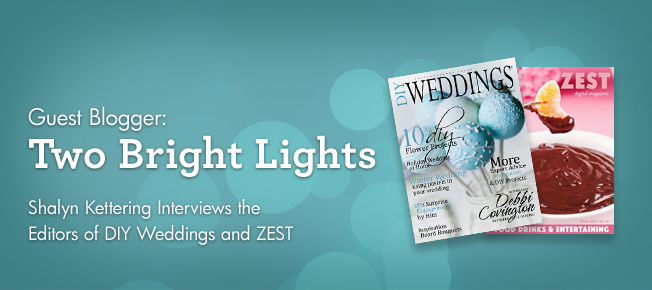
Meet Kym Stelmachers of DIY Weddings Magazine and Erika Pitera of Zest Digital Magazine.
Shalyn Kettering: Could you tell us a bit about your publication and editorial style?
Kym Stelmachers: DIY Weddings® Magazine is a wedding publication that is written and created by brides for brides. We cater to the bride with a budget of $15,000 and under with our main focus on the DIY. We provide DIY projects from brides, wedding planners, wedding vendors and crafters. I designed the publication to be a “visually pleasing” experience for our readers. We also decided to change the way we do advertising in our publications by developing a new innovative way to get the same content to our readers without the headache of having to thumb through endless ads to find the real content. We were the first wedding publication to offer its readers a better reading experience.
Erika Pitera:ZEST Digital Magazine is a seasonally focused mix of recipes, entertaining menus and easy, do-it-yourself home and holiday decor projects. Our goal is to inspire our readers with recipes, DIY projects and entertaining ideas that are approachable for both new and experienced home cooks.
SK: How does MagCloud fit into your publication process and what have you found most helpful about it as an publishing platform?
KS: Because we are primarily a digital magazine, we wanted to be able to offer our brides, vendors and photographers the option to purchase a hard copy. When we found MagCloud, we knew they would be a great fit for what we were looking for. It really became clear to us that we made an excellent choice when we received our first proof. The quality of their product is first rate! I hear it time and time again how beautiful our print publication is. MagCloud uses quality paper; the color is vibrant; their delivery and customer service is exceptional.
EP: In all honesty, it didn’t at first! When we first started ZEST, we only envisioned it as a digital publication. However, in exploring all of the publishing options out there, we were thrilled to find MagCloud because it allowed us to print our magazine with ease! Its accessibility and quality encouraged us to start designing our publication for both digital and print readers. MagCloud is great because it’s user-friendly. My reasons for that are two-fold: from a reader/consumer standpoint, it’s very easy to discover publications based on your interests or hobbies; from a publisher’s standpoint, MagCloud makes it easy for small publications to print small runs of awesome quality at an affordable price.
SK: What are your top 3 tips for first time MagCloud users?
KS: Really they makes it so easy to upload, setup, price and manage – anyone can use it. My only tip is to always order a proof so you know what you are offering your customers.
EP: 1. Be sure to follow MagCloud’s formatting instructions to get perfect results every time. You can get specific instructions customized for your publishing software that make it really easy to export your PDF properly.
2. Take advantage of the document preview to make sure all of your text and important elements are in the safe zone so that nothing gets cut off when it’s printed!
3. Get the most out of the your experience by offering both print and digital versions.
SK: Kym, We love all of your creative DIY tips in your magazine! Your sea shell bouquet in the last issue was fantastic! Where can people purchase it on MagCloud?
KS: Our Winter 2012 issue just arrived on December 1st and it’s our biggest issue ever. We have more inspirational ideas, do-it-yourself projects and 12 experts in the wedding industry giving our readers some great tips, advice and budget saving ideas. In each issue FiftyFlowers.com creates 3 DIY Flower Bouquet projects. What I love about it is they include an inspiration board and they provide the reader with a materials list and step-by-step instruction. We have gotten so much great feedback that we are going to continue these projects through 2013. You can purchase all of our issues on MagCloud under DIY Weddings® Magazine.
SK: Erika, The pear on the cover of your current issue looks delicious! Where can we get the recipe?
EP: Those are our Port Wine Poached Pears – they’re yummy and pretty easy to make. You’ll find the recipe on page 28 of our Holiday 2012 issue.
SK: What sort of submissions are you looking for from TBL members?
KS: I am glad you asked! We have a very special issue coming in 2013 and we are looking for anything that has a “red theme” about it. We will consider any of the following using a red theme: Photo style shoots, weddings, candy buffet tables, cake or sweet displays and engagements. Style shoots and weddings with themes around the circus, boardwalk, carnival, Valentines, Christmas, Fourth of July – keeping in mind that we are focusing on “red”. We look forward to working with all the talented photographers at Two Bright Lights!
EP: Your number one priority should always be to make the food or drinks look real and absolutely delicious! Natural light is a very powerful tool. I love food photos that are bright and appetizing rather than dark or dramatic. Props can be great, but make sure they don’t detract from the star of the show! Also, shallow depth of field can really help the food take center stage.
A big thanks for Kym and Erika for the interviews! Don’t forget to check out their magazines on MagCloud and if you are interested in having your photography featured in these and other great magazines check out the Two Bright Lights’ submission software!
It’s February, which means it’s officially time to start thinking about gifts for your friends and loved-ones for Valentine’s Day. But rather than buying an impersonal card at the store, why not make the holiday more meaningful with a DIY Recipe Book, Instagram-style poster or custom card? We’ve designed templates to help you get started and we can’t wait to see what you’re inspired to create!
Recipe Booklet
Around the holidays, we’re a big fan of the K.I.S.S method (Keep it simple, Silly!), so with that in mind we’ve created a template that makes for a great little gift, but doesn’t take a whole lot of time to create.
You can choose how little or how much to customize of this 12-page Digest Landscape recipe booklet. Make it personal by including photos, love notes and your favorite recipes, or you can use ours (don’t worry we won’t tell).
We’re offering the same template in some of your favorite software applications, so click on the links below to download the template of your choosing and get started!
***InDesign users: There are multiple layers in your file for you to get instructions and customize the design. Please note the “Example” layer is currently set to not print, so if you want to use our recipes and just edit the design directly, select the “Example” layer in the Layers palette and right-click to edit the “layer options” (just check the box that says “Print Layer”)
If the recipe booklet seems like too much, or you’d rather make a big impression without too much work, then the Instagram Poster or greeting card templates will be perfect for you. Swap in some personal photos of you and your loved one, or artistic shots they might enjoy and add a personalized message and you’re good to go!
Just be sure to use images that are high-enough resolution:
Poster – the squares require images that are at least 900 x 900 pixels and the rectangular images need to be a minimum of 1900 x 900 pixels.
Card – the square images need to be a minimum of 600×600 pixels and the rectangular images need to be a minimum of 1200×600 pixels.
All of the templates include standard system fonts, but to emulate that custom handmade look in our examples we recommend you swap out the typefaces for something more creative:
By now, you’ve seen some of the investments the social media community has made in Pinterest. The visual inspiration engine resonates with communities in such a natural way it’s no wonder that the little network that could is on a meteoric growth trajectory. But as Pinterest usage and prevalence increases, marketers are beginning to ask themselves how best to leverage the platform to get its message out.
MagCloud publishers have been using Pinterest for some time, with good success thus far. We’ve reached out to some “Pinteresting” publications to understand more about Pinterest’s benefits: Cory Ann Ellis (Pinterest page here)– of AC Ellis Photography, SD Wedding Style and The Cake Lady Bakery – and Trey Hill – who uses both MagCloud and Pinterest for Square Root of Nine, a story telling agency.
Have some thoughts, tips or ideas of your own? Let us know in the comments! And as always, if you’d like to respond to us or the authors, the comments section is the place to be.
—–
MagCloud: Have your publications used Pinterest for promotion recently? What have you seen from the platform that made the promotion unique?
Cory Ann: “We actively use Pinterest to promote our print and web publications. Pinterest is the fastest growing social media platform, and the viral exposure a company can receive through pinning is an important component of our marketing strategy.”
Trey Hill: “As the owner of a storytelling agency, sometimes it’s hard to distinguish what I do for myself and what I do to further our story. At some point, I just embraced that the line is blurry. I do use Pinterest regularly to bookmark images, stories and styles that I find appealing. I try to temper promoting my business, but do have a few boards that highlight my work.”
MagCloud: What do you think Pinterest might offer publishers that is unique to publishing (as opposed to the advantages for other small businesses)?
Cory Ann: “I think Pinterest offers publishers an opportunity to generate continued support and readership of past publications. When your publication is long off the shelf or not at the top of your promotional efforts, you have the ability through Pinterest to promote past issue sales, articles and advertisers. What a great way to stretch your reach and create a good use of past content rather than collecting dust in a lost folder on your hard drive.”
Trey Hill: “I’m certainly no publishing expert, but I think whether you’re a publication, small business, non-profit or sports team, Pinterest offers you the ability to curate tangible expressions of your brand’s story. You can craft a character and associate yourself, powerfully, with ideas, imagery and products you admire. However, most brands I interact with on Twitter aren’t taking advantage of this aspect of Pinterest.”
MagCloud: What are some tips that may help other publishers to get started on Pinterest?
Cory Ann: “Try not to only pin promotional pieces for your own business, but also images, services and products that supplement your business or life. For small businesses, Pinterest offers an easy method to allow your customers and readers to get to know the owners and employees by creating personal style boards. A personal connection is so important to brand and business loyalty, and this is a great easy way to reach out to your customers and share in a subtle way, without taking up vital print space. Pin images directly from your site or blog. Be sure the link back on Pinterest leads to a specific post and not just your home page. Use simple clear descriptions and hashtags on the images you pin. Make it easy for viewers to find your pins when they search.”
Trey Hill: “Don’t be scared to pin things that might not end up in a click back to your website. People respect organizations that are secure enough in their own identity that they are free to applaud the efforts of others. And, when you begin to point people to the things you admire, more often than not, the favor is returned.”
MagCloud: Pinterest is a highly visual social media platform, how can you use that style to promote your publication?
Cory Ann: “We are visual people and the use of good images and design can draw a viewer in and entice them to read a full article or publication. We like to post images of our publication that link back to our sale page on Pinterest. Also a board can be created for each article or issue to supplement the publication and drive traffic back for a full purchase or download. Behind the scenes and extra images that don’t make the article are great to draw the viewer in without compromising the distribution of the original content. Most publications are driven by advertisers. By pinning the ads, websites and products of your advertisers, you create an increased value to your ad sales.”
Trey Hill: “First, let me start with a warning. Self-promotion in social media of any kind needs to be tempered. Heavily. Make sure you’re pinning 15-20 items that have nothing to do with you directly for everyone that points back to you. If you can make that ration even larger, do it. As Brian Regan so appropriately warned, ‘Beware the Me Monster.’ I am continually impressed with Warby Parker’s strategy for pinning. This past summer they launched a Blue Mirror sunglass lens & created a board that featured pins with that shade of blue. Of the 39 pins on the board, only one featured the glasses themselves. That was an interesting idea and could apply to publications as well. Does your current issue have a theme that you could pin from? What about doing boards inspired by the various stories? That kind of thinking gets people excited and generates repins and conversation, which in-turn builds loyalty to your brand and the larger story you’re trying to tell.”
If you’re not already following @HPMagCloud on Instagram, you should be! We love to engage with our publishers and see MagCloud publications and products out in the wild–how you use them, where you enjoy them and cool pictures of your work coming together… So when you decide to show off your MagCloud product, be sure to tag us (@hpmagcloud) or use the #magcloud hashtag.
In the meantime, we have a few favorite Instagram users we’re following, and some suggested hashtags for when you share the MagCloud love on Instagram.

 March Madness is in full swing with tip-off just hours away for this year’s NCAA Basketball Tournament.





 With a desire to start the year with a positive outlook, Sandy Puc just began a great discussion thread on LinkedIn asking people to think about the Top 10 things they believe contribute to a successful photography studio.
 Visual storytelling is nothing new in the realm of business. Content consumers love the power of an image portraying “1,000” words that leaves enough to the imagination while alluding to a larger point. To that end, MagCloud is running a #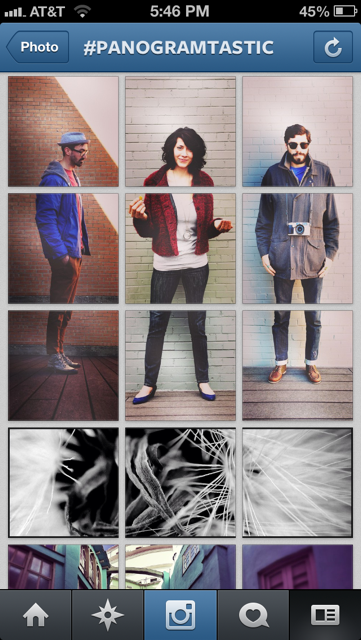







 Publisher's Corner