Go Big With Our Large Form Factor Products

MagCloud users deserve larger form factor products and we are happy to offer not just one but seven large product types.

Tabloid Product Family

At 11″ x 14″ trim size Small Tabloid is smaller than a standard newspaper but larger than our Standard letter-size product.  Our Large Tabloid product has a 17″ x 11″ trim size offering more room for images and content. All Tabloid products are published on premium cover stock, have Wire-O Binding, and are ideal for large format portfolios, custom calendars, manuals and more.

  • Small Tabloid: 11″ x 14″ and 14″ x 11″ trim size options
  • Large Tabloid: 17″ x 11″ trim size
  • $0.36 per page with full color printing
  • 8 to 90 pages in length in multiples of 2
  • $2.00 per copy for durable Wire-O Binding

Poster Product Family

Our full-color, double-sided Poster are printed on premium cover stock and come standard with UV coating giving them an extra sheen and making them more durable. Posters are ideal for promotions and special event keepsakes such as gallery exhibits, music festivals and fundraisers.

  • Available in 12″ x 18″ or 18″ x 12″ trim sizes
  • Full-color professional printing on 80# premium cover stock paper
  • Standard UV Coating front and back for increased durability
  • Each individual Poster is only $2 to print ($1.50 for orders of 20 or more).

Large Square

MagCloud is adding to its Square product family by offering a new large form factor Square product. At 12″ x 12″ trim size, this new product is great for one-of-a-kind portfolios, photo books or training material.

  • Available in 12″ x 12″ trim size
  • Durable Wire-O Binding
  • 80# premium cover stock
  • 8 to 90 pages in multiples of 2
  • $0.36 per page with full color printing
  • $2.00 per copy for Wire-O binding

Standard Landscape

Finally we are also expanding our Standard product line, with the addition of a landscape option. Measuring 11” x 8.5” and also using Wire-O Binding and premium #80 cover stock paper, this new product option is useful for portfolios, magazines, booklets, catalogs and more.

  • Available in 10.75″ x 8.25″ trim size
  • Durable Wire-O Binding standard
  • 80# premium cover stock
  • 8 to 90 pages in multiples of 2
  • $0.20 per page with full color printing
  • $2.00 per copy for Wire-O Binding

Note: Standard Landscape page and trim size will also be available as a Flyer option.

What do you think of these new products and how do you plan to use them?  Let us know in the comments section below.

Summer Fun with MagCloud

Over the next six weeks we’ll be sharing blog posts that discuss how to use MagCloud to plan vacations, create excitement for family reunions, capture all your summer memories and more.

First up is creating MagCloud published photo books directly from your iPad with the Poyomi Photo Book application. This iPad application makes it easy to create photo books while on the go–select photos, design your book, order, and have MagCloud print and deliver them before you even get home from your vacation.

Step 1: Select your Photos

Poyomi’s app makes it easy to choose photos for your book from your iPad albums including your camera roll and iCloud PhotoStream, or import them from third party websites such as Flickr, Facebook, Picasa, SmugMug and Dropbox.  Simply upload your photos to the Poyomi Book Editor by selecting the specific photos you want to include in your book.


Step 2: Organize Your Photos

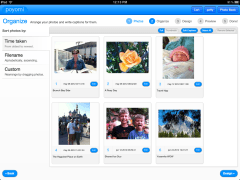
The Book Editor lets you organize the photos in your book by date taken, alphabetically or you can drag and drop them to create a custom arrangement.

You can also add captions, rotate images and ensure your photos print as large as possible by favoriting them.


Step 3: Design Your Book

Poyomi allows you to select from four of the MagCloud product types–Letter (aka MagCloud Standard), Digest, Digest Landscape and Small Square. You can also choose your binding type either Saddle Stitch Binding or Perfect Binding for books over 20 pages.

Poyomi’s design features include four color schemes for the inside of the book, as well as multiple type face colors for the cover title of the book.  Title your book and choose a wrap around cover photo or individual photos for the front and back of your book.

The Book Editor also allows you to crop and select portions of the cover and back photos for the perfect look.


Step 4: Preview Your Book

All that’s left is previewing and making final adjustments to your book.  You can write a brief intro to your book including using one of your travel photos as a background image, as well as creating a brief closing note to go at the end of the book.

Once you’ve previewed your entire book simply tap “Finish”.


Finished!

That’s it in a few easy steps you’ve created a travel photo book on your iPad without ever leaving your beach chair.

Poyomi gives you the option to save your book to your Poyomi account for editing when you get home or you can create a personal home page where friends and family can preview and order copies of your book. Finally you can purchase it directly from your iPad with a credit card or via a PayPal account.


How can you imagine using Poyomi’s Photo Book iPad app this summer?  Let us know in the comments section below.

Creating a PDF? We’ll Help You Get Started

As we continue to add new product sizes to the MagCloud service, we’ve made it easier to find the requirements for the product you want to create with our Getting Started page. This new page in the Create section on the MagCloud site lets you select the product, trim size, and binding type for the publication you want to create, and then provides you with the appropriate PDF specifications, things to keep in mind when designing your publication, and step-by-step information packets to help you get started.

In the PDF specifications section, we not only provide the correct PDF size, trim size, safe zone, and bleeds for creating a MagCloud-ready PDF but we also make it easier to understand what these concepts are and how they relate to one another. As you hover over each of these values on the right, you’ll notice that the corresponding area gets highlighted in red in the diagram on the left. At the same time, a text description of what the specification is appears next to your cursor, letting you know, for example, that the PDF Size is the page size of the PDF you will upload to MagCloud. Below the PDF specifications, there is a section for Additional Information that is specific to the publication you are hoping to create. This area lists things that are important to keep in mind while designing your PDF, from embedding fonts to allowing space for the 2D barcode that goes on the back page of your publication.

Finally, at the bottom of the Getting Started page are links to download Information Packets for a variety of software programs. Clicking on one of the icons will download a .zip file, which unzips to become a folder specific to that program and the product, trim size and binding you initially selected. Each folder contains a PDF with step-by-step instructions to help you design a MagCloud-ready PDF from scratch, or modify an existing document for use with MagCloud. In addition, many of these folders also include templates or presets that can be used in conjunction with the step-by-step instructions to help jump-start your creation process.

At the moment we offer Instruction Packets for Adobe InDesign, QuarkXPress, Microsoft Word for Mac and PC, Apple iWork Pages, and Microsoft Publisher. We are planning to add instructions for additional software in the near future though, so keep an eye on the blog for news about those additions. And if there’s a type of software that you would like to see MagCloud-specific instructions for, we’d love to hear about it in the comments below.

Print and Digital: A Winning Combination

Print vs. digital has long been hotly debated. Recently, we’ve seen several experts weighing in on the topic, arguing that print and digital can coexist and will in fact strengthen a brand when used together. Of course, we’ve always known this at HP MagCloud (check out our Jan. 5 blog post), and we are thrilled when other people realize it doesn’t have to be an either/or proposition. The challenge is finding the right medium to use to tell your unique story, so that it’s heard and understood by your audience.

So what are people saying? Novelist Dave Eggers in the Guardian said, “It’s our admittedly unorthodox opinion that the two can co-exist, and in fact should co-exist. … But they need to do different things. To survive, the newspaper, and the physical book, needs to set itself apart from the web. Physical forms of the written word need to offer a clear and different experience. And if they do, we believe, they will survive.”

When should you choose digital? “For news, facts and information, let’s tell stories as they unfold: a tweet here, an update there, a database, a video clip, a timeline, a slideshow, a conversation, a list. Let’s master the tools of digital storytelling and learn to match our tools and techniques to the circumstances,” stated digital guru Steve Buttry on Poynter.org.

What about print? “Let’s respect the pure, traditional story – the narrative string of paragraphs – by reserving that form for real stories,” Buttry added.

We’re fortunate to live in a world where we have both options.

In telling your story, you’ll want to rise above the chatter. It’s a good idea to participate in the online conversation by using Facebook, Twitter, email newsletters and more to share what’s happening in the moment. You’re demonstrating your knowledge about your industry and connecting in a more immediate way with your audience.

Meanwhile, a print publication showcases your photographs and carefully crafted story to an audience who wants to linger over and slowly digest your content. No matter how great digital content is, readers can stash magazines in their purses, dog-ear the pages and tear out their favorite articles. Quoting The Economist (June 9 issue): “As long as there are coffee tables, people will want things to put on them.” The high quality of print makes you proud to display your work to clients, and likewise, your clients will be happy to share your magazine with people they bump into.

HP MagCloud provides both print and digital offerings because different stories beg to be told in different ways. Plus, you might reach new readers who prefer to read content on their iPad or smartphone. We realize there is much to consider, and one of the main deterrents of print is the expense and complexity. With HP MagCloud, it costs only 20 cents per page for Standard and Square products, there are no upfront costs and everything can be done via our website with a few clicks of the mouse. So a small business on a tight budget can afford to self-publish their content.

For a small business, blending print and digital elements into your marketing is a win-win. Does your business plan include both digital and print? If not, here’s your chance to consider both.

MagCloud for Graduation Memories

Congratulations class of 2012! Now that you’re graduated, what’s next? Graduation parties? Summer travels? Job hunting? If it’s any and/or all of the above, then we’ve got you covered.

From party invitations to summer travel itineraries to professional portfolios to thank you cards, we’ve put together some ways that MagCloud can help prepare you for the next step in your life.


Graduation Parties

Hosting a graduation party? MagCloud’s new square product is perfect for invitations and party programs. After the party is over, create a one-of-a-kind scrapbook with photos and memories so you’ll never forget the special day.


Summer Travels

Traveling this summer? Whether you are traveling alone or with friends, keep track of flights, train schedules, hostels, and global destinations before you leave – our flyers are perfect for travel notes and itineraries!  After your trip, compile all of your pictures and memories into a Square photo book or scrapbook to share with your friends and family!  Need a little help designing that photo book then try out our partner Poyomi’s on-line templates.


Job Hunting

Looking for the perfect job? Show off your work by creating a portfolio with MagCloud’s new 8×8 square product, or make your resume stand out with our Flyer or Pamphlet products.


Thank You Cards

A simple ‘thank you’ note goes a long way. Use our smaller flyer products to create unique thank you cards for your family and friends for their support – and even your potential employer after you nail that interview.


Have you used MagCloud in planning or celebrating a graduation, or other special event? We would love to hear how – please share in the comments below!


Congrats again, graduates and good luck!

How to Use MagCloud for Your Tutoring Business

Over the past few weeks, we’ve looked at various ways teachers and professors can use MagCloud to help their students get ahead in the classroom. Outside of school, MagCloud’s print on demand and digital publishing tools can also be a great resource for professional tutors, for everything from personalized study aids for their pupils, to marketing their business with promotional brochures and flyers.

Tutoring Aids

Whether you are tutoring a student in a subject one-on-one, or offering test preparation to a larger group, MagCloud can be a great resource for printing up workbooks and study guides that are tailored to the needs of your students. With no minimum order quantity required, MagCloud lets you print as few as one copy, making it easy for you to create personalized study aids tailored to your students’ needs both in and out of your tutoring sessions. For example, if you are helping a student prepare for the SAT, you could use MagCloud to provide your pupil with a printed workbook of practice questions that he or she can complete as homework, a digital reference guide of common mathematical formulas that can be viewed in PDF format, and a pocket review book with common vocabulary words and definitions, all tailored to the areas of the test where they need the most help. You can create these documents using any program that can export a PDF file, and easily update them for new students by uploading a new version of the PDF to the MagCloud website.

To get started, check out the step-by-step instructions offered in the MagCloud PDF Guides, and browse through our product specs on the new product pages.

Marketing Tools

In addition to publishing print and digital publications for your students, you can also use MagCloud as a marketing tool for your tutoring business. Our Pamphlet product is perfect for making brochures that include testimonials from past students, the range of services you offer, and your contact information. Similarly, our single-sheet Flyer product is great for creating price lists or highlighting your services in a more compact format. MagCloud’s print on demand capabilities mean you can order copies of your brochure or price list as you need them, in smaller quantities that traditional printing requires. You can even direct mail copies of your brochure to an address list of potential clients using MagCloud’s Ship to Group feature, or offer all of your marketing materials in a digital format through your MagCloud storefront for potential clients to view as a PDF. If at any point you want to add a testimonial or update your pricing, you can do so simply by uploading a new PDF to the MagCloud website.

If you need help getting started with a brochure or price sheet for your tutoring business, or are looking for some inspiration, check out our past blog posts about brochures and flyers for additional tips and templates.

Are you a tutor who has used MagCloud as a resource for your business? Let us know how in the comments below!

Powerful Publishing Tools for Professors

Over the last week we talked about using MagCloud in education, as a powerful tool for teachers, and a great asset for students who want to present their work professionally. Today we are moving forward with the same theme to discuss how professors can use MagCloud in higher education.

Whether you teach at a major university, a local community college or a continued education course, print materials for classes are always a concern as far as budget, turnaround-time and quality. MagCloud can help you with all of those challenges, providing beautiful printing, easy-to-use digital distribution options and no-minimum print runs to help you publish content for your students in a timely, affordable and more sustainable fashion. Let’s take a look at a few solutions for professors:

Syllabi

The syllabus is traditionally handed to students as a printed document on the first day of class. For distance education courses, the syllabus can be posted online or even better, mailed to students. By publishing your syllabus through MagCloud, you make it easy for your students and yourself. You can order a bulk of them to hand out in class, direct your students to download a digital version to their PC, tablet device or you can use our ship-to-group feature to drop ship a copy to each of your students on a mailing list.

Easy Re-prints:

There’s always at least one student who loses their syllabus, so when they come to you for help, MagCloud gives you an easy place to direct them–your own unique page–where they can choose whether they want to get a digital version or order a new printed copy that will be delivered right to them, requiring very little effort on your part.

Handouts/Flyers

Throughout the semester/quarter there are regularly occasions to distribute supplemental handouts and flyers. Handouts are a great way to provide support material like graphs, tables, or diagrams, or even slide notes to compliment PowerPoint presentations.

You can use handouts for specific project assignments, recruiting students to join the club you advise, or supplements to the lesson plan. No matter what the purpose, MagCloud is a great asset for printing any number of flyers or handouts. There’s no need to run to the print shop, as you can easily place an order online and have them delivered straight to your office in as little as 3 days.

Other Handout Ideas:

  • lesson outlines
  • supply and reading lists
  • activity guides
  • supplementary materials like graphs and statistics
  • lab assignments
  • study guides
  • slide notes for presentations

Course Readers
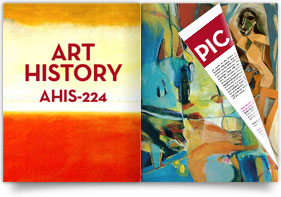
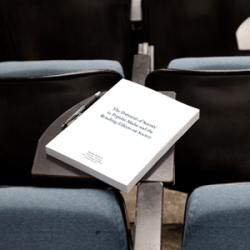
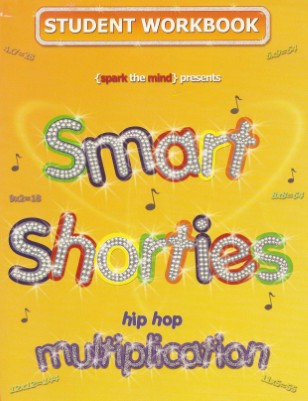
Course readers provide professors with the ability to customize specific texts for their classes. The material may include chapters from books, articles from magazines/newspapers, website print-outs, cases, or their own work. As a professor, you know that pulling this content together in a way that is compelling for the students is challenging. Standard black and white photo-copies can be tough to read, and photographs, illustrations and art suffer from poor print quality. MagCloud let’s you deviate from these long-antiquated types of course readers by making it possible for you to offer them as both full-color prints and in various digital formats.

Benefits of using MagCloud for your Course Readers:

  • free storage of the digital master in PDF format
  • no cost to you or your department– it’s free to publish, you/your students only pay when ordering print or marked-up digital files
  • publishing is immediate, so your course pack is available to students as soon as you click “publish”
  • it’s easy to make your content available to your students in print and digital formats
  • easily place orders for direct delivery to the department or use our ship-to-group feature to distribute to a mailing list
  • full-color, full-bleed printing makes it possible to showcase art, photography and imagery beautifully–no more grainy black and white images
  • easily direct students from all of your classes to collections for their course–you can sort publications by subject or class, and make it easy for your students to access all of your printed course materials in one place

Lab Manuals

If you have authored your own lab manual, you simply need to upload your document as a PDF file for publishing. You can choose whether to order the manual to distribute in class, or if you want to make it available for students to purchase themselves. MagCloud will produce high quality books up to 384 pages from your PDF that can be made available for print, digital download.

Student & Alumni Newsletters & Magazines

We know that being a professor means that you do a lot more than teach classes, so whether it’s for your Mock Trial Team or Journalism Faculty, publishing a newsletter through MagCloud will definitely help your community’s message stand out from the crowd.

Along with community newsletters, a number of educators are using MagCloud to publish the student magazines that they advise. MagCloud’s on-demand printing options mean that you don’t have to sacrifice print quality for a smaller budget or even a small readership. Whether your students are putting together a publication for their program of a couple hundred, or even for their class of 30, you can be confident that all publications are printed in full color with a full bleed on HP Indigo digital presses. These commercial presses have been calibrated to provide a high quality output of all your content, from crisp text to brilliant graphics. Our professional service features make it possible for your students to turn out a publication you can all be proud of.

Example Publications:

A Note About Using Copyrighted Work:

Federal copyright laws protect all original works of authorship fixed in a tangible medium. When using material that has been written, recorded, or designed by someone else, it is important to make sure that you are not violating copyright law by improperly using intellectual property belonging to someone else. While some items are public domain, most course readers are not considered “fair use” of published works and copyright owners retain all rights to grant or deny permission to use. In other words, do your homework before you print someone else’s content.

Are you an educator using MagCloud? Share in the comments section how you’ve used MagCloud for your needs.

MagCloud for Students

Earlier this week, we touched on ways that teachers can use MagCloud for everything from class assignments to printing coursework, but MagCloud can be a great resource for students too. Today we’ll look at a few ways that students can use MagCloud for both schoolwork and extracurricular activities.

Thesis and Final Projects

As we are nearing the end of the school year, many students are likely working to complete a thesis or final project. MagCloud offers a great option for publishing these works, whether you are writing a text-heavy dissertation or putting together a more visual project culminating a study in design or photography.

For text-based works, the MagCloud Standard product can be used for printing and binding up to 384 letter-sized pages, with printing in full color to accommodate both text and any corresponding images and graphics, and a perfect binding that gives your publication a professional look and feel. At the same time, you can make your publication available in a digital format, for viewing as a PDF download.

For students completing projects in an area of art or design, our Square and 8.5” x 5.5” Digest products are both great options for showing off graphic works that are anywhere from 2 to 384 pages long. With a single PDF upload, you’ll be able to create a high quality printed piece that does justice to the work you’ve put into your project, and also have the option for a digital version that can be viewed on any computer or mobile device.

Example Publications:
Photography Series
MFA Thesis
High School Senior Project
BFA Thesis Process Documentation
Graduate Thesis Process Book

Portfolios

For students studying architecture or design, as well as those with a more literary or journalistic focus, having a portfolio of work is of great importance, particularly looking beyond the school year. Whether you’re interviewing for an internship, applying to schools, or looking for a job, having a strong portfolio of your past work will likely be an important factor in achieving your goal. As we’ve discussed before, using MagCloud to publish your portfolio offers a number of convenient options, both during school and beyond.

While you are in school, you can easily update your portfolio on the MagCloud site as you complete new work, simply by uploading a new PDF to your MagCloud account. You’ll also have the option to keep your portfolio private, so only you can see it, or make it public for others to browse on the MagCloud website. When it comes time to apply for the position or program you want, you can order as few or as many print copies of your portfolio as you need, or even direct mail copies to a list of addresses. You can also offer a digital version of your portfolio and direct people to the URL for your publication in the MagCloud storefront, where they can download it as a PDF.

Example Publications:

Yearbook/Photography Student Portfolios
Architecture Design Portfolio
Interior Design Portfolio
Fashion Design Portfolio
Architecture Portfolio for Graduate School Admissions

Resource for Student Groups

During the school year, MagCloud is a great resource for students outside the classroom. At all levels of education, students active in clubs, sports and other extracurricular activities can use MagCloud for printing flyers, newsletters, and even full-length magazines. For example, when a club or sport is looking to attract new members or publicize an event, the MagCloud Flyer and Pamphlet products can be a great way to get the word out and offer additional information, without requiring a large volume of prints.

For groups that are more established, particularly at the college level, MagCloud’s Standard, Square and Digest product types offer a great opportunity for creating newsletters to stay in touch with both current members and alumni alike. Groups can take advantage of MagCloud’s direct mailing service for recipients who prefer receiving something in print, and simultaneously offer the same publication in digital formats for downloading as a PDF.

A number of middle school, high school and college-aged students have already used MagCloud to publish student-run magazines on topics ranging from art and literature to fashion and lifestyle. Regardless of the topic, MagCloud lowers the barrier to entry for creating these types of magazines, with no upfront costs and no minimum print runs. Students can offer their publication through the MagCloud storefront for customers around the world to purchase and read in both print on demand and digital versions. Printed copies can also be ordered for local distribution as they are needed instead of all at once as a large bulk order, cutting down on the cost of storage and potential waste.

Example Publications:
BYU Editing Students’ Travel Magazine

UF Asian American Students’ Magazine
Emerson College Lifestyle Magazine
AIGA Colorado Design Magazine
Journalism Students’ Fashion Magazine
High School Literary and Art Journal

Are you a student who has used MagCloud, either in or outside the classroom? Let us know in the comments below!

MagCloud Goes to the Head of the Class

MagCloud has been a friend of teachers, trainers and curriculum designers for some time.

Offering an easy way to bring lesson plans to life and engage students, MagCloud is being used as an educational tool both in and out of the classroom.


Curriculum Resource Planning and Teacher’s Aids

A number of educators and researchers are using MagCloud to share curriculum ideas and best practices. Whether using our Standard product to create a best practices magazine or simply a short curriculum synopsis with our Pamphlet product, MagCloud makes it easy for teachers to collaborate on current curriculum initiatives.

Example Publications:

Class Projects

Self-publishing provides students with a creative way to showcase their understanding of a topic, their personal perspectives and their own artistic work.  Publications like Bulldog Press and FIT have allowed high school and college students to express themselves and demonstrate their evolving skills.

Example Publications:

Workbooks, Study Guides, Training Materials and More

Teachers, instructors and trainers have used MagCloud to print field guides, camp workbooks, how-to guides, study-guides, training manuals, and educational workbooks to complement a variety of educational needs. In some cases these are printed ahead of time for use during a workshop or class, while other times they are simply made available online for attendees to purchase as supplementary or stand-alone training materials or as samples for other teachers.
Example Publications:

The Lorax Storytelling Tool

MagCloud has also developed a Storybook tool for creating custom books using templates, characters and backgrounds from the movie The Lorax. Used in conjunction with Scholastic’s custom Lorax curriculum, students can write a story that describes one creative new idea for how they, their family, or their community could live more sustainably.

Share in the comments section how you’ve used MagCloud for your teaching needs or read about some additional ideas from Jim Vanides, a member of the HP Office of Global Social Innovation.

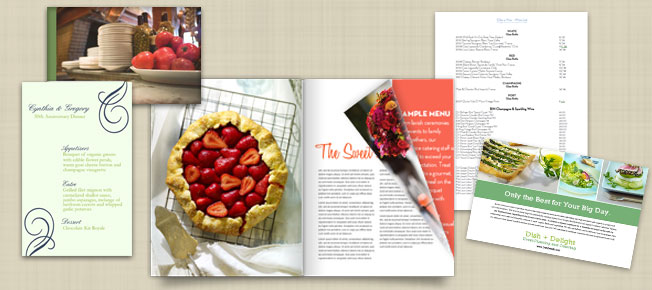
Delicious Ideas for Your Wedding Catering Business

No matter how professional a staff you may have hired or how special the foods you prepare may be, your catering business will always need appealing promotional pieces to attract new customers. In most cases your menu or brochure is a customer’s first opportunity to meet you. MagCloud makes it easy to publish a variety of publications for your catering business, and with low-minimum print runs (in most cases as few as 1), digital distribution options and direct mailing features, it doesn’t matter if you’ve catered 2 events or 200, you’ll wow your clients with beautiful publications that leave their mouths watering.

So why not try some of these delicious ideas to promote your business:

Flyers to Promote Your Brand

Our double-sided, single sheet Flyer product is ideal for brief messages or content that changes often such as sales promotions, or seasonal offerings. It’s available in four size options: 8 x 8”, 5.5 x 8.5”, 8.5 x 5.5″ or 8.5 x 11” so you can be sure to pick something that really makes your brand shine.

Glossy Brochures to Highlight Your Services, Team & Experience

A brochure will help you showcase your catering business and help the customer get a detailed account of your company. Our 4-page Pamphlet product is the perfect way to quickly capture your audience’s attention and whether you use a standard 8.5 x 11″, a unique square 8 x 8″ size or a pocket-sized 5.5 x 8.5″ you can rest assured that it will be affordable and beautifully-printed. With an easy one-click option to opt-in for digital distribution, you can also offer your brochure as a free digital-download for potential clients to peruse on their PC or mobile device.

Print and Digital Price Sheets

Once a client is interested in booking you, you’ll want to make it as easy for them as possible. Price sheets that double as order forms make for a tidy way to create a menu together. With MagCloud’s combo of high-quality print-on-demand and easy-to-use digital distribution options, you can make your price sheets available as print copies that you keep on hand as well as digital versions so potential clients can view them on any PC or mobile device.

Sample Menus

MagCloud’s new flyer sizes are perfect for reprinting menus from past events to give your customers an idea of how a beautifully planned menu comes together. You could even go so far as to create a proposed menu for their event and present it to them at their tasting.

Wine Lists

With distributor prices and product availability constantly changing, MagCloud makes it easy to have an up-to-date wine list and still look professional. Whenever you need to change a price or add a new wine to your list, simply upload a new PDF and order as few or as many copies as you need.

Special & Seasonal Menus

If you offer a variety of cuisines, or even if you want to break up your menus by season or meal-type, you can easily create a standard menu template that you can change up to create more specialized menus.

Full-Service Catalogs

Many catering businesses are full service, and can provide chairs, tables, china, glassware, silverware, tents and umbrellas, and even arrange centerpieces, place cards, and party favors. If your business offers a wide range of services like this, be sure to present them to your client in your brochure, and offer more in-depth information through a specialized catalog.

Partner Publications

Partnering with venue coordinators, event planners and other service professionals like wedding photographers is a great way to get your brand out there to more clients. Try collaborating with the other pros working with you on events and see if you can work out a way to help promote one another with unique pieces that highlight both of your services. For example a collaboration with a photographer could result in mouth-watering photos of your food and presentation that you can use to promote your business, and referrals for future events.

A One-Stop Shop for Your Business

With publisher pages that can be personalized, and the ability to group similar publications into tidy categories, MagCloud is a great platform to keep all of your business materials in one place and make them easily accessible in both print and digital formats. It’s easy to direct your customers to your personalized and branded page where they can find your menus, catalogs and wine lists all in one place, making them handy to select and download.

Have you used MagCloud to promote your catering or event business? Have another great idea that we missed? Share it below in the comments section!