Ways to Use MagCloud in Planning a Wedding

We recently highlighted ways wedding photographers can use MagCloud to promote and showcase their work. Today we are focusing on how MagCloud can be used for planning the wedding itself, as a resource for both professional event coordinators and those taking a DIY approach. From lookbooks and portfolios to show prospective clients, to destination information booklets and save-the-date materials for guests, all the way through to printed programs for the big day, MagCloud’s print on demand and digital services can be a great resource no matter what size of an event you’re planning.

Portfolios

We’ve discussed before how MagCloud is a great resource for publishing portfolios since it allows both an affordable print version and convenient digital version with a single PDF upload. As a professional event planner, showing potential clients your previous work will not only help you land the job but may also act as a source of inspiration. Since MagCloud offers prints for as little as $0.16 per page with no minimum order quantity, you can print off as few or as many full color, professional-quality portfolios as you need to share with these potential clients, at a price that won’t break the bank if you need to replace a copy. You can also make the same portfolio available in the MagCloud storefront for viewing as a PDF as a way to share your work digitally, with built-in promotion tools for your social media channels and website.

Vendor Lookbooks
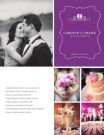
Just as a portfolio can help inspire your clients for their event, having vendor lookbooks to show previous work specific to a particular photographer, venue, hair or makeup artist can also help simplify these decisions for your clients. With MagCloud you can have print copies for clients to browse through as you meet with them or as a PDF on other digital devices. You can also make these publications available through the MagCloud website, to link to from your website and promote through your social media channels as a means of marketing your business. Since these books promote not only your services but those of the venues and photographers being highlighted, this also offers an opportunity for cross-promotion, as noted in our post for wedding photographers. While you use these lookbooks to promote the work you’ve done with a particular vendor, you could also offer these pieces to the vendor as a means of promoting both their work and yours to potential clients. Using the MagCloud storefront, these vendors can order copies for themselves as they need them without having to go through you to get them.

Save-the-Dates

Pinterest is brimming with creative ideas for non-traditional save-the-dates that offer more information about the bride and groom, and better fit their personalities. MagCloud’s Digest Landscape product is a great format for creating compact save-the-date photobooks, with photos of the couple, the story of how they met and got engaged, and when and where the wedding will be held. If the couple has done an engagement photo shoot, this is a great way to show off the resulting photos in a high quality printed piece that guests will enjoy flipping through and reading. With MagCloud’s Ship to Group feature, you can even drop-ship copies of a publication to a list of addresses, so both the printing and distribution of the save-the-dates can be taken care of at once.

Guest Information Booklets

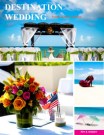
It’s likely that many of the guests at the wedding you are planning will be from out-of-town, and in most cases, they will be in town for a day or two leading up to or following the wedding. Therefore, it’s a nice idea to provide them with some information about the area, including options for lodging, places to eat, and things to do. This is particularly helpful for destination weddings, where everyone will likely be from outside the area and you may opt to arrange for additional activities for these guests to do. MagCloud is a great option for printing up reference booklets of guest information like this, to either send to guests ahead of time using the Ship to Group feature, or to make available via a link from the wedding website so guests can download a digital version for viewing on their iPad or other digital device. If this information is known in advance, this booklet could even act as the save-the-date and offer guests plenty of advance notice for planning their trip and booking lodging.

Programs

Whether it’s to provide information about the bridal party, list readings or songs to be performed, or simply to remind guests about directions to the reception location, most wedding ceremonies include a paper program that gets passed out to guests at the door. These programs provide helpful information for guests, and also offer a keepsake of the event. MagCloud’s smaller Digest product is a perfect format for programs of all lengths, particularly at the 4-page Pamphlet size. Our 4-page products are now printed on a heavier paper stock, so they offer a more formal feel that makes them a great fit for wedding programs. With no minimum order quantity, you can order programs in a quantity that fits the size of your event, whether it’s an intimate gathering with just a few guests or a larger affair numbering in the hundreds.

If you’re looking to create a wedding program for yourself, check out this basic template for Microsoft Publisher to help you get started.

Have you used MagCloud to publish content for a wedding or other event? Tell us how in the comments below.


MagCloud for the Wedding Photographer

Whether you are a professional wedding photographer with a studio space and a team of five, or you’re flying solo, it’s important to present your business in the most professional and appealing way possible to your clients. MagCloud is an easy and affordable way to publish lookbooks, promotional tools and affordable products that that you can sell as a part of your business’s offerings. With easy publisher settings you can offer any, or all of your publications in both print and digital formats.

A number of photographers have already discovered the value of MagCloud for their business. They are using the service to promote themselves at trade events with a brochure or glossy catalog, provide lookbooks to potential clients, print proof books for existing clients; and even as a sales tool intended to up-sell clients to an entire gallery of prints rather than just one or two.

Let’s explore some of the options available for your wedding photography business:

Portfolio and Catalog:

At just 20¢ a page for Standard size or 16¢ for Digest size, MagCloud offers full-color, full-bleed printing on HP’s beautiful Indigo presses–a true advantage for today’s professional photographers.

For example, if you want to create a full-color soft-bound book to highlight your photography and present your services, you could do so in a 28-page Standard-sized perfect-bound publication for just $6.60 a copy. Yep, you read that right, $6.60 a copy. And you don’t have to buy 100 to get that pricing, you could order them one at a time if you like, or drop-ship them to an address list of potential clients who have seen your work online and are interested in learning more.

**Want to create one of your own? If you use Microsoft Publisher, we’ve already got a great basic 4-page catalog template to get you started. Don’t use Publisher? Feel free to use the design as inspiration for your own services catalog.

Lookbook:

If you’d prefer to woo your customers before revealing all of your pricing, or would just prefer to have something less time-sensitive for showing off your work, we suggest creating a lookbook. Lookbooks are a great way to express your style, showcase your best work, and really tell your potential customers who you are.

Some publishers have started to use our ultra-portable Digest Landscape format to create a marketing piece that shows off their best work in a portable format that doesn’t break the bank.

What’s great about this idea is that the Digest Landscape’s compact 8.25″ x 5.25″ size makes it easy to keep on hand. Should you meet someone who is interested in hiring you, you can easily hand off the book to a potential client and not cringe at what it costs to replace. And with a max page count of 384, you could create a lookbook that includes hundreds of images, worthy of your coffee table. At just 16¢ a page for our Digest Landscape publications (plus $1 for perfect binding), you can create an impressive 60-page lookbook for just $10.60.

Album for family and friends:

Waiting for that big beautiful album can sometimes take weeks, or months, so while your bride is still excited about the wedding and singing your praises, why not surprise her with a mini photobook, or cool glossy magazine of photos from her big day? She’ll be thrilled to show off your work to her friends and family, and with our 3-day print turn around time, you could surprise the happy couple before they get home from their honeymoon.

You could also create a similar album as a product for your newlyweds to give as a thank you gift to extended family, bridesmaids and groomsmen.

Sales tool:

If you sell more than just digital packages, you know how hard it can be to sell prints–especially large prints (like the elusive 20″ x 30″ canvas) or collections of images, intended to be displayed as galleries. Most clients can’t envision what a gallery of their images could look like–”How would they arrange them? Where would it go?” That’s why some photographers have created booklets to help their clients place their orders. Diagrams and examples can help customers to envision a gallery in their home so they can select prints that work well together. If you went so far as to create this publication and save it as a template, you could drop a few of the customer’s images into the gallery diagrams creating a customized booklet to really seal the deal.

Proof Book:

It seems just about everyone has made the switch to online galleries for proofing, but there is something to be said about proofing photos in print, especially when you are planning to buy them in print.

So why not put together a proof book for your client to accompany that online gallery? This way your bride can have something in hand when she talks to her parents or grandparents about that 20”x 30” canvas. You could even go so far as to include your print pricing, packages or gallery inspiration guide into a custom publication to help encourage larger sales.

Showcase for Vendors:

If you’ve been in the business for awhile, you probably have already had a number of referrals come not just from happy brides, but also from vendors. You know that impressing a location rep means your images might get highlighted when they tour brides-to-be around their venue. Event planners love to show off your beautiful photos of their meticulously-planned soirées, so why not give them access to your photos in a way that not only highlights their work, but at the same time shows you off? We’ve seen photographers partner with venues and service professionals to create custom showcase publications for their specific businesses, but imagine how popular you’d be with everyone down to the makeup artist if you created a showcase book for each wedding and shared it them for their own promotional uses? Every time they show off that booklet, their client will see your brand.

Annual Retrospective for past clients:

If you do more than wedding photography, it makes sense to remind your clients of this. Then, as your wedding clients become growing families, they can make you their photographer for life – there to document their pregnancy, baby photos, family portraits and even high-school seniors.

Creating an annual retrospective photography magazine to highlight favorite sessions from the previous year is a great way to remind customers that you do other types of photography. Similar to a portfolio, this sort of publication can really highlight events, press-opportunities and sessions that occurred during the past year. Clients highlighted in the publication would surely love a copy to show off to their friends, and it keeps you top-of-mind for their next photo-worthy occasion.

Client Gifts:

A number of wedding photographers send gifts to their couples at their anniversary, or around the holidays, so why not create a calendar template that you can customize for each couple?

Swap in photos from their big day, add their anniversary to the calendar, and voilà! You’ll have a product that costs you $5.60 + shipping (a 28-page Standard publication) and reminds your bride how fabulous you are every day of the year.

Print or Digital? Why Choose?

There is a constant debate about print vs. digital, arguing why one is better than the other. Here at MagCloud, our motto is “Why choose?” What’s great about all of these ideas is that if you like, any one of them could also be enjoyed and shown off on the iPad or as a digital download to any PC or tablet device. With just a few clicks you can use one PDF for both print and digital purposes, just opt-in for digital distribution when you select your print pricing and finishing options.

More:

Along with all of these great ideas, you can also use MagCloud to print professionally bound Contracts, Employee Handbooks, Style Guides, Posing Guides, Workbooks, and Lighting How-to’s for workshops. Want more inspiration? Browse more wedding photography publications on the MagCloud website.

Have you used MagCloud as a promotional piece or product for your wedding photography business, or have you been inspired to create something from this post? Share your ideas in the comments section below.
Using MagCloud as a Sales Tool for Your Real Estate Business

In addition to using MagCloud to market their real estate business, a number of real estate agents have been using MagCloud as a sales tool. MagCloud’s print on demand capabilities allow real estate agents to order informational flyers for their open houses in smaller quantities, only as they need them, reducing waste and storage costs. Agents have taken advantage of MagCloud’s Ship to Group feature to easily mail copies of their listing catalog to an address list of potential buyers with a single order. The added benefit of MagCloud’s digital distribution means real estate agents can get these flyers and catalogs in front of potential buyers across all formats, whether it’s in print, as a downloadable PDF, or on the iPad. And if the price of a listing should change or photos need to be switched out, it’s as simple as uploading a new PDF file to immediately update both print and digital collateral.

Beyond the traditional flyers and catalogs used as sales tools in the real estate industry, MagCloud’s combination of professional print quality and no minimum order volume offers real estate agents the opportunity to experiment with to market their listings without breaking their budget. For example, if you are trying to sell a condo with a breathtaking view you could give buyers the opportunity to see what the view looks like at different points during the day by creating a time-lapse photo flipbook using the MagCloud Digest Landscape product. By taking photos at regular intervals from the same spot over the course of the day, then placing one photo per page in a MagCloud publication, potential buyers attending an open house will be able to look at individual pages in the printed book to see how the view looks at different times during the day, or can flip through the booklet all at once to watch the view change over time. Highlighting a key feature like this can be a great sales tool, and using MagCloud will allow the piece to be professional and affordable even if you just a need a couple of copies.

Alternatively, let’s say you have a listing for a single-family home in a neighborhood that has a lot to offer in terms of amenities. You could expand on the usual informational flyer and create a more in-depth, full color brochure with MagCloud that shows off not only the property, but shops, parks, restaurants, and schools in the surrounding area. Highlighting the key features outside the home that might appeal to your ideal buyer could be the difference that makes your listing stand out over the alternatives. Presenting this information as a high quality printed piece will have the added benefit of offering a more professional look without the expense of a traditional print run.

If you have multiple target buyers for a single property you could even take it a step further and create different versions of the brochure to highlight the amenities that appeal to your different audiences. For example, one version of the brochure might give more emphasis to the great schools and parks in the area, while the other might highlight the local restaurants, public transportation and nearby fitness centers. With MagCloud, printing 25 copies each of two different brochures will cost the same amount as printing 50 copies of the same brochure, so with no added cost you can align the messaging on your sales materials to a particular buyer’s interests and help them more readily see themselves in the property, which could translate into a sale for you.

To help you get started using MagCloud as a marketing and sales tool for your NSW real estate business, check out these resources that offer real estate-based templates that can be used to create MagCloud-ready PDFs:

MagCloud Real Estate Catalog Template: Catalog template created using the MagCloud specs for use with Microsoft Publisher. You can download the template here.

Microsoft Office Templates: The Microsoft Office website has a number of real estate templates that can be used with Word and Publisher, like this real estate flyer template for Microsoft Publisher. This template will allow you to create an 8.5 x 11″ PDF, perfect for printing with MagCloud’s Flyer product type.

LayoutReady: LayoutReady has templates for Microsoft Word and Publisher, and offer a variety of options for real estate publications. Their 2-page letter-sized newsletter templates can be used with the MagCloud Flyer product type, and their 8.5″ x 11″ flyer templates can as well. Their 17″ x 11″ brochure templates will require some editing to convert them to 4 page 8.5 x 11″ PDFs, but after doing so they can be printed as 4-page MagCloud Standard publications.

StockLayouts: StockLayouts has templates for Adobe InDesign, QuarkXPress, iWork Pages, Microsoft Word and Microsoft Publisher. Like LayoutReady, their 8.5 x 11″ flyer templates can be used with the MagCloud Flyer product type, while their 17″ x 11″ brochure templates and 11″ x 8.5″ newsletter templates will require some editing to convert them to 4 page 8.5 x11″ and 5.5 x8.5″ PDFs, respectively, but after doing so they can be printed as 4-page MagCloud Standard and Digest publications.

Inkd: Inkd has templates for a wide variety of design software, and has a section of templates specific to the real estate industry. Their 8.5 x 11″ datasheet and flyer templates work great with the MagCloud Flyer product.

Are you a real estate agent that has used MagCloud as a sales tool for your business? Let us know how you’ve been using it in the comments section below.

Using MagCloud to Market Your Real Estate Business

Today we want to speak to the real estate agents and agencies of the world. If you’re spending time and money printing up fact sheets, flyers, listing catalogs and brochures every month or even once a week, our service can help make the process easier. We know in the world of real estate, things are constantly changing. You sell a house and have to remove it from your list catalog. A new unit goes on the market and you’re turning around a new fact sheet in a few hours.

Just browse our site and you’ll see that MagCloud is already a popular tool for real estate agents. MagClouders are branching out beyond property listings; they’re including tips for first-time homeowners, agent profiles and ads for local businesses that home buyers might find useful. Photographers are in on the real estate market too as they sell annuity, using MagCloud to show how hiring a professional photographer can make your properties stand out as an agent. (And we couldn’t agree more!) MagCloud’s Flyer product is popular for any prints that don’t require binding. Full-color fliers with images of your listings will make your sales sheets pop and your competitors green with envy.

MagCloud’s services can also help you be more nimble as a business, keeping you a step ahead of that other agency or agent. Think about it. We offer a print-on-demand service which means no more bulk orders of brochures. With MagCloud, you order what you need as you need it and you’ll receive your prints in as little as three days. Go further with your publication by offering an iPad or PDF-friendly version as well. Your clients will appreciate a paperless version when they’re juggling fact sheets and flyers for so many different properties.

Beyond its true cost-saving and waste-reducing advantages, HP’s top-notch print quality is the No. 1 reason MagCloud customers keep coming back. Don’t just take our word for it, hear from a satisfied real estate agent who’s been using MagCloud to promote his realty business with 4-page flyers and community Buyers Guides. Also, check out other resources on our site like the Product Spotlight: Flyer for Business and tips on how to attract an audience with great content.

Now we want to hear from you. As a real estate agent, how have you incorporated MagCloud as a tool to promote your business? Feel free to share your tips and success stories with us in the comments section below.

Product Spotlight: Flyer for Business

One of the new product types we recently announced is the Flyer. The Flyer product is a single sheet of paper printed on both sides in full color with a full bleed, available in quantities of 10 copies or more. You can create a Flyer by uploading a one or two-page 8.5” x 11” PDF to MagCloud. Keep in mind that all Flyers must be two pages long, to encompass both the front and back sides of the printed sheet, so if you do upload a 1 page PDF we will automatically add a second blank page to the end of the PDF for you. Like our Standard product, the cost for a printed Flyer is 20 cents per MagCloud page, or $0.40 for each double-sided piece. As always, orders of 20 copies or more receive a bulk discount of 25%, dropping the price to just $0.30 per Flyer.

We feel like this shorter page limit opens up a number of new options for our publishers, and have listed a few ideas below for how you might be able to use the Flyer product for your business:

< Inserts
Update previously printed collateral to be more timely and customized by adding a single sheet insert. Adding a single sheet insert to a previously printed piece like this can provide more relevant information targeted to a specific recipient, or offer an update to existing collateral. For example, if you’re passing out a catalog, you might include an insert about your upcoming product line or summer sale. Similarly, if you are sending previous donors a copy of your non-profit’s annual prospectus, you might include a more personal thank you letter as an insert.

Conference and Tradeshow Handouts >
Whether they are included in the conference materials or handed out at a tradeshow booth, providing printed handouts to attendees to highlight the features of your product or service will help potential customers remember who you are when they get home.

< Datasheets
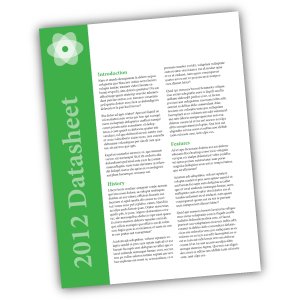
The Flyer product is a great option for creating single sheets of technical specs on your product or service. The high quality of the digital printing provides a more professional appearance than desktop printing, while the single letter-sized sheet is a format that can easily be included in a packet with other materials, or left behind at a sales meeting.

Real Estate Sales Sheets >
If you’re an Australian real estate agent, why not use the Flyer product to create sales sheets for your newly listed homes. The full color printing will allow you to include photos along with background information about the listing, that can be offered up as a way to entice potential buyers. Since MagCloud allows for shorter print runs, you can order fewer copies initially and print more on demand as they are needed, saving on storage and paper waste.

< Headshots and Resumes
Get your job interview or audition off on the right foot with a professionally printed resume or double-sided headshot.

Newsletters >
Use the Flyer product type to communicate with your clients or members by creating a single-sheet newsletter. With MagCloud’s digital options, you can offer your audience the same newsletter in both print and digital with a single PDF upload.

< Menus
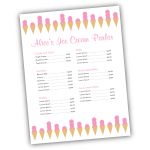
A single 8.5″ x 11″ sheet is the great size for menus, and MagCloud’s print-on-demand model provides a cost-effective and easy way to order additional copies or make updates to the menu as needed. If you’re a caterer, you can take advantage of MagCloud’s shorter print runs to create Flyer-sized menus tailored to each event you cater, whether it’s an intimate dinner party or a large buffet.

Price Sheets >
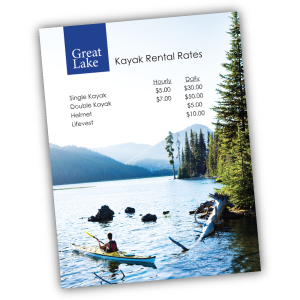
Are you a photographer offering senior portrait packages? How about a sporting goods store offering bikes, kayaks, and skis for rent? Or a spa owner with a list of services you need to publicize? Whether you are a makeup artist, landscaper, tutor, or dog walker, let your potential customers know the rates for your services with a professionally printed price sheet that can incorporate full-color images of your prior work and personal branding.

< Flyers for Sales and Events
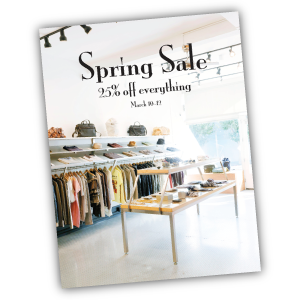
Use the Flyer product for what it was named after: flyers! Print and pass out single sheet flyers for your next retail sale, store opening, or company event. Whether you are hosting a signing in your book store, a concert in your coffee shop, or a spring sale in your clothing boutique, make sure your potential attendees and customers not only know about it but remember it with a printed flyer.

Looking for more inspiration, or wondering where to get started with your Flyer design? Templates that fit the 8.5″ x 11″ Flyer product type can be found around the internet, and even on your own computer. The Microsoft Office Suite, as well as Apple’s iWorks Pages come preloaded with a number of letter-sized templates that can be used for creating Flyer publications. In addition, sites like Inkd and Stock Layouts offer a range of different letter-sized templates in their Datasheet and Flyer sections that you can download for a price and edit to fit your needs before uploading to the MagCloud site for printing and distribution.

Have you already created something for your business with the new Flyer product? Let us know in the comments below!

How to Personalize Your MagCloud Page

If you’re using MagCloud to create collateral for your business, portfolios for photography, catalogs for your retail store, a unique magazine, or other content to promote your brand, then shouldn’t your MagCloud page reinforce your brand too?

It’s easy to make your MagCloud profile and publication pages work for you by taking a few minutes to flesh out your publisher profile and create header images that reinforce your brand throughout your pages.

Your Publisher Page

No matter what sort of business you’re into, when customers discover your content on MagCloud, you want them to be able to connect with you directly. Your profile page includes an option to link directly to a website of your choosing, and with some simple html you can also include hyperlinks, images and emphasize text within your profile description.

To get started, you’ll need to log into your account and go to your publisher profile editor.


Link to a website: <a href=”URL”>link</a>

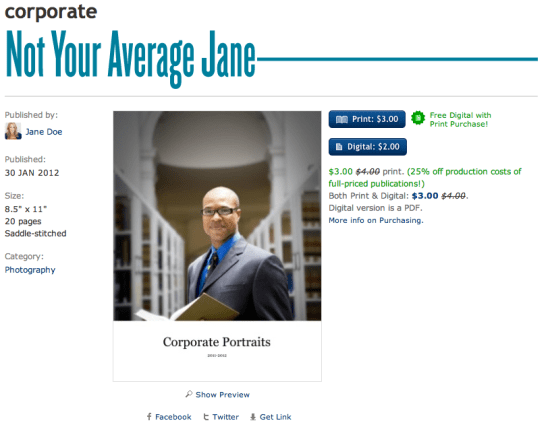
In our Jane Doe example, we used some of MagCloud’s allowed HTML tags to include more links in Jane’s profile. To add a link to your website without having to include the whole website URL, you can simply insert a block of text like below:

Curious about more recent work, or what I’m up to?
Check out my <a href=”http://yourwebaddress.com”>blog</a&gt;.

It will show up in your profile like this:

Bold Text: <b>text</b>

To create bold text, you just need to add <b> before your selection and </b> after. We did this with our Jane example like this:

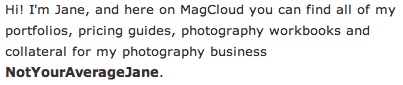
Hi! I’m Jane, and here on MagCloud you can find all of my portfolios, pricing guides, photography workbooks and collateral for my photography business <b>NotYourAverageJane</b>.

Which then looks like this:

Emphasize/italicize Text: <em>emphasis</em>

To add the title of Jane’s autobiography in italics we used the code for emphasis. Simply put <em> before the text you want italicized and </em> after the text to close the emphasis:

Want to find out more about me, and my life behind the lens? Be sure to check out my 200-page autobiography <em>Don’t Call Me Jane</em> available for purchase here on MagCloud.

Which will appear like this:

Image Link: <img src=”URL”>

You can also insert images or logos into your profile by linking to the image within the text using <img src=”URL”>. This requires that the image is the size you want it to appear in the profile, and that it already has an associated URL. It’s best if this image is pulled from your own website (like your logo) or if you have loaded a special sized image onto your own flickr or other photo host that allows linking directly to the image. If you link to a resource that you don’t control, you might run into broken links if the image is ever moved. For Jane’s example we linked the social media icons that she already had on her blog. This example actually includes two pieces of html, one for the icon image, and then the following text which links to the associated LinkedIn URL:

You can also find me on
<img src=”http://notyouraveragejane/images/LinkedIn_IN_Icon_25px.jpg&#8221; />
<a href=”http://linkedin.com”>LinkedIn</a&gt;

Which will appear like this:

Your Collection Page

For every group of documents you create, you get to have a “collection page” which can have it’s own branded banner and unique URL. This is great if you have a selection of related documents that you want to be able to promote as a group. A great example of this is MagCloud publisher, Golfweek, which has created collections of Souvenir Golf Programs and Golfweek Special Editions. Each collection reinforces the Golfweek brand and furthers their messaging but keeps relevant content together. Check out their banners below:

Customizing with Banners

Want to create your own branded banners? To setup the custom banner for a collection, you must first create the graphic that you plan to use. The banner specs require an image with a maximum size of 790 x 90px, in either JPG, GIF, or PNG formats. You can create this image in any software application of your choosing that can output to one of these formats. You can also upload a smaller image–it’s up to you.

Uploading Your Banner

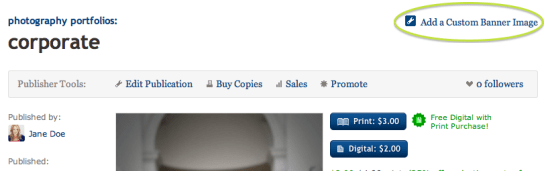
Once you have your image ready to go, you’ll want to navigate to your collection page. You can get here by visiting your profile page (yourusername.magcloud.com) or by going to one of your publications via magcloud.com/publish. On the right-hand side of the page, you will see an “Add a Custom Banner Image” button.

Once you have clicked the button, you will be prompted to find the image file on your harddrive, and upload it to MagCloud.

The image you upload will be visible on the associated collection page,

and on each of the individual publication pages within that collection.

Have you used custom banners or any of these HTML tricks in your publisher/publication descriptions?
If so, please share them below in the comments section to inspire others.

Extending Your Brand With a Magazine

Your brand collateral is the most important opportunity to talk about your product or service. But getting your target audience to read your brochure, or catalog cover-to-cover isn’t always easy.

That’s why so many businesses have found that branded magazines are a unique way to pique audiences interest with relevant content and information, while reinforcing their brand message. It keeps them top of mind in a format that gets to their customers or target audience more frequently—be it annually, quarterly or monthly. What’s better—it’s in a form-factor that is both familiar and comfortable for the reader.

Many businesses have found that they can better engage with potential customers and increase brand loyalty by publishing a magazine of their own. According to a study conducted by the Association of Publishing Agencies (APA Advantage Study, 2007) on branded magazines (or as they call them, “customer magazines,”) – customers spend 25 minutes on average with such a publication, compared with a TV ad (30 seconds) and an internet ad (0.5 seconds). That’s 25 minutes immersed with a brand.  And while in-house magazines were once considered glorified advertorials, today the use of subtle branding and genuine editorial content helps many successful businesses tactfully promote themselves. *Want to read more about the study? You can download the executive summary as a PDF here.

How does it work? Well, by presenting your business in a more editorial format you can:

  • develop prospective customers and foster increased loyalty
  • establish your organization or company as current on issues and trends
  • position yourself as an expert in your field
  • be a resource for information that is relevant to your audience
  • reinforce your style and voice
  • give depth and relevance to your brand in an environment you can control

Finding Inspiration

Take for example a few major brands that publish their own magazines: British fashion label Asos’ self-titled magazine includes advertising for products that appeal to their demographic, such as cosmetics, high-end watches and perfumes. They also balance the promotion of their own products by pairing them with complimentary pieces and accessories that work with their customer’s style.

Coscto has it’s very own The Costco Connection, which combines information about what’s new at Costco with a mix of lifestyle and small business articles.

USAA’s USAA Magazine focuses on advice for becoming financially secure, with articles that appeal to it’s wide audience–young and old.

The Lance Armstrong Foundation’s LIVESTRONG Quarterly—delivers compelling profiles and medically stoked articles in a publication that hopes to bolster the Lance Armstrong Foundation’s efforts to ‘make cancer a global priority.’

Each of these do a great job of combining editorial content with promotional content for their products, services, mission or cause. One great thing you will notice about all of them too? They each reinforce their brand through styling and voice, but without seeming like pushy sales collateral.

Getting Started

So how do you even get started creating a brand magazine? Well there are a number of things to consider, the first of which is the actual branding. Much like traditional collateral, a brand magazine should be in line with your  brand’s style and voice, but it where it differs is that a branded magazine needs to be subtle and controlled in how and when you promote your brand. A branded magazine should be designed with the customer’s tastes, interests, style and wants at the forefront; and weave in brand, product or service messaging where it actually enhances editorial and design.

Brand magazines can help you achieve your desired positioning in the minds of your stakeholders and customers. Whether your brand is edgy, luxurious, down to earth, straight to the point, or fun and whimsical, you want that same feeling to come across through your magazine. For most businesses, when you established your branding, you probably came up with words to describe your mission, voice, style and audience.

Put it Down on Paper

Now is the time to grab a piece of paper and start defining the sort of message you want to give to your customer. How do you want to establish your brand? What sort of content will you include, and how should you style it to be in line with your voice, mission and style? Use words to describe your brand and you customer– are they fashion-forward, politically-minded, edgy, traditional, mostly men or women, older, youthful etc?

These are your design principles and the list should be short and sweet. In as few words as possible, make clear the vision for the publication and any keywords people should keep in mind while designing.

Keep this list. Pin it to your wall. It will make for a great litmus test as you move forward and start creating. Every once and awhile go back to the list and be sure you are appealing to your audience and staying true to your brand.

Deciding on Color

This seems like a no-brainer, but coming up with colors that are true to your brand, that you use consistently throughout your magazine, is tougher that it seems. You may find sites like COLOURlovers helpful for exploring colors that work well with your logo or brand colors. Create a palette and save it. Then as you publish new issues, the consistent use of color will also reinforce your brand.

Typography

Now it’s time to define the typefaces to use: sizes, line height, spacing before and after, colors, headline versus body font, etc. With editorial content there is some flexibility in this, but defining a consistent style sheet will maintain the integrity of your publication and brand throughout the publication. Use fancy fonts sparingly, so that they maintain their impact and legibility on the page.

Create a Mock-up Magazine

This will eventually be your style guide, but at first it is a way to flesh out all of the style choices that you will want to make so that you can stay true to your brand. This will also help you keep a visual consistency not only throughout each publication, but also from publication to publication over time. Save this file and use it to start creating your magazine, then keep that original as a starting point for each subsequent issue–it will save you a lot of time!

Now Get Your Brand Out There

Now, you’re ready to publish. If you’re looking for more advice for designing your file, or templates to get you started, remember you can always check out our other Tips & Tricks!

How do you get your brand out there? Have you come up with other unique ways to keep you brand top-of-mind with your customers? Does your organization or company have a branded magazine? Tell us about it below in the comments section!

Maximize the Impact of Your Member Communications

Now that we’ve shared some of our best MagCloud examples of member communications, it’s time to talk content. What information is vital to include and what is best to leave out? Our take, like in most printed materials, is that less is more.

For many independent organizations, fundraising is typically a part of your member communications. Because of this, if not for other reasons, you must ensure that your materials are concise and compelling to make sure you’re reaching as many members as possible with your message.

Here are a few more tips to consider when composing your next member communication:

Spotlight Individual Members – Profiling a particularly active member can bolster involvement from the rest of the members who will strive to earn the honor as well, and it may drive the spotlighted guest to share the communication with his or her broader online network thus spreading the reach of your group.

Promote Your Social Media Channels – Many alumnae organizations have LinkedIn Groups and local community groups often have Facebook Pages. Whatever your channel, be sure you’re using your printed materials to promote your online social media channels. It’s a fast way to spread your message and it’s easy to communicate last-minute details about upcoming events.

Limit the Real Estate– All members are aware of the need for fundraising so when creating your materials, try to balance your fundraising call to actions with information that will inspire and inform members about your cause, club or organization. Each group will have a different setup, but no matter how many pages your publication is try to balance fundraising efforts with important news and updates.

Be Mindful of the White Space – We’ve spoken a lot about this subject in previous blog posts, and our advice remains the same. Make your images eye-catching and high quality (hire a professional photographer, if possible), but be sure you leave room on each page to avoid overcrowding.

Share your best practices for member communications in the comments below!

Getting Your Members on the Same Page

Community organizations, non-profits and student groups all work hard to build a strong member base that understands and spreads their mission. From new member materials to monthly newsletters, a clear, well-designed member communications strategy is an important step towards that goal. Thankfully, MagCloud is here to help you achieve that goal. Many groups already publish their materials with MagCloud and we’re excited to show you the high quality work they’re producing. These examples should give you a few ideas about where to focus your materials:

Orange County Orchid Society publishes this monthly newsletter filled with images of the group’s beautiful orchids and to update the group on its members, the latest meeting notes, tips and a few local ads.

American Glass Guild newsletter features a message from the president of the AGG, the latest news on awards and recognition for members and a recap of a recent AGG workshop.

Fort Collins Alumnae Chapter of Delta Delta Delta has several important updates for members such as key upcoming dates, a note from the chapter’s PanHellenic rep, an update on Fall recruitment and plans for several events in the next year.

Alpha Tau Omega Fraternity quarterly publication is a good publication for other Greek organizations to get content tips for. It features a spotlight on outgoing seniors and new members and several editorial pieces from members looking to stretch their writing muscles.

The Pulse is a publication by the Korean American Students of Yale that packs a concise update into six pages including a message from the outgoing board, notes from the most recent board meeting, a look at the top 9 KASY moments of the year and, of course, some funny KASY superlatives. It’s worth noting that each KASY publication is similar in length but the content varies by issue.

Let us know what member communications materials you use to share updates with your members. We want to hear about it

Design Tips to Help You Get Your Message Out

MagCloud offers a lot of options to help you communicate with members of your organization. Not only can you offer members the choice of a print or digital version through the MagCloud website, but you can also use our Ship to Group feature to mail a print copy to each one of them or use our Guest Pass feature to allow members-only access to unlisted publications via email.

Whether your group is focused on a shared interest or a shared alma mater, keeping members informed is an important part of maintaining any membership organization. At MagCloud we’ve seen membership communications take many forms, including newsletters, annual reports, member directories, and even calendars.

While the content of member communications varies greatly depending on the type of organization and the form of publication being created, here are a couple of design tips that are always good to keep in mind:

1. Keep your message clear. This doesn’t just pertain to what you are writing, but also to how you present your message on the page. Make sure that the information that is most important to your members is placed front and center, and anything additional is cleanly laid out in an organized and easy to follow fashion. Doing so will allow members to easily navigate through the publication and better ensure that they receive the messages you are hoping to deliver. This is particularly important when creating a member directory, which by nature contains a large amount of content. You don’t want to hinder the delivery of this content by having a disorderly layout that is difficult to find your way through.

Moorestown Rowing The Moorestown Rowing Club’s annual publication offers a great example of a large amount of content that has been laid out in an orderly fashion. Using bold titles and a consistent two-spread layout they are able to present their team rosters in a way that is easy to navigate and understand.

2. Use colors, fonts and imagery that are familiar. Although you may not think of it this way, your organization is a brand, and it’s important to take advantage of brand recognition in the communications you send to your members. The easiest way to do this is through the colors, fonts and imagery you use, matching those in your publication with ones that are used elsewhere on your group’s website or blog. By maintaining a consistent look and feel, you’ll help ensure that members make the association with your organization instantly when the printed piece lands on their doorstep.

American Glass GuildThe American Glass Guild does a great job of establishing a brand with their MagCloud-published newsletter. They not only keep a consistent look and feel with each issue but also using colors, fonts and imagery in their publications that is similar to those found on their website.

3. Balance your content. As with the other publication types we’ve discussed in recent weeks, it’s good to keep your readers engaged in your content, regardless of what the intent of the publication is. A big part of this is visual – when a reader encounters a page full of text, they may feel somewhat daunted by the amount of content they are being presented with. Rather than just giving your readers a lot of text to consume, balance the layout of your member communications with supporting images and related infographics. Even just breaking up a page of text with some white space can help make your message easier on the eyes. The easier your message is to consume, the more likely it is that your members will receive it.

Perception MagazineThe Canadian Council on Social Development’s Perception magazine is a great example of a membership publication with a balanced layout. Each of the longer text pieces in the magazine are accompanied by images, call-out quotes, and colored text boxes of related information. Not only does this makes the pages of the publication more visually appealing than they if they were just filled with solid blocks of text, but the added content also makes them more interesting to read.

Has your club or organization used MagCloud to communicate with its members? Tell us how in the comments below.