Ringing in the Holidays with a Meet-up and Twitter Chat

Hope you’re all enjoying December so far and that you’ve got those final MagCloud orders in for the holidays!

For your viewing pleasure, below are a few shots from our recent holiday meet-up at the Press Club in San Francisco. Be sure to follow MagCloud on Instagram to see the latest and greatest from our team. We look forward to seeing you at our next meet-up in the new year!

MagCloudMeetup_2

MagCloud’s Chief MagClouder Andrew Bolwell and
Marketing Mixologist Patty Tulloch at the MagCloud Meetup.
 

MagCloudMeetup_4

All the awesome MagCloud publications at our meetup!
 

MagCloudMeetup_3

Hooray for new MagCloud fans and friends!
 

MagCloudMeetup_1

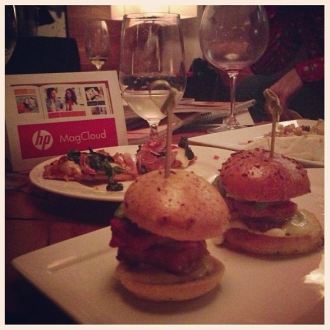
Delicious food and wine from the Press Club
at the MagCloud Holiday Meet-up.
 

We also had a memorable Twitter Chat last week with Kyle Menard, editor of BRINK Magazine. There were quite a few inspirational tweets that we wanted to share with you. Below is a brief excerpt from the Twitter Chat – feel free to read our entire Twitter Chat via Storify.

  1. MagCloud
    Q1 – To start things off – @BRINKmag, how did you get started in publishing? #MagCloud
  2. BRINKmag
    Started with a vision & to create a guide for young professionals RT @magcloud how did you get started in publishing? #MagCloud
  3. MagCloud
    Q3 – Do you see a difference in behavior/interest between your print and digital readers? #MagCloud
  4. BRINKmag
    @MagCloud It’s a challenge, but readers want that hard copy AND the instant download of the latest issue. MC lets us provide that #MagCloud
  5. BRINKmag
    @MagCloud Definitely. Big digital numbers when an issue debuts, but it tapers off. Hard copy somewhat sustains through the year #MagCloud
  6. MagCloud
    That’s great to hear, @BRINKmag. Digital offers instant gratification while print gives longevity – makes it easy to go back to. #MagCloud
  7. MagCloud
    Q5 from @TONE_DOPE: “When will @MagCloud begin offering subscriptions & an oversized 10×13 print copy option? #MagCloud
  8. MagCloud
    @TONE_DOPE We’re looking at subscription models and new product types. We do offer 11×14 today. #MagCloud
  9. MagCloud
    Okay, @BRINKmag. Jumping back to you with question from our community, how do you see #mag publishing evolving in the future? #MagCloud
  10. BRINKmag
    @magcloud There will always be a place for print, but with trends, it seems essential that a publication have an app #MagCloud
  11. MagCloud
    Last question from our team, @BRINKMag – what advice do you have for magazine publishers starting out? #MagCloud
  12. BRINKmag
    @magcloud It comes down to being on top of your game (in whatever you do), being a leader in what you believe in & staying current #MagCloud
  13. BRINKmag
    Lay the groundwork, be prepared (cont) RT @magcloud – what advice do you have for magazine publishers starting out? #MagCloud
  14. BRINKmag
    Also, (turning the tables) what advice do you have for publishers? RT @MagCloud Do you have any questions for Andrew? #MagCloud
  15. MagCloud
    Answering your 2nd Q: Listen to your customers, focus on innovation, embrace change, and don’t be afraid to take risks. #MagCloud
  16. BRINKmag
    BOOM —> RT @MagCloud “Listen to your customers, focus on innovation, embrace change, and don’t be afraid to take risks.” #MagCloud
  17. BRINKmag
    Definitely going to be quoting some of that for the next few weeks @MagCloud! Great stuff. #MagCloud

MagCloud Holiday Meet-Up and Twitter Chat

HolidayHeader_V2

Hey Bay Area! Help us celebrate 2012 at the MagCloud holiday meet-up in San Francisco with our Chief MagClouder and his team. Hear about all the latest MagCloud products and services, and learn what’s in store for next year.

  • Who: Fans of MagCloud – from new to seasoned publishers and all our social media fans!  Not sure what MagCloud is? Stop by to find out!
  • What: Learn about what the MagCloud team is working on, ask questions, share feedback and win prizes!
  • When: 6:30-8:30 p.m. on Tuesday, December 11
  • Where: Press Club, 20 Yerba Buena Lane, San Francisco, CA 94103 (View Map)
  • Cost: FREE! Light appetizers and drinks will be served
  • RSVP: Let us know you’re coming by RSVPing in the comment section below!

If you can’t join us on Tuesday evening, you can still discuss all things publishing during our next Twitter Chat with one of our MagCloud publishers! The hour-long Twitter Chat kicks off at 10:00 a.m. PST on Tuesday, December 11 on our MagCloud Twitter handle (@MagCloud) and will feature our Chief MagClouder Andrew Bolwell and BRINK Magazine editor Kyle Menard.

What are Twitter Chats? It’s simply a discussion conducted on Twitter, where you get to Tweet live with our Chief MagClouder and Kyle about, in this case, publishing as well as any other MagCloud questions you have on your mind.

How can you participate? Starting now, submit questions for Andrew and Kyle by either tweeting them to @MagCloud using the #MagCloud hashtag or ask them right here in the comments section of this blog post. We also encourage everyone to join our Twitter Chat from 10:00 to 11:00 a.m. PST on December 11 where Andrew and Kyle will respond to your questions live.

As an added incentive, all fans who ask a question will be entered into a random drawing for a chance to win a $25 Paypal MagCloud gift card perfect for you, your colleagues, friends, family, etc. to purchase your favorite publications on MagCloud.com during the holidays. The drawing is open to residents in the United States only. For the complete rules, see below.

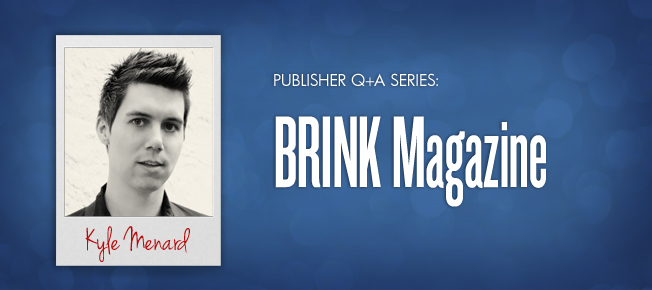
Here’s a little more info about Kyle:KyleMenard

Kyle Menard sets his sights on achievable goals while keeping the big picture within his scope. After launching his own award winning magazine in 2009, BRINK, he continues to explore fresh and innovative channels to reach a bigger and broader audience while keeping the current audience engaged. He thrives on spreading the message of entrepreneurship, attainable goals and staying dedicated to a brand – the ultimate message of BRINK Magazine.

Don’t forget to follow our Twitter handle, @MagCloud, for the latest MagCloud news and updates, and ask those questions using #MagCloud or in the comments section here! Look forward to seeing you in-person or virtually next week!

The giveaway opens on Thursday, December 6, 2012. Entries must be submitted by 10:00 a.m. PST, Tuesday, December 11, 2012 and the winner will be announced via Twitter and our blog on Tuesday, December 11, 2012. The prize will be one (1) $25 MagCloud gift card and one (1) winner will be selected at random. All entrants agree to be contacted by Hewlett Packard for prize fulfillment. The drawings are open to MagCloud blog readers, Twitter followers and Facebook fans that reside in the United States and are at least 18 years of age at time of entry. No purchase necessary to enter or win. There is no limit on the number of entries from any entrant, but each entry must be submitted separately as a Tweet using the hashtag #MagCloud on Twitter or as a blog comment on this blog post. Anyone found to be in violation of any of our rules or third party networks will be ineligible. Entries in this contest will not be carried over into subsequent giveaways or drawings.

Q+A with Alyssa Yuhas of WLWL Magazine

Toronto-based graphic designer Alyssa Yuhas specializes in branding and online design for a variety of clients across North America. But she’s never forgotten her longtime love for print magazines and the thought of working for one.

When she discovered MagCloud, she realized right away that she could publish a magazine of her own. So in 2008, after “months of planning, days of designing, hours of procrastinating (sometimes you just have to) and minutes of pacing,” Yuhas excitedly launched We Like We Love.

  Tell us about We Like We Love.

Alyssa Yuhas WLWL is exactly what the title says – we share the things we like and love. We showcase people who are passionate about their contributions to the worlds of lifestyle, fashion, arts and culture. If you’re passionate and excited about what you’re doing, we want to tell your story.

  Why print and not just online?

AY I’ve always been really interested in magazines – I’ve loved them since I was little. I love the physicality of holding a magazine and flipping through the pages. Online is awesome, but I really wanted the physical object. When it’s in print, people are excited to get involved in it.

  How has your MagCloud publication improved your business?

AY It has given me some great exposure, and we’ve been able to participate in several communitywide events because of the magazine. Plus, it adds credibility to my graphic design business. Potential clients see my name on the masthead, and that’s brought a lot of new work and contacts.

  How has publishing a magazine changed for you in the past five years?

AY We watch our Google Analytics and our MagCloud statistics – and we’re excited to see that the magazine keeps growing and growing. In fact, the MagCloud views of our magazine have increased by 158 percent since our first issue.

We hear from people every day, and we’re getting more and more contributors from all over the world. I think our quality is improving, and people see that we publish on a consistent basis. Establishing that longevity has been fantastic – it helps us earn our readers’ trust.

  How did you get started with publishing through MagCloud?

AY I can’t remember how I found MagCloud but I definitely remember thinking, “This is the best thing ever!”

WLWL is really well printed and gorgeously bound. And now we have new size and binding options. It’s so cool that print on demand is now possible for anyone at a very low cost. Anyone can start a magazine now.

  What tips would you give to someone new to self-publishing?

AY Focus on both design and content. It’s important that your magazine be visually appealing and exciting, and also that people will delve into the stories. You need to strike that balance.

  If you were stranded on a desert island, which books would you want with you?

AY The Chronicles of Narnia series. That was my favorite as a kid. The language and visuals are beautiful. I could reread them over and over again.

Q+A with LIVESTRONG Magazine’s (SPOT ON Media) Margot Sandenbergh

When Tour de France superstar Lance Armstrong’s foundation needed someone to create and publish his LIVESTRONG Quarterly magazine, it turned to magazine publishing expert Margot Sandenbergh. When Sandenbergh needed a way to offer the magazine as an on-demand product, she turned to MagCloud.

“With custom publishing, you control everything – how it looks, what’s in it, who gets it and how often to publish it,” says Sandenbergh, CEO and cofounder of New York City-based SPOT ON media. “Custom media is one of today’s fastest-growing marketing tools, and one of the best ways to strengthen the bond between a company and its customers – or in this case, a cancer advocacy organization and its supporters.”

  Tell us more about SPOT ON media.

Margot Sandenbergh We develop custom marketing tools for business and nonprofits. We create original content, which might take the form of magazines, video and online or mobile applications. As part of our media service we help our clients define and refine their strategies for customer relationship marketing.

Today’s audience is very media savvy. People are now immune to the same old marketing messages – they almost have an inner voice that acts as a gatekeeper. Our job is to tell them something they don’t know, and make it useful, interesting and entertaining while we do it.

  Why magazines?

MS Because they work. We know that 92 percent of readers spend an average of 30 minutes reading a magazine – 45 to 50 percent read it cover to cover. More than half have purchased a product or a service as a direct result of reading a customer magazine. And 39 to 42 percent keep their magazines or pass them on to friends and colleagues.

  What got you started with publishing through MagCloud?

MS MagCloud is an idea whose time has come. We were looking for a print-on-demand solution and saw an article about MagCloud. We started testing it in 2008, and we’ve kept up with all the improvements since then. We love the perfect-bound binding and the iPad solution.

One of the great benefits of print-on-demand is that it removes the high upfront printing costs, which is great news for small publishers or nonprofits. Nonprofits often have a loyal membership base that is willing to buy the publication from the MagCloud “newsstand.”

  How has MagCloud made a difference?

MS We’ve been able to reach a larger audience. We have an international audience of more than 90 million yellow wristband supporters. We couldn’t possibly print that many magazines. The iPad version on MagCloud is perfect for many people in our audience, but those who prefer a print version can also buy it from the MagCloud site and have it shipped to them anywhere in the world.

We’re creating a 15th-anniversary issue for October 2012. This special keepsake issue celebrating the milestones of LIVESTRONG, will have an indefinite shelf-life – thanks to MagCloud.

  What are your tips for someone new to self-publishing?

MS Know your audience and think about what makes your content unique. It’s always advisable to survey your readers about their interests. We try to use writers and editors who represent our audience – health writers, cyclists, cancer survivors and advocates. That allows for a rich editorial base and content.

  If your publication were a superhero, who would it be?

MS Every cancer survivor is our hero.

Q+A with Kyle Menard of BRINK Magazine

Kyle Menard has loved magazines since he could read. So much so that he once even dreamed of opening a newsstand selling magazines from around the world. “Like the kind you see in New York City,” he says.

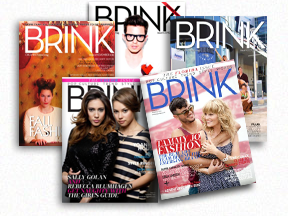
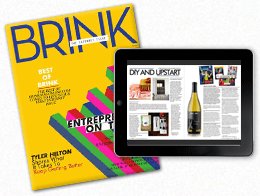
Now an adult in the digital age, Menard has directed his passion for print into a magazine of his own. In 2009, he launched BRINK, an Orlando, Fla.-based bimonthly magazine that celebrates entrepreneurs – those already successful and those just starting – and the spirit that makes them all so special. BRINK was voted “Best Magazine in Orlando 2012” by TheDailyCity.com readers.

  How did BRINK come about?

Kyle Menard  I’m just a huge fan of magazines and wanted to create a magazine of my own. So I put all my ideas together and named the magazine BRINK – because it’s always exciting to be on the cusp of something new, whatever that might be.

BRINK celebrates entrepreneurs and shares their stories and the lessons they’ve learned along the way. We feature entrepreneurs in the realm of entertainment, fashion, human interest and pop culture – everyone from indie musicians and actors to designers and artists – people who’ve quit their day jobs to live their dreams. We hope these stories inspire future entrepreneurs to create their own paths to success.

  How has publishing a magazine changed for you in the past five years?

KM My name has definitely become more recognizable in Orlando. And through the years people have become more willing to work with me and participate in BRINK. They want to join in the conversation. There’s something about publishing a print magazine that gives you more credibility.

There’s been a lot of talk about the demise of publishing, but print is not going anywhere. Online is great – everyone loves immediate gratification. But people still want to hold something in their hands. They want the physical magazine that they can hold – they want to experience a deeper connection.

  How did you get started publishing through MagCloud?

KM I did a web search for “publishing magazines” and found MagCloud. I began with a simple eight-page prototype. And after teaching myself Photoshop, going through some MagCloud tutorials and trial and error, I’ve never looked back.

  Why did you choose MagCloud?

KM We’re always evolving, and MagCloud is always evolving. The convenience factor is huge. If we need something printed right away, MagCloud can do that. If we need perfect bound instead of saddle stitched, MagCloud can do that. If we need 10 copies shipped to Spain, again, MagCloud makes all that possible. Plus, MagCloud is always encouraging us to do more with our magazine. They don’t just print your PDFs. They really care about your success.

Eternalize Summer Memories With Your Own Magazine

Though Summer’s heat lingers on, Labor day is just around the corner marking the unofficial end of Summer.  Whether your family took a big trip or just used the lazy afternoons to hang out together, you are sure to have plenty of memories – and pictures – you want to save.

For many, vacation photographs wind up unorganized and spread amongst their hard drives, cell phones, Instagram and Facebook–doomed to be lost in the shuffle. With that in mind, why not take an afternoon and organize your family’s vacation experience, photographs, and mementos into a summer memory magazine?

With MagCloud’s beautiful print quality and direct mail options, you can even order copies to be sent directly to grandparents, cousins and friends to enjoy.

Getting Started: Where will you create your PDF?

First, you’ll want to select a platform to design/assemble your MagCloud-ready PDF­. You can use web-based Poyomi, or software like Adobe InDesign, Quark, Apple iWork Pages, or Microsoft Word.

As you get started, you can choose to start with a pre-designed template from the software (if available), or with a plain MagCloud template available here. You may even remember a post from awhile back, when we used Apple Pages’ built-in Templates to create magazines.

Organize Your Images and Treasures

Next, gather together your vacation photographs and organize them into a single folder. Then select the images that most effectively represent your vacation experience.

Collect any small items that you may have picked up along the way (i.e., a drink coaster with a resort’s logo, maps, airline ticket stubs, brochures from attractions, etc.). Such items can be scanned and added throughout your magazine and provide a more personal touch to the project. For example, you can use your ticket stubs from the theme park to give a different look to your family’s latest roller coaster adventure.

Order and Details

Although you have complete creative control over how you assemble your summer memory magazine, the easiest way is to assemble things is in chronological order so those enjoying your magazine can experience your vacation from start to finish. Throughout the publication you can include  quotes from your family members, or funny anecdotes – like when the duck bit the zoo keeper during his presentation.

Be sure to take the time to caption your photographs, indicating the “who, what, when, and where” of each picture. This will be helpful for others viewing your memory magazine and for you in later years when small details slip from memory.

Write a short paragraph for each of your summer highlights. Ask your children for input and have them answer questions about their favorite parts of the summer. You’ll be amazed by what they come up with and it’s always fun to look back and remember what was happening in pop culture at the time.

Some details you may want to include:

  • Favorite Summer Memory
  • Places and people you visited
  • Friends made
  • Activities and Games played
  • Movies watched
  • Books read
  • Song that was on repeat in the car
  • The silliest moment of the summer

Design Can be Daunting

When it comes to assembling your summer memory magazine, don’t worry if you don’t have a lot of design skills or experience. You can look at magazines for inspiration, simply use photos and captions for a basic layout, or even re-purpose templates that have nothing to do with this purpose. You can find inspiration anywhere, you just have to look past the content and look at the design. For example, the magazine pictured above used our Microsoft Publisher Brochure Template as a starting point for the layout. The design was a perfect way to include ample text to tell the story that went along with the photos. A few tweaks to colors and typefaces and we were able to completely transform the look of the original design..

As an additional example below, we used the layout from an Apple Pages design template for a school yearbook. With a few changes (and by deleting the extra clip art that made the layout look  “education-centric” we were able to create a casual scrapbook-style. Adding a scanned scrap of paper with Sara’s favorite memory from the water park gave the page a personalized feel.

Microsoft Word also has some great “Newsletter Templates” that are built-in to the software (Mac) or available online. Below are some samples that could be easily tweaked and used as the interior pages of your memory magazine.

No matter what software or platform you choose to create your magazine in, there are lots of sources for inspiration. So start designing and have some fun with it!

Have you created a photo magazine or book with MagCloud to commemorate and event, trip or season in your life? Tell us about it, or share your publication in the comments below!

MagCloud for Students

Earlier this week, we touched on ways that teachers can use MagCloud for everything from class assignments to printing coursework, but MagCloud can be a great resource for students too. Today we’ll look at a few ways that students can use MagCloud for both schoolwork and extracurricular activities.

Thesis and Final Projects

As we are nearing the end of the school year, many students are likely working to complete a thesis or final project. MagCloud offers a great option for publishing these works, whether you are writing a text-heavy dissertation or putting together a more visual project culminating a study in design or photography.

For text-based works, the MagCloud Standard product can be used for printing and binding up to 384 letter-sized pages, with printing in full color to accommodate both text and any corresponding images and graphics, and a perfect binding that gives your publication a professional look and feel. At the same time, you can make your publication available in a digital format, for viewing as a PDF download.

For students completing projects in an area of art or design, our Square and 8.5” x 5.5” Digest products are both great options for showing off graphic works that are anywhere from 2 to 384 pages long. With a single PDF upload, you’ll be able to create a high quality printed piece that does justice to the work you’ve put into your project, and also have the option for a digital version that can be viewed on any computer or mobile device.

Example Publications:
Photography Series
MFA Thesis
High School Senior Project
BFA Thesis Process Documentation
Graduate Thesis Process Book

Portfolios

For students studying architecture or design, as well as those with a more literary or journalistic focus, having a portfolio of work is of great importance, particularly looking beyond the school year. Whether you’re interviewing for an internship, applying to schools, or looking for a job, having a strong portfolio of your past work will likely be an important factor in achieving your goal. As we’ve discussed before, using MagCloud to publish your portfolio offers a number of convenient options, both during school and beyond.

While you are in school, you can easily update your portfolio on the MagCloud site as you complete new work, simply by uploading a new PDF to your MagCloud account. You’ll also have the option to keep your portfolio private, so only you can see it, or make it public for others to browse on the MagCloud website. When it comes time to apply for the position or program you want, you can order as few or as many print copies of your portfolio as you need, or even direct mail copies to a list of addresses. You can also offer a digital version of your portfolio and direct people to the URL for your publication in the MagCloud storefront, where they can download it as a PDF.

Example Publications:

Yearbook/Photography Student Portfolios
Architecture Design Portfolio
Interior Design Portfolio
Fashion Design Portfolio
Architecture Portfolio for Graduate School Admissions

Resource for Student Groups

During the school year, MagCloud is a great resource for students outside the classroom. At all levels of education, students active in clubs, sports and other extracurricular activities can use MagCloud for printing flyers, newsletters, and even full-length magazines. For example, when a club or sport is looking to attract new members or publicize an event, the MagCloud Flyer and Pamphlet products can be a great way to get the word out and offer additional information, without requiring a large volume of prints.

For groups that are more established, particularly at the college level, MagCloud’s Standard, Square and Digest product types offer a great opportunity for creating newsletters to stay in touch with both current members and alumni alike. Groups can take advantage of MagCloud’s direct mailing service for recipients who prefer receiving something in print, and simultaneously offer the same publication in digital formats for downloading as a PDF.

A number of middle school, high school and college-aged students have already used MagCloud to publish student-run magazines on topics ranging from art and literature to fashion and lifestyle. Regardless of the topic, MagCloud lowers the barrier to entry for creating these types of magazines, with no upfront costs and no minimum print runs. Students can offer their publication through the MagCloud storefront for customers around the world to purchase and read in both print on demand and digital versions. Printed copies can also be ordered for local distribution as they are needed instead of all at once as a large bulk order, cutting down on the cost of storage and potential waste.

Example Publications:
BYU Editing Students’ Travel Magazine

UF Asian American Students’ Magazine
Emerson College Lifestyle Magazine
AIGA Colorado Design Magazine
Journalism Students’ Fashion Magazine
High School Literary and Art Journal

Are you a student who has used MagCloud, either in or outside the classroom? Let us know in the comments below!

Be Square and Standout

We are excited to introduce a new form factor that will help your publications standout from the crowd. At 8” x 8”, Square product is compact, portable, eye-catching; and available in sleek saddle stitch or professional perfect binding.

Ideal for portfolios, look books, small catalogs, handbooks and more, Square publications can be anywhere from 4 to 384 pages. The new Square product will be available for the same $.20 per page ($.15 per page for orders of 20 copies or more).

MagCloud Square Design Specifications:

  • PDF Size with Bleed:         8.25 x 8.25″
  • Trim Size (Final Size):       8 x 8″
  • Bleed Settings:                   0” inside edge, 0.25″ outside edge; 0.125″ top and bottom
  • Half-Fold Binding:             4 Pages
  • Saddle-Stitch Binding:      8 – 100 Pages
  • Perfect Binding:                  20 – 384 Pages

Start publishing with Square today and let us know how you envision using this new product in the comments below.

April’s Monthly Giveaway is Here

A new month means a new giveaway! Starting today, we’re launching our monthly giveaway for three $25 PayPal MagCloud gift cards. You can enter to win by answering the question below in the blog comments section, or tweeting @MagCloud your answer using the #MagCloudQ hashtag. The questions and prizes will change each month so if you don’t win this round, check back in May for another chance.

Photographers! This month’s question is for you. As you may have noticed, we here at MagCloud love photography.  From advancements in camera technology, to the explosion in photo apps across devices, to the astonishing growth in social photo sharing  (uh hello Facebook’s recent purchase of Instagram or the Pinterest phenomenon), photography is top of mind with both professional photographers and consumers alike.  So this month we would love to know, from DSLRs to point and shoots to smartphones, what’s your go-to camera when you want to capture that perfect shot?

The details:

  • Post your answer to the above question in the comments section below or tweet @MagCloud with the #MagCloudQ hashtag
  • Responses must be posted by Monday, April 30, 2012 at 5:00pm PST
  • Winners will be announced via Twitter, Facebook, and our blog on Thursday, May 3, 2012 by 12:00pm PST
  • Questions? Post in the comments below or tweet us @MagCloud
  • And don’t forget to follow @MagCloud on Twitter and/or ‘Like’ us on Facebook for the latest MagCloud news and future contest details

The contest opens at 12:00 pm PST on Friday, April 13, 2012. Entries must be submitted by 5:00 p.m. PST, Monday, April 30, 2012 and the winner will be announced via Twitter, Facebook, and our blog on Wednesday, May 3, 2012. The prize will be one $25 MagCloud gift card. Three unique winners will be selected at random. All entrants agree to be contacted by Hewlett Packard for prize fulfillment. The drawings are open to MagCloud blog readers, Twitter followers and Facebook fans that reside in the United States and are at least 18 years of age at time of entry. No purchase necessary to enter or win. Limit two entries (one on Twitter and one blog comment) per person, per month. Anyone found to be in violation of any of our rules or third party networks will be ineligible. Entries in this contest will not be carried over into subsequent giveaways or drawings.

How to Personalize Your MagCloud Page

If you’re using MagCloud to create collateral for your business, portfolios for photography, catalogs for your retail store, a unique magazine, or other content to promote your brand, then shouldn’t your MagCloud page reinforce your brand too?

It’s easy to make your MagCloud profile and publication pages work for you by taking a few minutes to flesh out your publisher profile and create header images that reinforce your brand throughout your pages.

Your Publisher Page

No matter what sort of business you’re into, when customers discover your content on MagCloud, you want them to be able to connect with you directly. Your profile page includes an option to link directly to a website of your choosing, and with some simple html you can also include hyperlinks, images and emphasize text within your profile description.

To get started, you’ll need to log into your account and go to your publisher profile editor.
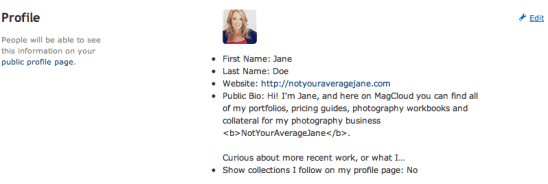

Link to a website: <a href=”URL”>link</a>

In our Jane Doe example, we used some of MagCloud’s allowed HTML tags to include more links in Jane’s profile. To add a link to your website without having to include the whole website URL, you can simply insert a block of text like below:

Curious about more recent work, or what I’m up to?
Check out my <a href=”http://yourwebaddress.com”>blog</a&gt;.

It will show up in your profile like this:

Bold Text: <b>text</b>

To create bold text, you just need to add <b> before your selection and </b> after. We did this with our Jane example like this:

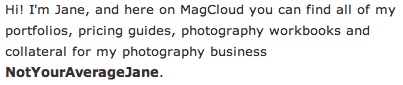
Hi! I’m Jane, and here on MagCloud you can find all of my portfolios, pricing guides, photography workbooks and collateral for my photography business <b>NotYourAverageJane</b>.

Which then looks like this:
Emphasize/italicize Text: <em>emphasis</em>

To add the title of Jane’s autobiography in italics we used the code for emphasis. Simply put <em> before the text you want italicized and </em> after the text to close the emphasis:

Want to find out more about me, and my life behind the lens? Be sure to check out my 200-page autobiography <em>Don’t Call Me Jane</em> available for purchase here on MagCloud.

Which will appear like this:

Image Link: <img src=”URL”>

You can also insert images or logos into your profile by linking to the image within the text using <img src=”URL”>. This requires that the image is the size you want it to appear in the profile, and that it already has an associated URL. It’s best if this image is pulled from your own website (like your logo) or if you have loaded a special sized image onto your own flickr or other photo host that allows linking directly to the image. If you link to a resource that you don’t control, you might run into broken links if the image is ever moved. For Jane’s example we linked the social media icons that she already had on her blog. This example actually includes two pieces of html, one for the icon image, and then the following text which links to the associated LinkedIn URL:

You can also find me on
<img src=”http://notyouraveragejane/images/LinkedIn_IN_Icon_25px.jpg&#8221; />
<a href=”http://linkedin.com”>LinkedIn</a&gt;

Which will appear like this:

Your Collection Page

For every group of documents you create, you get to have a “collection page” which can have it’s own branded banner and unique URL. This is great if you have a selection of related documents that you want to be able to promote as a group. A great example of this is MagCloud publisher, Golfweek, which has created collections of Souvenir Golf Programs and Golfweek Special Editions. Each collection reinforces the Golfweek brand and furthers their messaging but keeps relevant content together. Check out their banners below:


Customizing with Banners

Want to create your own branded banners? To setup the custom banner for a collection, you must first create the graphic that you plan to use. The banner specs require an image with a maximum size of 790 x 90px, in either JPG, GIF, or PNG formats. You can create this image in any software application of your choosing that can output to one of these formats. You can also upload a smaller image–it’s up to you.

Uploading Your Banner

Once you have your image ready to go, you’ll want to navigate to your collection page. You can get here by visiting your profile page (yourusername.magcloud.com) or by going to one of your publications via magcloud.com/publish. On the right-hand side of the page, you will see an “Add a Custom Banner Image” button.
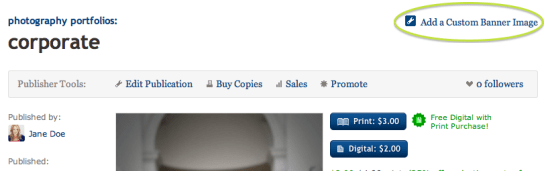
Once you have clicked the button, you will be prompted to find the image file on your harddrive, and upload it to MagCloud.

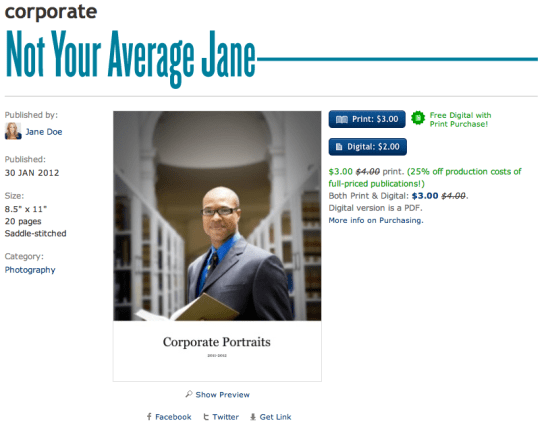
The image you upload will be visible on the associated collection page,

and on each of the individual publication pages within that collection.
Have you used custom banners or any of these HTML tricks in your publisher/publication descriptions?
If so, please share them below in the comments section to inspire others.